Skip to content

Support

5.1k Topics 22.0k Posts

Questions about installing, configuring and using NetXMS.

  • Unnecessary checkbox for shortcut

    1
    0 Votes
    1 Posts
    12k Views
    S
    Server installer contains unnecessary checkbox Create a desktop shortcut and Create a Quick Launch shortcut (then it appears that part of the installation is if the Client app). It might be better to remove these controls.
  • Client stops responding

    7
    0 Votes
    7 Posts
    24k Views
    R
    I have had no further issues with my client since deleting the .nxmc folder.
  • Error loading subagent module "mysql.nsm"

    12
    1
    0 Votes
    12 Posts
    29k Views
    A
    Big thanks Filipp and Alex! Everything works now! 
  • Connection timed out: connect

    6
    0 Votes
    6 Posts
    19k Views
    K
    check the image for both server and console configuration: [image: 2024-08-01_163308.png]
  • Graph colors reset when doubleclicking in Performance view

    2
    0 Votes
    2 Posts
    13k Views
    F
    Different colors and time frame - that's definitely a bug, I've created an issue for that: https://track.radensolutions.com/issue/NX-2559 , you can subscribe to it to get notification when it's fixed. Zooming - yes, it's currently absent, there are thoughts to make this a bit differently: https://track.radensolutions.com/issue/NX-2560
  • Where is current node status

    2
    0 Votes
    2 Posts
    10k Views
    A
    It's status column in table object_properties (https://www.netxms.org/documentation/datadictionary/#t-object-properties)
  • Create Event from User Session

    4
    0 Votes
    4 Posts
    9k Views
    F
    Historically there are two approaches to WIndows Event Log - Log Synchronization mentioned by Tatjana and Log File Monitoring. First one has the benefit that whole text of events is stored on the server. Second approach does not require to modify agent configuration file - configuration is uploaded via policy, events are generated by agent. Let me describe it in more details: Under "Templates" create a new template. Third tab in the template - "Agent Policies". Create a new "Log Parser" policy, give it some name. In the policy click "Add file" and put *Security into File path field. This means that Windows security log will be parsed. Add a new rule. You can filter by Level, ID and Source as well as by log entry text ("Matching regular expression" field, it parses all lines of the entry as one long string).  For testing you can use (.*) as the regex - it will capture whole message as parameter of the generated event - if you double-click an entry en event log, you'll see all the information. I am not sure about correct event ID, but it seems that 4624 is capturing logon events, so regex .* and ID 4624 will capture these events. You need to specify an event in the rule. Create event template, this defines what parameters are included into message field. E.g. the following in the message field: User %<variable6> was successfully logged on (Event ID: %<eventId>, Severity: %<severity>, Network Address: %<variable19>)
  • after installationon fedora 40 very low to login

    5
    0 Votes
    5 Posts
    18k Views
    L
    Many thanks, I wil retry whit this version of postgresql .  Luciano.
  • Web management Client - Map not displaying DCI values

    2
    3
    0 Votes
    2 Posts
    12k Views
    V
    I suggest upgrading to latest version from 5.0 branch if possible. We did lot of changes in network maps in version 5.0, that issue could be also solved. I just double checked on 5.0.6 - DCI data is shown on map in this version. Best regards, Victor
  • Web Service Monitoring

    4
    1
    0 Votes
    4 Posts
    28k Views
    Z
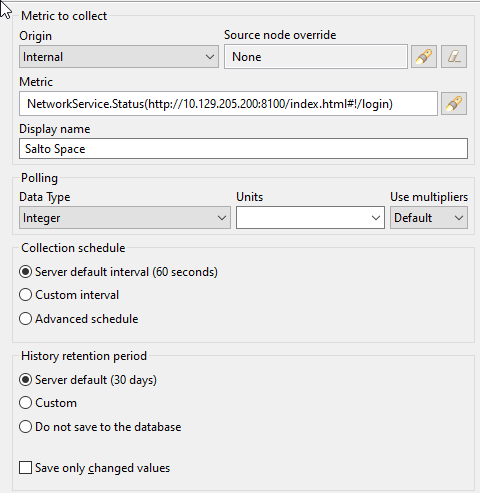
    You can set debug level to 6 on agent, where requests should go through and check agent log. There should be messages like:  2024.07.22 16:44:06.575 *D* [comm.cs.1250      ] Requesting metric "NetworkService.Status(https://netxms.org)" 2024.07.22 16:44:06.995 *D* [netsvc            ] NetworkServiceStatus_HTTP(https://netxms.org got reply (807 bytes, response code 302)
  • instance discovery and calculating disk used percentage - qnap snmp

    4
    0 Votes
    4 Posts
    37k Views
    Z
    @jdowney said in instance discovery and calculating disk used percentage - qnap snmp: I managed to get this working just need a few tweeks as sometime receive 0 randomly. Any ideas welcome. You can add trace command to trace data to server log when incorrect data is obtained. Like: trace(1, "Incorrect value");
  • Moving nodes after auto discovery

    3
    0 Votes
    3 Posts
    22k Views
    Z
    There might be 2 different problems. Either there is too many notification form server and client was out of sync (this status not yet mooed to new UI) or there is something bad happening with server.  If objects are just out of sync you can drag and drop object (it should work), then close and reopen console again - if objects are properly moved after re-login - then it's just synchronization problem. If they are not - then there are some delays on the server side, chat can be investigated further more.
  • NetXMS Management Client / Infrastructure View

    6
    2
    0 Votes
    6 Posts
    30k Views
    A
    Hi ! Thank you for the quick implementation - now it works like expected ! Best regards Thomas
  • netxms is showing wrong lldp port number

    5
    0 Votes
    5 Posts
    25k Views
    V
    Hi! Did you try version 5.0.4? We made changes in LLDP handling on Huawei devices. Best regards, Victor
  • DCI Detect anomalies

    2
    0 Votes
    2 Posts
    21k Views
    V
    It is new feature that is (somehow) working. If you check this box, server will use Isolation Forest algorithm to check if new value is an outlier within two set of data points - all values within 30 minutes of current time of the day for last 30 days, and all values within 30 minutes around current time of the day on the same day of the week for last 10 weeks. Currently it has arbitrary score threshold 0.75, depending on testing results we may adjust it or made configurable. If new data point classified as outlier in both data sets, DCI will be marked as having anomalous value. If you want to generate event, you can use special threshold function "anomaly". Best regards, Victor
  • networkmaps backgroundimge dispaly partially broken in new gui 5.0.1

    3
    0 Votes
    3 Posts
    18k Views
    V
    I changed map size logic a bit - now map will not be smaller than background image size if it's size set to default (0 values for width and height). This change will be included into upcoming release 5.0.5. Best regards, Victor
  • Uploaded MIBs don't work - case-sensitive filename extension

    3
    0 Votes
    3 Posts
    21k Views
    V
    Fixed in upcoming 5.0.5. MIB compiler is now case-insensitive when selecting files by extension, and server ensures that MIB files upload via GUI have extension .mib. Best regards, Victor
  • Default proxy node for active discovery target is "Zone proxy"

    2
    0 Votes
    2 Posts
    13k Views
    V
    I registered this as a bug: https://track.radensolutions.com/issue/NX-2543 We will discuss internally what could be the best approach to fix it. Best regards, Victor
  • LDAP sync crashes NetXMS Core in NetXMS 5 version

    3
    0 Votes
    3 Posts
    10k Views
    V
    I think I found the bug (it was really introduced in version 5). Fix will be included into upcoming patch release. Best regards, Victor
  • NetXMS Shows VLAN at wrong Ports

    2
    0 Votes
    2 Posts
    8k Views
    V
    Server reads VLAN names from 1.3.6.1.2.1.17.7.1.4.3.1.1, then ports from 1.3.6.1.2.1.17.7.1.4.2.1.5 and 1.3.6.1.2.1.17.7.1.4.2.1.4, optionally also 1.3.6.1.2.1.17.7.1.4.3.1.2. For all those 3 tables index is VLAN ID and value is byte string, where each bit represent port membership in VLAN. You can check what values are actually returned. Below is description from Q-BRIDGE-MIB: Each octet within this value specifies a set of eight ports, with the first octet specifying ports 1 through 8, the second octet specifying ports 9 through 16, etc. Within each octet, the most significant bit represents the lowest numbered port, and the least significant bit represents the highest numbered port.  Thus, each port of the bridge is represented by a single bit within the value of this object.  If that bit has a value of '1' then that port is included in the set of ports; the port is not included if its bit has a value of '0'. Also note that "port number" in this context is bridge port number (as obtained from 1.3.6.1.2.1.17.1.4.1.2), not interface index. Best regards, Victor