Skip to content

Support

5.1k Topics 22.0k Posts

Questions about installing, configuring and using NetXMS.

  • MIB collection

    Pinned
    20
    0 Votes
    20 Posts
    632k Views
    K
    Probably the most comprehensive list of mibs for both hardware vendors as well as net-snmp standard types. Generally kept up do date. LibreNMS MIB Repo I have not 'yet' had any problems importing these to netxms.
  • Sharing Standard Templates for NetXMS

    Pinned
    75
    0 Votes
    75 Posts
    2m Views
    K
    Hi, Does anybody have the following templates that they would like to share? Proxmox VE OPNsense Many thanks, Alex
  • Agent Config (Action / ExternalParam)

    Pinned
    3
    0 Votes
    3 Posts
    135k Views
    V
    Thank you for excellent howto! I'll probably never manage to write so long text Some comments and corrections: @jdl said in Agent Config (Action / ExternalParam): which by the way you will not find in the available list You will, but only after next configuration poll for that node. To prevent sending request for supported parameters to agent each time you press "Select" button in console, server reads list of supported parameters during configuration poll (each hour by default) and caches it. You should either wait for next configuration poll or force immediate configuration poll from console using Poll -> Configuration menu. @jdl said in Agent Config (Action / ExternalParam): I did not try but I would suggest not to use any existing data collection name... Possible conflict or simply possible problem easy to avoid - play it safe and simple In fact, you can use names of existing parameters - if you do, built-in parameter's handler will be replaced by your script. Normally, this should be avoided, but sometimes it may help - for example, if built-in implementation of certain parameter is buggy, and you are able to provide replacement script as workaround. Best regards, Victor
  • Useful WinPerf counters

    Pinned
    8
    0 Votes
    8 Posts
    176k Views
    J
    These three counters: Counter = Hyper-V Virtual Machine Summary.Running:"\Hyper-V Virtual Machine Summary\Running":60:A:INT:"The number of virtual machines in 'running' state." Counter = Hyper-V Virtual Machine Summary.Saved:"\Hyper-V Virtual Machine Summary\Saved":60:A:INT:"The number of virtual machines in 'saved' state." Counter = Hyper-V Virtual Machine Summary.Turned Off:"\Hyper-V Virtual Machine Summary\Turned Off":60:A:INT:"The number of virtual machines in 'turned off' state." have been removed from Hyper-V shipped with Windows Server 2012 (they are only available in 2008R2). This one: Counter = Hyper-V Hypervisor Virtual Processor.%Total Run Time(_Total):"\Hyper-V Hypervisor Virtual Processor(_Total)\% Total Run Time":60:A:INT:"The percentage of Host CPU used by Hyper-V Guests." is still available. Best regards, Marco
  • Useful WMI Queries

    Pinned
    2
    0 Votes
    2 Posts
    117k Views
    A
    Temperature of CPU's thermal zone:WMI.Query(root\WMI,"select * from MSAcpi_ThermalZoneTemperature",CurrentTemperature) This temperature is in tenths of degrees Kelvin, so you need to add transformation script: for Celsius:($1-2730)/10 for Fahrenheit:((($1-2730)/10)*1.8)+32
  • Network map link values automatic refresh

    2
    0 Votes
    2 Posts
    46 Views
    F
    Sorry, I forgot to attach the screenshot to my original post. Here it is! Thanks, Federico. [image: network map link values.png]
  • Client Crash after upgrading from 6.2.5 to 7.2.0

    6
    1
    0 Votes
    6 Posts
    120 Views
    A
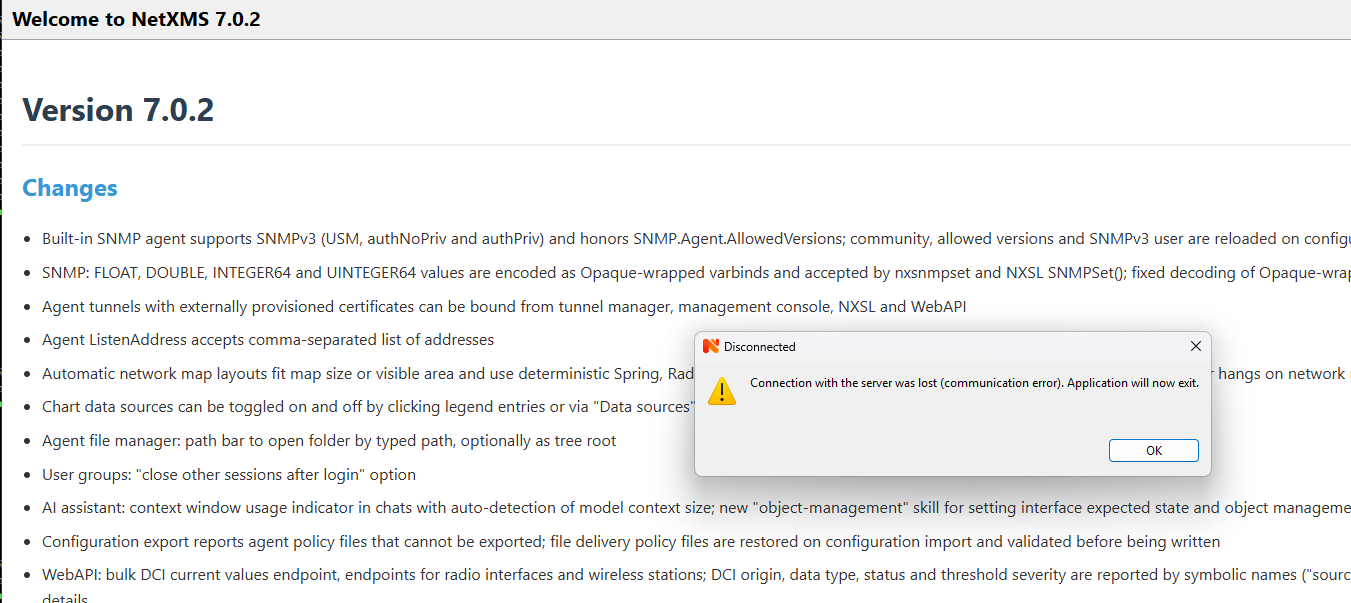
    @gmonk63 said: I tried to upload netxmsd-bt.txt but it says I do not have permissions. After forum migration? Thanks, I’ll check permissions UPDATE: permissions fixed
  • NetXMS 7.0.2 crashes with SIGSEGV shortly after startup

    7
    0 Votes
    7 Posts
    251 Views
    A
    Hi Alex, thank you for the detailed analysis. We checked our current NetXMS 6.2.5 installation. Both Dell drivers are present: dell.ndd 426K dell-pwc.ndd 168K Old NetXMS libraries are still present in /usr/local/lib: We found both .so.50 and .so.61 versions, including the libraries you mentioned: libnxsrv.so.61 libnxsl.so.61 libnetxms.so.61 .. The old Dell driver is actively loaded under NetXMS 6.2.5. Our server log contains several entries such as: Network device driver DELL-PWC loaded successfully This confirms that the old driver is still being loaded in our current 6.2.5 installation. We have not removed or modified any files yet, as the current production server is still running 6.2.5. Your explanation sounds very plausible and matches what we found. We will prepare a clean upgrade to 7.0.2, removing the obsolete driver and libraries as suggested. Thanks again for investigating this issue! Best regards Alwin
  • Change in certificate trust in v7?

    8
    0 Votes
    8 Posts
    487 Views
    S
    Thank you for the fix. Bit offtopic, any way to clean up my business service ?
  • Unifi OS Server - How to detect as "Wireless Controller"

    2
    0 Votes
    2 Posts
    171 Views
    A
    Hi, Yes, this works with a self-hosted UniFi OS Server, and SNMP isn't needed. The bridge doesn't use the node at all. The NetXMS server calls the UniFi Network API directly, and everything is configured as custom attributes on the wireless domain object. You can remove the VM node from the domain, because it does nothing in this mode. Add Module = wlcbridge to netxmsd.conf and restart the server. On the wireless domain, add these custom attributes: wlcbridge UniFi unifi.base-url https://<vm-ip>:<port> # same URL you open the UniFi web UI on unifi.login <local admin account> unifi.password <password> # plain text, or encrypted with: nxencpasswd <login> <password> unifi.site <site id> # only if not "default" Instead of login/password you can set unifi.token to an API key created in the Network application. Login/password is the safer option, though. The account has to be a local one, not a UI.com cloud account. Run a configuration poll on the wireless domain. The output should show "Reading access point list via bridge interface UniFi" and the number of access points reported. The access points are created under the domain. Important detail: leave unifi.isAppliance unset. The name is misleading: true is for the old standalone Network Application (the one on port 8443), and UniFi OS Server needs it unset. If the poll reports "Cannot retrieve access point list", set debug level 7 for tag wlcbridge.unifi. The server log will then show the exact URL being requested and the HTTP code that came back.
  • NetXMS Core server will not start after upgrade to 7.*

    4
    0 Votes
    4 Posts
    215 Views
    A
    I've removed the database password from your post. It was public for a while, so please change it anyway. "Connection refused" means the core service still isn't running, so the client has nothing to connect to. The most likely reason is that the database schema wasn't upgraded. The installer runs the upgrade hidden, so if it fails you see nothing, and netxmsd refuses to start on an old schema. Please run this from an elevated command prompt: cd C:\NetXMS\bin nxdbmgr upgrade netxmsd -D 4 The first command shows any upgrade error directly. The second runs the server in the foreground with debug output, so you can see where it stops. If either one fails, post the output here, or the end of C:\NetXMS\log\netxmsd.log.
  • v7.01 client issue

    2
    4
    0 Votes
    2 Posts
    167 Views
    A
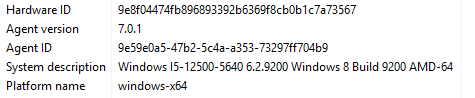
    Hi, This is a bug in the 7.0.1 Windows agent build, fixed in 7.0.2, which was released today. Upgrading the agent brings back the correct version, build and product name. Here's what's actually happening: Windows reports itself as Windows 8 (6.2.9200) to any program that doesn't declare support for newer Windows versions in its application manifest. The 7.0 Windows build moved to a new toolchain, and the 7.0.1 agent shipped without that manifest. It's back in 7.0.2. Note: on 7.0.1 the agent also skipped Windows Store apps in software inventory, because it thought it was running on Windows 8. If you have inventory enabled, the first configuration poll after the upgrade will show those packages as newly installed. That's expected, nothing was actually installed.
  • V7 Client Issues

    11
    0 Votes
    11 Posts
    967 Views
    A
    Причина в обоих thread dump'ах одна: deadlock в клиенте между обновлением списка алармов и таймером мигания. Возникает только при включённой опции "Blinking outstanding alarms". Обход: отключить эту опцию в настройках клиента, раздел Alarms. Тикет: https://github.com/netxms/netxms/issues/3863
  • agent hardening

    2
    0 Votes
    2 Posts
    238 Views
    A
    Hi Andrea, Yes, on both. For monitoring-only use, the setting that matters most is the access level you give the server, covered at the end. Linux. The packaged agent runs as root. Create a dedicated user and either change the systemd unit with "systemctl edit netxms-agent": [Service] User=nxagent Group=nxagent or let the agent drop privileges at startup, with this in nxagentd.conf: UserId = nxagent GroupId = nxagent Use the systemd route if the user needs extra groups, such as adm for reading logs, because the agent applies only the primary group. Either way, this user needs write access to the agent's log file and data directory. CPU, memory, disk, filesystem, network and process metrics keep working. You lose SMBIOS hardware data (serial numbers, memory modules, etc.) and ICMP from the ping subagent, and the agent can only read files and logs that this user can read. Windows. The installer always creates the service under LocalSystem, but the agent works under a limited account if you change it in the service properties afterwards. The account needs rights on the agent's etc, log and var folders. Anything that needs administrator rights stops working, such as System.Restart, and per-process metrics such as CPU time and I/O will quietly return 0 for processes of other users. Both. Give the server read-only access and use an outbound tunnel, so the agent has no open port: Servers = netxms.example.com # read-only, remove the MasterServers line ServerConnection = netxms.example.com # outbound tunnel to the server ListenPort = 0 # no inbound listener With this the server can read metrics, but it can't run actions, edit the agent's config, deploy policies or write files. The tunnel has to be bound to the node on the server side. Note: the installer writes MasterServers, which is full access, so that line has to be removed. All config changes are then made locally on the host.
  • vmware monitor

    4
    0 Votes
    4 Posts
    833 Views
    I
    ok  i will try thanks
  • Activating SNMP V3 on a QNAP : sending get-request ignored by netXMS

    3
    0 Votes
    3 Posts
    519 Views
    P
    Hello ! I can confirm that with the latest server version 7.0.0 this issue is resolved !
  • 0 Votes
    3 Posts
    441 Views
    J
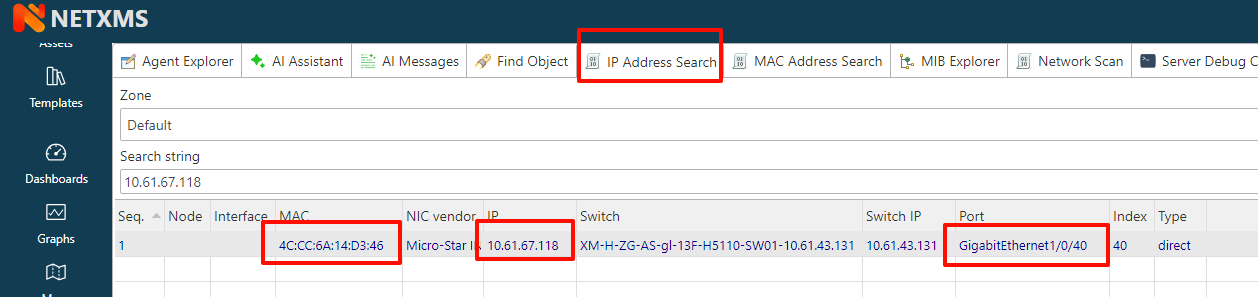
    Thank you very much for your quick reply. Our use case is: based on historical IP addresses (for example, IPs logged when users access critical systems), we want to look up the MAC address associated with that IP at that point in time, so we can identify the specific endpoint. We look forward to this new feature. Many thanks!
  • Installer hangs on SQLite database selection

    2
    0 Votes
    2 Posts
    364 Views
    A
    Hi, most likely this is not a hang - installer is waiting for database initialization, which runs in separate console window. If initialization fails, that window shows the error and "PRESS ANY KEY TO CONTINUE", and it can end up behind the installer window. With SQLite it usually fails either because folder in "Path to database file" does not exist (file is created automatically, folder is not), or because database file is already there from previous attempt. Log switch does not change anything here. On second run installer finds existing installation and "Initialize database" is not checked by default, so this step is just skipped - which also means database may still be not initialized. Is NetXMS Core service running and can you log in? If not, please share what you entered as path to database file and last lines of C:\NetXMS\log\netxmsd.log.
  • How to configure MCP

    2
    0 Votes
    2 Posts
    1k Views
    A
    Hi, Yes, Module = mcp enables it, and you'll want Module = aitools as well - most of the tools the MCP server exposes come from that module. The module has no settings of its own. It adds the endpoint to the server's built-in HTTP listener, so port and address are set in the [WEBAPI] section of netxmsd.conf: Module = mcp Module = aitools [WEBAPI] Address = any # default is loopback only Port = 8000 # default The endpoint path is fixed: http://<server>:8000/mcp (streamable HTTP transport). No separate web service is needed - the listener is part of netxmsd and enabled by default. Module = webapi only adds the REST API endpoints, MCP doesn't depend on it. Clients authenticate with an "Authorization: Bearer <token>" header. Issue a persistent token in the user's properties, and give that user the "Use AI assistant" system right, otherwise requests get 403. You're right that this isn't documented, ticket: https://github.com/netxms/netxms-doc/issues/87
  • alarm does not always resolve correctly

    2
    0 Votes
    2 Posts
    1k Views
    A
    Hi, This is a bug in the server, not your configuration: https://github.com/netxms/netxms/issues/3682 Here's what's actually happening: when the node leaves maintenance mode, the server re-generates threshold events for every threshold whose state changed during maintenance. That's where your two "task running" events at 04:00 came from. Those events can be processed while the node is still flagged as in maintenance, and then they get correlated to the "maintenance enter" event, which is why they reference 8766568. By default, EPP rules ignore correlated events, so the rule that should terminate the alarm never sees them. It's a timing race, which is why it only happens sometimes. Workaround until it's fixed: enable Accept correlated events on the EPP rule that terminates the alarm on OS_PROCESS_OK. As a side effect, the alarm will also be terminated when the task recovers while the node is still in maintenance, which is probably what you want anyway. If the same rule also creates the alarm, split it into two rules and set the flag only on the terminating one. Otherwise alarms will be created during maintenance too.