Skip to content
  • NetXMS 7.0 patch release 3

    Announcements
    1
    0 Votes
    1 Posts
    16 Views
    V
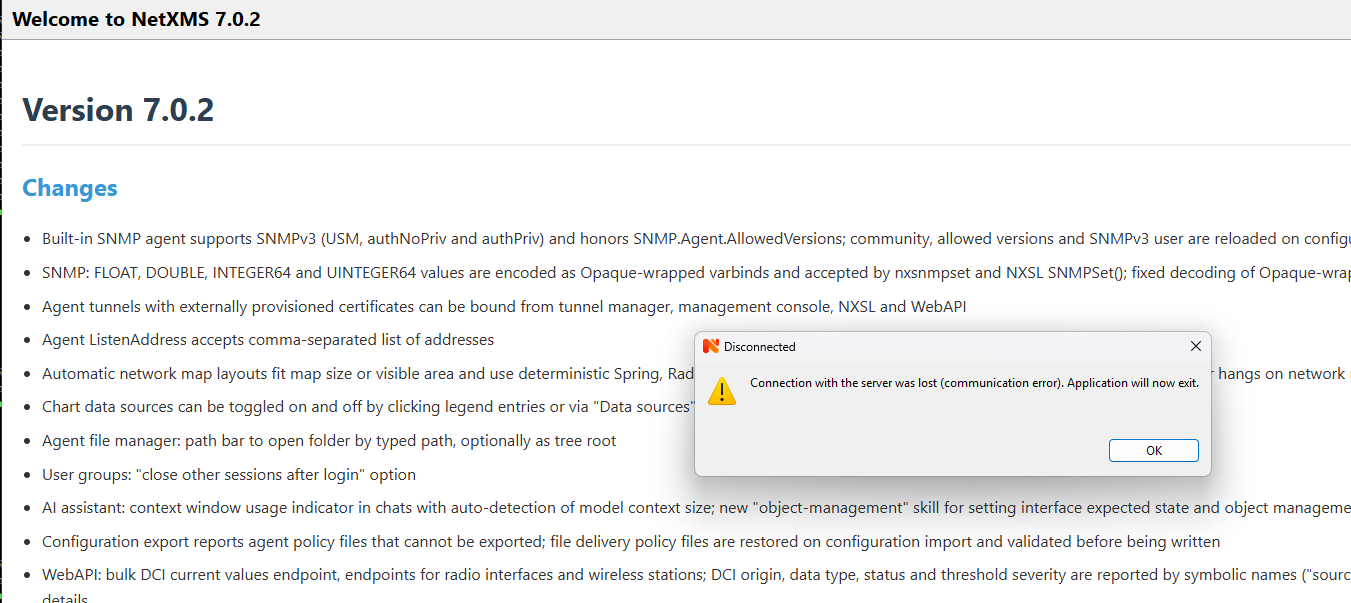
    We just published patch release 3 for version 7.0. Notable changes New server configuration variable Agent.TLS.ReverseTunnels (disabled/allowed/preferred) for controlling use of TLS tunels to agents Modbus: unit ID from DCI metric and from Modbus sensor is honored; DCIs on sensors are collected with sensor's unit ID File transfer over encrypted connection is aborted on encryption or send failure instead of being reported as successful with missing data New agent and server configuration parameter CurlSSLBackend libcurl uses Windows certificate store when no CA bundle is configured Docker connector no longer disables TLS verification on Windows New AI assistant tool get-node-health (one-call OS health snapshot of a node with pre-evaluated findings) AI security fixes DCI data export includes delta method, transformation flag, time zone and SHA-256 digests Network map link color calculation script can access link via global variable $link FDB entries with status other(1) (e.g. MAC addresses authorized by port security or 802.1X) are no longer discarded JUNIPER driver recognizes CLI prompt on devices without configured host name SYS_NODE_UNREACHABLE events caused by agent tunnel being down are correlated to SYS_NETWORK_CONN_LOST Hardware inventory: storage device and network adapter index changes no longer cause spurious component added/removed events Windows: mysql.ddr is treated as alias for mariadb.ddr (MySQL driver removed from Windows build) Agent web service requests: fixed bearer authentication; improved workarounds for memory leaks in old libcurl versions Added Chinese (Simplified) translation of management console Fixed issues #3868 (Hardware inventory: storage device index changes cause spurious component added/removed events) #3869 (Bundled libcurl on Windows has no trusted CA roots, https verification fails with curl error 60) #3871 (Docker connector disables TLS verification on Windows and depends on OpenSSL-only curl callback) #3872 (Empty user variable values cannot be stored on Oracle (ORA-01400 on user_profiles.var_value)) #3873 (Decommission with "Clear IP addresses" leaves interfaces in zone address index: former IP "already in use" until server restart when zoning is enabled) #3874 (Windows server installer: upgrade from <7.0 with DBDriver = mysql.ddr leaves server unable to start) #3875 (Create public SSH key from private automatically) #3876 (SSH terminal via agent proxy disconnects after login (libssh 0.11+)) #3877 (Modbus data collection ignores unit ID from DCI metric and from Modbus sensors) #3879 (Web console: inactivity timeout never fires while node Overview is open) #3881 (HPE Comware FDB entries with status other(1) are discarded — configurable acceptance policy requested) #3883 (AI tool get-node-health: one-call OS health snapshot of a node with pre-evaluated findings) #3885 (MinGW subagent build: embedded resource (parser XML) is not rebuilt when the embedded file changes) #3892 (MCP endpoint must work standalone without AI provider: core tools, NXSL ai_tool scripts and disabled-items list are skipped when InitAIAssistant() bails out on missing provider) #3893 (Device driver data is not reset when node's network device driver changes) #3895 (Data export download fails in web console) #3897 (aifileops log_tail/log_grep only see the first 10000 lines of a file) #3898 (AI log/incident search tools: no row limit on Oracle, negative limit accepted, hard-coded LIMIT breaks MSSQL/Oracle/DB2) #3899 (execute-agent-tool discards agent error details and returns only numeric error code) #3900 (Add server configuration variable Agent.TLS.ReverseTunnels (disabled/allowed/preferred) to control server-initiated (reverse) agent TLS tunnels globally) #3901 (Node::connectToAgent() establishes reverse TLS tunnel while reusing alive legacy NXCP connection, leaving tunnel unused) #3903 (Allow map link color scripts to distinguish parallel links) #3904 (JUNIPER driver: CLI prompt without host name not recognized, {master:0} line left in configuration read via interactive SSH) #3905 (File transfer over encrypted connection reported success with missing data) #3906 (AI operator owner can be set to any user, allowing privilege escalation via MANAGE_AI_OPERATORS) #3907 (Race condition in server object index reader/writer handshake) #3908 (NetXMS 7.0.2: recurring agent tunnel timeouts, proxy polling failures and unexpected agent process termination)
  • Network map link values automatic refresh

    Support
    2
    0 Votes
    2 Posts
    46 Views
    F
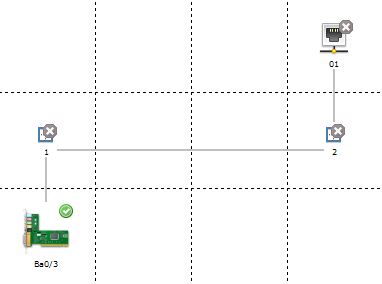
    Sorry, I forgot to attach the screenshot to my original post. Here it is! Thanks, Federico. [image: network map link values.png]
  • Client Crash after upgrading from 6.2.5 to 7.2.0

    Support
    6
    1
    0 Votes
    6 Posts
    120 Views
    A
    @gmonk63 said: I tried to upload netxmsd-bt.txt but it says I do not have permissions. After forum migration? Thanks, I’ll check permissions UPDATE: permissions fixed
  • NetXMS 7.0.2 crashes with SIGSEGV shortly after startup

    Support
    7
    0 Votes
    7 Posts
    251 Views
    A
    Hi Alex, thank you for the detailed analysis. We checked our current NetXMS 6.2.5 installation. Both Dell drivers are present: dell.ndd 426K dell-pwc.ndd 168K Old NetXMS libraries are still present in /usr/local/lib: We found both .so.50 and .so.61 versions, including the libraries you mentioned: libnxsrv.so.61 libnxsl.so.61 libnetxms.so.61 .. The old Dell driver is actively loaded under NetXMS 6.2.5. Our server log contains several entries such as: Network device driver DELL-PWC loaded successfully This confirms that the old driver is still being loaded in our current 6.2.5 installation. We have not removed or modified any files yet, as the current production server is still running 6.2.5. Your explanation sounds very plausible and matches what we found. We will prepare a clean upgrade to 7.0.2, removing the obsolete driver and libraries as suggested. Thanks again for investigating this issue! Best regards Alwin
  • Translation] Updated zh_CN translation for NXMC (zh_CN.po)

    Development
    2
    0 Votes
    2 Posts
    302 Views
    V
    Thank you! Just added to the source tree. Note that before nxmc had only Chinese Traditional translation, so I have added yours as separate language entry "Chinese (Simplified)". Could you please also translate client error messages in src/client/java/netxms-client/src/main/resources/netxms-client-messages.properties? Best regards, Victor
  • Change in certificate trust in v7?

    Support
    8
    0 Votes
    8 Posts
    487 Views
    S
    Thank you for the fix. Bit offtopic, any way to clean up my business service ?
  • Unifi OS Server - How to detect as "Wireless Controller"

    Support
    2
    0 Votes
    2 Posts
    171 Views
    A
    Hi, Yes, this works with a self-hosted UniFi OS Server, and SNMP isn't needed. The bridge doesn't use the node at all. The NetXMS server calls the UniFi Network API directly, and everything is configured as custom attributes on the wireless domain object. You can remove the VM node from the domain, because it does nothing in this mode. Add Module = wlcbridge to netxmsd.conf and restart the server. On the wireless domain, add these custom attributes: wlcbridge UniFi unifi.base-url https://<vm-ip>:<port> # same URL you open the UniFi web UI on unifi.login <local admin account> unifi.password <password> # plain text, or encrypted with: nxencpasswd <login> <password> unifi.site <site id> # only if not "default" Instead of login/password you can set unifi.token to an API key created in the Network application. Login/password is the safer option, though. The account has to be a local one, not a UI.com cloud account. Run a configuration poll on the wireless domain. The output should show "Reading access point list via bridge interface UniFi" and the number of access points reported. The access points are created under the domain. Important detail: leave unifi.isAppliance unset. The name is misleading: true is for the old standalone Network Application (the one on port 8443), and UniFi OS Server needs it unset. If the poll reports "Cannot retrieve access point list", set debug level 7 for tag wlcbridge.unifi. The server log will then show the exact URL being requested and the HTTP code that came back.
  • NetXMS 7.0 patch release 2

    Announcements
    3
    0 Votes
    3 Posts
    273 Views
    A
    Это новый веб, он пока еще в разработке. В ближайшее время откроем репозиторий @moba said in NetXMS 7.0 patch release 2: Клиент не зависает. спасибо! Вопрос а что за интерфейс такой симпотичный https://netxms.com/blog/how-companies-choose-a-monitoring-platform-and-where-netxms-clearly-wins/ в этой статье? Какая-то неизданная версия ещё?
  • NetXMS Core server will not start after upgrade to 7.*

    Support
    4
    0 Votes
    4 Posts
    215 Views
    A
    I've removed the database password from your post. It was public for a while, so please change it anyway. "Connection refused" means the core service still isn't running, so the client has nothing to connect to. The most likely reason is that the database schema wasn't upgraded. The installer runs the upgrade hidden, so if it fails you see nothing, and netxmsd refuses to start on an old schema. Please run this from an elevated command prompt: cd C:\NetXMS\bin nxdbmgr upgrade netxmsd -D 4 The first command shows any upgrade error directly. The second runs the server in the foreground with debug output, so you can see where it stops. If either one fails, post the output here, or the end of C:\NetXMS\log\netxmsd.log.
  • 0 Votes
    3 Posts
    197 Views
    E
    да, причина в размере war-файла. Увеличил лимит в manager, все получилось
  • Изменения в UI

    Support (Russian)
    4
    3
    0 Votes
    4 Posts
    281 Views
    A
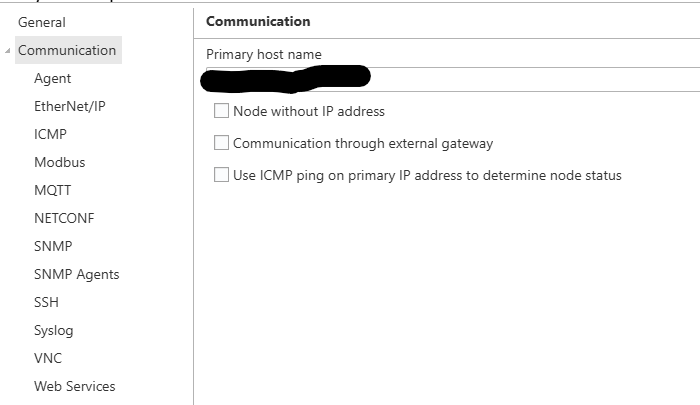
    Сообщение об успешном резолве в логе, скорее всего, вида "Node name resolved to ..." - это синхронизация имени ноды, а не резолв primary host name. Она работает в обратную сторону: имя объекта берётся из reverse DNS адресов интерфейсов или из SNMP sysName, поэтому срабатывает, даже если прямой записи для имени нет ни в одном DNS. Успешный резолв primary host name сразу заполняет primary IP, в логе это "IP address for node ... changed from ... to ...". SNMP при этом на самом деле не опрашивается. Все запросы идут на primary IP, и без него сервер проверки пропускает: configuration poll пишет "SNMP polling is not possible", status poll проверку SNMP не делает, проверка доступности ноды для нод без IP отключена. "SNMP status: Responding" и статус Normal - это состояние на момент, когда IP ещё был. Фактически нода не мониторится. С включённым Objects.Nodes.ClearIPAddressOnDNSFailure так же выпадут все ноды, чьё имя не резолвится с сервера NetXMS. Найти их можно по SYS_DNS_RESOLUTION_FAILED в event log или по Primary IP address "none". Вернуть - вписать в Primary host name резолвящееся имя или IP. По интерфейсу: в 6.x и 7.0 тут ничего не менялось. Primary host name всегда был на странице Communication в Properties. В 4.4 (2023) на Overview блок Communications, где показываются primary host name и IP, вынесли из General - видимо, его вы и помнили.
  • v7.01 client issue

    Support
    2
    4
    0 Votes
    2 Posts
    167 Views
    A
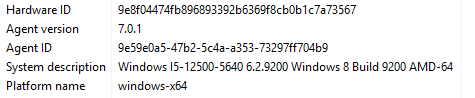
    Hi, This is a bug in the 7.0.1 Windows agent build, fixed in 7.0.2, which was released today. Upgrading the agent brings back the correct version, build and product name. Here's what's actually happening: Windows reports itself as Windows 8 (6.2.9200) to any program that doesn't declare support for newer Windows versions in its application manifest. The 7.0 Windows build moved to a new toolchain, and the 7.0.1 agent shipped without that manifest. It's back in 7.0.2. Note: on 7.0.1 the agent also skipped Windows Store apps in software inventory, because it thought it was running on Windows 8. If you have inventory enabled, the first configuration poll after the upgrade will show those packages as newly installed. That's expected, nothing was actually installed.
  • V7 Client Issues

    Support
    11
    0 Votes
    11 Posts
    967 Views
    A
    Причина в обоих thread dump'ах одна: deadlock в клиенте между обновлением списка алармов и таймером мигания. Возникает только при включённой опции "Blinking outstanding alarms". Обход: отключить эту опцию в настройках клиента, раздел Alarms. Тикет: https://github.com/netxms/netxms/issues/3863
  • agent hardening

    Support
    2
    0 Votes
    2 Posts
    238 Views
    A
    Hi Andrea, Yes, on both. For monitoring-only use, the setting that matters most is the access level you give the server, covered at the end. Linux. The packaged agent runs as root. Create a dedicated user and either change the systemd unit with "systemctl edit netxms-agent": [Service] User=nxagent Group=nxagent or let the agent drop privileges at startup, with this in nxagentd.conf: UserId = nxagent GroupId = nxagent Use the systemd route if the user needs extra groups, such as adm for reading logs, because the agent applies only the primary group. Either way, this user needs write access to the agent's log file and data directory. CPU, memory, disk, filesystem, network and process metrics keep working. You lose SMBIOS hardware data (serial numbers, memory modules, etc.) and ICMP from the ping subagent, and the agent can only read files and logs that this user can read. Windows. The installer always creates the service under LocalSystem, but the agent works under a limited account if you change it in the service properties afterwards. The account needs rights on the agent's etc, log and var folders. Anything that needs administrator rights stops working, such as System.Restart, and per-process metrics such as CPU time and I/O will quietly return 0 for processes of other users. Both. Give the server read-only access and use an outbound tunnel, so the agent has no open port: Servers = netxms.example.com # read-only, remove the MasterServers line ServerConnection = netxms.example.com # outbound tunnel to the server ListenPort = 0 # no inbound listener With this the server can read metrics, but it can't run actions, edit the agent's config, deploy policies or write files. The tunnel has to be bound to the node on the server side. Note: the installer writes MasterServers, which is full access, so that line has to be removed. All config changes are then made locally on the host.
  • NetXMS major release 7

    Announcements
    5
    0 Votes
    5 Posts
    620 Views
    S
    Sorry, i missed that:  https://docs.netxms.org/admin/7.0/installation/upgrading/ Ignore my last message, please...
  • vmware monitor

    Support
    4
    0 Votes
    4 Posts
    833 Views
    I
    ok  i will try thanks
  • 0 Votes
    10 Posts
    107k Views
    A
    Слоёв и анимации на картах сейчас нет, завёл feature request: https://github.com/netxms/netxms/issues/3842 Из существующего ближе всего: на одной подложке (план ЦОДа как background image) можно совместить DCI Container с текущими значениями (температуры), DCI Image, который меняет картинку по значению DCI, и статусы объектов. Включать и выключать их по отдельности нельзя - для этого сейчас только отдельные карты с той же подложкой и drill-down между ними.
  • 0 Votes
    2 Posts
    308 Views
    A
    Добрый день, На WAN-интерфейсе роутера нужно включить флаг "Exclude this interface from network topology" (свойства интерфейса → Polling). Адреса такого интерфейса не участвуют в привязке к подсетям, и на следующем configuration poll нода будет отвязана от 192.168.1.0/24. Важно: primary IP ноды должен быть адресом со стороны сети 123.x - если primary IP сам попадает в 192.168.1.0/24, нода останется в этой подсети. Имя меняется из-за Objects.Nodes.SyncNamesWithDNS: сервер делает reverse DNS для primary IP, а если записи нет - перебирает адреса всех интерфейсов, включая исключённые из топологии. В итоге берётся PTR для 192.168.1.100, т.е. имя внутреннего хоста с этим адресом. Решение - добавить PTR-запись для primary IP роутера, либо выключить Objects.Nodes.SyncNamesWithDNS и задать имена вручную (параметр глобальный, отдельного флага на ноду нет).
  • 0 Votes
    3 Posts
    519 Views
    P
    Hello ! I can confirm that with the latest server version 7.0.0 this issue is resolved !
  • Языковой интерфейс.

    Support (Russian)
    4
    0 Votes
    4 Posts
    10k Views
    A
    Добрый день, Английского language bundle в web UI нет - английские надписи это исходные строки. Если bundle для выбранного языка не найден, Java берёт локаль по умолчанию JVM, в которой работает web UI, - на Ubuntu с русской локалью это ru_RU. В итоге загружается русский перевод, а он неполный: переведённые строки показываются по-русски, остальные по-английски. Тикет на исправление: https://github.com/netxms/netxms/issues/3777 Решение - запустить JVM web интерфейса с английской локалью. Например, через systemd override сервиса, в котором развёрнут web UI (Tomcat, Jetty): systemctl edit tomcat10 # добавить: [Service] Environment="JAVA_TOOL_OPTIONS=-Duser.language=en -Duser.country=US" и перезапустить сервис. Отдельной серверной настройки языка по умолчанию в 6.2 нет: язык хранится в браузере (cookie) и по умолчанию English. После смены локали JVM английский интерфейс будет у всех пользователей, кроме тех, кто явно выбрал другой язык.