Skip to content

Support

5.1k Topics 22.0k Posts

Questions about installing, configuring and using NetXMS.

  • Client Reconnect

    2
    0 Votes
    2 Posts
    20k Views
    F
    There's parameter Server.Security.2FA.TrustedDeviceTTL in Configuration->Server configuration, it's time in seconds
  • Netxms Server 5.0.2 install on Ubuntu 24.04 Noble

    2
    0 Votes
    2 Posts
    19k Views
    F
    Please check again, this should be now fixed
  • snmpOID is no longer returning the OID starting with dot

    5
    0 Votes
    5 Posts
    36k Views
    F
    NXSL functions accept OIDs both with and without the leading dot. Returned values are without the dot. So both of below lines will print "System description: 1.3.6.1.4.1.14988.1" println("System description: " .. $node.createSNMPTransport()?.getValue(".1.3.6.1.2.1.1.2.0") ); println("System description: " .. $node.createSNMPTransport()?.getValue("1.3.6.1.2.1.1.2.0") ); ?. is safe dereference which appeared in 5.0 - should createSNMPTransport() return null, this will not produce script error.
  • Bulk DCI removal

    3
    0 Votes
    3 Posts
    25k Views
    W
    Thank you, I was able to use this to filter through all my devices and clear out the DCIs that were duplicated.
  • 0 Votes
    2 Posts
    23k Views
    A
    These scripts were not converted during migration (for multiple reasons, we'll handle that). You can convert scripts using "nxscript -5" command. Copy script from the chart into a file, then run "nxscript -5 file.nxsl", it will output updated script.
  • Template Errors after 5.0 install

    5
    2
    0 Votes
    5 Posts
    41k Views
    V
    For out of the box templates, if you didn't change them, you can just re-import them, either manually or by changing server configuration option Server.ImportConfigurationOnStartup to "always" and restarting server. Best regards, Victor
  • mssql.ddr in agent on windows server 2022

    3
    0 Votes
    3 Posts
    31k Views
    V
    Most likely you have to install SQL Server Native Client which is needed for mssql.ddr to work. Best regards, Victor
  • 5.0 Install

    4
    0 Votes
    4 Posts
    33k Views
    G
    Thank you guys... Thats good news that we no longer need to compile the mibs manually. I appreciate it
  • nxAgent, crash, libcrypto (4.x.x-4.5.6,linux,x86_64,package)

    4
    0 Votes
    4 Posts
    33k Views
    V
    We will try to reproduce that, but it likely will take some time. I registered it a s a bug: https://track.radensolutions.com/issue/NX-2527
  • Signing Key

    2
    1
    0 Votes
    2 Posts
    23k Views
    A
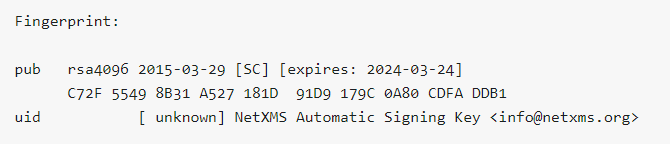
    Hi It's already renewed and uploaded a while ago. I highly recommend to use netxms-release package, which update keys automatically. Key locations: https://packages.netxms.org/netxms-keyring.gpg -- binary keyring https://packages.netxms.org/netxms.gpg -- armoured key Also it's available from key servers. Make sure that key is not imported into trusted keys (e.g. using apt-key), but is stored in separate key store, as recommended in recent Debian/Ubuntu.
  • Incorrect interface bandwidth measurement

    2
    0 Votes
    2 Posts
    21k Views
    F
    You can check raw values in history of a DCI and do the calculation manually, but I am afraid that's just the data that this switch provides.
  • Monitoring of Dell SAN ? (Equallogic and ME5024) or HP SAN (MSA2050)?

    2
    0 Votes
    2 Posts
    17k Views
    F
    Hi, I would expect that these devices support SNMP. If this is so, you need to enable snmp on the device and run configuration poll in NetXMS to check if SNMP capablitiy is detected (it's visible on node's Overview page). When this is done, you can use MIB explorer to walk available OIDs and add data collection items. The other possible approach is to use ssh - in node properties you can specify ssh password or key. Or, if you have many devices, credentials can be specified in Configuration -> Network credentials - these will be auto-probed. If ssh credentials are ok, on configuration poll SSH capability should become "YES". And, finally, if your device runs under linux, you can try generic NetXMS agents - but this depends on platform/cpu and not necessarily would work
  • snmp v3

    3
    0 Votes
    3 Posts
    24k Views
    M
    Tried clean test server install with just the node that do not work and it works on test server. Tried renaming and then recreate the node that does not work and now snmp v3 works on the new node on production server. Odd issue that only snmp v3 is not working on some old nodes. I will recreate all nodes to be safe.
  • Connection Refused

    2
    0 Votes
    2 Posts
    17k Views
    F
    nxshell is integration tool, that allows python code to interact with netxms server. For Windows GUI client you need to install this: https://netxms.com/download/releases/4.5/netxms-client-4.5.6-x64.exe
  • [Windows] Web Api install?

    10
    0 Votes
    10 Posts
    37k Views
    F
    Current Windows WEB UI installer includes web api as well. It can be reached at http://127.0.0.1:4788/api/ War file itself is located in C:\NetXMS-WebUI\jetty-base\webapps\api.war
  • SNMP Poll issues

    2
    0 Votes
    2 Posts
    14k Views
    F
    The only situation when this might be happening - if during configuration poll device did not answer to a packet with currently stored community string. In this case server thinks that community string might have changed and starts trying all available ones. You can do tcpdump from your server filtering by device IP and SNMP port, then we will have some more information. The command is tcpdump -s 0 -w traffic.pcap host = IP_ADDRESS Or you can just set checkbox "Prevent automatic SNMP configuration changes" in node properties, it should prevent trying community strings.
  • Alarm View or Dashboard with DCI Value

    2
    0 Votes
    2 Posts
    12k Views
    F
    Alarm filter allows to filter by multiple conditions - if you press space bar in filter field, drop down with possible keywords will open. Source: - is node name, however wildcards are not supported. But you can make a separate container for your servers - nodes can be present in multiple containers simultaneously. And containers can have auto-bind scripts to add nodes automatically. Event: - is event name, list of possible options will be shown. It is convenient to configure events with different names for different occasions in addition to SYS_THRESHOLD_REACHED. This way it's easier to dealt with them in EPP rules or search alarms, so your update DCI is a good candidate to have separate event for it. That's approximately it. In addition you can check DCI summary table functionality - this allows to display table with DCI data accross multiple nodes. And, also, you can use a container and it's auto-bind script to add only nodes that have some threshold triggered. This way you'll always have a list of nodes that require attention at hand.
  • where is the menu?import/export template

    2
    0 Votes
    2 Posts
    12k Views
    F
    In new management client it's in "Configuration", "Import configuration" / "Export configuration"
  • A switch network equipment managed by snmp,its Driver=GENERIC,

    2
    0 Votes
    2 Posts
    11k Views
    A
    Driver is unrelated to templates, it's a loadable server extension which provide vendor (or device) specific information which is either not available via common SNMP OIDs, or not available via SNMP at all (like physical ports layout on the switch). GENERIC is a default driver for all devices which works in standard way. In ideal world it would be the only driver in the system. You can check sources here: https://github.com/netxms/netxms/tree/master/src/server/drivers.
  • I want to use netxms for information gathering. What should I do?

    2
    0 Votes
    2 Posts
    12k Views
    F
    For servers - you’d need to install netxms agent and set MasterServers = IP-address-of-your-netxms-server in nxagentd.conf After adding a node in netxms, it should detect that agent is present on that system, then you can add DCIs (data collection items) for the metrics that you need. Also, check the docs, there’s some info there: https://www.netxms.org/documentation/adminguide/concepts.html https://www.netxms.org/documentation/adminguide/quickstart.html