Skip to content

Support

5.1k Topics 22.0k Posts

Questions about installing, configuring and using NetXMS.

  • Custom node down

    Locked
    5
    0 Votes
    5 Posts
    32k Views
    R
    Thanks, it works like a charm!
  • Difference between parameters

    Locked
    5
    0 Votes
    5 Posts
    36k Views
    B
    Doesn't seem to be in the wiki yet, but there's a table at the end of the old user manual: https://www.netxms.org/documentation/netxms_user_manual.pdf
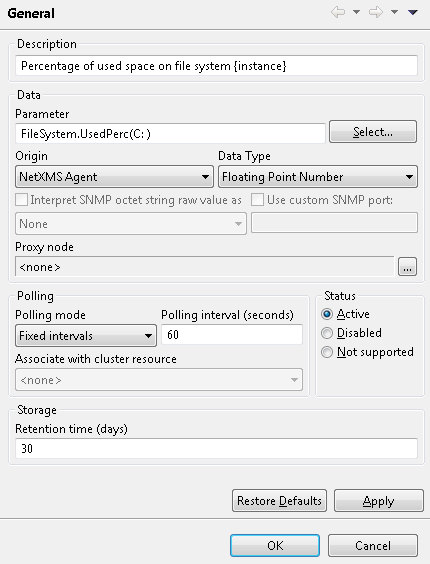
  • DCI not Polling Values for "FileSystem.UsedPerc(C: )"

    Locked
    4
    1
    0 Votes
    4 Posts
    33k Views
    M
    Hi, sorry for my late reply I had to be in a meeting. I just wanted to test your suggestions and now I see that everything works. For whatever reason! Thank you for your Time. I'm starting to love to your system. Best regards Mo
  • Start services on boot

    Locked
    3
    0 Votes
    3 Posts
    35k Views
    J
    Hi, Thank you for your quick reply, that worked! Many thanks, Jesper.
  • DCI Configuration Problem (missing agent parameters)

    Locked
    7
    1
    0 Votes
    7 Posts
    62k Views
    M
    So there was a Bug in the Windows Firewall Setting the local rules were overwritten by a GPO. Thanks for your help. Mo
  • Manually add nodes in 1.2.3

    Locked
    2
    0 Votes
    2 Posts
    24k Views
    B
    Hi, To manually add nodes, right click on the "All Services" object in the Object Browser, which should be on the left-hand side of the window (If not, press F3, or look under the View menu to open it). Then select "Create node..." from the dropdown menu. You can also create Containers this way to organize your nodes. The node probably appears automatically after a while because network discovery is enabled. You can find its options under the Configuration menu. The user manual is unfortunately a bit outdated, the wiki contains some more up to date information but isn't quite complete yet either: http://wiki.netxms.org Good luck!
  • Error in Transformation Script

    Locked
    9
    2
    0 Votes
    9 Posts
    22k Views
    dushyantmdaveD
    Hello SKYnv, I have tried following script and it is running successfully. if ($1 > 5000) return 0; else return $1; thank you very much.
  • Driver "CATALYST-GENERIC" for Cisco Catalyst 3550

    Locked
    7
    0 Votes
    7 Posts
    17k Views
    V
    Sorry, I completely forgot about it Now added as an issue to bug tracker (https://www.radensolutions.com/chiliproject/issues/128) - will try to implement it in few days. Best regards, Victor
  • Nagios plugin

    Locked
    3
    0 Votes
    3 Posts
    10k Views
    V
    Hi! Few clarifications: There are no difference between ExternalParameter and ExternalParameterShellExec on UNIX/Linux. They only behave differently on Windows. There are two timeouts that must be taken into consideration: a) ExecTimeout on agent - timeout for executing external program b) AgentCommandTimeout on server - timeout for any command sent from server to client In general AgentCommandTimeout must be greater or equal to ExecTimeout. Also, if you have couple of external parameters with possible long collection time, you may create wrapper script to get them all at once and use it as external parameters provider - see wiki for details: http://wiki.netxms.org/wiki/ExternalParametersProvider. Best regards, Victor
  • IBM Blade Center - FC Controller

    Locked
    1
    0 Votes
    1 Posts
    8k Views
    L
    hi victor, i have the new version 1.2.3 installed for some time now and the app does not seem to discover the Fiber Channel controllers even though they have an ip address each of it's own and when i run network scanning tools i can find them. i have already posted a topic on the subject but i did not get your respond. i hope there is a way to help me with this and i'll add some tech stuff to help you: i have no vlans but i have divided the network to subnets. i have configured netxms to discover nodes using active and passive and i have configured filtering that covers all the subnets i have. the communication to the FC controllers is routed through the management controller. the last time i told you that i see events from the FC controllers but now i do not. i have checked the DB for errors after the installation of the new version and they were none. you tolled me that by now you have access to such blade center and you will run some tests on it, any news on that ? Best Regards, Lindeamon
  • SMS notification problem with different USB-3G adapters

    Locked
    2
    0 Votes
    2 Posts
    11k Views
    V
    Hi! Try to change speed in port's settings. Generic driver uses 9600 by default, and I've seen cases where GSM modem was not working on speed below 38400. Make sure that speed in port settings match configured port speed in SMSDrvConfig parameter. Best regards, Victor
  • NXSL script help

    Locked
    3
    0 Votes
    3 Posts
    13k Views
    V
    Hi! @tivanni said in NXSL script help: when I add a filtering script to the event processing policy, where i can found the output of the print/println command? If i add a print or a println command to the filter script, when the event occuor i can't find the output in the remote console server or in the server console or in other way. You should use trace() function to write messages to server's log. @tivanni said in NXSL script help: Another questions...in the filtering script of event processing policy, can i put directly the code?Or, have I to add the declaration of the main (sub main(){etc ) Yes, you can write code directly. Defining main() is not necessary. Also, the following code is also valid: trace(0, "main() starts here"); sub someFunction() { } trace(0, "main() continues here"); @tivanni said in NXSL script help: I have to create a filter script that send the alarm's mail for an interface down for only specific interface... I tried to insert in the event processing police as source the specific interface, but did'nt work; so i use as source the switch and i wanna to add a filter script that select for which interface the alarm's mail have to start. Any suggestion? Source of interface down event is the node. You can filter events using script by interface name or index. For example, to pass SYS_IF_DOWN events only for interface named "eth2", you can use the following script: return $2 == "eth2"; We use $2 here because interface name passed as second parameter with SYS_IF_DOWN event. You can see this from event description: Generated when interface goes down. Please note that source of event is node, not an interface itself. Parameters:   1) Interface object ID   2) Interface name   3) Interface IP address   4) Interface netmask   5) Interface index Best regards, Victor
  • Possible bug in Object Tools - SNMP Table

    Locked
    4
    0 Votes
    4 Posts
    13k Views
    B
    Hi, after upgrading to 1.2.3 the problem unfortunatelly still remains. In a MIB browser I can see following data when walking .1.3.6.1.4.1.17607.5.1 .1.3.6.1.4.1.17607.5.1.1.2.1 [STRING] = 2012-07-12 11:44:44 .1.3.6.1.4.1.17607.5.1.1.2.2 [STRING] = 2012-07-17 09:40:49 .1.3.6.1.4.1.17607.5.1.1.2.3 [STRING] = 2012-07-17 09:40:49 .1.3.6.1.4.1.17607.5.1.1.2.4 [STRING] = 2012-07-17 09:40:49 .1.3.6.1.4.1.17607.5.1.1.2.5 [STRING] = 2012-08-14 16:05:45 .1.3.6.1.4.1.17607.5.1.1.3.1 [STRING] = CTI-Avaya:1 .1.3.6.1.4.1.17607.5.1.1.3.2 [STRING] = Screen:1 .1.3.6.1.4.1.17607.5.1.1.3.3 [STRING] = watchdog:1 .1.3.6.1.4.1.17607.5.1.1.3.4 [STRING] = CTI-Avaya:1 .1.3.6.1.4.1.17607.5.1.1.3.5 [STRING] = :0 .1.3.6.1.4.1.17607.5.1.1.4.1 [INTEGER] = 2 .1.3.6.1.4.1.17607.5.1.1.4.2 [INTEGER] = 2 .1.3.6.1.4.1.17607.5.1.1.4.3 [INTEGER] = 2 .1.3.6.1.4.1.17607.5.1.1.4.4 [INTEGER] = 2 .1.3.6.1.4.1.17607.5.1.1.4.5 [INTEGER] = 2 .1.3.6.1.4.1.17607.5.1.1.5.1 [STRING] = 104 .1.3.6.1.4.1.17607.5.1.1.5.2 [STRING] = Failure of service .1.3.6.1.4.1.17607.5.1.1.5.3 [STRING] = Failure of service .1.3.6.1.4.1.17607.5.1.1.5.4 [STRING] = Failure of service .1.3.6.1.4.1.17607.5.1.1.5.5 [STRING] = Failure of service .1.3.6.1.4.1.17607.5.1.1.6.1 [INTEGER] = 1 .1.3.6.1.4.1.17607.5.1.1.6.2 [INTEGER] = 1 .1.3.6.1.4.1.17607.5.1.1.6.3 [INTEGER] = 1 .1.3.6.1.4.1.17607.5.1.1.6.4 [INTEGER] = 1 .1.3.6.1.4.1.17607.5.1.1.6.5 [INTEGER] = 1 .1.3.6.1.4.1.17607.5.1.1.7.1 [INTEGER] = 0 .1.3.6.1.4.1.17607.5.1.1.7.2 [INTEGER] = 0 .1.3.6.1.4.1.17607.5.1.1.7.3 [INTEGER] = 0 .1.3.6.1.4.1.17607.5.1.1.7.4 [INTEGER] = 0 .1.3.6.1.4.1.17607.5.1.1.7.5 [INTEGER] = 0 .1.3.6.1.4.1.17607.5.1.1.8.1 [STRING] = 2012-07-12 11:44:44 .1.3.6.1.4.1.17607.5.1.1.8.2 [STRING] = 2012-07-17 09:40:49 .1.3.6.1.4.1.17607.5.1.1.8.3 [STRING] = 2012-07-17 09:40:49 .1.3.6.1.4.1.17607.5.1.1.8.4 [STRING] = 2012-07-17 09:40:49 .1.3.6.1.4.1.17607.5.1.1.8.5 [STRING] = 2012-08-14 16:05:45 .1.3.6.1.4.1.17607.5.1.1.9.1 [INTEGER] = 211807 .1.3.6.1.4.1.17607.5.1.1.9.2 [INTEGER] = 206001 .1.3.6.1.4.1.17607.5.1.1.9.3 [INTEGER] = 206001 .1.3.6.1.4.1.17607.5.1.1.9.4 [INTEGER] = 206001 .1.3.6.1.4.1.17607.5.1.1.9.5 [INTEGER] = 206001 OIDs of my columns: .1.3.6.1.4.1.17607.5.1.1.2 .1.3.6.1.4.1.17607.5.1.1.3 .1.3.6.1.4.1.17607.5.1.1.4 .1.3.6.1.4.1.17607.5.1.1.5 .1.3.6.1.4.1.17607.5.1.1.6 .1.3.6.1.4.1.17607.5.1.1.7 .1.3.6.1.4.1.17607.5.1.1.8 .1.3.6.1.4.1.17607.5.1.1.9 When I run the tool, created table is empty.             Beda
  • Raspberry Pi - Wallboard Deployment

    Locked
    5
    0 Votes
    5 Posts
    19k Views
    A
    Thank you, not to urgent. So happy to wait for the next build. Regards Aron
  • Every SNMP Item I have comes back "Changed To Unsupported"

    Locked
    4
    0 Votes
    4 Posts
    17k Views
    V
    Most likely instance will not be 0 in that case, but 1, 2, 3 or anything else. You can use MIB explorer to find exact OIDs - just find .1.3.6.1.4.1.2021.10.1.3 in MIB tree, right-click on it, select "Walk", and see the results. Best regards, Victor
  • Common_Parameters

    Locked
    2
    0 Votes
    2 Posts
    13k Views
    S
    http://wiki.netxms.org/
  • Error upgrading from 1.2.2 to 1.2.3.1

    Locked
    2
    0 Votes
    2 Posts
    11k Views
    T
    i change permission to file create_ssa.sh, redo sh ./configure... command and the make command go fine
  • Could not create the view: Argument cannot be null

    Locked
    11
    0 Votes
    11 Posts
    18k Views
    U
    Hi Victor for the map i could find any documentation about the configuration for that i asked about nagvis. for the time response under 1s i always get zero so in the graph no deffirence between 800ms and 8 ms which is huge difference
  • Two DCI combined in one chart of Object->PerformanceTab

    Locked
    3
    0 Votes
    3 Posts
    16k Views
    G
    Thanks for that idea!
  • nxagent 1.2.3.1 and unixodbc on ubuntu 10.10

    Locked
    5
    0 Votes
    5 Posts
    19k Views
    A
    Hello, Thank you that has worked Many Thanks Aron