Skip to content

Support

5.1k Topics 22.0k Posts

Questions about installing, configuring and using NetXMS.

  • Manage https port

    2
    0 Votes
    2 Posts
    25k Views
    F
    You can make a DCI with one of the following metrics: https://www.netxms.org/documentation/adminguide/service-monitoring.html#network-service-monitoring-using-dci The DCI should be on a node that has agent running, e.g. on your NetXMS server node. But there's a way to overcome this - you can have this DCI on the node that you are monitoring and in properties of that DCI you can select another node in "Source node override" field.
  • TCP Proxy to service on same network as node

    4
    0 Votes
    4 Posts
    31k Views
    F
    In this case You'd need to create a Zone and set this worksation, which is on the same network as Synology NAS as proxy for that zone.
  • 0 Votes
    4 Posts
    33k Views
    F
    Could be firewall issue, some limits on server that prevent process from accepting connections. It was some time ago, so I hope it's resolved. If not, what's the output of netstat -lptun on your server?
  • Agent Policies under templates

    2
    0 Votes
    2 Posts
    28k Views
    F
    Policy will be applied only to nodes, to which the template is applied (but should work in any sequence - either template was applied first and then policy was added, or otherwise). On Windows systems default location for configuration policy files is C:\Windows\System32\config\systemprofile\AppData\Local\nxagentd\config_ap so you can watch this folder to check if policy gets there. Agent restart is needed so it can catch up the new configuration. Also, on a side node, there are two ways how to monitor Windows Event logs - one is Windows Event Sync, when logs are sent to NetXMS server and stored there (so it requires bandwidth and DB space. The other is Log File Parser Policy - you can specify Windows Event Logs there in file name field, e.g. *Security
  • The table 'alarm_event' is full in NetXMS 4.5.3-1 version

    10
    0 Votes
    10 Posts
    69k Views
    B
    Hi, Hopping over from https://www.netxms.org/forum/general-support/netxmsd-hangs-during-startup/ to say thanks for the pointer towards alarm_events which solved my issue! I also had a huge number of rows in this table, and found the culprit in a misconfigured event processing policy which was catching too many events. You may also have something similar. In my case I discovered it by looking at alarms with very high repeat counts. If you open the alarm details it will show the EPP rule which created it.
  • Netxmsd hangs during startup

    4
    0 Votes
    4 Posts
    40k Views
    B
    I found the cause, someone had checked the "inverse rule" checkbox on the event condition of the "show alarm when node is down" EPP rule. This caused every event except the actual node down one to trigger and be correlated to a NODE_DOWN_%i alarm per node. I've corrected this and will monitor the table growth. We probably will have to do some alarm cleanup as well.
  • Web Service XML with node attributes generates ERROR

    4
    0 Votes
    4 Posts
    37k Views
    M
    We upgraded to 4.5.3 today and had a new look on my Web Services. XPath is working perfectly. Thank you!
  • Event Processing Policy Question

    2
    0 Votes
    2 Posts
    20k Views
    V
    Hello! It will use server time. Just fixed typo, thank you! Best regards, Victor
  • Guide: Integrate OpsGenie and NetXMS

    5
    0 Votes
    5 Posts
    33k Views
    G
    I'll be updating this using correct syntax for NetXMS v5.0.
  • Accessrights for Maintenance Journal

    2
    0 Votes
    2 Posts
    21k Views
    F
    No, in Users and groups all access rights are related to global things - e.g. ability to edit server actions - this is not related to any specific node. But things related to nodes and other objects - ability to modify configuration, edit comments and edit maintenance journal are set in the object tree - this way you can limit users to access only some nodes which is typically needed.
  • Polling

    2
    0 Votes
    2 Posts
    20k Views
    F
    "Disable usage of Modbus for all polls" sould be in Polling tab in properties of a node. But I thing there was some version of NetXMS where this checkbox was not present, so try upgrading to the latest.
  • Cannot connect to NetXMS agent (connect failed)

    4
    0 Votes
    4 Posts
    17k Views
    F
    Try connecting to agent port from your server with telnet: telnet AGENT_IP 4700 it should establish connection. The other thing to check is that your server IP is in agent configuration file in MasterServers = IP_OF_YOUR_SERVER
  • Calculating with multiple oids

    2
    0 Votes
    2 Posts
    12k Views
    F
    At some point in the future, when https://track.radensolutions.com/issue/NX-2322 will be implemented it would be possible to specify muliple OIDs and they will appear as variables in transformation script. For now - either a script DCI that does all SNMP job and calculation and returns final result, or SNMP DCI that reads one OID and the rest being read in transformation script, e.g.: totalMem = $1; transport = $node->createSNMPTransport(); if (transport == null) return null; freeMem = transport->getValue(".1.3.6.1.4.1.14823.2.2.1.1.1.11.1.4.1"); if (freeMem == null) return null; return format(100UL * freeMem / totalMem, 1, 0); The only bonus of the first approach is that you can perform recalculation for historical collected values.
  • Problems with email

    2
    0 Votes
    2 Posts
    13k Views
    F
    You can enable debug related to notification channels. This can be done without restarting server from Tools->Server Debug Console or from nxadm command line utility. Issue the following commands: debug nc.* 6 debug ncd.* 6 You can check current status of debug by issuing debug Then check netxms server log file (/var/log/netxmsd on linux).
  • automatic cancellation of all alarms after 24 hours

    2
    0 Votes
    2 Posts
    10k Views
    V
    You can create scheduled task that will run NXSL script on any top level object ("entire network" or "infrastructure services"). In that script you can do something like this: for(a : $object->alarms) { a->terminate(); } Alternatively you can use FindObejct(2) to refer to "infrastructure services" instead of $object - then you can run script in any context. You can add additional logic to terminate only old alarms, etc. Best regards, Victor
  • Initialization of subagent "ORACLE" failed

    7
    0 Votes
    7 Posts
    16k Views
    V
    Can you show full agent config?
  • remote proxy broken internet

    8
    0 Votes
    8 Posts
    16k Views
    F
    Hi! I've checked with a developer yesterday - currently there might be issues with correlation for nodes that are behind proxy. This will be investigated whenever developer resources are available.
  • 0 Votes
    6 Posts
    13k Views
    F
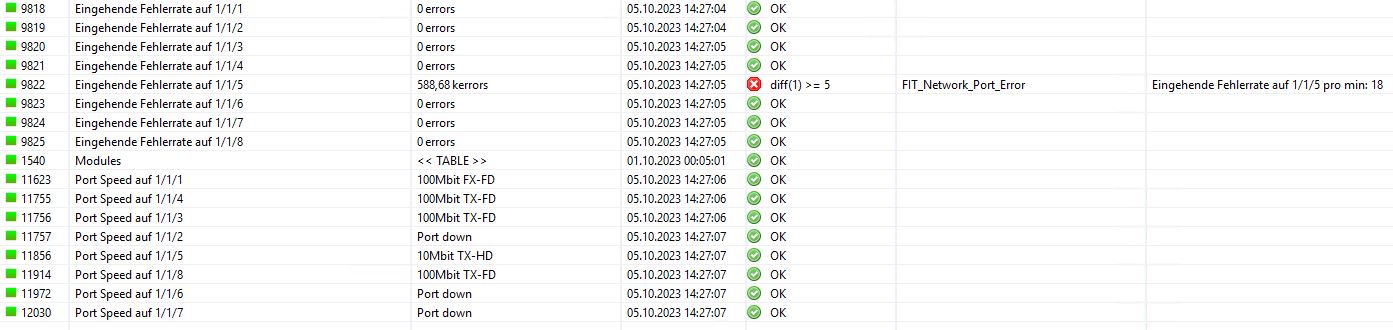
    Looks like some screenshots are missing. But a question regarding your text - may be you can just use your threshold script right on "Port Speed auf x/x/x" DCI?
  • Displaying bandwidth in use - format data?

    2
    0 Votes
    2 Posts
    7k Views
    F
    This SNMP OID is a counter (https://oid-rep.orange-labs.fr/get/1.3.6.1.2.1.31.1.1.1.6). When setting up a DCI, on transformation tab select delta calculation - average delta per second.
  • 0 Votes
    8 Posts
    13k Views
    V
    Finally get to check this - works fine for me (using API token). Maybe the problem was in using password instead of API token. I changed /rest/auth/1/session to /rest/api/2/myself for checking connection for the future though, as former URL supposed to be removed in the future. Best regards, Victor