Skip to content

Support

5.1k Topics 22.0k Posts

Questions about installing, configuring and using NetXMS.

  • Bug: Template - Custom Attributes inheritance

    5
    0 Votes
    5 Posts
    30k Views
    E
    Thanks for the tip, this indeed solved the problem. Egert
  • Grafana - connection impossible

    1
    2
    0 Votes
    1 Posts
    22k Views
    SashS
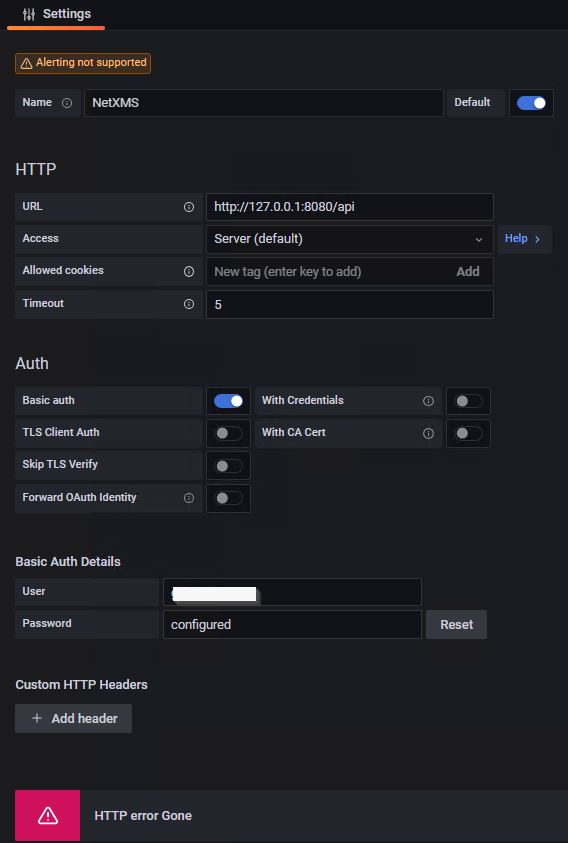
    I´ve installed NetXMS 4.2.395, webui 4.2.398, Grafana 9.3.1. and the NetXMS Plugin 1.2.3 on the same Windows Server 2019. I never used Grafana before. Now I tried to connect to NetXMS with Grafana but get an error "HTTP error Gone" The api is shown in the Browser correctly, The User is memebr of NetXMS admin Group Could someone help me here? [image: Grafana.jpg] [image: API.jpg]
  • Java SubAgent and OPC UA

    8
    0 Votes
    8 Posts
    45k Views
    SashS
    Thanks Alex.
  • NXMC database best practices

    8
    0 Votes
    8 Posts
    45k Views
    J
    Hi, gkaudewitz. First I appreciate your time to reply my follow-up message. Second, I am going to follow your comments. Thanks. My best Jose
  • Rapid Severity Changes Due To Event Flapping

    1
    0 Votes
    1 Posts
    19k Views
    P
    Overnight we had an object that suddenly started flooding NetXMS with severity changes due to what I can only describe as Event flapping. Specifically...   12/13 21:00 - Device goes unreachable due to network failure. 12/13 21:01 - Device returns to normal. 12/13 22:04 - Device goes unreachable again 12/13 22:14 - Device back up and goes normal. 12/13 22:22 - Object Severity starts bouncing from CRITICAL to NORMAL multiple times per second; Event column shows flapping between SYS_NODE_CRITICAL and SYS_NODE_UNKNOWN;  20+ times per second. A network unreachable alert is logged at this time. 12/13 22:22 to 12/14 08:47 - Flapping continues unabated; two more network unreachable entries are logged at 22:28 and 22:54; none after that.   12/14 08:47 - Placed in Maintenance Mode. 12/14 09:20 - Taken out of Maintenance Mode.  No further bouncing. We confirmed through other sources there were no issues with the device or the connection to it. We've seen this happen a couple of times in the past, but the issue occurs so infrequently that this is the first time we've had a chance to look into it.  Forum searching turns up nothing related to this that is useful.  The closest we could find was this thread https://www.netxms.org/forum/general-support/too-much-alarm/ .  But the cause noted there did not apply here. So we're at a loss as to what would have caused this flood of Event log entries.  Any pointers on where to look for further clues would be helpful.
  • WebAPI custom attribute filter

    2
    0 Votes
    2 Posts
    25k Views
    Z
    Hi, If you have custom attribute with name: "Region" and you want filter all nodes where custom attribute value is "Latvia" your request URL should look like: API_BASE/objects?@Region=Latvia
  • NetXMS Core initialization failed due to version mismatch

    2
    0 Votes
    2 Posts
    24k Views
    F
    What changes have you performed prior for this to happen? Did you upgrade NetXMS? From what version to what version (exactly)?
  • TCPProxy documentation and/or current status

    2
    0 Votes
    2 Posts
    23k Views
    F
    In 4.2 support for TCP proxying was added into agent and desktop management client (and was not yet documented) Agent should have EnableTCPProxy=yes in it's config In management client it's done via Object Tools, there's "Setup TCP tunnel..." checkbox. There are two macros - ${local-address} and ${local-port} which are replaced by actual local IP and port So Local Command object tool with command mstsc /v:${local-address}:${local-port} should work for RDP
  • Dashboards disappeared

    2
    0 Votes
    2 Posts
    23k Views
    F
    What exactly version of NetXMS do you have? Could it be that your NetXMS got upgraded recently?
  • No vlan found on Juniper ex4600-40f Virtual Chassis

    14
    0 Votes
    14 Posts
    64k Views
    S
    I'm sorry for late reply, but after further verifications it turns out that juniper vlans (all junipers, VC and the single one) are wrongly recognized by netxms v4.2.433 I don't know if denpends on the patch created for this thread and wrong vlans are too random for me to identify a specific pattern of the beahviour. For Virtual Chassis i confirm the patch resolve the empty vlan bug for interface aggregations, but single interfaces have sometimes a lot of vlans (like the trunk) when it should be only one, other times have wrong vlanid or empty vlans . For example: snmpwalk -v2c -c community 172.x.x.x 1.3.6.1.4.1.2636.3.40.1.5.1.5.1.2 SNMPv2-SMI::enterprises.2636.3.40.1.5.1.5.1.2.2 = STRING: "CP-1" SNMPv2-SMI::enterprises.2636.3.40.1.5.1.5.1.2.3 = STRING: "SSO-1" SNMPv2-SMI::enterprises.2636.3.40.1.5.1.5.1.2.4 = STRING: "SSO-2" SNMPv2-SMI::enterprises.2636.3.40.1.5.1.5.1.2.5 = STRING: "SSO-3" SNMPv2-SMI::enterprises.2636.3.40.1.5.1.5.1.2.6 = STRING: "SSO-4" SNMPv2-SMI::enterprises.2636.3.40.1.5.1.5.1.2.7 = STRING: "SSO-5" SNMPv2-SMI::enterprises.2636.3.40.1.5.1.5.1.2.8 = STRING: "SSO-6" SNMPv2-SMI::enterprises.2636.3.40.1.5.1.5.1.2.9 = STRING: "SSO-7" SNMPv2-SMI::enterprises.2636.3.40.1.5.1.5.1.2.10 = STRING: "SSO-8" SNMPv2-SMI::enterprises.2636.3.40.1.5.1.5.1.2.11 = STRING: "SSO-9" SNMPv2-SMI::enterprises.2636.3.40.1.5.1.5.1.2.12 = STRING: "SSO-10" SNMPv2-SMI::enterprises.2636.3.40.1.5.1.5.1.2.13 = STRING: "SSO-11" SNMPv2-SMI::enterprises.2636.3.40.1.5.1.5.1.2.14 = STRING: "SSO-12" SNMPv2-SMI::enterprises.2636.3.40.1.5.1.5.1.2.15 = STRING: "SSO-13" SNMPv2-SMI::enterprises.2636.3.40.1.5.1.5.1.2.16 = STRING: "SSO-UnautenthicatedDevice" SNMPv2-SMI::enterprises.2636.3.40.1.5.1.5.1.2.17 = STRING: "Example1" SNMPv2-SMI::enterprises.2636.3.40.1.5.1.5.1.2.18 = STRING: " Example2" SNMPv2-SMI::enterprises.2636.3.40.1.5.1.5.1.2.20 = STRING: "default" SNMPv2-SMI::enterprises.2636.3.40.1.5.1.5.1.2.21 = STRING: "n0-1" SNMPv2-SMI::enterprises.2636.3.40.1.5.1.5.1.2.22 = STRING: "n9-1" SNMPv2-SMI::enterprises.2636.3.40.1.5.1.5.1.2.23 = STRING: "n9-2" snmpwalk -v2c -c community 172.x.x.x 1.3.6.1.4.1.2636.3.40.1.5.1.7.1.3 SNMPv2-SMI::enterprises.2636.3.40.1.5.1.7.1.3.2.516 = INTEGER: 3 SNMPv2-SMI::enterprises.2636.3.40.1.5.1.7.1.3.2.519 = INTEGER: 3 SNMPv2-SMI::enterprises.2636.3.40.1.5.1.7.1.3.2.521 = INTEGER: 3 SNMPv2-SMI::enterprises.2636.3.40.1.5.1.7.1.3.2.522 = INTEGER: 3 SNMPv2-SMI::enterprises.2636.3.40.1.5.1.7.1.3.2.534 = INTEGER: 3 SNMPv2-SMI::enterprises.2636.3.40.1.5.1.7.1.3.2.535 = INTEGER: 3 SNMPv2-SMI::enterprises.2636.3.40.1.5.1.7.1.3.2.536 = INTEGER: 3 SNMPv2-SMI::enterprises.2636.3.40.1.5.1.7.1.3.2.564 = INTEGER: 3 SNMPv2-SMI::enterprises.2636.3.40.1.5.1.7.1.3.3.516 = INTEGER: 3 SNMPv2-SMI::enterprises.2636.3.40.1.5.1.7.1.3.3.564 = INTEGER: 3 SNMPv2-SMI::enterprises.2636.3.40.1.5.1.7.1.3.4.516 = INTEGER: 3 SNMPv2-SMI::enterprises.2636.3.40.1.5.1.7.1.3.4.518 = INTEGER: 3 SNMPv2-SMI::enterprises.2636.3.40.1.5.1.7.1.3.4.564 = INTEGER: 3 SNMPv2-SMI::enterprises.2636.3.40.1.5.1.7.1.3.5.516 = INTEGER: 3 SNMPv2-SMI::enterprises.2636.3.40.1.5.1.7.1.3.5.520 = INTEGER: 3 SNMPv2-SMI::enterprises.2636.3.40.1.5.1.7.1.3.5.533 = INTEGER: 3 SNMPv2-SMI::enterprises.2636.3.40.1.5.1.7.1.3.5.534 = INTEGER: 3 SNMPv2-SMI::enterprises.2636.3.40.1.5.1.7.1.3.5.535 = INTEGER: 3 SNMPv2-SMI::enterprises.2636.3.40.1.5.1.7.1.3.5.536 = INTEGER: 3 SNMPv2-SMI::enterprises.2636.3.40.1.5.1.7.1.3.5.564 = INTEGER: 3 SNMPv2-SMI::enterprises.2636.3.40.1.5.1.7.1.3.6.516 = INTEGER: 3 SNMPv2-SMI::enterprises.2636.3.40.1.5.1.7.1.3.6.564 = INTEGER: 3 SNMPv2-SMI::enterprises.2636.3.40.1.5.1.7.1.3.7.516 = INTEGER: 3 SNMPv2-SMI::enterprises.2636.3.40.1.5.1.7.1.3.7.564 = INTEGER: 3 SNMPv2-SMI::enterprises.2636.3.40.1.5.1.7.1.3.8.516 = INTEGER: 3 SNMPv2-SMI::enterprises.2636.3.40.1.5.1.7.1.3.8.564 = INTEGER: 3 SNMPv2-SMI::enterprises.2636.3.40.1.5.1.7.1.3.9.516 = INTEGER: 3 SNMPv2-SMI::enterprises.2636.3.40.1.5.1.7.1.3.9.564 = INTEGER: 3 SNMPv2-SMI::enterprises.2636.3.40.1.5.1.7.1.3.10.516 = INTEGER: 3 SNMPv2-SMI::enterprises.2636.3.40.1.5.1.7.1.3.10.564 = INTEGER: 3 SNMPv2-SMI::enterprises.2636.3.40.1.5.1.7.1.3.11.516 = INTEGER: 3 SNMPv2-SMI::enterprises.2636.3.40.1.5.1.7.1.3.11.536 = INTEGER: 3 SNMPv2-SMI::enterprises.2636.3.40.1.5.1.7.1.3.11.564 = INTEGER: 3 SNMPv2-SMI::enterprises.2636.3.40.1.5.1.7.1.3.12.516 = INTEGER: 3 SNMPv2-SMI::enterprises.2636.3.40.1.5.1.7.1.3.12.564 = INTEGER: 3 SNMPv2-SMI::enterprises.2636.3.40.1.5.1.7.1.3.13.516 = INTEGER: 3 SNMPv2-SMI::enterprises.2636.3.40.1.5.1.7.1.3.13.535 = INTEGER: 3 SNMPv2-SMI::enterprises.2636.3.40.1.5.1.7.1.3.13.564 = INTEGER: 3 SNMPv2-SMI::enterprises.2636.3.40.1.5.1.7.1.3.14.516 = INTEGER: 3 SNMPv2-SMI::enterprises.2636.3.40.1.5.1.7.1.3.14.534 = INTEGER: 3 SNMPv2-SMI::enterprises.2636.3.40.1.5.1.7.1.3.14.535 = INTEGER: 3 SNMPv2-SMI::enterprises.2636.3.40.1.5.1.7.1.3.14.536 = INTEGER: 3 SNMPv2-SMI::enterprises.2636.3.40.1.5.1.7.1.3.14.564 = INTEGER: 3 SNMPv2-SMI::enterprises.2636.3.40.1.5.1.7.1.3.15.516 = INTEGER: 3 SNMPv2-SMI::enterprises.2636.3.40.1.5.1.7.1.3.15.564 = INTEGER: 3 SNMPv2-SMI::enterprises.2636.3.40.1.5.1.7.1.3.16.516 = INTEGER: 3 SNMPv2-SMI::enterprises.2636.3.40.1.5.1.7.1.3.16.523 = INTEGER: 3 SNMPv2-SMI::enterprises.2636.3.40.1.5.1.7.1.3.16.534 = INTEGER: 3 SNMPv2-SMI::enterprises.2636.3.40.1.5.1.7.1.3.16.535 = INTEGER: 3 SNMPv2-SMI::enterprises.2636.3.40.1.5.1.7.1.3.16.536 = INTEGER: 3 SNMPv2-SMI::enterprises.2636.3.40.1.5.1.7.1.3.16.564 = INTEGER: 3 SNMPv2-SMI::enterprises.2636.3.40.1.5.1.7.1.3.17.516 = INTEGER: 3 SNMPv2-SMI::enterprises.2636.3.40.1.5.1.7.1.3.17.533 = INTEGER: 3 SNMPv2-SMI::enterprises.2636.3.40.1.5.1.7.1.3.17.534 = INTEGER: 3 SNMPv2-SMI::enterprises.2636.3.40.1.5.1.7.1.3.17.535 = INTEGER: 3 SNMPv2-SMI::enterprises.2636.3.40.1.5.1.7.1.3.17.536 = INTEGER: 3 SNMPv2-SMI::enterprises.2636.3.40.1.5.1.7.1.3.17.564 = INTEGER: 3 SNMPv2-SMI::enterprises.2636.3.40.1.5.1.7.1.3.18.514 = INTEGER: 3 SNMPv2-SMI::enterprises.2636.3.40.1.5.1.7.1.3.18.515 = INTEGER: 3 SNMPv2-SMI::enterprises.2636.3.40.1.5.1.7.1.3.18.516 = INTEGER: 3 SNMPv2-SMI::enterprises.2636.3.40.1.5.1.7.1.3.18.534 = INTEGER: 3 SNMPv2-SMI::enterprises.2636.3.40.1.5.1.7.1.3.18.535 = INTEGER: 3 SNMPv2-SMI::enterprises.2636.3.40.1.5.1.7.1.3.18.536 = INTEGER: 3 SNMPv2-SMI::enterprises.2636.3.40.1.5.1.7.1.3.18.564 = INTEGER: 3 SNMPv2-SMI::enterprises.2636.3.40.1.5.1.7.1.3.20.531 = INTEGER: 3 SNMPv2-SMI::enterprises.2636.3.40.1.5.1.7.1.3.21.516 = INTEGER: 3 SNMPv2-SMI::enterprises.2636.3.40.1.5.1.7.1.3.21.530 = INTEGER: 3 SNMPv2-SMI::enterprises.2636.3.40.1.5.1.7.1.3.21.564 = INTEGER: 3 SNMPv2-SMI::enterprises.2636.3.40.1.5.1.7.1.3.22.516 = INTEGER: 3 SNMPv2-SMI::enterprises.2636.3.40.1.5.1.7.1.3.22.524 = INTEGER: 3 SNMPv2-SMI::enterprises.2636.3.40.1.5.1.7.1.3.22.525 = INTEGER: 3 SNMPv2-SMI::enterprises.2636.3.40.1.5.1.7.1.3.22.526 = INTEGER: 3 SNMPv2-SMI::enterprises.2636.3.40.1.5.1.7.1.3.22.529 = INTEGER: 3 SNMPv2-SMI::enterprises.2636.3.40.1.5.1.7.1.3.22.530 = INTEGER: 3 SNMPv2-SMI::enterprises.2636.3.40.1.5.1.7.1.3.22.564 = INTEGER: 3 SNMPv2-SMI::enterprises.2636.3.40.1.5.1.7.1.3.23.516 = INTEGER: 3 SNMPv2-SMI::enterprises.2636.3.40.1.5.1.7.1.3.23.534 = INTEGER: 3 SNMPv2-SMI::enterprises.2636.3.40.1.5.1.7.1.3.23.535 = INTEGER: 3 SNMPv2-SMI::enterprises.2636.3.40.1.5.1.7.1.3.23.536 = INTEGER: 3 SNMPv2-SMI::enterprises.2636.3.40.1.5.1.7.1.3.23.564 = INTEGER: 3 snmpwalk -v2c -c community 172.x.x.x 1.3.6.1.2.1.17.1.4.1.2 SNMPv2-SMI::mib-2.17.1.4.1.2.514 = INTEGER: 505 SNMPv2-SMI::mib-2.17.1.4.1.2.515 = INTEGER: 507 SNMPv2-SMI::mib-2.17.1.4.1.2.516 = INTEGER: 509 SNMPv2-SMI::mib-2.17.1.4.1.2.518 = INTEGER: 513 SNMPv2-SMI::mib-2.17.1.4.1.2.519 = INTEGER: 515 SNMPv2-SMI::mib-2.17.1.4.1.2.520 = INTEGER: 517 SNMPv2-SMI::mib-2.17.1.4.1.2.521 = INTEGER: 519 SNMPv2-SMI::mib-2.17.1.4.1.2.522 = INTEGER: 521 SNMPv2-SMI::mib-2.17.1.4.1.2.523 = INTEGER: 523 SNMPv2-SMI::mib-2.17.1.4.1.2.524 = INTEGER: 525 SNMPv2-SMI::mib-2.17.1.4.1.2.525 = INTEGER: 527 SNMPv2-SMI::mib-2.17.1.4.1.2.526 = INTEGER: 529 SNMPv2-SMI::mib-2.17.1.4.1.2.529 = INTEGER: 535 SNMPv2-SMI::mib-2.17.1.4.1.2.530 = INTEGER: 537 SNMPv2-SMI::mib-2.17.1.4.1.2.531 = INTEGER: 539 SNMPv2-SMI::mib-2.17.1.4.1.2.533 = INTEGER: 546 SNMPv2-SMI::mib-2.17.1.4.1.2.534 = INTEGER: 547 SNMPv2-SMI::mib-2.17.1.4.1.2.535 = INTEGER: 548 SNMPv2-SMI::mib-2.17.1.4.1.2.536 = INTEGER: 549 SNMPv2-SMI::mib-2.17.1.4.1.2.564 = INTEGER: 553 snmpwalk -v2c -c community172.x.x.x 1.3.6.1.2.1.2.2.1.2 IF-MIB::ifDescr.502 = STRING: ge-0/0/0 IF-MIB::ifDescr.504 = STRING: ge-0/0/1 IF-MIB::ifDescr.506 = STRING: ge-0/0/2 IF-MIB::ifDescr.508 = STRING: ge-0/0/3 IF-MIB::ifDescr.510 = STRING: ge-0/0/4 IF-MIB::ifDescr.512 = STRING: ge-0/0/5 IF-MIB::ifDescr.514 = STRING: ge-0/0/6 IF-MIB::ifDescr.516 = STRING: ge-0/0/7 IF-MIB::ifDescr.518 = STRING: ge-0/0/8 IF-MIB::ifDescr.520 = STRING: ge-0/0/9 IF-MIB::ifDescr.522 = STRING: ge-0/0/10 IF-MIB::ifDescr.524 = STRING: ge-0/0/11 IF-MIB::ifDescr.526 = STRING: ge-0/0/12 IF-MIB::ifDescr.528 = STRING: ge-0/0/13 IF-MIB::ifDescr.530 = STRING: ge-0/0/14 IF-MIB::ifDescr.532 = STRING: ge-0/0/15 IF-MIB::ifDescr.534 = STRING: ge-0/0/16 IF-MIB::ifDescr.536 = STRING: ge-0/0/17 IF-MIB::ifDescr.538 = STRING: ge-0/0/18 IF-MIB::ifDescr.540 = STRING: ge-0/0/19 IF-MIB::ifDescr.541 = STRING: ge-0/0/20 IF-MIB::ifDescr.543 = STRING: ge-0/0/21 IF-MIB::ifDescr.544 = STRING: ge-0/0/22 IF-MIB::ifDescr.545 = STRING: ge-0/0/23 IF-MIB::ifDescr.552 = STRING: ge-0/1/3 Some Port configuration not recognized by netxms: ge-0/1/3 { description XXXXXXXX; unit 0 { family ethernet-switching { port-mode trunk; vlan { members [ 2920 all ]; } } } } ge-0/0/16 { unit 0 { family ethernet-switching { port-mode access; vlan { members n9-2; } } } } Screenshot of netxms retrived ifaces and vlans: [image: Immagine 2022-12-05 155747.png]
  • Move node between clusters?

    2
    0 Votes
    2 Posts
    20k Views
    F
    If you have that node under some other container or template, you can remove it from cluster and then you can add it to another cluster (all done from cluster context menu). By the way, how many clusters do you have in your system (just to understand the scale how people use clusters)
  • I am getting error while collecting script data

    3
    2
    0 Votes
    3 Posts
    28k Views
    F
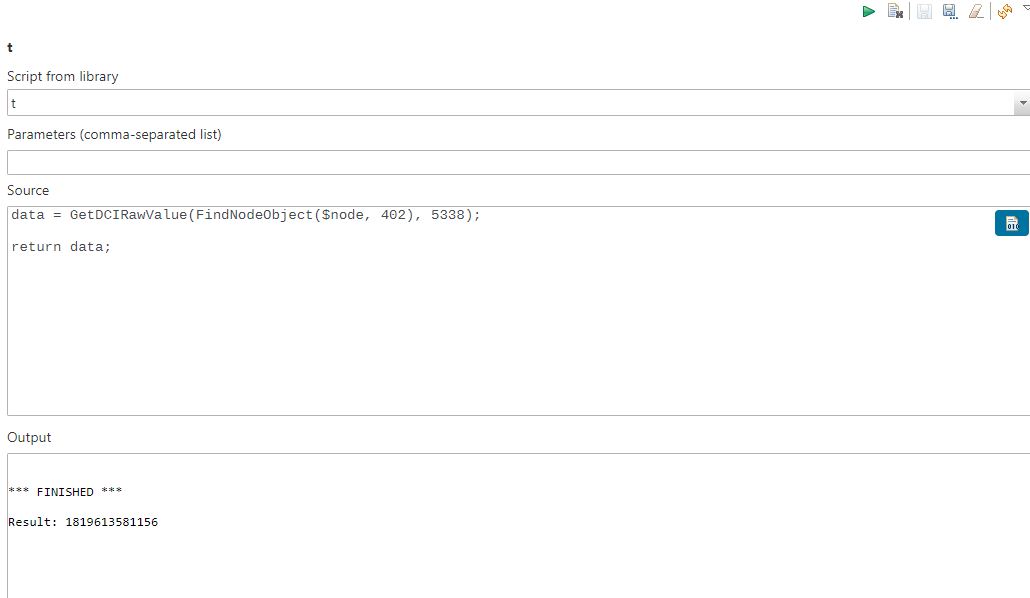
    Something like this may happen right after server start, if you are taking values from a DCI that has quite frequent collection interval. In this case server is not getting last collected value from database, but awaits it from agent. You can check if GetDCIRawValue returns null and handle this situation in the script.
  • SNMP Proxy causing too many authentication errors on the device

    6
    0 Votes
    6 Posts
    46k Views
    L
    Hi Victor, Thank you very much for your attention. I believe it will help other users as well. When it's ok, I'll test and come back here.
  • Network map, crashing mgm console

    1
    0 Votes
    1 Posts
    17k Views
    S
    Hi!  I am having trouble getting an image of my network map, its lagging so bad, that even netxms console client itself is crashing and going into Not responding state for minutes, I have to wait 5 minutes to make a click or move anything, could be performance problem be on the server side or my PC isnt just strong enough to render the picture. And when i finally get to save an .png image, it won't do it. I can see from my PC that file was made but, its 0 KB and has different name or has been moved? Is there possibility to save it from command line itself?    Any tips?
  • Topology on Cisco Nexus

    6
    0 Votes
    6 Posts
    33k Views
    N
    Hi, the problem is on a nexus 93240 but not on nexus 93360 with similar configuration  ... very strange. Fred
  • jq.lib and breakpad-client_dbg.lib

    2
    0 Votes
    2 Posts
    17k Views
    V
    Hi, You have to build those two libraries yourself from their sources. Best regards, Victor
  • Best way to check if a file exists

    3
    0 Votes
    3 Posts
    15k Views
    V
    For version 4.3 we have also added new metric File.Type, which returns 0 if file does not exist, 1 if it is a directory, 2 if it is a device, and 3 if it is a regular file. Best regards, Victor
  • I am getting server ssl error?

    3
    0 Votes
    3 Posts
    16k Views
    V
    Hi! most likely server does not have certificate. If this is the case than you can safely ignore this error, or delete problematic DCI. Best regards, Victor
  • SNMP Trap Threshold

    4
    0 Votes
    4 Posts
    18k Views
    G
    ok so I was able to to achieve what I wanted with the following its hacky  but if works. How do I go about terminating this alarm ? I want to terminate the alarm as soon as the time expires. ts = ReadPersistentStorage("ts_".$node->name); if(ts == NULL){ /* create initial timestamp and event*/ WritePersistentStorage("ts_".$node->name,$event->timestamp); WritePersistentStorage($node->name,1); return; } /* if within time range of 10min check storage */ if (time() - ts <=600){   events = ReadPersistentStorage($node->name); WritePersistentStorage($node->name,events+1); if (events!=NULL ){ if (events >=5){ return true; } } }else{ /* if time is over 10min reset storage values for timestamp and event*/ WritePersistentStorage($node->name, NULL); WritePersistentStorage("ts_".$node->name, NULL); }
  • High load performance

    1
    0 Votes
    1 Posts
    16k Views
    U
    Dears, Here my stats results,     netxmsd: show stats     Objects............: 75948     Monitored nodes....: 1034     Collectible DCIs...: 1822     Active alarms......: 3337 And here are my changes of server configuration values     ThreadPool.Syncer.BaseSize: 10     Events.Processor.PoolSize: 10     ThreadPool.Syncer.MaxSize: 10     DBWriter.DataQueues: 8     ThreadPool.DataCollector.BaseSize: 30     ThreadPool.Poller.BaseSize: 200     DBConnectionPool.BaseSize: 15     DBConnectionPool.MaxSize: 100     ThreadPool.Agent.BaseSize: 10     ThreadPool.Main.BaseSize: 15 I'm facing multiple issues: I found a lot of DCI readings are errors when I open last values tab (they change from time to time). I have nearly 90 network maps each map represents a device image with dci readings on it, many times when I open any one of them, I got load image error. Some of my SNMP devices lose their interfaces or I found only one- interface although when I run poll full configuration it returns all its interfaces again. I use web client, after a long time without login, when I try to login it gives me request time out, so I restart the server.