
NetXMS 1.2.15 released
-
-
Hi,
Am I supposed to update all the agents I've running with previous versions (1.2.8 and 1.2.14) in order to upload a file from the netxms server (1.2.15)? and wait until the new realese (inclundin the missing file manager subagent).
I've having a really hard time trying to install remotly software using the package manager on server 1.2.15, could it be a new bug?. NPI file are ok and sometime the server could achieve the task but mostly it fails.
Thanks,
-
Hi!
@flynao said in NetXMS 1.2.15 released:
Am I supposed to update all the agents I've running with previous versions (1.2.8 and 1.2.14) in order to upload a file from the netxms server (1.2.15)? and wait until the new realese (inclundin the missing file manager subagent).
Remote upgrade and file upload are supported by older agents also. For fully functional file manager you need agent 1.2.15 or higher and filemgr subagent (which will be included in 1.2.16).
@flynao said in NetXMS 1.2.15 released:
I've having a really hard time trying to install remotly software using the package manager on server 1.2.15, could it be a new bug?. NPI file are ok and sometime the server could achieve the task but mostly it fails.
Can you please provide more details? What errors you got, on what platforms, etc.
Best regards,
Victor -
-
Hi!
Seems that you have some object (with ID 492)being deleted for which corresponding idata table does not exist. As a workaround try to create table with that name and any structure so server can delete it and proceed.
Best regards,
Victor -
@victor said in NetXMS 1.2.15 released:
Hi!
Seems that you have some object (with ID 492)being deleted for which corresponding idata table does not exist. As a workaround try to create table with that name and any structure so server can delete it and proceed.
Best regards,
VictorDid that, created the table manually, the server then dropped the table.
Error still in log however, even after doing this. -
Strange. Is it really same table, or maybe it is now with different ID or tdata instead of idata? Try to create four tables: idata_492, tdata_492, tdata_rows_492, tdata_records_492.
Best regards,
Victor -
@victor said in NetXMS 1.2.15 released:
Strange. Is it really same table, or maybe it is now with different ID or tdata instead of idata? Try to create four tables: idata_492, tdata_492, tdata_rows_492, tdata_records_492.
Best regards,
VictorFirst I was getting many of there errors (as in my original post):

So I created a table "idata_492" in DB. The server then dropped this table.
After the server dropped that table in DB, I got this error:

I created that table in the DB as well. The server then dropped that table as well.
Now I am getting the original "idata_492" error again tho.

-
Hi Victor.
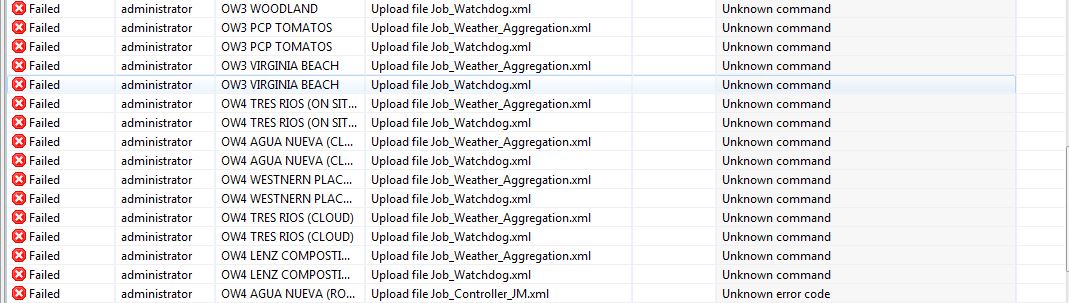
This is the message I received after trying to upload a xml file from the server to the nodes (Win 64 and 32 architecure). Basically the files I'm tryining to upload, are log parse configuration files. Before the upgrade I was able to do it and any problem came up.
-
To do any manipulations with files on a node it is required to load filemng subagent and configure accessible paths. https://www.netxms.org/documentation/adminguide/file-management.html
The only 2 exceptions are agent update and upload of file to default path(When destination path is empty). Upload to default path is broken in version 1.2.15.
-
Hi Tatiana. Thanks for your reply.
what do you mean by "upload of file to default path(When destination path is empty)"?
the only way I found to deploy these xml files to my nodes was as follows:
I created a npi file for each file, so then I uploaded the xml files as a software using the package manager, then as usual I deployed the files to the nodes (the files have been stores at the directory set up on the agent's configuration file.
I know the new version has a file manager subagent. I added the filemgr.snm by hand on one of my nodes. please find attached the configfile used. the file manager worked, I was able to upload a file using the new manager. But in this new case I've to update every single node I've (we're talking about 80 nodes) by hand, and Im still no able to deploy in one shot one file to all the nodes.
-
@flynao said in NetXMS 1.2.15 released:
the only way I found to deploy these xml files to my nodes was as follows:
I created a npi file for each file, so then I uploaded the xml files as a software using the package manager, then as usual I deployed the files to the nodes (the files have been stores at the directory set up on the agent's configuration file.
Package manager should not be affected by changes in file transfer (and introducing filemgr subagent). Could you please check it with "nxupload" command line tool? Syntax is "nxupload AGENT_IP local_file_name". File should be uploaded into FileStore (C:\NetXMS\etc in your case).
I'd use slightly different way (but you'll need file manager subagent for that):
- Tools -> Upload File to Server (select target XML configuration as "local file", leave "remote name" empty to use local name)
- Right click on any node or container and select "File upload". Click on "select" button and select file you uploaded in step 1, leave name blank
- Click "Ok"
-
-
Note about enabled filemgr subagent on the large network, there are two ways:
- Create configuration policy and deploy to all agents, where required.
Sample policy:
<config> <agent> <subagent>filemgr.nsm</subagent> </agent> <filemgr> <RootFolder>/opt</RootFolder> <RootFolder>/private/etc</RootFolder> </filemgr> </config>- Use nxshell-based script to fetch existing agent config remotely, modify it and reapply. I don't have script on hand at the moment, but can share it later.
- Create configuration policy and deploy to all agents, where required.
-
-
-
@lindeamon said in NetXMS 1.2.15 released:
Hi,
don't want to be a nag but, when does 1.2.16 with all the bugs fixes will be out ?
10x,
LindeamonHi,
it's being packed and will be available later today.
Best regards,
Victor -
@flynao said in NetXMS 1.2.15 released:
Hi Victor,
I runned the nxupload on line command and the result is:
903: I/O failure
thanks
Hi,
file upload using core agent is fixed. We will release version 1.2.16 which will include that fix later today.
Best regards,
Victor -


Hello! It looks like you're interested in this conversation, but you don't have an account yet.
Getting fed up of having to scroll through the same posts each visit? When you register for an account, you'll always come back to exactly where you were before, and choose to be notified of new replies (either via email, or push notification). You'll also be able to save bookmarks and upvote posts to show your appreciation to other community members.
With your input, this post could be even better 💗
Register Login