
NetXMS 2.0-RC1 released
-
-
Hi,
Thanks for the new release looks good.
I have encountered one issue. While upgrading from 2.0M5 all the mibs from var/mibs dis-appeared. This is on win2k8r2.
Restored mibs from a backup and re-built. But now when I run the 32bit console on win7 I get the following error after logging in:
"Cannot load MIB file from server: File I/O operation failed"There was no issues before the upgrade.
Also, do not know if this is related to the upgrade, before upgrading I stopped the Core, Agent & WebGUI services, but there was still a lock on the MySQL DB which prevented DB upgrade.
-
@brettmilfos said in NetXMS 2.0-RC1 released:
I have encountered one issue. While upgrading from 2.0M5 all the mibs from var/mibs dis-appeared. This is on win2k8r2.
Restored mibs from a backup and re-built. But now when I run the 32bit console on win7 I get the following error after logging in:
"Cannot load MIB file from server: File I/O operation failed"MIB locations was changed in 2.0-RC1. Source MIBs now are in <install_path>\share\mibs and compiled MIB file in <install_path>\var. Installer was supposed to move any non-standard MIBs from var\mibs to share\mibs. If you compile MIBs manually, you should set output file to be <install_path>\var\netxms.mib.
@brettmilfos said in NetXMS 2.0-RC1 released:
Also, do not know if this is related to the upgrade, before upgrading I stopped the Core, Agent & WebGUI services, but there was still a lock on the MySQL DB which prevented DB upgrade.
That means that core service didn't stop normally and was forcibly terminated by service manager. It's not related to upgrade, but rather indicates some problem with previous version.
Best regards,
Victor -
Hi, again.
Perhaps I could not explain my problem.
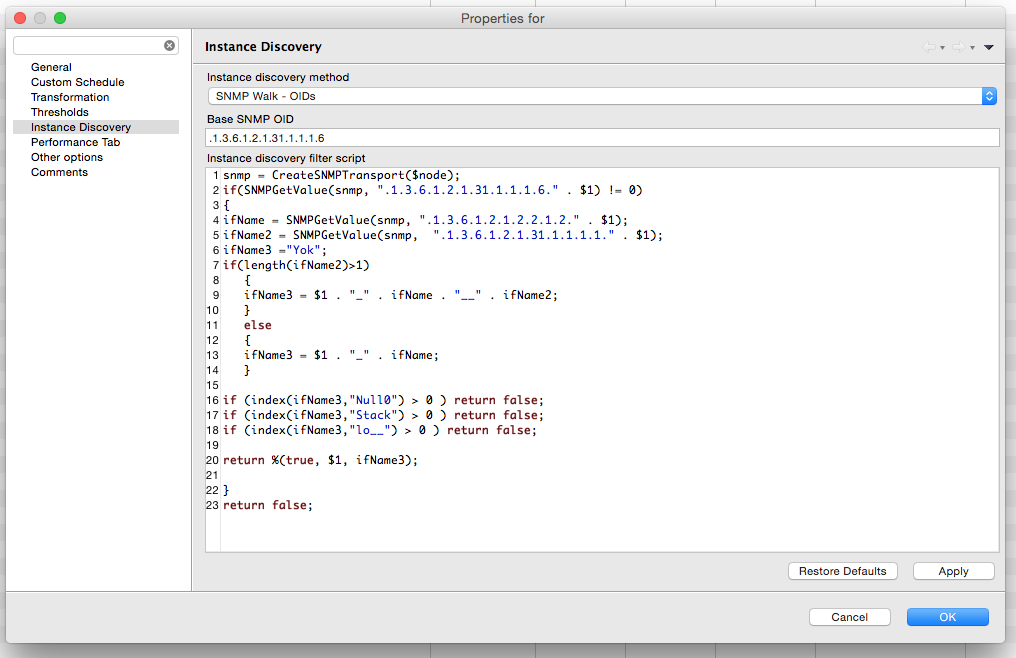
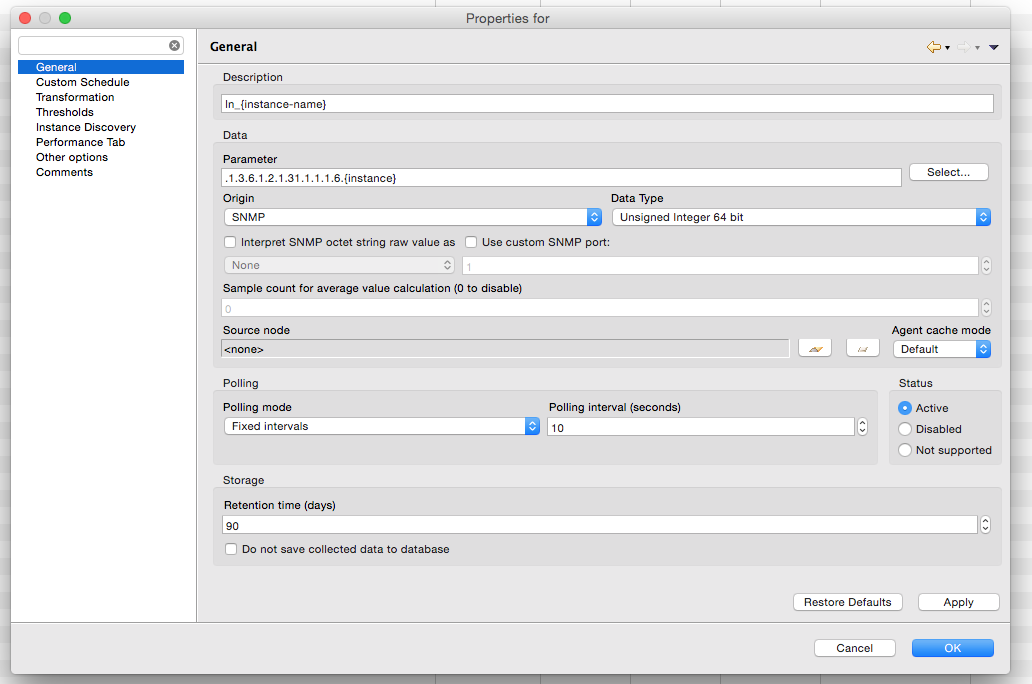
I added screensohts for template DCI. Instance discovery is working for first OID.
In fact, it is walking for all OIDs, but return %(true,$1,ifName3); command line is not working properly (or, function that calling this script is not working properly)There must be at least 30 (for each In_ and Out_) DCIs in this node's DCI config section
I set debug level to 6. and here is log: It seems all discovery is returning first interface's script result.
1-Aug-2015 13:30:06.444] [DEBUG] Node::doInstanceDiscovery(AnaBinaKat2Sw1 [29910]): Updating instances for instance discovery DCI .1.3.6.1.2.1.31.1.1.1.6.{instance} [19365]
[11-Aug-2015 13:30:06.444] [DEBUG] [CLSN-0] Sending message CMD_POLLING_INFO
[11-Aug-2015 13:30:06.563] [DEBUG] Node::doInstanceDiscovery(AnaBinaKat2Sw1 [29910]): read 29 values
[11-Aug-2015 13:30:06.566] [DEBUG] DCItem::filterInstanceList(.1.3.6.1.2.1.31.1.1.1.6.{instance} [19365]): instance "1" removed by filtering script
[11-Aug-2015 13:30:06.582] [DEBUG] DCItem::filterInstanceList(.1.3.6.1.2.1.31.1.1.1.6.{instance} [19365]): instance "132" replaced by "132"
[11-Aug-2015 13:30:06.583] [DEBUG] DCItem::filterInstanceList(.1.3.6.1.2.1.31.1.1.1.6.{instance} [19365]): instance "132" name set to "132_Vlan132__Vl132"
[11-Aug-2015 13:30:06.592] [DEBUG] DCItem::filterInstanceList(.1.3.6.1.2.1.31.1.1.1.6.{instance} [19365]): instance "600" replaced by "132"
[11-Aug-2015 13:30:06.593] [DEBUG] DCItem::filterInstanceList(.1.3.6.1.2.1.31.1.1.1.6.{instance} [19365]): instance "132" name set to "132_Vlan132__Vl132"
[11-Aug-2015 13:30:06.596] [DEBUG] DCItem::filterInstanceList(.1.3.6.1.2.1.31.1.1.1.6.{instance} [19365]): instance "10001" removed by filtering script
[11-Aug-2015 13:30:06.598] [DEBUG] DCItem::filterInstanceList(.1.3.6.1.2.1.31.1.1.1.6.{instance} [19365]): instance "10002" removed by filtering script
[11-Aug-2015 13:30:06.611] [DEBUG] DCItem::filterInstanceList(.1.3.6.1.2.1.31.1.1.1.6.{instance} [19365]): instance "10003" replaced by "132"
[11-Aug-2015 13:30:06.611] [DEBUG] DCItem::filterInstanceList(.1.3.6.1.2.1.31.1.1.1.6.{instance} [19365]): instance "132" name set to "132_Vlan132__Vl132"
[11-Aug-2015 13:30:06.621] [DEBUG] DCItem::filterInstanceList(.1.3.6.1.2.1.31.1.1.1.6.{instance} [19365]): instance "10004" removed by filtering script
[11-Aug-2015 13:30:06.624] [DEBUG] DCItem::filterInstanceList(.1.3.6.1.2.1.31.1.1.1.6.{instance} [19365]): instance "10005" removed by filtering script
[11-Aug-2015 13:30:06.637] [DEBUG] DCItem::filterInstanceList(.1.3.6.1.2.1.31.1.1.1.6.{instance} [19365]): instance "10006" replaced by "132"
[11-Aug-2015 13:30:06.637] [DEBUG] DCItem::filterInstanceList(.1.3.6.1.2.1.31.1.1.1.6.{instance} [19365]): instance "132" name set to "132_Vlan132__Vl132"
[11-Aug-2015 13:30:06.639] [DEBUG] DCItem::filterInstanceList(.1.3.6.1.2.1.31.1.1.1.6.{instance} [19365]): instance "10007" removed by filtering script
[11-Aug-2015 13:30:06.644] [DEBUG] DCItem::filterInstanceList(.1.3.6.1.2.1.31.1.1.1.6.{instance} [19365]): instance "10008" removed by filtering script
[11-Aug-2015 13:30:06.653] [DEBUG] DCItem::filterInstanceList(.1.3.6.1.2.1.31.1.1.1.6.{instance} [19365]): instance "10009" replaced by "132"
[11-Aug-2015 13:30:06.653] [DEBUG] DCItem::filterInstanceList(.1.3.6.1.2.1.31.1.1.1.6.{instance} [19365]): instance "132" name set to "132_Vlan132__Vl132"
[11-Aug-2015 13:30:06.668] [DEBUG] DCItem::filterInstanceList(.1.3.6.1.2.1.31.1.1.1.6.{instance} [19365]): instance "10010" replaced by "132"
[11-Aug-2015 13:30:06.668] [DEBUG] DCItem::filterInstanceList(.1.3.6.1.2.1.31.1.1.1.6.{instance} [19365]): instance "132" name set to "132_Vlan132__Vl132"
[11-Aug-2015 13:30:06.670] [DEBUG] StatusPoll(GEVAS_VAN.yourdomain.com): bAllDown=false, dynFlags=0x00001001
[11-Aug-2015 13:30:06.677] [DEBUG] DCItem::filterInstanceList(.1.3.6.1.2.1.31.1.1.1.6.{instance} [19365]): instance "10011" replaced by "132"
[11-Aug-2015 13:30:06.677] [DEBUG] DCItem::filterInstanceList(.1.3.6.1.2.1.31.1.1.1.6.{instance} [19365]): instance "132" name set to "132_Vlan132__Vl132"
[11-Aug-2015 13:30:06.680] [DEBUG] DCItem::filterInstanceList(.1.3.6.1.2.1.31.1.1.1.6.{instance} [19365]): instance "10012" removed by filtering script
[11-Aug-2015 13:30:06.688] [DEBUG] DCItem::filterInstanceList(.1.3.6.1.2.1.31.1.1.1.6.{instance} [19365]): instance "10013" replaced by "132"
[11-Aug-2015 13:30:06.688] [DEBUG] DCItem::filterInstanceList(.1.3.6.1.2.1.31.1.1.1.6.{instance} [19365]): instance "132" name set to "132_Vlan132__Vl132"
[11-Aug-2015 13:30:06.696] [DEBUG] DCItem::filterInstanceList(.1.3.6.1.2.1.31.1.1.1.6.{instance} [19365]): instance "10014" replaced by "132"
[11-Aug-2015 13:30:06.697] [DEBUG] DCItem::filterInstanceList(.1.3.6.1.2.1.31.1.1.1.6.{instance} [19365]): instance "132" name set to "132_Vlan132__Vl132"
[11-Aug-2015 13:30:06.697] [DEBUG] StatusPoll(GEVAS_VAN.yourdomain.com [18592]): boot time set to 1439179618 from SNMP
[11-Aug-2015 13:30:06.697] [DEBUG] StatusPoll(GEVAS_VAN.yourdomain.com [18592]): unable to get agent uptime
[11-Aug-2015 13:30:06.697] [DEBUG] Finished status poll for node GEVAS_VAN.yourdomain.com (ID: 18592)
[11-Aug-2015 13:30:06.709] [DEBUG] DCItem::filterInstanceList(.1.3.6.1.2.1.31.1.1.1.6.{instance} [19365]): instance "10015" replaced by "132"
[11-Aug-2015 13:30:06.709] [DEBUG] DCItem::filterInstanceList(.1.3.6.1.2.1.31.1.1.1.6.{instance} [19365]): instance "132" name set to "132_Vlan132__Vl132"
[11-Aug-2015 13:30:06.716] [DEBUG] DCItem::filterInstanceList(.1.3.6.1.2.1.31.1.1.1.6.{instance} [19365]): instance "10016" replaced by "132"
[11-Aug-2015 13:30:06.716] [DEBUG] DCItem::filterInstanceList(.1.3.6.1.2.1.31.1.1.1.6.{instance} [19365]): instance "132" name set to "132_Vlan132__Vl132"
[11-Aug-2015 13:30:06.726] [DEBUG] DCItem::filterInstanceList(.1.3.6.1.2.1.31.1.1.1.6.{instance} [19365]): instance "10017" replaced by "132"
[11-Aug-2015 13:30:06.726] [DEBUG] DCItem::filterInstanceList(.1.3.6.1.2.1.31.1.1.1.6.{instance} [19365]): instance "132" name set to "132_Vlan132__Vl132"
[11-Aug-2015 13:30:06.734] [DEBUG] DCItem::filterInstanceList(.1.3.6.1.2.1.31.1.1.1.6.{instance} [19365]): instance "10018" replaced by "132"
[11-Aug-2015 13:30:06.734] [DEBUG] DCItem::filterInstanceList(.1.3.6.1.2.1.31.1.1.1.6.{instance} [19365]): instance "132" name set to "132_Vlan132__Vl132"
[11-Aug-2015 13:30:06.749] [DEBUG] DCItem::filterInstanceList(.1.3.6.1.2.1.31.1.1.1.6.{instance} [19365]): instance "10019" replaced by "132"
[11-Aug-2015 13:30:06.749] [DEBUG] DCItem::filterInstanceList(.1.3.6.1.2.1.31.1.1.1.6.{instance} [19365]): instance "132" name set to "132_Vlan132__Vl132"
[11-Aug-2015 13:30:06.752] [DEBUG] DCItem::filterInstanceList(.1.3.6.1.2.1.31.1.1.1.6.{instance} [19365]): instance "10020" removed by filtering script
[11-Aug-2015 13:30:06.754] [DEBUG] DCItem::filterInstanceList(.1.3.6.1.2.1.31.1.1.1.6.{instance} [19365]): instance "10021" removed by filtering script
[11-Aug-2015 13:30:06.767] [DEBUG] DCItem::filterInstanceList(.1.3.6.1.2.1.31.1.1.1.6.{instance} [19365]): instance "10022" replaced by "132"
[11-Aug-2015 13:30:06.767] [DEBUG] DCItem::filterInstanceList(.1.3.6.1.2.1.31.1.1.1.6.{instance} [19365]): instance "132" name set to "132_Vlan132__Vl132"
[11-Aug-2015 13:30:06.775] [DEBUG] DCItem::filterInstanceList(.1.3.6.1.2.1.31.1.1.1.6.{instance} [19365]): instance "10023" replaced by "132"
[11-Aug-2015 13:30:06.775] [DEBUG] DCItem::filterInstanceList(.1.3.6.1.2.1.31.1.1.1.6.{instance} [19365]): instance "132" name set to "132_Vlan132__Vl132"
[11-Aug-2015 13:30:06.789] [DEBUG] DCItem::filterInstanceList(.1.3.6.1.2.1.31.1.1.1.6.{instance} [19365]): instance "10024" replaced by "132"
[11-Aug-2015 13:30:06.789] [DEBUG] DCItem::filterInstanceList(.1.3.6.1.2.1.31.1.1.1.6.{instance} [19365]): instance "132" name set to "132_Vlan132__Vl132".

-
Hi,
I was able to reproduce this problem on my test system. I'll provide fix soon.
Best regards,
Victor -
@victor said in NetXMS 2.0-RC1 released:
@brettmilfos said in NetXMS 2.0-RC1 released:
I have encountered one issue. While upgrading from 2.0M5 all the mibs from var/mibs dis-appeared. This is on win2k8r2.
Restored mibs from a backup and re-built. But now when I run the 32bit console on win7 I get the following error after logging in:
"Cannot load MIB file from server: File I/O operation failed"MIB locations was changed in 2.0-RC1. Source MIBs now are in <install_path>\share\mibs and compiled MIB file in <install_path>\var. Installer was supposed to move any non-standard MIBs from var\mibs to share\mibs. If you compile MIBs manually, you should set output file to be <install_path>\var\netxms.mib.
@brettmilfos said in NetXMS 2.0-RC1 released:
Also, do not know if this is related to the upgrade, before upgrading I stopped the Core, Agent & WebGUI services, but there was still a lock on the MySQL DB which prevented DB upgrade.
That means that core service didn't stop normally and was forcibly terminated by service manager. It's not related to upgrade, but rather indicates some problem with previous version.
Best regards,
VictorMany thanks, I had seen the new folder for the mibs, but could not see where the compiled file was meant to go.
Also, in my attempts to sort this out I may have noticed an issue with one of the mibs, that I suspect prevented the installer from generating the compiled output?
HH3C-LICENSE-MIB: ERROR 001: Import symbol "PhysicalIndexOrZero" unresolvedSearching does not find a definition for the symbol.
Sadly, I have made a big mess of things now and was wondering where I could find all the "deafault" mibs?
Thanks, Brett.
-
PhysicalIndexOrZero is defined in ENITY-MIB.
You can get correct MIBs from git: https://git.netxms.org/public/netxms.git (it's in contrib/mibs, branch develop), or download this archive: https://www.dropbox.com/s/tt1r7ygc1eyyh05/mibs.tar.gz?dl=0
-
-
Hi,
we just updated Windows installers and source package with new build that contain a fix. File names are the same, but after install you should see build number 8036 for server binaries. Debian repository will be updated in a few hours.
Best regards,
Victor -
Debian packages updated to 2.0-RC1-2
-
Thanks for the new release.
We just updated this morning from V2.0-M5 to V2.0-RC1 on Linux x64 from sources.
After the update, all custom Images in Image Library are lost. They all have a 'broken image' icon (of course also in all maps). The image files are still existing in the 'image' folder on the server. There must be a problem with the references. How can this be fixed? -
Hi,
directory structure was changed in RC1 to match recommended layout for Linux systems. Try to move all files from <install-prefix>/share/netxms/images to <install-prefix>/var/lib/netxms/images.
Best regards,
Victor -
Thanks Victor for your fast reply. That fixed it!
Are there other changes in directory structure? And are they documented anywhere?
Maybe I can delete some old dirs not used anymore.edit1:
I see that Server File Manager files are not moved to the new directory too. -
Basically everything that can be changed moved to <install-prefix>/var/lib/netxms (directories images, files, packages, backgrounds). Compiled MIB file now is <install-prefix>/var/lib/netxms/netxms.mib (but source MIBs keep location).
Best regards,
Victor -
-
-
@victor said in NetXMS 2.0-RC1 released:
Hi,
we just updated Windows installers and source package with new build that contain a fix. File names are the same, but after install you should see build number 8036 for server binaries. Debian repository will be updated in a few hours.
Best regards,
VictorI'm running on version 2.0 RC-1 8035 and I am trying to get the server to version 8036 as mentioned above. Is there another download spot that this is stored? I went to https://www.netxms.org/download/ - SERVER BINARIES and downloaded the file with the same name "netxms-2.0-RC1-x64.exe"
After I run that install again it still shows 8035 when starting the management console. What am I doing wrong?
-
I am not able to save layout on a network map in the new version.
Is there any way to do it?And just to inform the users:
I also noticed that the macros %OBJECT_IP_ADDR% and %USERNAME% don't work either.But I found a solution : Use %a% for the primary ip and %u% for the username. -
Hi,
Just noticed that this problem has come back again for the agent:
DB Library: Unable to load database driver module "sqlite.ddr": The specified module could not be found.
Odd thing, the file is in the bin folder.
Cheers, Brett.
-
Hi.
You said- Unified macros in all types of object tools
in 2.0.RC1.
Can you write an explanation for actual macros (or give a link) ? I found ALARM_ID macro for sending alarm id to object tool (trying to send alarm id to server command), bur could not use it. I think perhaps something changed.
Thanks.
- Unified macros in all types of object tools

Hello! It looks like you're interested in this conversation, but you don't have an account yet.
Getting fed up of having to scroll through the same posts each visit? When you register for an account, you'll always come back to exactly where you were before, and choose to be notified of new replies (either via email, or push notification). You'll also be able to save bookmarks and upvote posts to show your appreciation to other community members.
With your input, this post could be even better 💗
Register Login