
Java Console - Object tree
-
-
Sounds like a good suggestion.
I've found that there are a few things that could be more intuitive when it comes to (double)clicking in the console.
Most new users I've shown the console get stuck on these four:- doubleclicking containers to open them
- doubleclicking nodes to go to the Object Details
- doubleclicking network maps to open the map (rather than right click -> Open Map)
- doubleclicking a DCI to go to a line graph
1 and 2 are a bit conflicting though, I guess, seeing nodes contain interfaces and containers have object details too.
While I'm at it, may I suggest something like control+double click to open Data Collection Configuration of a node? It would make my life a bit easier too

-
Hi!
I have implemented extendable "open" function in object tree. By default double-clicking on object in the tree will expand/collapse it, unless this action is redefined. So far it's redefined for network maps and dashboards - double click on them will open appropriate view. Object details shows data for currently selected object in object tree, so I don't see how double click will help there. Using CTRL and SHIFT keys as click modifiers is problematic, as they already used for selecting multiple items. I'll try to implement "alternative open" by double click with ALT key. Line graph by double click is on the way.
Best regards,
Victor -
hi victor,
i have installed the new version 1.2.3 out of the box and i did not changed anything.
maybe i didn't explain my self correctly.
in the attached screenshot you can see that i have created 2 containers and what i wanted is the ability to double click "test1" and it will expand showing "test2" and so on until i get to the objects.
is this already enabled ?Best Regards,
Lindeamon
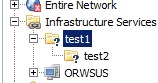
-
I was mean that I just implemented that. So it will be available in 1.2.4 release
-
-
-
Sounds great. By "extendable", you probably mean by editing the source code of the console?
The problem with Object Details is when a different window is in front of it; like a graph, configuration window or the alarm browser. The object browser is still visible to the left, but clicking in it won't seem to change anything.
I have the intuition that the object browser and object details pretty much belong together, similar to when you click a code file in the project explorer in Eclipse you expect the code editor for that file to come to the foreground.
One more small awkwardness I've noticed is working with alarm comments. Two ideas come to mind:
- a tooltip text when you hover over the comment field (or the entire row) in the alarm browser that show the last comment or such
- a single window for displaying the comments that goes along with the currently highlighted alarm, like object details with a selected object, instead of a tab for comments per alarm
Sorry for dumping all these ideas in one topic!
-
@bdefloo said in Java Console - Object tree:
Sounds great. By "extendable", you probably mean by editing the source code of the console?
Yes. As console is actually a set of plugins, additional plugins can register it's own double click handlers.
@bdefloo said in Java Console - Object tree:
The problem with Object Details is when a different window is in front of it; like a graph, configuration window or the alarm browser. The object browser is still visible to the left, but clicking in it won't seem to change anything.
I have the intuition that the object browser and object details pretty much belong together, similar to when you click a code file in the project explorer in Eclipse you expect the code editor for that file to come to the foreground.
Now I'm understand. Then it's probably must be made configurable, because somebody (me for example) may still wish to expand a node to see interfaces by double click. Btw, I can also add a keyboard shortcut for object details view.
-
Being able to select it would be the most flexible solution, I think. (without having to edit source code as user)
Useful options I can think of would be
1) Fold children open/closed
2) set focus to object details (and open it, if neccessary)
3) Open/set focus to data collection configuration
4) Open propertiesThanks!
Hello! It looks like you're interested in this conversation, but you don't have an account yet.
Getting fed up of having to scroll through the same posts each visit? When you register for an account, you'll always come back to exactly where you were before, and choose to be notified of new replies (either via email, or push notification). You'll also be able to save bookmarks and upvote posts to show your appreciation to other community members.
With your input, this post could be even better 💗
Register Login