
NetXMS 1.1.10 released
-
Hi all!
NetXMS version 1.1.10 is out. Changes from previous release:
- Completely new web interface
- New action type: execute NXSL script
- Changed default timeout for service checking subagent
- Added Oracle monitoring subagent
- Added option to force creation of character string instead of hex string in SNMP trap mapping
- Java console:
- Log viewers greatly improved
- Added missing DCI option "process all thresholds"
- Added missing "interconnect networks" property for cluster objects
- Added possibility to add and edit names on map link
- SNMP trap monitor
- "Query" button implemented in agent parameter selection dialog
- Implemented syslog parser configuration
- Resolved issue: Cannot delete non-existing object from map
- Resolved issue: Template filtering script is lost when template is renamed
- Resolved issue: Tab character not stripped from DCI parameter configuration and server reports "unsupported"
- Resolved issue: Map background not drawn beyound viewport
- Resolved issue: Node under cluster not shown in object selection dialog
- Resolved issue: "Cluster resource" field unavailable for DCI on cluster node
- Resolved issue: Reports not working on Windows
- Resolved issue: extra new line characters in local command output - New format specifiers in nxalarm: %x and %X
- New MIBs added: BAY-STACK-ADAC-MIB, BAY-STACK-ARP-INSPECTION-MIB,
BAY-STACK-DHCP-SNOOPING-MIB, BAY-STACK-ECMP-MIB, BAY-STACK-ERROR-MESSAGE-MIB,
BAY-STACK-LACP-EXT-MIB, BAY-STACK-MULTICAST-FLOODING-MIB,
BAY-STACK-OSPF-EXT-MIB, BAY-STACK-PETH-EXT-MIB, BAY-STACK-RADIUS-MIB,
BAY-STACK-SOURCE-GUARD-MIB, BAY-STACK-STATS-MIB, BAY-STACK-VRRP-EXT-MIB,
FOUNDRY-CAR-MIB, FOUNDRY-SN-AGENT-MIB, FOUNDRY-SN-IP-MIB,
FOUNDRY-SN-OSPF-GROUP-MIB, FOUNDRY-SN-ROOT-MIB,
FOUNDRY-SN-SW-L4-SWITCH-GROUP-MIB, FOUNDRY-SN-SWITCH-GROUP-MIB,
FOUNDRY-SN-TRAP-MIB, FOUNDRY-SN-VSRP-MIB - Resolved issue: Subnet objects not placed correctly under zones
- Resolved issue: No retention time for alarm history
Best regards,
Victor -
-
Hi,
Upgraded today to 1.1.10. Everything seems to work fine.

Some things I've noticed that may be done for next version:
- Windows service description is missing for the 3 NetXMS services. Trivial but would look better.
- Copyright in Alarm Notifier may be update to 2012
- Reports is still not working for me: Execute works, however when I try to render the result to PDF I receive the following error:
'Rendering report' has encountered a problem. Cannot render report xxx job y: Input/Output error
Regards,
Dan
-
Hi,
Good work with this new release!
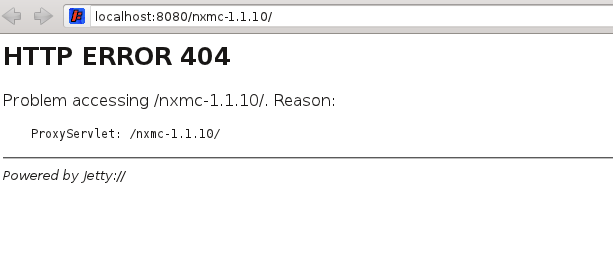
The new web interface was exciting news! But it didn't work for me, is it something I have missed?I downloaded the war-file, and gave it to jetty. Jetty deployed it without any errors, but when I try to access it from the browser it get an error like this (see also attached screenshot):
Problem accessing /nxmc-1.1.10/. Reason:ProxyServlet: /nxmc-1.1.10/
The application is there, if I use another non-valid url jetty gives another message. Suggestions..?
Regards,
Kjell
-
Hi!
Try to use the following URL: /nxmc-1.1.10/nxmc?startup=org.netxms.webui.core.nxmc
Best regards,
Victor -
-
-
Hi!
Installer for 1.1.10 does not contain new web interface yet. You have to install application server by yourself (Tomcat or Jetty should work) and deploy war file available from download page. Next release will have Jetty bundled into installer.
Best regards,
Victor -
@dang said in NetXMS 1.1.10 released:
- Reports is still not working for me: Execute works, however when I try to render the result to PDF I receive the following error:
'Rendering report' has encountered a problem. Cannot render report xxx job y: Input/Output error
I've fixed couple more issues with reporting, it will be included in 1.1.11.
In a meantime, please check couple of things:- netxmsd started with full path to netxmsd.conf (e.g. "netxmsd -c c:\netxms\etc\netxmsd.conf", not something like "netxmsd -c ..\etc\netxmsd.conf")
- "JavaPath" parameter in netmxsd.conf should point to java executable (e.g. "JavaPath=C:\Java\jdk1.6.0_17.x86\bin\java.exe")
- "JDBCDriver" should be set to appropriate driver (e.g. "JDBCDriver=org.postgresql.Driver"). Currently supported: org.postgresql.Driver, com.ibm.db2.jcc.DB2Driver, com.microsoft.sqlserver.jdbc.SQLServerDriver, com.mysql.jdbc.Driver and oracle.jdbc.OracleDriver.
- "JDBCUrl" is set to proper jdbc connection string (e.g. "JDBCUrl=jdbc:postgresql://localhost/netxms")
- "report-generator.jar" is in directory specified by "JavaLibraryDirectory" parameter. Default location (for windows build) is "c:\netxms\lib\java\"
- Reports is still not working for me: Execute works, however when I try to render the result to PDF I receive the following error:
-
Hi Alex,
here are my findings:
-
netxmsd started with full path to netxmsd.conf (e.g. "netxmsd -c c:\netxms\etc\netxmsd.conf", not something like "netxmsd -c ..\etc\netxmsd.conf")
C:\Program Files\NetXMS\bin\netxmsd.exe" --config "C:\Program Files\NetXMS\etc\netxmsd.conf" -d
=> OK -
"JavaPath" parameter in netmxsd.conf should point to java executable (e.g. "JavaPath=C:\Java\jdk1.6.0_17.x86\bin\java.exe")
was:
JavaPath=/usr/jre/bin/java
now:
JavaPath = "C:\Program Files (x86)\Java\jre6\bin\java.exe" -
"JDBCDriver" should be set to appropriate driver (e.g. "JDBCDriver=org.postgresql.Driver"). Currently supported: org.postgresql.Driver, com.ibm.db2.jcc.DB2Driver, com.microsoft.sqlserver.jdbc.SQLServerDriver, com.mysql.jdbc.Driver and oracle.jdbc.OracleDriver.
JDBCDriver= com.microsoft.sqlserver.jdbc.SQLServerDriver
=> OK -
"JDBCUrl" is set to proper jdbc connection string (e.g. "JDBCUrl=jdbc:postgresql://localhost/netxms")
JDBCUrl=jdbc:microsoft:sqlserver://localhost:1433/netxms_db
=> I think this is not right, I'm using odbc to connect with the database, 1433 port is used for a mssql tcp/ip connection. Telnet test confirms this as connection to this port fails... -
"report-generator.jar" is in directory specified by "JavaLibraryDirectory" parameter. Default location (for windows build) is "c:\netxms\lib\java\"
JavaLibraryDirectory = "C:\Program Files\NetXMS\lib\java"
=> the only file in this directory is the "report-generator.jar". Should there be anything else in there?
Regards,
Dan -
Hello! It looks like you're interested in this conversation, but you don't have an account yet.
Getting fed up of having to scroll through the same posts each visit? When you register for an account, you'll always come back to exactly where you were before, and choose to be notified of new replies (either via email, or push notification). You'll also be able to save bookmarks and upvote posts to show your appreciation to other community members.
With your input, this post could be even better 💗
Register Login