
Dynamic Content Network Map
-
Hello
Since moving the Netxms we have loved all the net features and stability of the system. However there is one thing that which I believe would be a good addition to the system.
Allot of the information we investigate tends to be throughput related on a multiple network switches/routers, unfortunately we have not found a way to constructively display the information in graphs/alarms. It would be beneficial if the network maps could have the addition of DCI collected information, i.e. the throughput of interfaces. I have attached a demo screen from the previous system. This would allow a cross-section of information to be displayed in a easy to understand logic way.
Regards
Aron
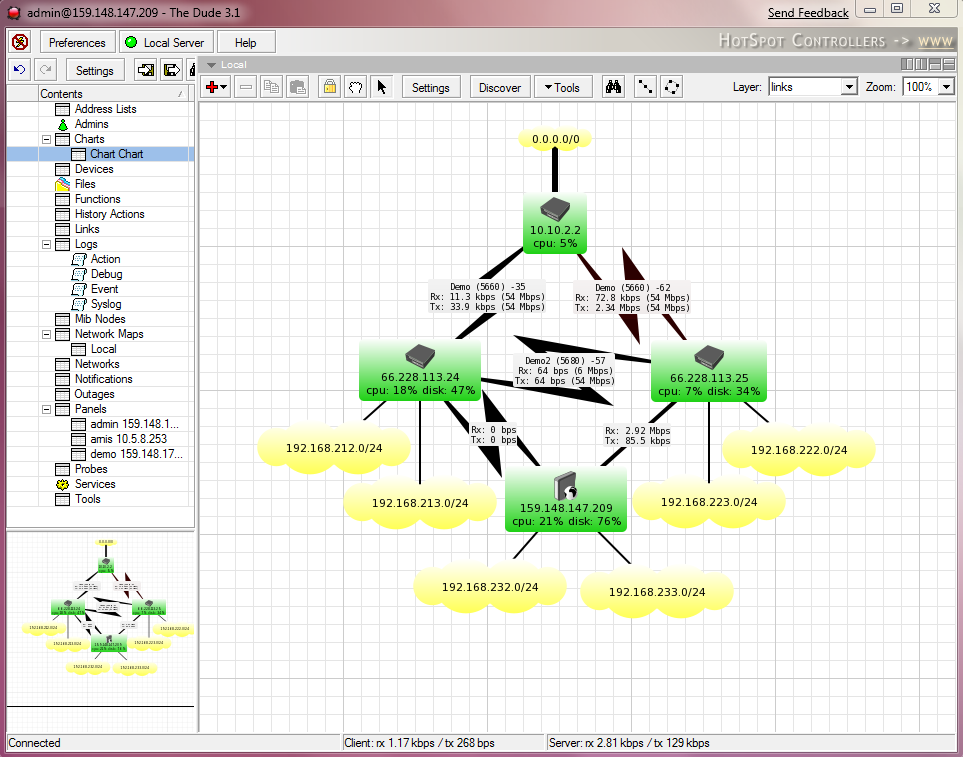
-
-
@athesis said in Dynamic Content Network Map:
Hi,
I would also support an Display like that, it would be enoumous advantage for traffic monitoring and clarity what where is. At least to say witch port is connected to what device etc.
Just one comments regarding which port is connected to what device - it's already possible. You can either do this manually (just link objects on the map and put appropriate labels on link), or automatically (create new map of type "layer 2 topology", put some network device as a seed, and NetXMS will build and update it automatically with known layer 2 connectivity information).
There are also minor move toward active network maps: you already can show values of selected DCIs in object's tooltips. Just check "show in object tooltips" checkbox in DCI properties, and value of this DCI will be displayed when you hover mouse over node object on map.
I'll try to add options for displaying DCI data over map links in 1.2.8 or 1.2.9, depending on how well it will go.
Best regards,
Victor
Hello! It looks like you're interested in this conversation, but you don't have an account yet.
Getting fed up of having to scroll through the same posts each visit? When you register for an account, you'll always come back to exactly where you were before, and choose to be notified of new replies (either via email, or push notification). You'll also be able to save bookmarks and upvote posts to show your appreciation to other community members.
With your input, this post could be even better 💗
Register Login