
Incomplete MAC address tables for Cisco 2960 and 4900M switches - missing static
-
I have a site that has about 20 Cisco 2960S switches and a couple Cisco 4900M switches that I have NetXMS monitoring.
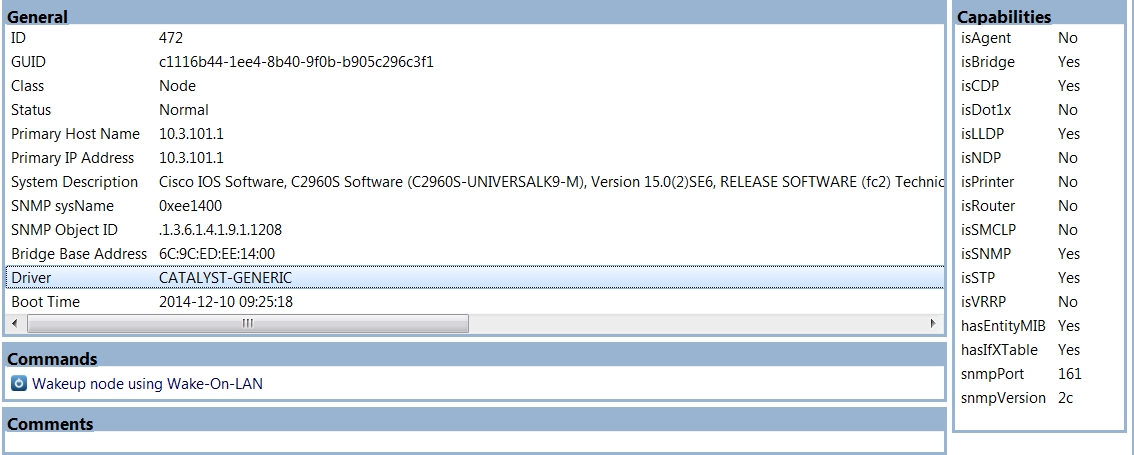
NetXMS is using the CATALYST-GENERIC Driver so it appears that the switches are being recognized.
I am on NetXMS version 1.2.17 at this site.
The problem I'm running into is that NetXMS seems to only be aware of some of the MAC addresses on the switch. If I try to find a switch port, it never reports a direct connection. It always reports that a given node is indirectly connected to a remote switch.
In researching the problem, I've determined that NetXMS is only storing "dynamic" MAC addresses. It ignores "static" MAC addresses. We use Cisco's security features where it learns what mac addresses are directly connected to a port and only lets those addresses on that port. This prevents someone from plugging in a foreign device that we don't know about. Apparently, even though those addresses are "learned", Cisco classifies them as Static.
Strangely when I snmpwalk the switches, all the mac addresses appear and I don't see anything obvious that would distinguish between static addresses and dynamic addresses. When I researched cisco literature, I couldn't even find a reference for using SNMP to look at whether an address is static or dynamic. So, I'm puzzled at why the static addresses are missing.
Is there are way of configuring NetXMS to store all the addresses? I would really like to be able to use the "Find switch port" feature on an object to see the local port it is connected to. Seeing that it indirectly connects to a root switch in the core isn't helpful since all my devices connect to one of the two root switches.
I've attached the following files to demonstrate the problem. I picked a simple 24 port gigabit switch, that has an additional 2 ports of ten-Gigabit. We always use one of the Ten Gigabit ports as a trunk to the other switches. typically the gigabit ports are connecting to servers and other nodes in the same rack.
- An SNMP walk of the 3 VLANs and typical OIDs used for mapping the MAC table to switch ports. I used the following reference to get those OIDs:
- A screen capture from Object Details of the switch
- An Excel Spreadsheet in which I compared the output of NetXMS's exported Switch Forwarding Database to the list produced by telneting into the switch and running a "show mac address-list". I sorted both of those items by MAC address and inserted blank lines whenever appropriate to keep the MAC addresses matching. When looking at that comparison, you can see that all the "static" entries are missing from NetXMS's data. There are other items missing from NetXMS and from the Cisco output, but I consider that related to timing and just noise because there is no consistent pattern.
Please let me know if you need additional info.
Snmpwalks-common-mac-related.txt
-
I just read in the following post that there is a difference between the topology view of the FDB database and the view from the tools menu because the topology view is filtered for only dynamic addresses where the tools view walks the SNMP tree.
https://www.netxms.org/forum/general-support/switch-fdb-differences/
What is the reasoning for removing static addresses from the topology view and does that affect the "Find switch port" query.
When I use the tools version which walks the tree, I get only one entry -- the entry for the aggregate port, but it shows only one MAC address. Maybe this is ok also if the purpose is to see what switch it connects to. Strangely when I run the same tools->info-FDB query on a root switch, it returns nothing.
My main concern is to get "Find Switch Port" working so it identifies local connections on these switches, but I would be interested in understanding the reasoning for the different behavior on Topology query and the tools-based query.
-
Hi,
honestly, I can't remember the reason for this decision anymore. I suppose that we just didn't encounter installation where static FDB entries was actively used. I will add configuration option to include static FDB entries (it will be turned off by default so existing installations will not be affected unexpectedly). I've registered it as change request for 2.0-M3: https://dev.raden.solutions/issues/759.
Best regards,
Victor -
Thank you Victor. I suspect you had a good reason to disable static entries. It is too bad that Static entries come from different sources. The ones I care about come from the Security feature of the switch. You can see them with the SHOW MAC ADDRESS-LIST SECURE. If you use SHOW MAC ADDRESS-LIST STATIC you get a bigger list.
The Static ones include odd CPU port types. Maybe there was a need to filter them out. Perhaps in your solution if you could consider filtering out the CPU-based addresses, or at a minimum allowing the learned SECURE addresses (assuming you can detect them), the solution won't have a lot of side-effects. I agree with making it an option. Please make sure you publish that option somewhere when it is implemented

Here is an example on the same switch:
#show mac address-table secure
Mac Address Table
-------------------------------------------Vlan Mac Address Type Ports
---- ----------- -------- -----
103 00c0.b75b.421e STATIC Gi1/0/2
102 101f.742d.9c07 STATIC Gi1/0/22
102 101f.742d.9c45 STATIC Gi1/0/6
102 101f.742d.b239 STATIC Gi1/0/20
102 9c8e.9919.9bc5 STATIC Gi1/0/10
102 9c8e.992e.555f STATIC Gi1/0/18
102 9c8e.992f.defd STATIC Gi1/0/8
102 9c8e.992f.ee9f STATIC Gi1/0/16
102 9c8e.9930.d013 STATIC Gi1/0/4
101 101f.742d.9c06 STATIC Gi1/0/21
101 101f.742d.9c44 STATIC Gi1/0/5
101 101f.742d.b238 STATIC Gi1/0/19
101 9c8e.9919.9bc4 STATIC Gi1/0/9
101 9c8e.992e.555e STATIC Gi1/0/17
101 9c8e.992f.defc STATIC Gi1/0/7
101 9c8e.992f.ee9e STATIC Gi1/0/15
Total Mac Addresses for this criterion: 16#show mac address-table static
Mac Address Table
-------------------------------------------Vlan Mac Address Type Ports
---- ----------- -------- -----
All 0100.0ccc.cccc STATIC CPU
All 0100.0ccc.cccd STATIC CPU
All 0180.c200.0000 STATIC CPU
All 0180.c200.0001 STATIC CPU
All 0180.c200.0002 STATIC CPU
All 0180.c200.0003 STATIC CPU
All 0180.c200.0004 STATIC CPU
All 0180.c200.0005 STATIC CPU
All 0180.c200.0006 STATIC CPU
All 0180.c200.0007 STATIC CPU
All 0180.c200.0008 STATIC CPU
All 0180.c200.0009 STATIC CPU
All 0180.c200.000a STATIC CPU
All 0180.c200.000b STATIC CPU
All 0180.c200.000c STATIC CPU
All 0180.c200.000d STATIC CPU
All 0180.c200.000e STATIC CPU
All 0180.c200.000f STATIC CPU
All 0180.c200.0010 STATIC CPU
All ffff.ffff.ffff STATIC CPU
103 00c0.b75b.421e STATIC Gi1/0/2
102 101f.742d.9c07 STATIC Gi1/0/22
102 101f.742d.9c45 STATIC Gi1/0/6
102 101f.742d.b239 STATIC Gi1/0/20
102 9c8e.9919.9bc5 STATIC Gi1/0/10
102 9c8e.992e.555f STATIC Gi1/0/18
102 9c8e.992f.defd STATIC Gi1/0/8
102 9c8e.992f.ee9f STATIC Gi1/0/16
102 9c8e.9930.d013 STATIC Gi1/0/4
101 101f.742d.9c06 STATIC Gi1/0/21
101 101f.742d.9c44 STATIC Gi1/0/5
101 101f.742d.b238 STATIC Gi1/0/19
101 9c8e.9919.9bc4 STATIC Gi1/0/9
101 9c8e.992e.555e STATIC Gi1/0/17
101 9c8e.992f.defc STATIC Gi1/0/7
101 9c8e.992f.ee9e STATIC Gi1/0/15
Total Mac Addresses for this criterion: 36
#Thank you in advance for your hard work and your attention on this item.
Bill
-
-
-
Yes, I'm running 2.0.1. I looked up my own MAC address and it shows me indirectly connected to another switch (my VLAN extends to a Juniper switch), rather than my directly connected Cisco 2960X (running 15.2(3)E2). We enable port security on all switch ports in order to limit the number of MAC addresses learned and to prevent CAM table overflows. We don't actually statically assign MAC addresses to ports, but a look at the MAC address table shows almost all MAC addresses as "STATIC". The only DYNAMIC ones are the MAC's learned on the uplink port-channel (which doesn't have port security enabled). Here's a snippet:
SWITCHNAME#show mac address-table | include STATIC All 0100.0ccc.cccc STATIC CPU All 0100.0ccc.cccd STATIC CPU All 0100.0ccd.cddc STATIC CPU All 0180.c200.0000 STATIC CPU All 0180.c200.0001 STATIC CPU All 0180.c200.0002 STATIC CPU All 0180.c200.0003 STATIC CPU All 0180.c200.0004 STATIC CPU All 0180.c200.0005 STATIC CPU All 0180.c200.0006 STATIC CPU All 0180.c200.0007 STATIC CPU All 0180.c200.0008 STATIC CPU All 0180.c200.0009 STATIC CPU All 0180.c200.000a STATIC CPU All 0180.c200.000b STATIC CPU All 0180.c200.000c STATIC CPU All 0180.c200.000d STATIC CPU All 0180.c200.000e STATIC CPU All 0180.c200.000f STATIC CPU All 0180.c200.0010 STATIC CPU All ffff.ffff.ffff STATIC CPU 509 00a0.0304.8cfe STATIC Gi3/0/31 509 00c0.e403.31dc STATIC Gi3/0/40 3 00c0.b784.5333 STATIC Gi3/0/38 3 00c0.b7a1.e885 STATIC Gi3/0/32 3 00c0.b7b8.ccaf STATIC Gi3/0/37 3 00c0.b7b8.d0a2 STATIC Gi3/0/36 30 0001.e65c.89b1 STATIC Gi1/0/17 30 001a.4b1f.f7ae STATIC Gi3/0/34 30 001b.780d.090f STATIC Gi2/0/7 30 0026.732f.b2ae STATIC Gi1/0/2 30 308d.99ab.29d7 STATIC Gi1/0/37 30 5820.b14c.a5c4 STATIC Gi2/0/2 30 7446.a04e.7867 STATIC Gi3/0/33 30 f4ce.463d.0b3f STATIC Gi1/0/1 14 0004.f296.dda5 STATIC Gi2/0/36 14 0004.f29a.da22 STATIC Gi1/0/15 14 0004.f29b.1196 STATIC Gi1/0/21 14 0004.f29d.22af STATIC Gi2/0/34 -
Can you please confirm if you see the static entries for the Cisco switch node in its Object tools > Switch forwarding database (FDB)?
I have also created a new ticket:
https://dev.raden.solutions/issues/1129 -
-
Hi,
what driver is selected for this Cisco switch (you can see it on object overview page)?
Best regards,
Victor -
-
Could you please send result of SNMP walk on .1.3.6.1.2.1.17.4.3.1.1 for that switch?
Best regards,
Victor -
[netxms@netxms ~]# snmpwalk -v 2c -Of -c "SUPERSECRETSTRING" THE_IP_ADDRESS .1.3.6.1.2.1.17.4.3.1.1 .iso.org.dod.internet.mgmt.mib-2.dot1dBridge.dot1dTp.dot1dTpFdbTable.dot1dTpFdbEntry.dot1dTpFdbAddress.'..B...' = STRING: 0:3:42:f4:ef:81 .iso.org.dod.internet.mgmt.mib-2.dot1dBridge.dot1dTp.dot1dTpFdbTable.dot1dTpFdbEntry.dot1dTpFdbAddress.'.....`' = STRING: 0:1a:1e:0:9a:60 .iso.org.dod.internet.mgmt.mib-2.dot1dBridge.dot1dTp.dot1dTpFdbTable.dot1dTpFdbEntry.dot1dTpFdbAddress.'......' = STRING: 0:1a:1e:0:9a:b0 .iso.org.dod.internet.mgmt.mib-2.dot1dBridge.dot1dTp.dot1dTpFdbTable.dot1dTpFdbEntry.dot1dTpFdbAddress.'.&....' = STRING: 0:26:f0:dd:0:0 .iso.org.dod.internet.mgmt.mib-2.dot1dBridge.dot1dTp.dot1dTpFdbTable.dot1dTpFdbEntry.dot1dTpFdbAddress.'.*j..B' = STRING: 0:2a:6a:a4:f0:42 .iso.org.dod.internet.mgmt.mib-2.dot1dBridge.dot1dTp.dot1dTpFdbTable.dot1dTpFdbEntry.dot1dTpFdbAddress.'.*j.l.' = STRING: 0:2a:6a:a5:6c:c2 .iso.org.dod.internet.mgmt.mib-2.dot1dBridge.dot1dTp.dot1dTpFdbTable.dot1dTpFdbEntry.dot1dTpFdbAddress.'(..^.h' = STRING: 28:c7:ce:5e:dd:68 .iso.org.dod.internet.mgmt.mib-2.dot1dBridge.dot1dTp.dot1dTpFdbTable.dot1dTpFdbEntry.dot1dTpFdbAddress.'(..^.X' = STRING: 28:c7:ce:5e:de:58 [netxms@netxms ~]# -
Is it all MAC addresses that should be? If not, try to use community@vlan for different vlans (for example, public@100 as community string for vlan 100) - will it report all MAC addresses? Also please do walk on .1.3.6.1.2.1.17.4.3.1.2 and .1.3.6.1.2.1.17.4.3.1.3 (or just one walk on .1.3.6.1.2.1.17.4.3.1).
Best regards,
Victor -
No, it's not all of the MAC addresses. There are 3 or 4 VLANs on the switch. I attached the output of one of them.
-
I just noticed that you check FDB on switch using object tools. What is shown if you use Topology -> Switch forwarding database context menu on switch?
-
-
So the problem is not with reading FDB, but with internal logic. Can you run manual topology poll (from Poll->Topology context menu) on Cisco switch and your workstation and show results?
-
From the switch:
[26.01.2016 09:34:56] **** Poll request sent to server ****
[26.01.2016 09:34:56] Poll request accepted
[26.01.2016 09:34:56] Starting topology poll for node IT
[26.01.2016 09:34:58] VLAN list successfully retrieved from node
[26.01.2016 09:35:01] Switch forwarding database retrieved
[26.01.2016 09:35:02] Link layer topology retrieved (2 connections found)
[26.01.2016 09:35:02] Updating peer information on interfaces
[26.01.2016 09:35:02]    Local interface Gi1/0/50 linked to remote interface UPLINK SWITCH1:Ethernet2/21
[26.01.2016 09:35:02]    Local interface Gi2/0/50 linked to remote interface UPLINK SWITCH2:Ethernet2/21
[26.01.2016 09:35:02] Link layer topology processed
[26.01.2016 09:35:02] Finished topology poll for node IT
[26.01.2016 09:35:02] **** Poll completed successfully ****
And from the node object that is my workstation:
[26.01.2016 09:36:44] **** Poll request sent to server ****
[26.01.2016 09:36:44] Poll request accepted
[26.01.2016 09:36:44] Starting topology poll for node Test Workstation
[26.01.2016 09:36:44] Failed to get switch forwarding database
[26.01.2016 09:36:44] Link layer topology retrieved (0 connections found)
[26.01.2016 09:36:44] Updating peer information on interfaces
[26.01.2016 09:36:44] Link layer topology processed
[26.01.2016 09:36:44] Finished topology poll for node Test Workstation
[26.01.2016 09:36:44] **** Poll completed successfully ****
I hope that's what you were looking for.
-
Do you see correct MAC address on workstation's interface? If yes, is this MAC address present in FDB table you see in console and is it the only MAC address on a port?
Hello! It looks like you're interested in this conversation, but you don't have an account yet.
Getting fed up of having to scroll through the same posts each visit? When you register for an account, you'll always come back to exactly where you were before, and choose to be notified of new replies (either via email, or push notification). You'll also be able to save bookmarks and upvote posts to show your appreciation to other community members.
With your input, this post could be even better 💗
Register Login