
Add support for Cisco 4900M switch
-
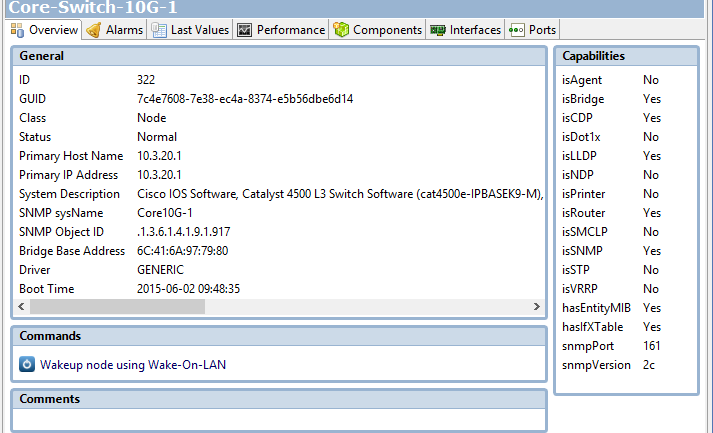
I have a network consisting of Cisco 2960S with 4900M switches at the core. The 4900M switches are using the GENERIC driver. Because of this, I believe that it is preventing me from effectively using the "Find Switch Port" commands because NetXMS can't figure out the entire network.
I had the same problem on NetXMS version 1.2.17, but upgraded to 2.0.M5 to see if the switch was supported on the newer version.
What would be involved with supporting this switch?
I'm attaching an Object Details screen print of the switch and an SNMP walk. The SNMP walk file contains two different walks, the first walk was just using the community name. The 2nd walk was a vlan snmp walk of vlan 101 produced by appending @101 to the community name.
It appears this switch's snmp info is similar to the 2960S switches which do work. Is there a way I can trick NetXMS into thinking it is a supported switch while I wait for this switch to be supported?
Thanks in Advance
Bill
-
Hi,
you can force driver selection for a node by setting node's custom attribute snmp.driver to driver name. Try to use Catalyst driver and if it will work I'll correct supported device detection in the driver.
Best regards,
Victor -
The workaround worked well. I have a good topology map now.
But, I'm still having problems with the "Find switch port" functionality. It shows me indirect information, but not the switch & port the device is directly connected to. When I know the switch that it belongs to, I can do a level 2 topology view and see the node is associated with a switch port. But, if I try from the node, it tends to show the switch and trunk port of a node that has another server talking to the original node.
Because this sounds like an unrelated issue, I'm going to start a post in the General Support section and provide the documentation there.
Thank you so much for you prompt help on this original request. Hopefully you can help me on the other issue.
Bill
-
So the driver that is working is CATALYST-GENERIC? In that case, could you send me result of SNMP walk on .1.3.6.1.4.1.9.5.1.2 from this C4500 switch?
I've seen post on topology issues, will answer on it later.
Best regards,
Victor -
That OID doesn't exist. The closest I can get is .1.3.6.1.4.1.9.5 There is nothing between .1.3.6.1.4.1.9.3 and .1.3.6.1.4.1.9.9 on this switch. Below is a portion of the long snmp walk for .1.3.6.1.4.1.9.5
SNMPv2-SMI::enterprises.9.3.6.14.0 = INTEGER: 1
SNMPv2-SMI::enterprises.9.3.6.15.0 = Timeticks: (0) 0:00:00.00
SNMPv2-SMI::enterprises.9.9.6.1.1.1.1.10.3.20.1.80.10.2.18.8.50585 = Counter32: 1880
SNMPv2-SMI::enterprises.9.9.6.1.1.1.1.10.3.20.1.80.10.2.18.8.50750 = Counter32: 611 -
Hello! It looks like you're interested in this conversation, but you don't have an account yet.
Getting fed up of having to scroll through the same posts each visit? When you register for an account, you'll always come back to exactly where you were before, and choose to be notified of new replies (either via email, or push notification). You'll also be able to save bookmarks and upvote posts to show your appreciation to other community members.
With your input, this post could be even better 💗
Register Login