
How to use the External List and ExternalMetricProvider correctly?
-
Good day!
I added an External List and an ExternalMetricProvider to the agent configuration file.:ExternalList = RaidController: powershell.exe -NoLogo -STA -NoProfile
-NonInteractive -File "C:\Backup\StartRI.ps1" -ListExternalMetricProvider = powershell.exe -NoLogo -STA -NoProfile
-NonInteractive -File "C:\Backup\StartRI.ps1":600Test script for getting controller parameters:
$PSCommandPath = "C:\Backup\C_Model.ps1"
Start-Process powershell -ArgumentList '-NoProfile -NonInteractive -ExecutionPolicy Bypass -File "C:\Backup\C_Model.ps1'
-Verb RunAs
$prefix = 'Product Name'
$ExecuteStoreCLI = Get-Content -Path 'C:\Backup\Storcli\Windows\RaidInfo.txt' -Raw
$ArrayStorCli = ConvertFrom-Json $ExecuteStoreCLI
$reportLine = ([String]::Format("{0} ={1}",
$prefix,
$ArrayStorCli.Controllers.'Response data'.'Product Name'
))
Write-Output $reportLineThe script returns a string like:
Product Name = AVAGO MegaRAID SAS 9440-8i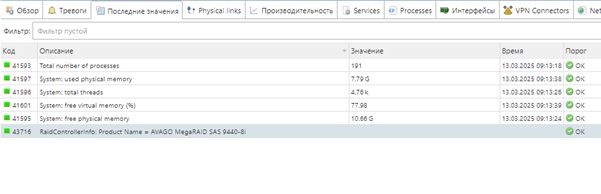
The question is this: How do I make the result, a row named "AVAGO MegaRAID SAS 9440-8i" appear in the "Value" column? For me, all the results are recorded only in the "Description" column, regardless of whether it is numeric or string data. What format should I output the string from the script in order to get the correct Key\Value for ExternalMetricProvider?Metrica Settings:


-
The script that is ran as ExternalList should just produce name of some things, one name for each line. E.g. if these are raid controllers then it could be something like:
raid1
raid2Then, when instance discovery happens on that node, it will create DCIs with metrics:
RaidControllerInfo(raid1)
RaidControllerInfo(raid2)But you need to have external metric or provider, which will provide values for metrics like RaidControllerInfo(raid1), currently you do not have it.
What you currently have is metric "Product Name", which is coming from the provider script and you can create a DCI with that metric (but probably you need to remove space for it to work)
Hello! It looks like you're interested in this conversation, but you don't have an account yet.
Getting fed up of having to scroll through the same posts each visit? When you register for an account, you'll always come back to exactly where you were before, and choose to be notified of new replies (either via email, or push notification). You'll also be able to save bookmarks and upvote posts to show your appreciation to other community members.
With your input, this post could be even better 💗
Register Login