
Формирование отчетов с Jaspersoft
-
Доброго дня.
Как сейчас работает создание отчетов? В мануале упоминается Jaspersoft, как и по форуму встречается описание как эти отчеты создавать. Я сформировал jar, включил в настройках сервера отчеты, но сервер не опознает подсунутый файл - во вкладке отчетов все так и остается пустым. Превью из макета Jaspersoft при этом с базы инфу нормально собирает
В какую сторону смотреть? -_-NetXMS Server Version 6.1.0 Build 6.1-421-gc4223f97d4
NXCP: 5.62.1.55 (AES-256, 3DES, AES-128)
Built with: g++ (Ubuntu 13.2.0-23ubuntu4) 13.2.0
-
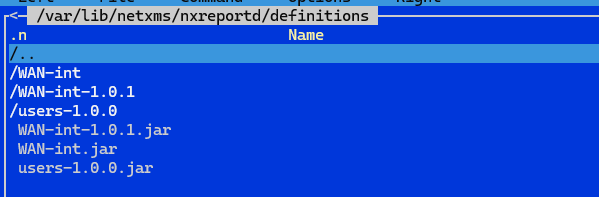
В приложении тестовый отчет (он есть на гитхабе: https://github.com/netxms/sample-report, там есть чуток инфы в readme). На Линуксе его надо положить в директорию /var/lib/netxms/nxreportd/definitions, репортинг сервер его должен подцепить - это проявится тем что там должна появится директория users-1.0.0.
В настройках сервера адрес репортинг сервера нужно написать именно в IPv4 виде - 127.0.0.1, потому что localhost может раскрывать в IPv6, а репортинг его не умел.
Если не хочет работать, покажите лог репортинга
journalctl -u netxms-reporting.service
-
Адрес репортинг сервера дефолтный 127.0.0.1
users-1.0.0 в ui подтянулся и выполняется. В definitions кстати папки отчетов, что я туда складывал так же имеются, хоть и самих отчетов в ui нет. Получается сами отчеты косячно составлены\скомпилированы.. Можете подсказать ресурс, где была бы инфа как их нормально составлять? Статья, мб видеоурок какой-то
Лог от nxreportd прикрепил, там момент его попытки запуска отчета из первого сообщения
-
Даб там в логе Cannot compile report /var/lib/netxms/nxreportd/definitions/WAN-int-1.0.1/main.jrxml
net.sf.jasperreports.engine.JRException: org.xml.sax.SAXParseException; lineNumber: 2; columnNumber: 232; cvc-complex-type.3.2.2: Attribute 'uuid' is not allowed to appear in element 'jasperReport'.Так что да, директория создалась, но скомпилироваться он не смог и поэтому его и в списке нет.
Я забыл упомянть выше, что нужна версия Jasper Studio 6.20.5 или младше. Тут похоже что версия более новая.
Я в принципе у claude такие вещи спрашиваю, вот его ответ по этой ошбике:
The error is a JRXML schema validation failure: the bundled JasperReports library in nxreportd is validating against an XSD that does
not allow uuid on the root <jasperReport> element. This usually means the JRXML was produced by a Jaspersoft Studio newer than the
JR runtime on the reporting server.A couple of options to unblock the deploy:
1. Quick fix — open main.jrxml and delete the uuid="…" attribute from the <jasperReport …> root tag, then rebuild. If validation then
complains about uuid on a nested element (e.g. <band>, <textField>), strip those too. A one-shot scrub:
sed -i 's/ uuid="[^"]*"//g' src/main/resources/main.jrxml
2. Real fix — design the report in a Jaspersoft Studio version aligned with the JR library shipped with this NetXMS server. The two
sample JRXMLs in this repo are produced with Jaspersoft Studio 6.16/6.19 (JasperReports Library 6.x), and they're known to deploy.
Anything noticeably newer (7.x / 9.x) will emit XML features the server's older XSD rejects.For context: the samples in this repo (users/src/main/resources/main.jrxml and user-input/src/main/resources/main.jrxml) do carry
uuid on <jasperReport> and deploy fine, so the user's server is matched to a stricter/older XSD than the one the samples were
validated against — confirming the version-mismatch diagnosis. Designing with Studio 6.16–6.19 is the safest path. -
Hello! It looks like you're interested in this conversation, but you don't have an account yet.
Getting fed up of having to scroll through the same posts each visit? When you register for an account, you'll always come back to exactly where you were before, and choose to be notified of new replies (either via email, or push notification). You'll also be able to save bookmarks and upvote posts to show your appreciation to other community members.
With your input, this post could be even better 💗
Register Login