Skip to content

Support

5.1k Topics 22.0k Posts

Questions about installing, configuring and using NetXMS.

  • How long will LLDP-data be stored/cached on a node?

    17
    0 Votes
    17 Posts
    427k Views
    Dani@M3TU
    For me it seems also fixed. No old topology info anymore. Thanks Victor.
  • Network discovery does not work

    2
    0 Votes
    2 Posts
    9k Views
    C
    Is there some way how I can find out why the network discovery does not work? I've set the DicoveryPollingInterval = 100 ActiveDiscoveryInteval = 7200 ActiveNetworkDiscovery = 1 Do I have to set anything else. Did I miss to activate a service?
  • create event with acknowledgements

    3
    0 Votes
    3 Posts
    15k Views
    M
    thank you.
  • Template DCI's disappear

    11
    0 Votes
    11 Posts
    17k Views
    G
    Thanks for your help.  I'll download the new version tomorrow, then.
  • Action is not taken (executed)?

    3
    0 Votes
    3 Posts
    9k Views
    M
    @victor said in Action is not taken (executed)?: try to set debug level to at least 4 (add DebugLevel = 4 to netxmsd.conf) and check server's log. Thanks, I can see clearly that script was executed but actually it was not because I had a typo in command line. I think return value (of cmd.exe /c) in log file would be a help.
  • Table DCI parameters

    4
    2
    0 Votes
    4 Posts
    13k Views
    A
    You are using extremely old version (I'd say 1.1.11), which was released in the 2012.
  • New Dashboard Forms

    1
    2
    0 Votes
    1 Posts
    9k Views
    I
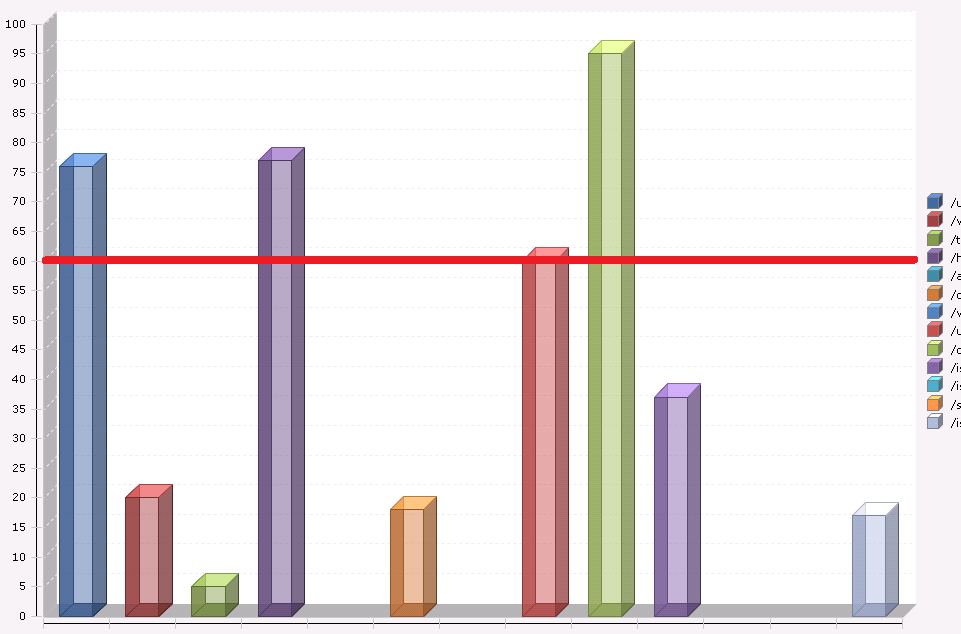
    Dears, 1- is there any way can show a static value as line in a bar chart or tube chart as the picture below ? if not could it be customized? 2- can the value of each bar chart or tube chart be displayed above it? or whenever the mouse is near to it or on click?? if not can it be customized ? or included for the next release ? 3- how can i create a LED or status dashboard for DCI having return values only 0/1 for example 0 will be red LED and 1 green LED?? [image: Bar_Chart_Custom.png] [image: Bar_Chart_Value_Display.png]
  • netxms 1.2.16 getavgdcivalue not working

    4
    0 Votes
    4 Posts
    10k Views
    M
    All Information about DCI values and script as follows: DCI Values : "Timestamp","Value" "15.10.2014 22:48:51","5192" "15.10.2014 22:48:41","7360" "15.10.2014 22:48:31","8624" "15.10.2014 22:48:21","160" "15.10.2014 22:48:11","2952" "15.10.2014 22:48:01","160" "15.10.2014 22:47:51","160" "15.10.2014 22:47:41","160" "15.10.2014 22:47:31","160" "15.10.2014 22:47:21","160" "15.10.2014 22:47:11","160" "15.10.2014 22:47:01","2952" (Got these with export to csv) my sample script is : node=FindNodeObject(null,11298); nodedci2=FindDCIByDescription(node,"inbound_12"); nodedci=GetDCIObject(node,nodedci2); saturesure=GetCustomAttribute(node,"saturesure"); btime=time(); avgdci=GetAvgDCIValue(node,nodedci->id,btime-saturesure,btime); sumdci=GetSumDCIValue(node,nodedci->id,btime-saturesure,btime); println "avgdci    : ".avgdci; println "sumdci    : ".sumdci; println "saturesure : ".saturesure; inboundsondakka=GetDCIValues(node,nodedci->id,btime-saturesure,btime); ib=0; ic=0; foreach (ia:inboundsondakka) { ib++; ic=ic+ia; println ib.".th record :".ia; } ic=ic/ib; println "recordcount :".ib; println "avgdcivalue :".ic; return false; (11298 my node id) and console output is : avgdci : 2.00000 sumdci : 3.00000 saturesure : 120 1th record : 5192 . . . 12.th record : 2952 recordcount : 12 avgdcivalue : 2350.00000 NETXMS version : 1.2.16. Compiled from source, and i am using mysql 5.5.38-0 and Operating System is : linux mint 17
  • IP address change issues..

    2
    0 Votes
    2 Posts
    8k Views
    V
    Hi, what are you using as primary host name (visible in properties on "Communications" page) - DNS name or IP address? I recommend to use DNS names for nodes with dynamic IP addresses. If they change often you may also want to set server's configuration parameter ResolveDNSToIPOnStatusPoll to 1 so server will resolve DNS names on each status poll (by default it is done only on configuration polls). Best regards, Victor
  • Use "Custom Attributes" in Object Tools

    3
    0 Votes
    3 Posts
    9k Views
    V
    Hi, yes, you can use them in form %attribute_name% Best regards, Victor
  • Native Agent not responding

    3
    0 Votes
    3 Posts
    11k Views
    B
    Thank you! Must have forgot to force it 2014-10-12 22:21:47 netxms-autopass Normal SYS_TEMPLATE_AUTOREMOVE Template Generic_agent automatically removed from node NODENAME
  • android graphs impossible to differ

    4
    0 Votes
    4 Posts
    12k Views
    R
    Superb. Thanks Marco! 
  • Writing my own network driver

    9
    0 Votes
    9 Posts
    16k Views
    V
    Thank you! I'll try to use it later today. Best regards, Victor
  • Translation Rule

    2
    0 Votes
    2 Posts
    16k Views
    A
    You can make use transformation script on DCI to do that. Sample script: if ($1 == 0) { return "OK"; } if ($1 == 1) { return "STATUS_1"; } if ($1 == 2) { return "STATUS_2"; } return "UNKNOWN (" . $1 . ")";
  • NetXMS Objects Decorator unexpectedly and randomly turns off

    1
    0 Votes
    1 Posts
    11k Views
    F
    An annoying bug in NetXMS Management Console (1.2.16): the NetXMS Objects Decorator unexpectedly and randomly turns off, and the statuses in the Object tree disappear. (my environment: Windows 7, Java 7).
  • 1.2.16 database migration - out of memory [SOLVED]

    2
    0 Votes
    2 Posts
    10k Views
    T
    Thank you for sharing
  • SNMP source port

    5
    0 Votes
    5 Posts
    13k Views
    M
    OK. Thank you for the information. I misunderstood your previous post. I will wait for 1.2.17 then.
  • Debian package installation [SOLVED]

    8
    0 Votes
    8 Posts
    34k Views
    V
    Currently it's not possible with web UI. For 1.2.17 I've added new command line / URL option "dashboard=" to both desktop and web console to automatically open given dashboard (specified by dashboard object ID or name). It is already described in Autologin for Management Console on our wiki. Best regards, Victor
  • NetXMS polling packets log

    2
    0 Votes
    2 Posts
    14k Views
    V
    Hi, the only option is to use tcpdump or WireSHark (depending on OS you are running server on). For tcpdump it could be like this: tcpdump -s 65535 -w <file> udp and host <switch_ip> and port 161 all SNMP packets to and from switch should be in file you specify in -w option. Best regards, Victor
  • Interface Inbound/outbound traffic dci: can't view/export all history!

    2
    0 Votes
    2 Posts
    19k Views
    V
    Hi, in history view (right click on DCI value, select History) you should be able to select desired time range (in top right corner of history view press little down arrow and choose "Select data range..." from menu). Best regards, Victor