Skip to content

Support

5.1k Topics 22.0k Posts

Questions about installing, configuring and using NetXMS.

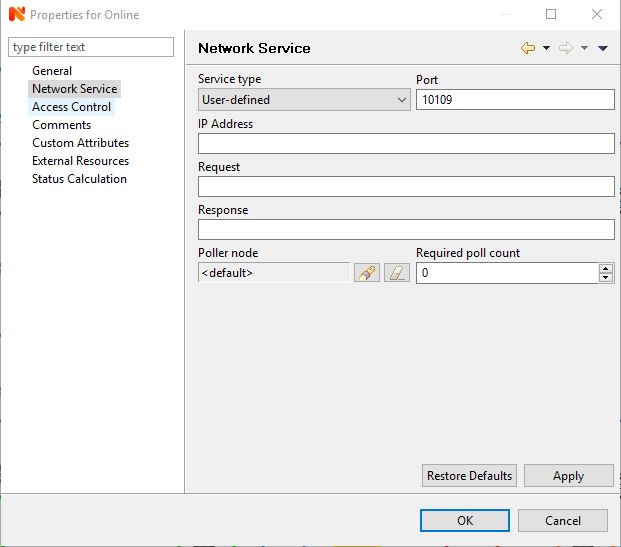
  • Network Service Broken?

    4
    1
    0 Votes
    4 Posts
    64k Views
    N
    Good day, I upgraded to 2.2.9 today and can confirm that the port check now works 100%
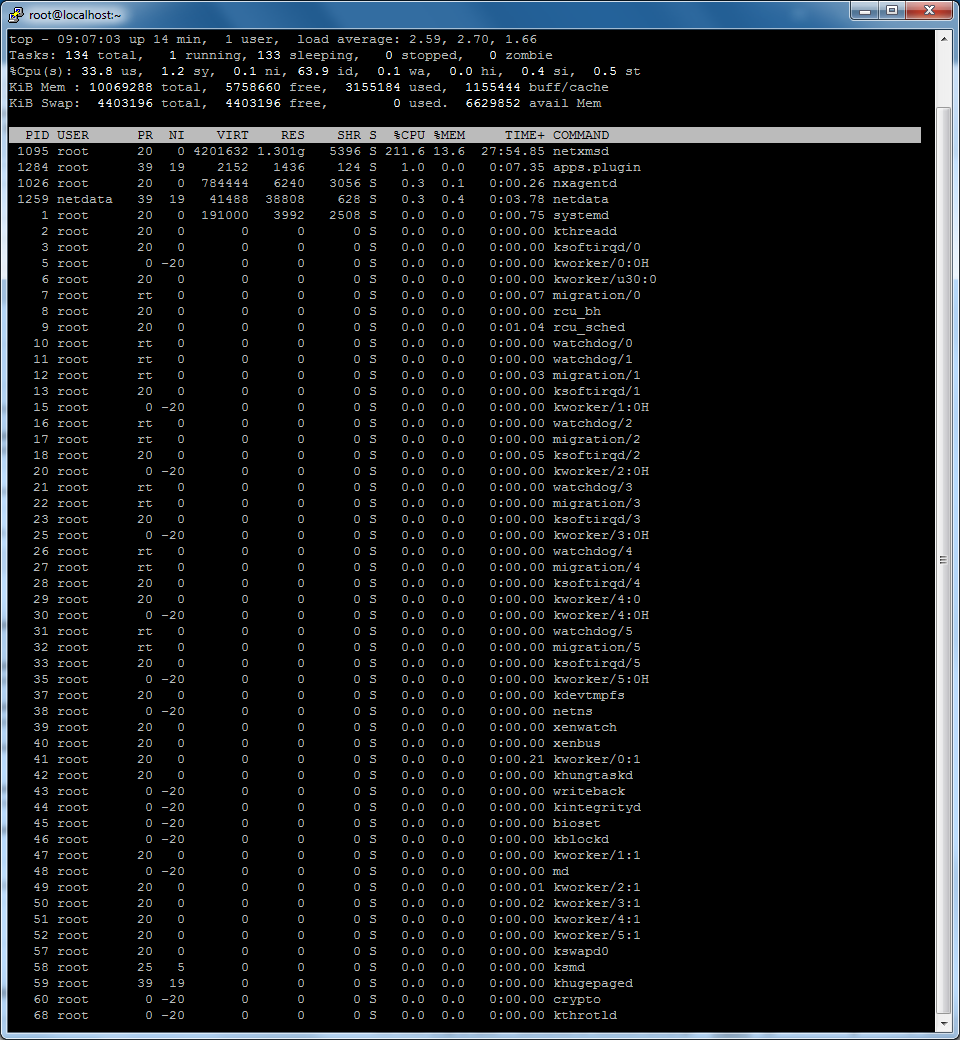
  • NetXMS CPU Usage High

    34
    2
    0 Votes
    34 Posts
    291k Views
    C
    Hi Victor, The 2.2.9 Upgrade solved all issues everything works just great!! Regards Clifford Dsouza
  • Netxms client for windows not starting

    2
    0 Votes
    2 Posts
    39k Views
    V
    Hi, what Java version you are using? Desktop client may not be compatible with Java 10 and higher. Best regards, Victor
  • netxmsd seg-fault

    5
    0 Votes
    5 Posts
    51k Views
    R
    Thanks Tatjana.  Actually, since I ran netxmsd direct from the shell (without the -d flag) rather that from it's init script, it hasn't crashed since. I'll implement what you suggest and try again using service. Rich
  • nxshell - problem with session EventProcessingPolicy methods

    4
    0 Votes
    4 Posts
    44k Views
    S
    Found the problem.  I downloaded nxshell-2.2.8.jar and replaced C:\NetXMS\lib\nxshell.jar Works Great! Thanks.
  • Database not migrated correctly with 2.2.8

    4
    0 Votes
    4 Posts
    39k Views
    Z
    It looks like it might be MarinaDB problem we have fixed (we had a lot of problems with MarinaDB recently). Most probably this problem happened due to corrupted DB upgrade. The fix will be included in next release 2.2.9. Now this problem could be fixed only with hands, by manually adding a column to the table or as you did - by recreating the database. We highly do not recommend SQLite usage, we recommend PostgreSQL as a database.
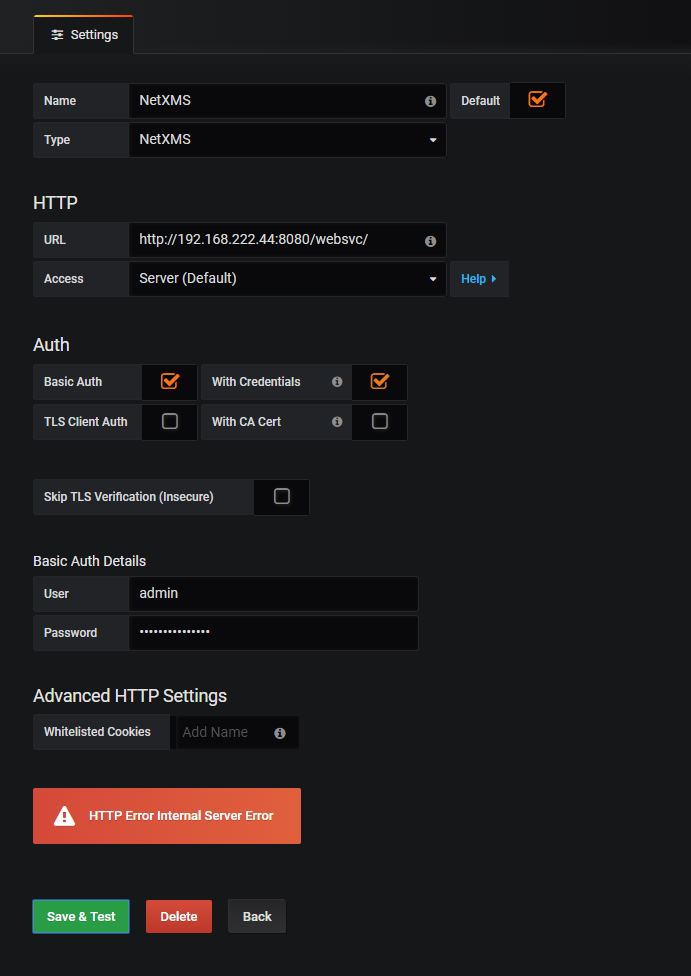
  • websvc and grafana integration problem

    2
    1
    0 Votes
    2 Posts
    27k Views
    B
    I can confirm adding "--add-modules java.xml.bind" to JAVA_OPTS in /etc/default/tomcat8 works for "openjdk 10.0.2" and tomcat8
  • Ping IP which is result of another DCI

    2
    0 Votes
    2 Posts
    28k Views
    V
    Hi, you can create script DCI with the following script: // Read default gateway from DCI gw = GetDCIValueByName($node, ".1.3.6.1.2.1.4.21.1.7.0.0.0.0"); if (gw == null) return null; // Find node which will be ping source pingSourceNode = FindNodeObject($node, "netxms"); if (pingSourceNode == null) return null; // Return ping RTT from ping source node return AgentReadParameter(pingSourceNode, "ICMP.Ping(" . gw . ")"); This script reads default gateway address from existing DCI and then use agent parameter ICMP.Ping to ping it from another node. Name of ping source node should be set in FindNodeObject function call. Best regards, Victor
  • nxshell - problem with session EventObject related methods

    6
    0 Votes
    6 Posts
    47k Views
    S
    Thank You!  Very helpful.
  • nxshell - create new data collector items

    2
    0 Votes
    2 Posts
    30k Views
    V
    Hi, it is deprecated in 3.0 branch (latest javadoc generated from 3.0), you can safely use it in 2.2 branch. In 3.0 you should call DataCollectionConfiguration.modifyObject with data collection object ID set to 0 (but this will not work in 2.2). Best regards, Victor
  • nxshell - problem with session.getScriptLibrary()

    2
    0 Votes
    2 Posts
    22k Views
    V
    Hi, getScriptLibrary() call intended to retrieve list of available scripts (because script source could be quite big). Source code for each script should be retrieved individually using getScript() method. The following script will show sources for all scripts: scripts = session.getScriptLibrary() for script in scripts: script = session.getScript(script.getId()) print('id={0} name={1} source={2}'.format( script.getId() ,script.getName() ,script.getSource() ) ) Best regards, Victor
  • Netxms Agent Cache Problem (timeout synchronization)

    6
    0 Votes
    6 Posts
    39k Views
    V
    Can you please reproduce timeout issue again, with server running at debug level 7 and agent at debug level 6, and send me synchronized log files for period during synchronization? Best regards, Victor
  • Raspberry Pi 3 - Compile Agent

    9
    0 Votes
    9 Posts
    84k Views
    T
    There is latest up-to-date Raspbian packages in the official NetXMS APT repo. (This includes 2.2.8 for Raspbian Stretch, and armhf Ubuntu 18 pacakges)
  • Problem to store Last values into database.

    4
    0 Votes
    4 Posts
    25k Views
    V
    Hello Victor, Thanx for your answer. I followed your suggestion and modified the source file. It was successful. I can see stored values now. Thank you very much, Best regards, Attila.
  • Retrospectively transform/post-process DCI values

    3
    0 Votes
    3 Posts
    30k Views
    R
    Thanks Victor.  Yes, that may be a good idea if it's not too difficult. Perhaps a suggestion for a new feature would be to add a "filter" script that sits between the DCI and, say, a graph.  Or perhaps have the ability to select a script as the input to a graph instead of (as well as) a DCI. Rich
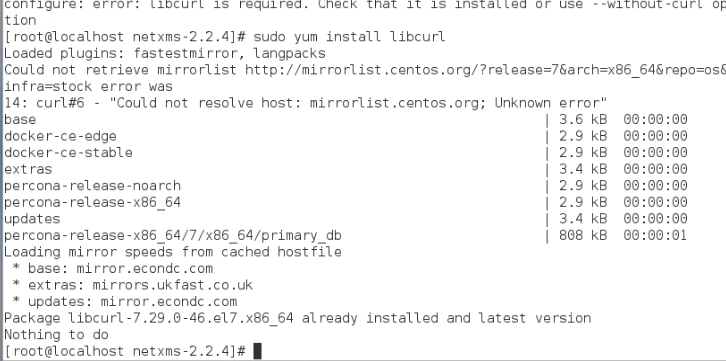
  • error installing agent on Centos 7

    4
    2
    0 Votes
    4 Posts
    35k Views
    T
    Assuming you want to compile with MQTT support, you'll need to install the matching mosquitto-devel package. https://breadfit.wordpress.com/2015/06/24/installing-mosquitto-under-centos/ might help (it's a guide on installing Mosquitto on CentOS 7, not specifically mentioning the mosquitto-devel package though). If you don't need MQTT, simply compiling without it should remove the need for mosquitto-devel.
  • Interface names in instance discovery

    8
    0 Votes
    8 Posts
    50k Views
    S
    Let me summarize to make it easy for other beginners like me: for inward traffic (using the 64bit snmp oid) In "Data Collection Confiugration:" Description: Traffic on {instance-name} - bits/s IN Parameter: .1.3.6.1.2.1.31.1.1.1.6.{instance} Origin: SNMP - Unsigned Int 64bit Transformation: Average delta per sec Transform script: $1 * 8 Instance discovery: SNMP Walk - OIDs Base SNMP OID: .1.3.6.1.2.1.31.1.1.1.1 Instance discovery script: return %(true, $1, $2); For OUT traffic just change: Description: Traffic on {instance-name} - bits/s OUT Parameter: .1.3.6.1.2.1.31.1.1.1.10.{instance}
  • AlliedTelesis - network topology

    13
    2
    0 Votes
    13 Posts
    92k Views
    S
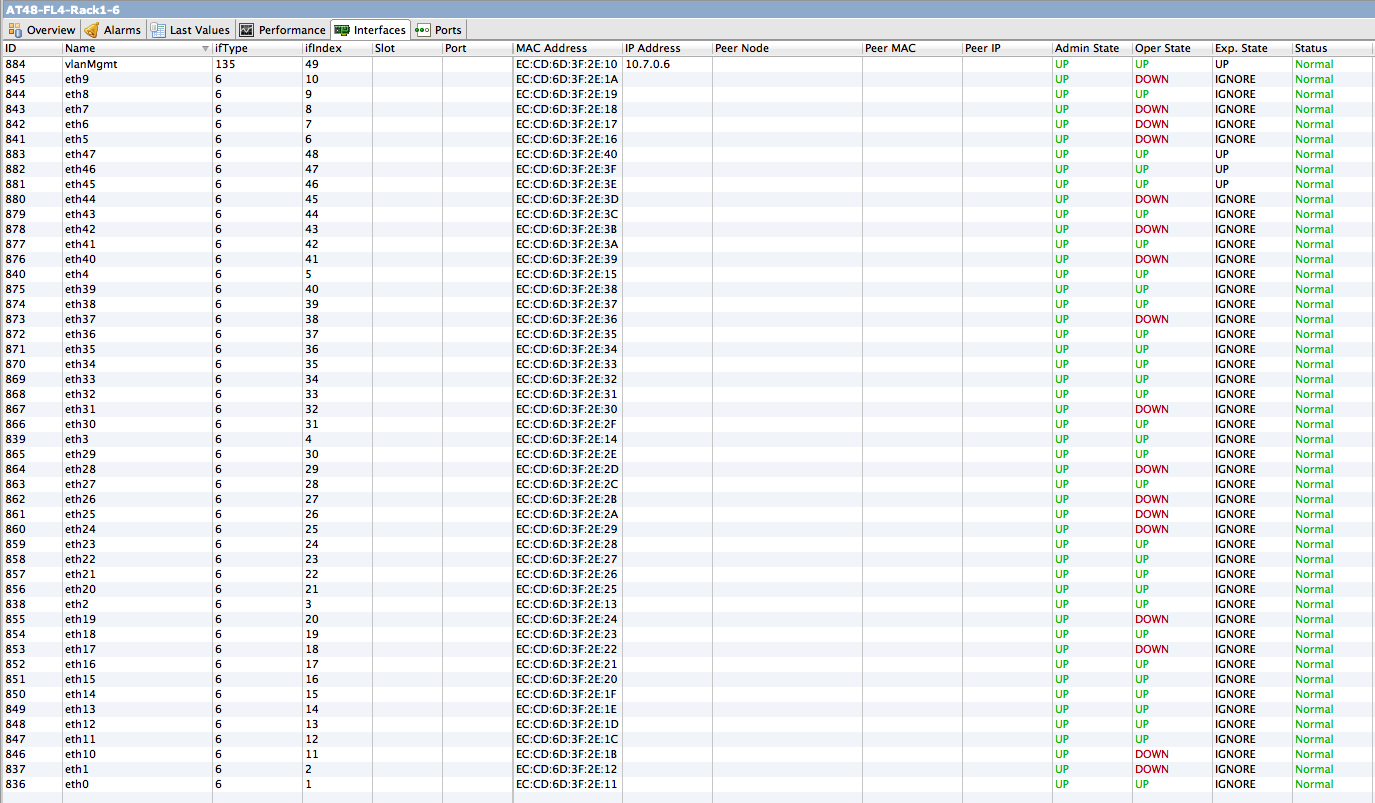
    I have a similar issue with some dlink switches (not with netgear and cisco switches). I get "VLAN list successfully retrieved from node" [09.09.2018 20:54:13] **** Poll request sent to server **** [09.09.2018 20:54:14] Poll request accepted [09.09.2018 20:54:14] Starting topology poll for node Library [09.09.2018 20:54:14] VLAN list successfully retrieved from node [09.09.2018 20:54:20] Switch forwarding database retrieved [09.09.2018 20:54:21] Link layer topology retrieved (1 connections found) [09.09.2018 20:54:21] Updating peer information on interfaces [09.09.2018 20:54:21] Link layer topology processed [09.09.2018 20:54:21] Finished topology poll for node Library [09.09.2018 20:54:21] **** Poll completed successfully **** but nothing shows up in the dlink VLAN column on the interfaces tab (cisco and netgear switch interface tabs show vlan information in vlan column) Dlink MIB seems to be loaded because in the netxms MIB browser for the dlink switch I can see the vlan table OID for the switch, with OID as text and description filled as below, and SNMP walking it gives me vlan names and egress and untagged members .1.3.6.1.4.1.171.10.76.9.7.6.1 .iso.org.dod.internet.private.enterprises.d-link.dlink-products.dlink-DGS1210SeriesProd.dgs-1210-16ax.companyDot1qVlanGroup.dot1qVlanTable.dot1qVlanEntry [image: netxms-novlan.JPG] [image: netxms-novlan2.JPG]
  • NetXMS SYSLOG | Receiving windows events log

    1
    0 Votes
    1 Posts
    13k Views
    A
    Hi! I've configured NetXMS to act as central syslog server. Remote ubuntu and centos machines are sending information and everything is displayed correctly. Regarding windows - i use nxlog agent on windows server 2016 machine. Key configuration: <Input in>     Module  im_msvistalog     Query      <QueryList>                     <Query Id="0">                         <Select Path="Application">*</Select>                         <Select Path="System">*</Select>                         <Select Path="Security">*</Select>                     </Query>                 </QueryList> </Input> <Processor proc>     Module pm_transformer     Exec $EventReceivedTime = integer($EventReceivedTime) / 1000000; to_json();     OutputFormat syslog_rfc5424 </Processor> <Output udp>     Module  om_udp     Host    xx.xx.xx.xx     Port    514     Exec $raw_event = replace($raw_event,"\r\n"," ");     Exec $raw_event = replace($raw_event,"\t"," "); </Output> <Route in_to_udp>     Path    in => proc => udp </Route> Example of syslog text message received: 1 2018-09-09T05:56:00.660046+00:00 EC2AMAZ-O9GPR2C - 752 - [NXLOG@14506 Keywords=""-9214364837600034816"" EventType=""AUDIT_SUCCESS"" EventID=""4776"" ProviderGuid=""{54849625-5478-4994-A5BA-3E3B0328C30D}"" Version=""0"" Task=""14336"" OpcodeValue=""0"" RecordNumber=""565505"" ActivityID=""{6F6FC6C1-1842-0000-06B6-D6784218D401}"" ThreadID=""8936"" Channel=""Security"" Category=""Credential Validation"" Opcode=""Info"" PackageName=""MICROSOFT_AUTHENTICATION_PACKAGE_V1_0"" TargetUserName=""Administrator"" Workstation=""EC2AMAZ-O9GPR2C"" Status=""0x0"" EventReceivedTime=""1536472562"" SourceModuleName=""in"" SourceModuleType=""im_msvistalog""] The computer attempted to validate the credentials for an account. Authentication Package: MICROSOFT_AUTHENTICATION_PACKAGE_V1_0 Logon Account: Administrator Source Workstation: EC2AMAZ-O9GPR2C Error Code: 0x0" Tag for such is marked as "1". Is there a way to configure that Tag will be some other received field ?  Maybe there is some good template available how to configure better nxlog WEF to work with NetXMS ? Should i use other format as output there ? Thank You in advance.
  • Configuration Polls

    2
    0 Votes
    2 Posts
    20k Views
    T
    Yes, the server will run configuration polls on startup and then in regular intervals as per your Server Configuration, so if the configuration polls are the reason for your high CPU usage, you should see this whenever the server tries to run the next batch of configuration polls, too. You can't turn Configuration Polls off. I guess you could set very high intervals, but really, you want configuration polls to run to pick up changes on your nodes. Without knowing just how large your installation is, I can't tell what other reasons there might be for your high CPU usage. I know a test system of mine (which basically collects the same data as the live one) caused my hardware firewall to collapse as it couldn't handle the packets per second, but that's a 250,000 DCI installation and it was a SOHO firewall. My switches and routers had no problems. I know that some Cisco IOS versions behave badly when you run an snmpwalk against them. There are several tables mentioned in recent IOS bugfixes which can cause devices to stop responding to snmp queries, lead to high cpu usage and SNMP crashing completely - in fact the fixes also happen to be security fixes. So if your network devices with high CPU are Ciscos, my first suggestion would be to install the very latest IOS.