Skip to content

Support

5.1k Topics 22.0k Posts

Questions about installing, configuring and using NetXMS.

  • Syntax error in scriptlibrary on compile will crash netxmsd

    4
    0 Votes
    4 Posts
    17k Views
    V
    I was able to reproduce this issue. It is fixed in development branch and fix will be included into next release. Best regards, Victor
  • LDAP user groups?

    4
    0 Votes
    4 Posts
    18k Views
    Z
    Multiple search bases can be used separated by semicolon (;) symbol. Configuration looks OK. You can check server log on 4 lvl.
  • Parameters in Event Monitor?

    3
    0 Votes
    3 Posts
    14k Views
    P
    Thank you, Victor!
  • Change default switch icon

    2
    0 Votes
    2 Posts
    12k Views
    V
    Hi, it's not possible yet. Best regards, Victor
  • Trouble installing/initialising db on Ubuntu 16.04 xenial

    2
    0 Votes
    2 Posts
    12k Views
    V
    Hi, Error message "Table 'metadata' already exists" suggests that you are trying to initialize same database after unsuccessful initialization attempt, so it is not possible to determine root cause. Please drop existing database, create a new one, run nxdbmgr init once, and post it's output. Best regards, Victor
  • Network Discovery

    2
    0 Votes
    2 Posts
    16k Views
    V
    Hi, there could be multiple reasons for that - firewall issues, no SNMP devices within subnets (needed for passive discovery), etc. Active discovery can take long time if subnets are big. You can try to set debug level to 6 and check messages with DiscoveryPoller prefix. Best regards, Victor
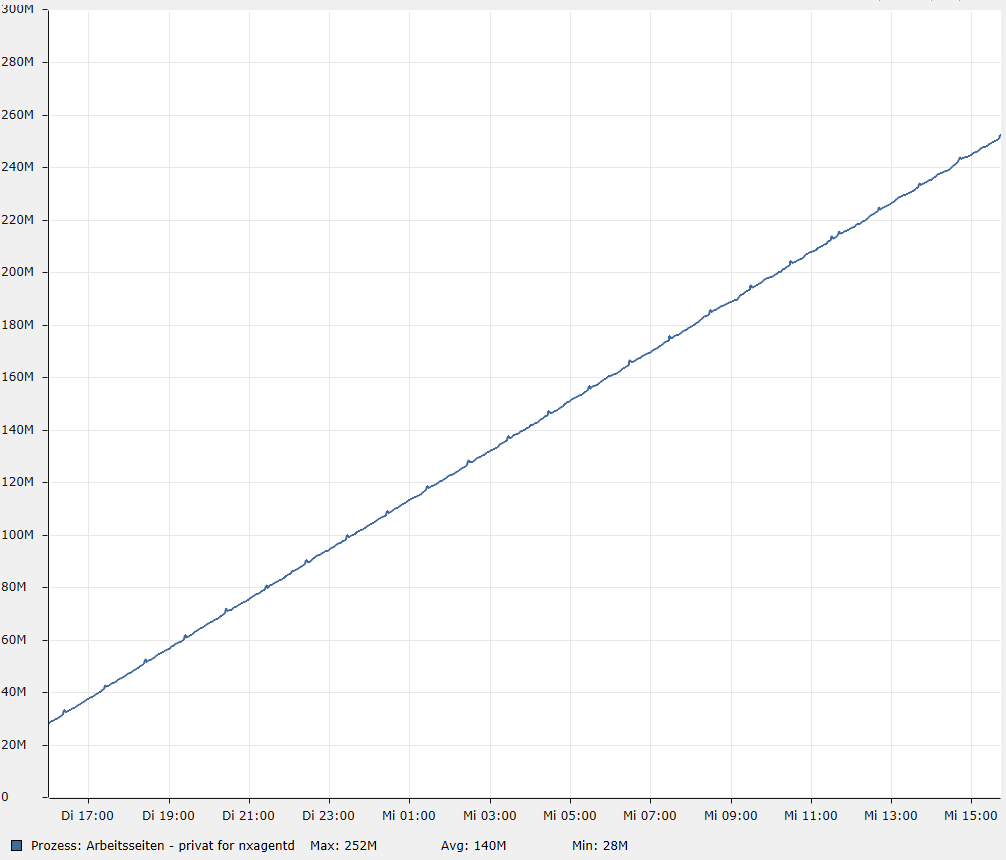
  • nxagentd.exe eating up memory, maybe related to the Oracle subclient

    8
    1
    0 Votes
    8 Posts
    28k Views
    V
    Hi, please try upgrading agent to 2.2.8. There were lot of fixes since 2.1.2. Best regards, Victor
  • Cannot access $dci from script

    5
    0 Votes
    5 Posts
    21k Views
    T
    If you are looking for a 95th percentile for all interfaces you are collecting data for, you can probably use the same type of instance discovery you are using for monitoring those interfaces to create the 95th DCIs. As part of that 95th instance discovery, you can pass parameters to the script. For example if your script is called "myScript" you could call it as "myScript("{instance}")" to pass the instance value through. That should allow you to locate the DCI to pull the data for the calculation from. Alternatively, you can configure a custom attribute on each node that lists all interfaces you care about. You can then read in that custom attribute in your script.
  • Monitor Specific Services with Netxms

    2
    0 Votes
    2 Posts
    15k Views
    V
    Hi, may be this will help you https://www.netxms.org/documentation/adminguide/log-monitoring.html
  • Monitoring Remote Networks

    4
    0 Votes
    4 Posts
    22k Views
    T
    Configure the NetXMS agent on the server as a proxy. Ensure the firewall is configured to allow SNMP connections from that server agent's IP address. Place the server and firewall in the same zone in NetXMS. Configure the server node in NetXMS as the communications proxy for that zone. That should allow you to poll the firewall via the server. You can add switches into that zone as well and they'll be polled via the server agent.
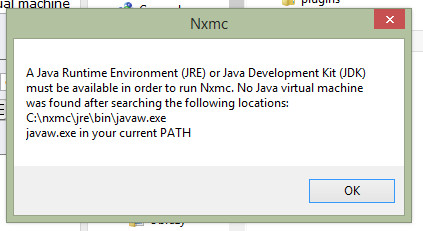
  • nxmc 1.2.11 works but 1.2.13 no java virtual machine

    3
    1
    0 Votes
    3 Posts
    25k Views
    D
    Most of the time you can fix this problem by uninstalling the Java runtime and then reinstalling it all over again. Most of the time you can fix this problem by uninstalling the Java runtime and then reinstalling it all over again. In a nutshell, the instructions show you how to make a System Variable for Java called _JAVA_OPTIONS with the value Xmx512M. This sets a global maximum heap memory size for Java. You can solve this by: Open the Control Panel Go to System Go to Advanced Systems Properties Then Environment Variables In System Variables, click Add New Variable Name: _JAVA_OPTIONS New Variable Value: -Xmx512M Click OK That's it, your Java program should now be able to execute properly. For those interested, Java -Xmx/s is the configuration parameter that control the amount of memory Java uses. Xmx sets the maximum heap memory size Xms sets the minimum heap memory size
  • WebAPI Problem (Setup for Grafana with NetXMS 2.2.7)

    Locked
    1
    1
    0 Votes
    1 Posts
    19k Views
    F
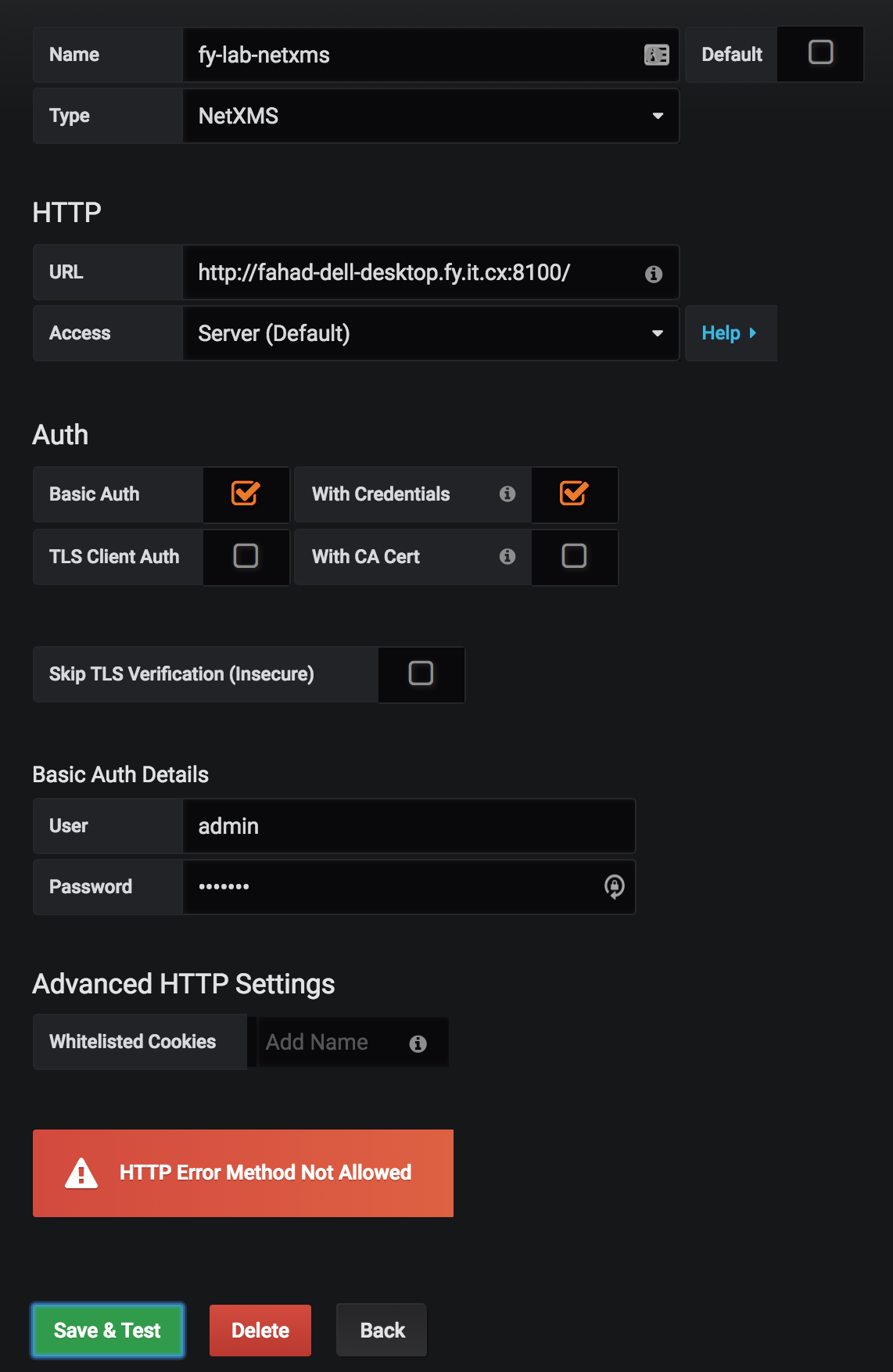
    Hi Guys. I'm having trouble setting up the WebAPI for use with Grafana (v5.2.2). When I try to setup the Data Source with the below parameters (screenshot attached): URL:    http://fahad-dell-desktop.fy.it.cx:8100/    (I have set it to use 8100 during setup. ) Access: Server (default) Basic Auth (checked) With Credentials (checked) (all SSL/TLS related options unchecked) User: admin Password: <entered correctly> I ran a packet capture on my Grafana server to capture the request and response and they are posted below: Request: POST /sessions HTTP/1.1 Host: fahad-dell-desktop.fy.it.cx:8100 User-Agent: Mozilla/5.0 (Macintosh; Intel Mac OS X 10_13_6) AppleWebKit/537.36 (KHTML, like Gecko) Chrome/69.0.3497.42 Safari/537.36 Content-Length: 0 Accept: application/json, text/plain, */* Accept-Encoding: gzip, deflate Accept-Language: en-US,en;q=0.9,fr;q=0.8 Authorization: Basic <Hash Removed form Post> Content-Type: application/json;charset=utf-8 Origin: http://ubuntu-server.fy.it.cx:3100 Referer: http://ubuntu-server.fy.it.cx:3100/datasources/edit/1 X-Forwarded-For: 192.168.100.202, 192.168.100.202 X-Grafana-Nocache: true X-Grafana-Org-Id: 1 Response HTTP/1.1 405 HTTP method POST is not supported by this URL Date: Tue, 21 Aug 2018 12:07:27 GMT Content-Type: text/html; charset=ISO-8859-1 Cache-Control: must-revalidate,no-cache,no-store Content-Length: 364 Server: Jetty(9.2.19.v20160908) <html> <head> <meta http-equiv="Content-Type" content="text/html; charset=UTF-8"/> <title>Error 405 HTTP method POST is not supported by this URL</title> </head> <body><h2>HTTP ERROR 405</h2> <p>Problem accessing /sessions. Reason: <pre> HTTP method POST is not supported by this URL</pre></p><hr><i><small>Powered by Jetty://</small></i><hr/> </body> </html> It's evident that Grafana is correctly trying to Post to the /sessions URL (as mentioned in the wiki https://wiki.netxms.org/wiki/Web_service_API) but the WebAPI is saying POST is not an allowed method for /sessions. UPDATE OK so it turns out my Web API war file wasn't set up correctnly (typo in jetty-web.xml). Fixing that resolved the issue. [image: Screen Shot 2018-08-21 at 15.07.36.png]
  • Need to reset Password in Windows base installations

    1
    0 Votes
    1 Posts
    22k Views
    R
    Hi All, I don't know whether that topic was old but need some key point to reset in widows base installation I done windows 2012 server environment NetXms instillation ,i forget the password and how i reset this has to properway. Any solution for this very appreciate I went through the some of post i am not clear about that Below i read that path and i not confidence where it would be executing,Appreciate u re full of help to this  Passwords in NetXMS are stored in hashed, not-reversible way, so there are no way to recover it, but it can be reseted. New in version 1.2.9. Use following command to reset password and unlock account: nxdbmgr resetadmin Deprecated since version 1.2.9. To reset password to installation default (“netxms”): Stop netxmsd Run nxdbmgr check to make sure that server is down and database is unlocked Create temporary file “reset.sql” with following content: UPDATE users SET   password='3A445C0072CD69D9030CC6644020E5C4576051B1',   flags=8,   grace_logins=5,   auth_method=0,   auth_failures=0,   disabled_until=0 WHERE id=0; Execute reset.sql: nxdbmgr batch reset.sql Kind Rgeards Rajeewa
  • Enabling Zones

    2
    0 Votes
    2 Posts
    25k Views
    T
    You need to set the Server Configuration variable "EnableZoning" to 1 and restart the NetXMS server. Cheers
  • netxms on mssql 2014

    5
    0 Votes
    5 Posts
    31k Views
    V
    Hi, seems to be packaging error then. Btw, it could be the reason for incorrect map display mentioned in other topic. We will fix it in upcoming 2.2.8 version (to be released within next few days). Best regards, Victor
  • Netxms rancid export script

    3
    0 Votes
    3 Posts
    21k Views
    I
    Thanks i will try. Have a nice day 
  • Agent on ubuntu 16.04 not starting

    4
    0 Votes
    4 Posts
    36k Views
    V
    Try to run configuration poll manually (right click on node, Poll, then Configuration). Check what agent will report. Best regards, Victor
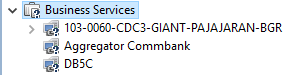
  • Unknown Node Link in bussines Services

    3
    1
    0 Votes
    3 Posts
    33k Views
    K
    @victor said in Unknown Node Link in bussines Services: Hi, Do you have any service checks below node link? They are needed to do actual service status calculation. If you have at least one, check it's status. If it's unknown most likely you have an error in check script. Best regards, Victor Hi Victor, How service checks do the calculation if Nodelink doesnt link to my main node in infrastructure ?, i think the first step before creating service checks is how we connect the nodelink to main link. if not how do it get the value ? can u show me the correct script, because i just follow what the manual guide say about create bussines services. best regards, Kevin
  • It is a question about receiving snmptrap.

    5
    0 Votes
    5 Posts
    53k Views
    M
    Hi, When notifying with V2c and Inform, we confirmed with the manufacturer that it is notified with OID different from V1. Sorry. Thank you very much for pointing out.
  • Discovery of MAC addresses

    5
    0 Votes
    5 Posts
    57k Views
    D
    Thanks StanHubble and Viktor. I was relieved to hear it's a bug and not something wrong on our network. Any ETA for 2.2.8? Kind regrads, Dan