
nxmc 1.2.11 works but 1.2.13 no java virtual machine
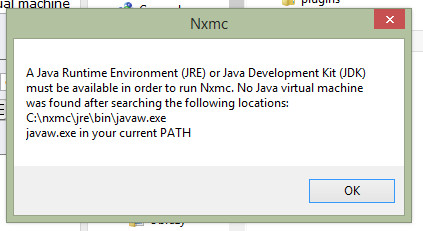
-
-
I had the same issue, if you are running a 64bit version of windows, you need to install the 64bit version of Java.
Hope this helps.
-
Most of the time you can fix this problem by uninstalling the Java runtime and then reinstalling it all over again.
Most of the time you can fix this problem by uninstalling the Java runtime and then reinstalling it all over again. In a nutshell, the instructions show you how to make a System Variable for Java called _JAVA_OPTIONS with the value Xmx512M. This sets a global maximum heap memory size for Java. You can solve this by:
Open the Control Panel
Go to System
Go to Advanced Systems Properties
Then Environment Variables
In System Variables, click Add
New Variable Name: _JAVA_OPTIONS
New Variable Value: -Xmx512M
Click OKThat's it, your Java program should now be able to execute properly.
For those interested, Java -Xmx/s is the configuration parameter that control the amount of memory Java uses.Xmx sets the maximum heap memory size
Xms sets the minimum heap memory size

Hello! It looks like you're interested in this conversation, but you don't have an account yet.
Getting fed up of having to scroll through the same posts each visit? When you register for an account, you'll always come back to exactly where you were before, and choose to be notified of new replies (either via email, or push notification). You'll also be able to save bookmarks and upvote posts to show your appreciation to other community members.
With your input, this post could be even better 💗
Register Login