
SNMP Proxy
-
Hi!
There must be some difference between sites, but it's hard to tell anything based on provided information. Can you show full agent configs from both working and non-working sites, results of configuration polls of agent nodes, and screenshots of SNMP device configuration (both working and non-working)?
Best regards,
Victor -
Hello,
working site:
Agent poll:
[01.08.2013 06:59:23] **** Poll request sent to server ****
[01.08.2013 06:59:23] Poll request accepted
[01.08.2013 06:59:23] Starting configuration poll for node s-prtg-04
[01.08.2013 06:59:23] Checking node's capabilities...
[01.08.2013 06:59:23] Checking NetXMS agent...
[01.08.2013 06:59:23] NetXMS native agent is active
[01.08.2013 06:59:23] NetXMS agent version changed to 1.2.8
[01.08.2013 06:59:23] Platform name changed to windows-x64
[01.08.2013 06:59:23] System description changed to Windows S-PRTG-04 6.1.7601 Windows Server 2008 R2 Build 7601 Service Pack 1 AMD-64
[01.08.2013 06:59:23] Reading list of available Windows Performance Counters...
[01.08.2013 06:59:25] 99 counters read
[01.08.2013 06:59:25] Checking SNMP...
[01.08.2013 07:00:21] Capability check finished
[01.08.2013 07:00:21] Checking interface configuration...
[01.08.2013 07:00:21] Interface configuration check finished
[01.08.2013 07:00:21] Checking node name
[01.08.2013 07:00:21] Node name is OK
[01.08.2013 07:00:21] Reading list of installed software packages
[01.08.2013 07:00:21] Got information about 8 installed software packages
[01.08.2013 07:00:21] Finished configuration poll for node s-prtg-04
[01.08.2013 07:00:21] Node configuration was changed after poll
[01.08.2013 07:00:21] **** Poll completed successfully ****Agent config:
MasterServers = s-netxms-01.kkrn.local
ConfigIncludeDir = C:\NetXMS\etc\nxagentd.conf.d
# LogFile = {syslog}
LogFile = C:\Temp\log.log
DebugLevel = 0
FileStore = C:\NetXMS\var
SubAgent = ecs.nsm
SubAgent = ping.nsm
SubAgent = logwatch.nsm
SubAgent = portcheck.nsm
SubAgent = winperf.nsm
SubAgent = wmi.nsm
EnableProxy = yes
EnableSNMPProxy = yesNon working site:
[01.08.2013 06:59:32] **** Poll request sent to server ****
[01.08.2013 06:59:32] Poll request accepted
[01.08.2013 06:59:32] Starting configuration poll for node s-prtg-06.kkrn.local
[01.08.2013 06:59:32] Checking node's capabilities...
[01.08.2013 06:59:32] Checking NetXMS agent...
[01.08.2013 06:59:32] NetXMS native agent is active
[01.08.2013 06:59:32] NetXMS agent version changed to 1.2.8
[01.08.2013 06:59:32] Platform name changed to windows-x64
[01.08.2013 06:59:32] System description changed to Windows S-PRTG-06 6.1.7601 Windows Server 2008 R2 Build 7601 Service Pack 1 AMD-64
[01.08.2013 06:59:32] Reading list of available Windows Performance Counters...
[01.08.2013 06:59:33] 99 counters read
[01.08.2013 06:59:33] Checking SNMP...
[01.08.2013 07:00:29] Capability check finished
[01.08.2013 07:00:29] Checking interface configuration...
[01.08.2013 07:00:29] Interface configuration check finished
[01.08.2013 07:00:29] Checking node name
[01.08.2013 07:00:29] Node name is OK
[01.08.2013 07:00:29] Reading list of installed software packages
[01.08.2013 07:00:29] Got information about 11 installed software packages
[01.08.2013 07:00:29] Finished configuration poll for node s-prtg-06.kkrn.local
[01.08.2013 07:00:29] Node configuration was changed after poll
[01.08.2013 07:00:29] **** Poll completed successfully ****MasterServers = s-netxms-01.kkrn.local
ConfigIncludeDir = C:\NetXMS\etc\nxagentd.conf.d
LogFile = c:\temp\netxms.log
DebugLevel = 0
FileStore = C:\NetXMS\var
SubAgent = ecs.nsm
SubAgent = ping.nsm
SubAgent = logwatch.nsm
SubAgent = portcheck.nsm
SubAgent = winperf.nsm
SubAgent = wmi.nsm
EnableProxy = yes
EnableSNMPProxy = yes -
Hello,
and the attachemants.
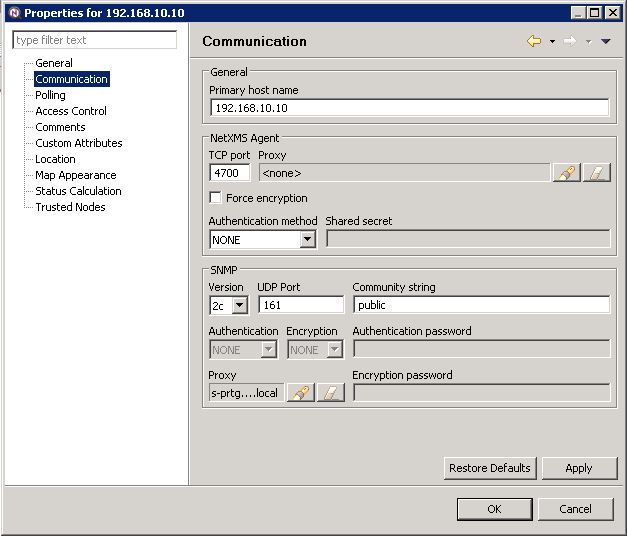
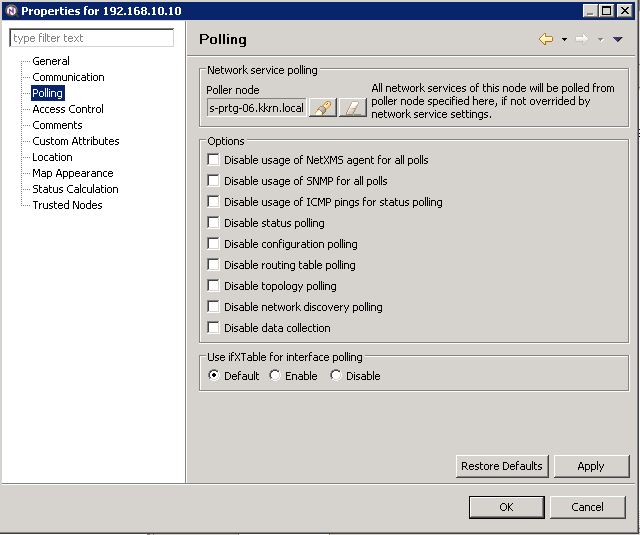
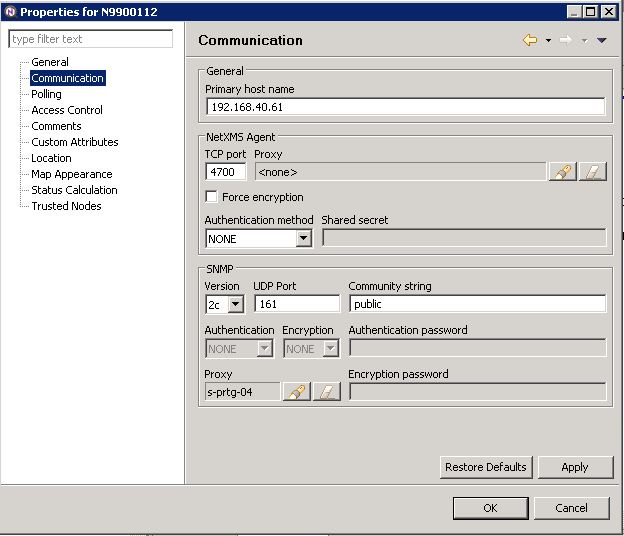
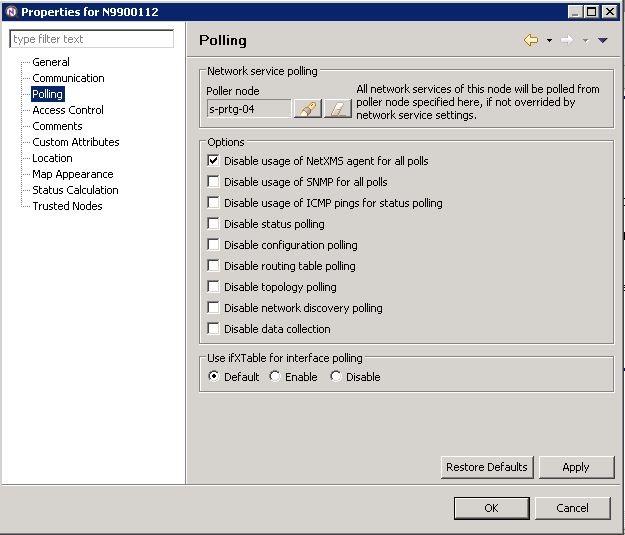
SNMP device N9900112 is working with the agent.
SNMP device 192.168.10.10 is not working.
Both HP Procurve switches. 5308XL and 5406.One question:
withe the configuration:
When i start configuration polling on 192.168.10.10, the netxms server is asking the agent "s-prtg-06" to do this, correct? Also querying snmp is started by s-prtg-06, also correct?
Is it needed to have a direct communication between the netxms server and the device 192.168.10.10?Is there a log on the netxms server like the agent log? Maybe i can see there a failure?
Regards
-
Strange, I don't see much difference between configs. Server don't need direct communication with device if proxy agent is used. What configuration poll from console shows for 192.168.10.10?
You can enable server debug log as well, edit netxmsd.conf file and set LogFile parameter to some file, and DebugLevel parameter to 5 or 6. Seeing server log can really help.Best regards,
Victor -
Hello,
i have installed netxms server on windows xp on same site.
Added my switch 192.168.10.10.
result of configuraiton poll:
[05.08.2013 11:56:03] **** Poll request sent to server ****
[05.08.2013 11:56:03] Poll request accepted
[05.08.2013 11:56:03] Starting configuration poll for node 192.168.10.10
[05.08.2013 11:56:03] Checking node's capabilities...
[05.08.2013 11:56:03] Checking NetXMS agent...
[05.08.2013 11:56:04] Checking SNMP...
[05.08.2013 11:57:16] Capability check finished
[05.08.2013 11:57:16] Checking interface configuration...
[05.08.2013 11:57:16] Unable to get interface list from node
[05.08.2013 11:57:16] Interface "unknown" is no longer exist
[05.08.2013 11:57:16] Interface configuration check finished
[05.08.2013 11:57:16] Checking node name
[05.08.2013 11:57:16] Node name is an IP address and need to be resolved
[05.08.2013 11:57:25] Node name cannot be resolved
[05.08.2013 11:57:25] **** Poll completed successfully ****[05.08.2013 11:57:25] Finished configuration poll for node 192.168.10.10
[05.08.2013 11:57:25] Node configuration was not changed after pollThe server log is attached. Maybe you can find some helpful information?
Regards
-
Hi!
Looks like switch at 192.168.10.10 does not respond to SNMP requests. I would suggest to check SNMP configuration on the switch and firewalls in between, if you have any.
Best regards,
Victor -
Hello,
i have tried the snmp test tool from paessler (http://www.paessler.com) on the windows system which is also netxms core server.
I can query snmp values (like uptime or interfaces).
This works...
Looks like an incompatibility between netxms snmp implementation and the hp device.
There is another switch with same problem. Other snmp devices are working.Is there a way to start deeper troubleshooting?
Regards
-
Hi!
It will be very helpful if you can capture packets from successful communication with snmp test tool and from unsuccessful communication with NetXMS server.
Best regards,
Victor -
Hello,
do you want capture with wireshark or something like that?
Can i send this to you directly?Regards
-
Hello,
found the problem.
The procurve switches have multiple ip adresses, because they are routing.
I have to use the switch ip which is in the same subnet as the agent.
When i query ip 192.168.10.10 from the agent and the switch replies with 172.31.0.1 netxms is not accepting the packets.
This seems to be different to most other snmp tools we use.But now it works.
Thank you.
Regards
Hello! It looks like you're interested in this conversation, but you don't have an account yet.
Getting fed up of having to scroll through the same posts each visit? When you register for an account, you'll always come back to exactly where you were before, and choose to be notified of new replies (either via email, or push notification). You'll also be able to save bookmarks and upvote posts to show your appreciation to other community members.
With your input, this post could be even better 💗
Register Login