
MTBF (Mean Time Between Failures) and MTTR (Mean Time To Repair)
-
Hi!
Key question here is how you determine if node is in a failed state. After that you can do some combination of internal DCIs and custom attributes to do calculations.
Best regards,
Victor -
-
Hi!
One possible way to implement MTBF calculation could be following:
- Assume that you have two events, one for downtime start and one for downtime end.
- We will use the following custom attributes for each node:
mtbf
mtbfTotalUptime
mtbfNumFailures
mtbfTimeUp- On downtime end, run the following script:
SetCustomAttribute($node, "mtbfTimeUp", time());- On downtime start, run the following script:
uptime = time() - GetCustomAttribute($node, "mtbfTimeUp");
mtbfNumFailures = GetCustomAttribute($node, "mtbfNumFailures");
if (mtbfNumFailures == null)
   mtbfNumFailures = 0;
mtbfNumFailures++;
mtbfTotalUptime = GetCustomAttribute($node, "mtbfTotalUptime");
if (mtbfTotalUptime == null)
   mtbfTotalUptime = 0;
mtbfTotalUptime += uptime;
mtbf = mtbfTotalUptime / mtbfNumFailures;
SetCustomAttribute($node, "mtbfNumFailures", mtbfNumFailures);
SetCustomAttribute($node, "mtbfTotalUptime", mtbfTotalUptime);
SetCustomAttribute($node, "mtbf", mtbf);
After this script execution, custom attribute "mtbf" will contain MTBF in seconds.
- If you want to see current MTBF value as DCI for the node, you can create DCI with source "Internal" and name "Dummy", and use the following transformation script:
return GetCustomAttribute($node, "mtbf");MTTR can be calculated in similar way.
Best regards,
Victor -
Hi Victor.
Thank you very much for your help.
Based on your proposal, I think that this requirement can be simplified to just two steps:-
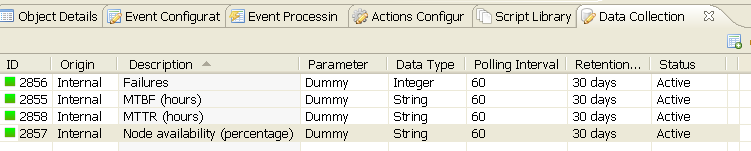
- Create a template called say "Availability" with the four DCIs shown in the image
"Availability template DCIs.png". Transformation scripts for each DCI are these
For "Failures" DCI
- Create a template called say "Availability" with the four DCIs shown in the image
return GetCustomAttribute($node, "NumFailures");
For "MTBF (hours)" DCI
return GetCustomAttribute($node, "mtbf");
For "MTTR (hours)" DCI
return GetCustomAttribute($node, "mttr");
For "Node availability (percentage)" DCI
// This script calculates MTTR, MTBF and perAvailability parameters and stores them in custom attributes
// Initialize some custom attributes the first time.
// Undefined attributes are created by SetCustomAttribute function automatically
CurrentStatus = GetDCIValue($node, FindDCIByName($node, "Status"));
PreviousState = GetCustomAttribute($node, "PreviousState");
if (PreviousState == null)
{ // In the first time, previous state is null
SetCustomAttribute($node, "PreviousState", CurrentStatus);
SetCustomAttribute($node, "TimeStamp", time());
SetCustomAttribute($node, "NumFailures", 0);
SetCustomAttribute($node, "TotalUptime", 0);
SetCustomAttribute($node, "TotalDowntime", 0);
return 100;
}// From here the 2nd and subsequent times
NumFailures = GetCustomAttribute($node, "NumFailures");
LastTime = time() - GetCustomAttribute($node, "TimeStamp");// Status is up
if (CurrentStatus == 0)
{
if (PreviousState != CurrentStatus)
{ // just changed to up
// update mttr
TotalDowntime = GetCustomAttribute($node, "TotalDowntime") + LastTime;
mttr = TotalDowntime / ((NumFailures == 0) ? 1 : NumFailures) / 3600; // to prevent division by ze
SetCustomAttribute($node, "TotalDowntime", TotalDowntime);
SetCustomAttribute($node, "mttr", mttr);
}
else
{ // still up
// update mtbf
TotalUptime = GetCustomAttribute($node, "TotalUptime") + LastTime;
mtbf = TotalUptime / ((NumFailures == 0) ? 1 : NumFailures) / 3600; // to prevent division by zero
SetCustomAttribute($node, "TotalUptime", TotalUptime);
SetCustomAttribute($node, "mtbf", mtbf);
}
}// Status is down
if (CurrentStatus == 4)
{
if (PreviousState != CurrentStatus)
{ // just changed to down
// update mtbf
NumFailures++;
TotalUptime = GetCustomAttribute($node, "TotalUptime") + LastTime;
mtbf = TotalUptime / NumFailures / 3600;
SetCustomAttribute($node, "NumFailures", NumFailures);
SetCustomAttribute($node, "TotalUptime", TotalUptime);
SetCustomAttribute($node, "mtbf", mtbf);
}
else
{ // still down
// update mttr
TotalDowntime = GetCustomAttribute($node, "TotalDowntime") + LastTime;
mttr = TotalDowntime / NumFailures / 3600;
SetCustomAttribute($node, "TotalDowntime", TotalDowntime);
SetCustomAttribute($node, "mttr", mttr);
}
}If (CurrentStatus == 0 || CurrentStatus == 4)
{
// Save previous state and timestamp
SetCustomAttribute($node, "PreviousState", CurrentStatus);
SetCustomAttribute($node, "TimeStamp", time());// perAvailability section
TotalUptime = GetCustomAttribute($node, "TotalUptime");
TotalDowntime = GetCustomAttribute($node, "TotalDowntime");
perAvailability = TotalUptime / (TotalUptime + TotalDowntime) * 100;
SetCustomAttribute($node, "perAvailability", perAvailability);return perAvailability;
}-
- Apply manually previous template to nodes required or apply this template automatically to nodes filtered by custom script (Properties -> Automatic Apply Rules).
In this way, we avoid having to define custom attributes (now created by the fourth transformation script), events, actions, event processing policy rules, etc.
In addition, the four DCIs are updated at each polling interval.
Only supports up (Normal = 0) and down (Critical = 4) node status.Best regards.
-
-
Hi Testos,
This is something that we can use for sure. Were you successful using the simplified 2 step implementation?
-Kevin C.
-
Hi!
That's really cool! I'll put this into wiki as well.
Best regards,
Victor -
-
@testos said in MTBF (Mean Time Between Failures) and MTTR (Mean Time To Repair):
millerpaint,
I apply this template to nodes that I need to know if my Internet Service Provider meets the Service Level Agreements availability contracted, ie all remote nodes.Best regads.
Hi,
is the template intended to be used on any nodes? I tried to apply it to two nodes where I have the netxms agent running, I left it running for a couple of days but I only get:
Failure 0
MTBF (hours) empty
MTTR (hours) empty
Node availability (percentage) 0Any hints on where I'm wrong?
Best regards,
Marco -
Hi!
I've found syntax error in transformation script - if statement starts with capital letter:
If (CurrentStatus == 0 || CurrentStatus == 4)
after changing it to lowercase, script seems to be working.
Best regards,
Victor -
Hi Victor!
yes, that was the problem. Thank you very much for your help!
Best regards,
Marco
Hello! It looks like you're interested in this conversation, but you don't have an account yet.
Getting fed up of having to scroll through the same posts each visit? When you register for an account, you'll always come back to exactly where you were before, and choose to be notified of new replies (either via email, or push notification). You'll also be able to save bookmarks and upvote posts to show your appreciation to other community members.
With your input, this post could be even better 💗
Register Login