Skip to content
  • Categories
  • Recent
  • Tags
  • Popular
  • Users
  • Groups
Skins
  • Light
  • Brite
  • Cerulean
  • Cosmo
  • Flatly
  • Journal
  • Litera
  • Lumen
  • Lux
  • Materia
  • Minty
  • Morph
  • Pulse
  • Sandstone
  • Simplex
  • Sketchy
  • Spacelab
  • United
  • Yeti
  • Zephyr
  • Dark
  • Cyborg
  • Darkly
  • Quartz
  • Slate
  • Solar
  • Superhero
  • Vapor

  • Default (Flatly)
  • No Skin
Collapse
Brand Logo

NetXMS Forum

  1. Home
  2. Support
  3. Instance Discovery Filter Script [SOLVED]

Instance Discovery Filter Script [SOLVED]

Scheduled Pinned Locked Moved Support
34 Posts 4 Posters 173.8k Views
  • Oldest to Newest
  • Newest to Oldest
  • Most Votes
Reply
  • Reply as topic
Log in to reply
This topic has been deleted. Only users with topic management privileges can see it.
  • V
    V
    Victor Kirhenshtein
    wrote on last edited by
    #11

    This filtering script checks that absolute value for given OID is 0. If you have non-zero value which is not changing over time, OID will pass filter but you will still get 0 as delta value. If you want to filter out any non-changing values, you should get two samples and check delta, like this:

    snmp = CreateSNMPTransport($node);
    v1 = SNMPGetValue(snmp, ".1.3.6.1.2.1.2.2.1.16." . $1);
    sleep(10000);  // sleep for 10 seconds
    v2 = SNMPGetValue(snmp, ".1.3.6.1.2.1.2.2.1.16." . $1);
    return (v2 - v1) != 0;
    

    Of course, practical use of such method is questionable and depends on your goals - you will either miss slowly changing OIDs if sleep interval is too small or make configuration polling extremely long if you have lot of instances and long sleep interval.

    Best regards,
    Victor

    1 Reply Last reply
    0
    • N
      N
      Nikk
      wrote on last edited by
      #12

      Hi,

      Yea, I thought that it could be something with non-zero values, but some of them actually are 0 values, as some ports, have never been opened.
      I'm monitoring many parameters on a lot of instances, so maybe I just delete the unnecessary instances for now 🙂
      Thank you for idea any way 😉

      Nikk

      1 Reply Last reply
      0
      • P
        P
        Percy
        wrote on last edited by
        #13

        hi,
        I tried your script from that i am able to get non zero interfaces but still there is a problem why it is giving 0 value of traffic on interfaces.
        regards
        Percy

        1 Reply Last reply
        0
        • S
          S
          sperlm
          wrote on last edited by
          #14

          Hello, I will reply here so others can try to help too.

          DESCRIPTION -interface traffic: {instance}
          PARAMETER -1.3.6.1.2.1.2.2.1.16.{instance}
          base OID to .1.3.6.1.2.1.2.2.1.16
          snmp = CreateSNMPTransport($node);
          return SNMPGetValue(snmp, ".1.3.6.1.2.1.2.2.1.16." . $1) != 0;

          Not sure if it is the problem you encountered but I had problems with this structure because there is no guarantee there will be 0 value, there can be null too so I wrote it like this:

          snmp = CreateSNMPTransport($node);
          x = SNMPGetValue(snmp, ".1.3.6.1.2.1.2.2.1.16." . $1);
          if  (x != null) return (x > 0);
          else return 0;

          p.s. does it mean you get the desired DCI with correct OID on all of your nodes but the value there is 0 or it creates unwanted DCIs with wrong OID?

          1 Reply Last reply
          0
          • P
            P
            Percy
            wrote on last edited by
            #15

            hi Sperlm,

            thank you for replying back.
            [/quote]Not sure if it is the problem you encountered but I had problems with this structure because there is no guarantee there will be 0 value, there can be null too so I wrote it like this:

            snmp = CreateSNMPTransport($node);
            x = SNMPGetValue(snmp, ".1.3.6.1.2.1.2.2.1.16." . $1);
            if  (x != null) return (x > 0);
            else return 0;[/quote]

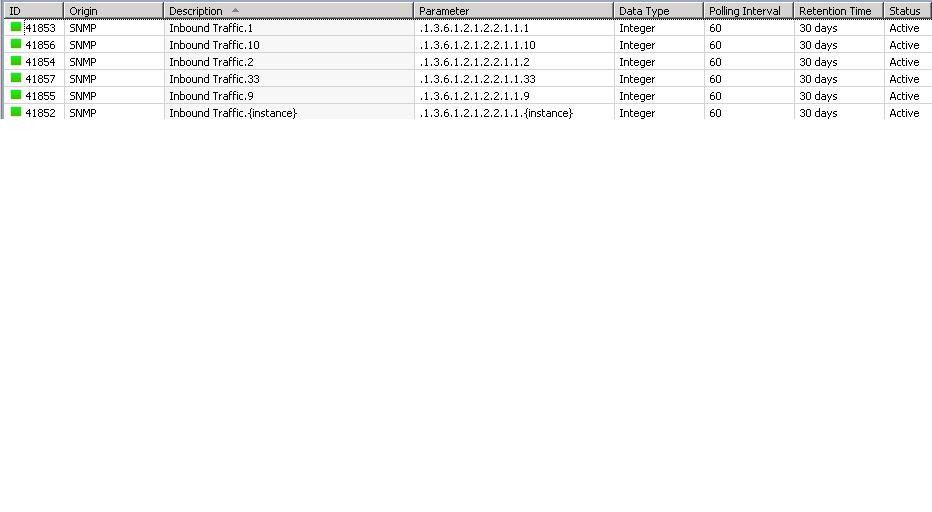
            i tried this Script on the instance discovery tab of Template than applied to Node i get the DCI for Non Zero values interfaces [ like 1,2,9,10,33] pls check on attachment but when i see the collected values for these DCI it shows 0 value...

            [/quote]p.s. does it mean you get the desired DCI with correct OID on all of your nodes but the value there is 0 or it creates unwanted DCIs with wrong OID?
            [/quote]

            yes getting 0 value. why it does not give the values of traffic on interfaces.
            Regards,
            Percy

            output.jpg

            1 Reply Last reply
            0
            • P
              P
              Percy
              wrote on last edited by
              #16

              @sperlm said in Instance Discovery Filter Script [SOLVED]:

              Hello, I will reply here so others can try to help too.

              DESCRIPTION -interface traffic: {instance}
              PARAMETER -1.3.6.1.2.1.2.2.1.16.{instance}
              base OID to .1.3.6.1.2.1.2.2.1.16
              snmp = CreateSNMPTransport($node);
              return SNMPGetValue(snmp, ".1.3.6.1.2.1.2.2.1.16." . $1) != 0;

              Not sure if it is the problem you encountered but I had problems with this structure because there is no guarantee there will be 0 value, there can be null too so I wrote it like this:

              snmp = CreateSNMPTransport($node);
              x = SNMPGetValue(snmp, ".1.3.6.1.2.1.2.2.1.16." . $1);
              if  (x != null) return (x > 0);
              else return 0;

              p.s. does it mean you get the desired DCI with correct OID on all of your nodes but the value there is 0 or it creates unwanted DCIs with wrong OID?

              @percy said in Instance Discovery Filter Script [SOLVED]:

              hi Sperlm,

              thank you for replying back.

              Not sure if it is the problem you encountered but I had problems with this structure because there is no guarantee there will be 0 value, there can be null too so I wrote it like this:

              snmp = CreateSNMPTransport($node);
              x = SNMPGetValue(snmp, ".1.3.6.1.2.1.2.2.1.16." . $1);
              if  (x != null) return (x > 0);
              else return 0;
              [/quote]
              i tried this Script on the instance discovery tab of Template than applied to Node i get the DCI for Non Zero values interfaces [ like 1,2,9,10,33] pls check on attachment but when i see the collected values for these DCI it shows 0 value...

              [/quote]

              p.s. does it mean you get the desired DCI with correct OID on all of your nodes but the value there is 0 or it creates unwanted DCIs with wrong OID?
              [/quote]
              yes getting 0 value. why it does not give the values of traffic on interfaces.
              [/quote]

              1 Reply Last reply
              0
              • S
                S
                sperlm
                wrote on last edited by
                #17

                Hi,

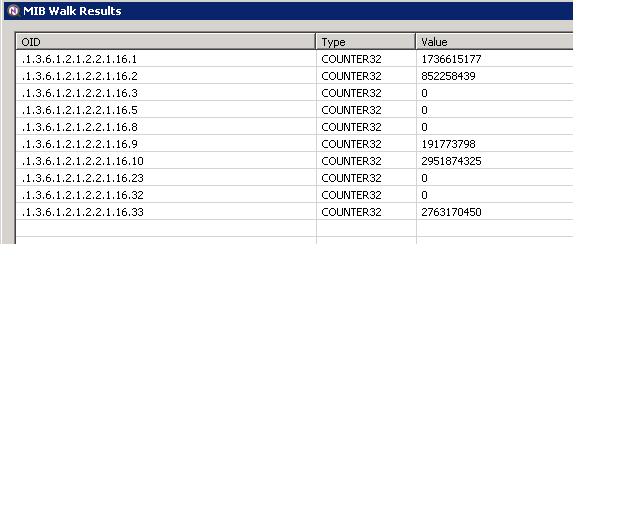
                do a snmpwalk on the device with .1.3.6.1.2.1.2.2.1.16 value.
                It should list all subsequent oids (.1.3.6.1.2.1.2.2.1.16.0, .1.3.6.1.2.1.2.2.1.16.1 etc..) with values and see if there are values in 1, 2, 9, 10, 33.

                One more thing - Instance discovery method should be SNMP Walk - OIDs (but I suppose you've got that right).

                With regards,
                Milan

                1 Reply Last reply
                0
                • P
                  P
                  Percy
                  wrote on last edited by
                  #18

                  hi,

                  yes i checked there are values . i have attached the screen shot.

                  thanks,
                  Percy


                  output.jpg

                  1 Reply Last reply
                  0
                  • S
                    S
                    sperlm
                    wrote on last edited by
                    #19

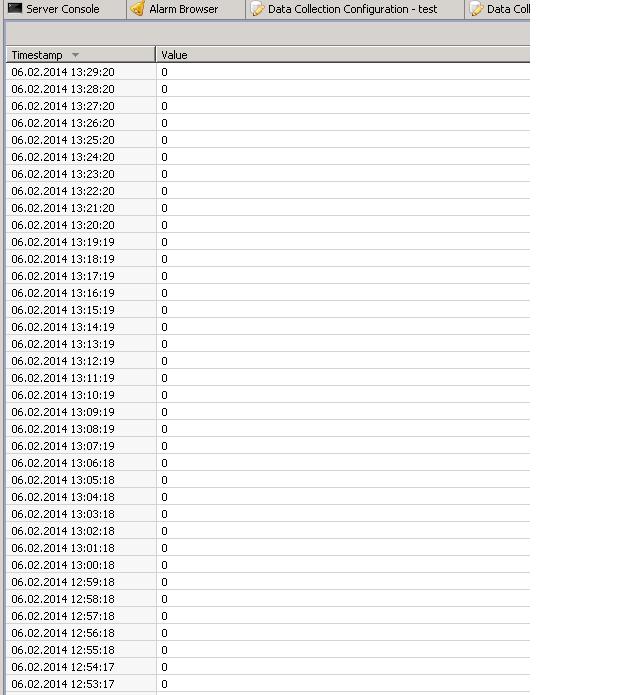
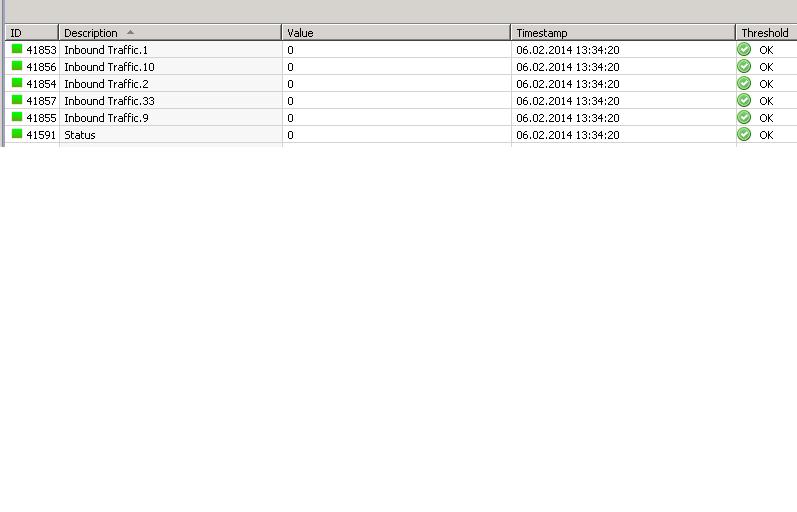
                    Can you post screenshots with the Last values (for the node) view and History (for one DCI) too ?

                    1 Reply Last reply
                    0
                    • P
                      P
                      Percy
                      wrote on last edited by
                      #20

                      hi Milan,

                      thanks for the patience posting you the screenshots for the History of the DCI for the interface 1 and last value.
                      In Delta calculation tab :- Average Delta Per minute, it is correct or will be something else ?

                      regards.
                      Percy


                      output.jpg

                      output2.jpg

                      1 Reply Last reply
                      0
                      • P
                        P
                        Percy
                        wrote on last edited by
                        #21

                        hi Sperlm..

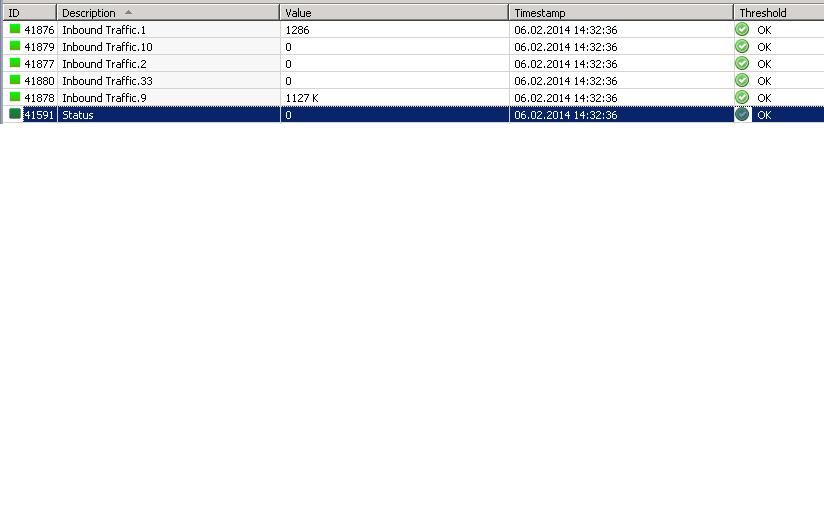
                        its working now. thanks a lot for the Support.
                        posting the Screenshots for the last values.

                        with Regards
                        Percy


                        output3.jpg

                        1 Reply Last reply
                        0
                        • S
                          S
                          sperlm
                          wrote on last edited by
                          #22

                          What was the problem if I may ask ?

                          I was also wandering what you mean by the Delta calculation tab, because only delta calculation I am aware of is in the Transformation tab...

                          1 Reply Last reply
                          0
                          • P
                            P
                            Percy
                            wrote on last edited by
                            #23

                            hi..,

                            i didn't change anything in delta calculation but a little change in this Script.

                            snmp = CreateSNMPTransport($node);
                            x = SNMPGetValue(snmp, ".1.3.6.1.2.1.2.2.1.16." . $1);
                            if  (x != null)  return x;  // you  gave  me like this return (x > 0 );
                            else return 0;

                            i am also confused how it started collecting data.  due to that change in the script or happened automatically. but still there is 0 value for the other interfaces (10,2.33) strange why it gives for 1,9 did you notice this in screenshots.

                            thank you,
                            Percy

                            1 Reply Last reply
                            0
                            • N
                              N
                              Nikk
                              wrote on last edited by
                              #24

                              @victor said in Instance Discovery Filter Script [SOLVED]:

                              Hi!

                              You actually thinking in right direction - you can use SNMPGet function to read value of each instance and determine to include it or not. Below is a working example of such approach. I use OID .1.3.6.1.2.1.2.2.1.16 (ifOutOctets) as a base. I use

                              Port traffic: {instance}

                              as description and

                              .1.3.6.1.2.1.2.2.1.16.{instance}

                              as parameter name. Correct parameter name is important, because {instance} will be the part after base OID you configure on instance discovery page, not the full OID.

                              Then, on instance discovery page, I set discovery method to "SNMP Walk - OIDs", set base OID to .1.3.6.1.2.1.2.2.1.16, and use the following filtering script:

                              snmp = CreateSNMPTransport($node);
                              return SNMPGetValue(snmp, ".1.3.6.1.2.1.2.2.1.16." . $1) != 0;

                              Now just close data collection configuration for the node and run configuration poll. You should get DCIs for all OIDs with non-zero value.

                              Best regards,
                              Victor

                              @victor said in Instance Discovery Filter Script [SOLVED]:

                              This filtering script checks that absolute value for given OID is 0. If you have non-zero value which is not changing over time, OID will pass filter but you will still get 0 as delta value.

                              So I changed from delta value to original value and i'm still getting 0 values. Absolute values all are 0s (checked with snmpwalk).
                              Where is the problem?
                              Configuration is the same, except oid is now .1.3.6.1.2.1.31.1.1.1.3. (CRCAlignErrors) where all values are 0:

                              @nikk said in Instance Discovery Filter Script [SOLVED]:

                              My parameter is:  .1.3.6.1.2.1.31.1.1.1.10.{instance}
                              and in Instance tab:
                              SNMP Walk - OID's
                               .1.3.6.1.2.1.31.1.1.1.10

                              and script:
                              snmp = CreateSNMPTransport($node);
                              return SNMPGetValue(snmp, ".1.3.6.1.2.1.31.1.1.1.10." . $1) != 0;

                              1 Reply Last reply
                              0
                              • V
                                V
                                Victor Kirhenshtein
                                wrote on last edited by
                                #25

                                Check that you really get the value with SNMPGetValue - it will return null if SNMP query fails for some reason, and null != 0, so instance that cannot be read will be accepted.

                                Best regards,
                                Victor

                                1 Reply Last reply
                                0
                                • N
                                  N
                                  Nikk
                                  wrote on last edited by
                                  #26

                                  Victor you are right, i'm receiving null values, so is there a chance to get rid of them too? I tried to add != null, but no success.

                                  1 Reply Last reply
                                  0
                                  • V
                                    V
                                    Victor Kirhenshtein
                                    wrote on last edited by
                                    #27

                                    Hi,

                                    != null should work. Can you show full script please?

                                    Best regards,
                                    Victor

                                    1 Reply Last reply
                                    0
                                    • N
                                      N
                                      Nikk
                                      wrote on last edited by
                                      #28

                                      Script looks like this:

                                      snmp = CreateSNMPTransport($node);
                                      value = SNMPGetValue(snmp, ".1.3.6.1.2.1.16.1.1.1.3." . $1);
                                      if (value != null || value != 0) return value;
                                      else return false;

                                      Maybe i just don't get it 🙂

                                      1 Reply Last reply
                                      0
                                      • S
                                        S
                                        sperlm
                                        wrote on last edited by
                                        #29

                                        Hello, just a question...

                                        IF value is 0, doesnt it automatically mean that return value is equivalent to return false ?
                                        (thus not passing the filter script)

                                        MS

                                        1 Reply Last reply
                                        0
                                        • V
                                          V
                                          Victor Kirhenshtein
                                          wrote on last edited by
                                          #30

                                          Hi!

                                          Condition (value != null || value != 0) is always true - if value is null then it will not be 0, and vise versa. Correct condition will be (value != null && value != 0), so full script could look like this:

                                          snmp = CreateSNMPTransport($node);
                                          value = SNMPGetValue(snmp, ".1.3.6.1.2.1.16.1.1.1.3." . $1);
                                          return (value != null) && (value != 0);
                                          

                                          @sperlm:

                                          you are right, returning 0 is the same as returning false.

                                          Best regards,
                                          Victor
                                          1 Reply Last reply
                                          0

                                          Hello! It looks like you're interested in this conversation, but you don't have an account yet.

                                          Getting fed up of having to scroll through the same posts each visit? When you register for an account, you'll always come back to exactly where you were before, and choose to be notified of new replies (either via email, or push notification). You'll also be able to save bookmarks and upvote posts to show your appreciation to other community members.

                                          With your input, this post could be even better 💗

                                          Register Login
                                          Reply
                                          • Reply as topic
                                          Log in to reply
                                          • Oldest to Newest
                                          • Newest to Oldest
                                          • Most Votes


                                          • Login

                                          • Don't have an account? Register

                                          • Login or register to search.
                                          Powered by NodeBB Contributors
                                          • First post
                                            Last post
                                          0
                                          • Categories
                                          • Recent
                                          • Tags
                                          • Popular
                                          • Users
                                          • Groups