
Traceroute
-
-
hi All, after digging on the forum, I finally figured out how to do that. Basically, I use ExternalParameter to implement the traceroute checking function. Here is what I did :-
-
Create a powershell script in a host, check_3hoptracert.ps1
-
In the nxagentd.conf, add this line
ExternalParameter = Check_3Hop(*): "c:\Windows\System32\WindowsPowerShell\v1.0\powershell.exe" "D:\netxms-agent\bin\check_3hoptracert.ps1" $1 $2 $3 $4
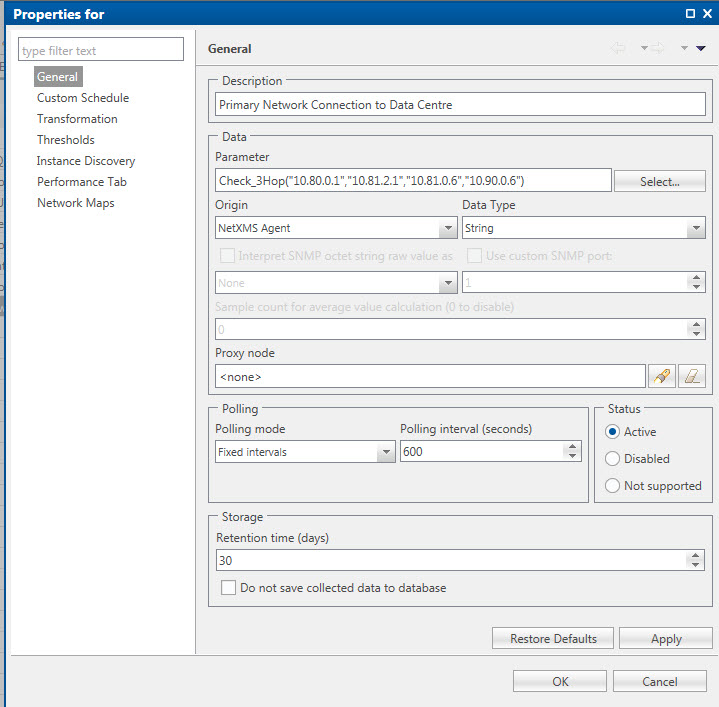
- In NetXMS console, add a DCI per the screen attached.
Please make sure the AgentCommandTimeout specified in server configuration and exectimeout specified in nxagentd.conf are large enough to execute the script.
I hope this can help someone in the future. Thanks!
check_3hoptracert.ps1
===============
# This script is to check whether the first 3 hops of a traceroute is the same as the specifed ip addresses
# Return "OK" if same; otherwise "Changed"
#
# Usage : check_3hoptracert hostname 1st-hop 2nd-hop 3rd-hop
#
# Written by Pedro on 29/5/2014# Get arguments
$hostname = $args[0]
$ip1 = $args[1]
$ip2 = $args[2]
$ip3 = $args[3]# Run traceroute
tracert -d $hostname > c:\temp\tracert.txt# Get 1st hop
$hop1 = get-content c:\temp\tracert.txt | select-object -skip 3 | select-object -First 1 | % { $_.substring(32,9); }
#write-host $hop1 " " $ip1
if ( $hop1 -ne $ip1 ) { write-host "Changed"; EXIT 0; }# Get 2nd hop
$hop2 = get-content c:\temp\tracert.txt | select-object -skip 4 | select-object -First 1 | % { $_.substring(32,9); }
#write-host $hop2
if ( $hop2 -ne $ip2 ) { write-host "Changed"; EXIT 0; }# Get 3rd hop
$hop3 = get-content c:\temp\tracert.txt | select-object -skip 5 | select-object -First 1 | % { $_.substring(32,9); }
#write-host $hop3
if ( $hop3 -ne $ip3 ) { write-host "Changed"; EXIT 0; }# The traceroute result is the same as specified
write-host "OK"
del c:\temp\tracert.txt
EXIT 1
-
Hello! It looks like you're interested in this conversation, but you don't have an account yet.
Getting fed up of having to scroll through the same posts each visit? When you register for an account, you'll always come back to exactly where you were before, and choose to be notified of new replies (either via email, or push notification). You'll also be able to save bookmarks and upvote posts to show your appreciation to other community members.
With your input, this post could be even better 💗
Register Login