Skip to content
  • Categories
  • Recent
  • Tags
  • Popular
  • Users
  • Groups
Skins
  • Light
  • Brite
  • Cerulean
  • Cosmo
  • Flatly
  • Journal
  • Litera
  • Lumen
  • Lux
  • Materia
  • Minty
  • Morph
  • Pulse
  • Sandstone
  • Simplex
  • Sketchy
  • Spacelab
  • United
  • Yeti
  • Zephyr
  • Dark
  • Cyborg
  • Darkly
  • Quartz
  • Slate
  • Solar
  • Superhero
  • Vapor

  • Default (Flatly)
  • No Skin
Collapse
Brand Logo

NetXMS Forum

  1. Home
  2. Support
  3. Adding memory use alarm to NetXms

Adding memory use alarm to NetXms

Scheduled Pinned Locked Moved Support
10 Posts 2 Posters 46.4k Views
  • Oldest to Newest
  • Newest to Oldest
  • Most Votes
Reply
  • Reply as topic
Log in to reply
This topic has been deleted. Only users with topic management privileges can see it.
  • G
    G
    Gray
    wrote on last edited by
    #1

    Hi,

    I would like to add new alarm node to Netxms.
    Alarm shoud alert me when router have high percentage of memory.

    I found three OIDs that i probalby use:

    para1 = memTotalReal.0 .1.3.6.1.4.1.2021.4.3
    para2 = 2memAvailReal.0 .1.3.6.1.4.1.2021.4.6
    para3 = memCached.0 .1.3.6.1.4.1.2021.4.15

    static:
    max_ram_value = 0.9

    My function shoud work when:
    if
    (para2 + para3) / para1 >= max_ram_value
    then
    SEND_ALERT

    How to implemet tomething like that in Netxms?

    Thx in advance!

    1 Reply Last reply
    0
    • V
      V
      Victor Kirhenshtein
      wrote on last edited by
      #2

      Hi,

      there are different ways to implement this. One could be to create DCI with origin "Internal" and parameter name "Dummy" (it will just generate 0 at given intervals), give it meaningful description like "Memory usage", and in transformation script read necessary SNMP values and do the computation. Transformation script cold look like following:

      snmp = CreateSNMPTransport($node);
      total = SNMPGetValue(snmp, ".1.3.6.1.4.1.2021.4.3");
      avail = SNMPGetValue(snmp, ".1.3.6.1.4.1.2021.4.6");
      cached = SNMPGetValue(snmp, ".1.3.6.1.4.1.2021.4.15");
      return (avail + cached) / total;
      

      Then you can add threshold "more then 0.9" or any other as usual.

      Best regards,
      Victor

      1 Reply Last reply
      0
      • G
        G
        Gray
        wrote on last edited by
        #3

        Thx Victor!

        I setup DCI origin and script with you instruction.
        I run test script and get value about 0.25.

        Then i setup  threshold:
        Last pooled value: 1
        > greater then: 0.2

        Activation event:
        SYS_THRESHOLD_REACHED

        And apply changes.
        But this settings don't generate alarm to me.
        What i do wrong?

        Thx!

        EDIT:
        I looked in into DCI history and all values are 0, how to "insert" value from script?
        SOLVED: I changed Data type on Floating Point Number 😉

        EDIT TWO:
        In Object Details of chosen node i see that threshold is exceed my value, but alarm is not generated.

        1 Reply Last reply
        0
        • V
          V
          Victor Kirhenshtein
          wrote on last edited by
          #4

          Hi!

          Did you add a rule to generate alarm? Having threshold will only generate you an event - you have to add a rule to event processing policy to make alarm from it. See Event Processing section in user manual for more information.

          Best regards,
          Victor

          1 Reply Last reply
          0
          • G
            G
            Gray
            wrote on last edited by
            #5

            Hi!

            There is my working process:

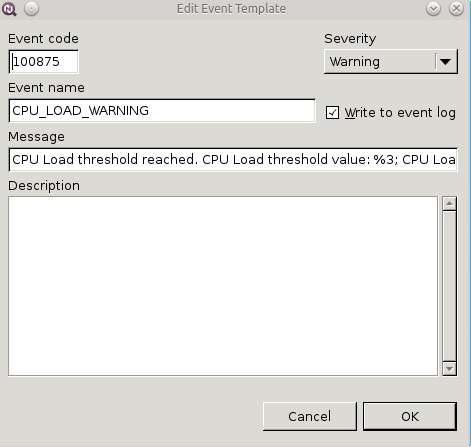
            1. Create 3 events - normal/warning/critical
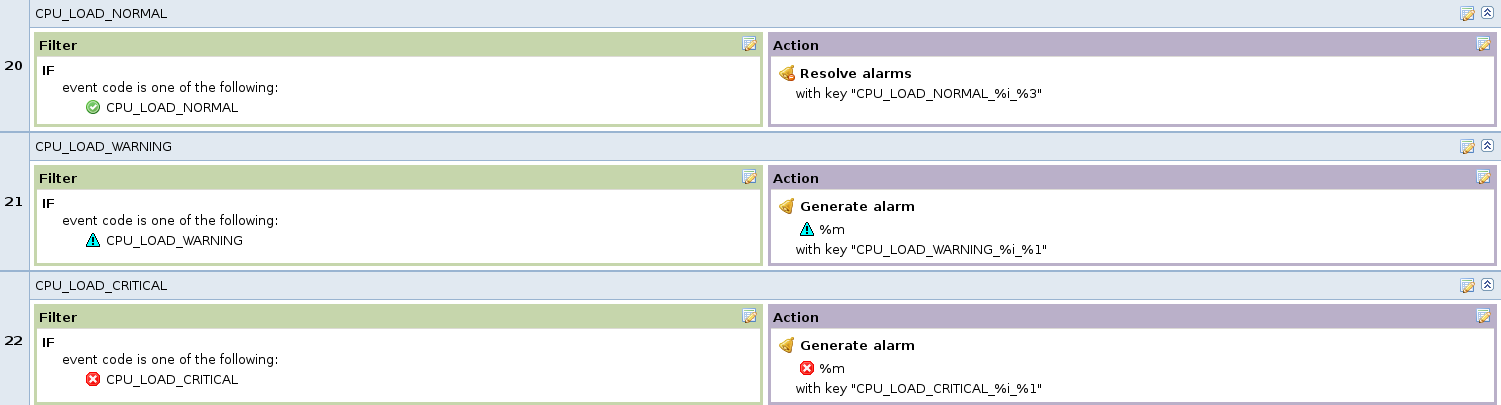
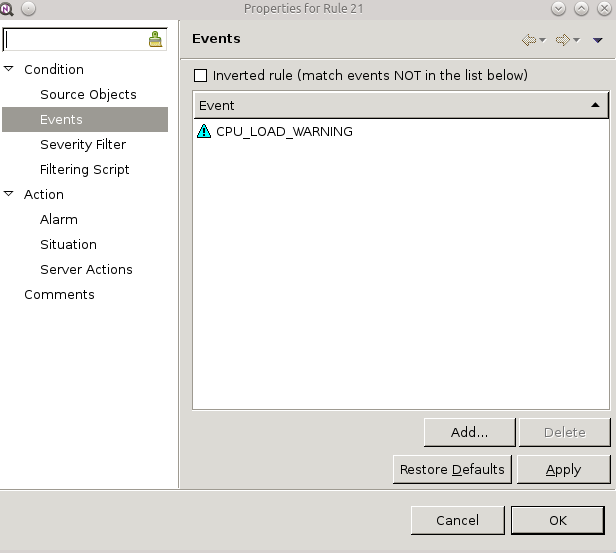
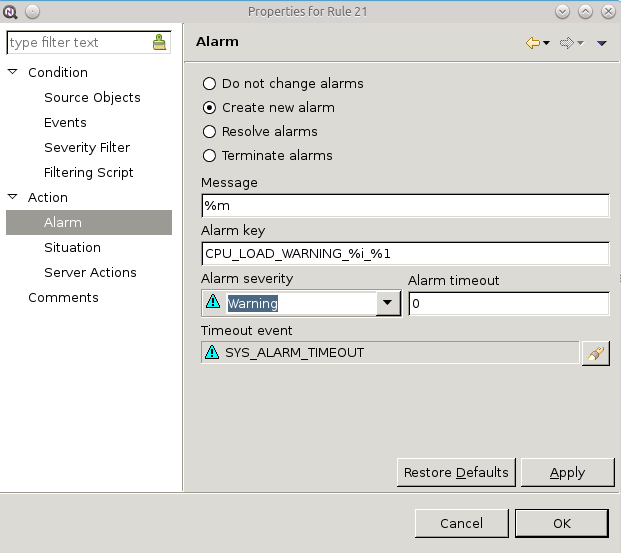
            2. Creating 3 event processing policys - normal/warning/critical and linked they with event. Policys have structure: IF my_event THEN Action generate/resolve alarm.
            3. On nodes Data Collector Configuration in Threshold section i create two Thresholds - iIF my_value THEN my_event.

            When i check node Last Value i see that my_value is greater that threshold, so alarm should generate.
            Yesterday those alarm didn't work, but today suddenly alarmed me. I don't do anything (i think so).

            Today i create new DCC parameter, same way as described above and setup values to generate alarms.
            I see event exceeds my_value but don't generate alarms.

            What i do wrong?

            Thx!

            1 Reply Last reply
            0
            • V
              V
              Victor Kirhenshtein
              wrote on last edited by
              #6

              Hi!

              Likely some sobtle error in configuration. By description everything looks correct. Can you share screenshot of exact configuration - maybe I'll spot the problem.

              Best regards,
              Victor

              1 Reply Last reply
              0
              • G
                G
                Gray
                wrote on last edited by
                #7

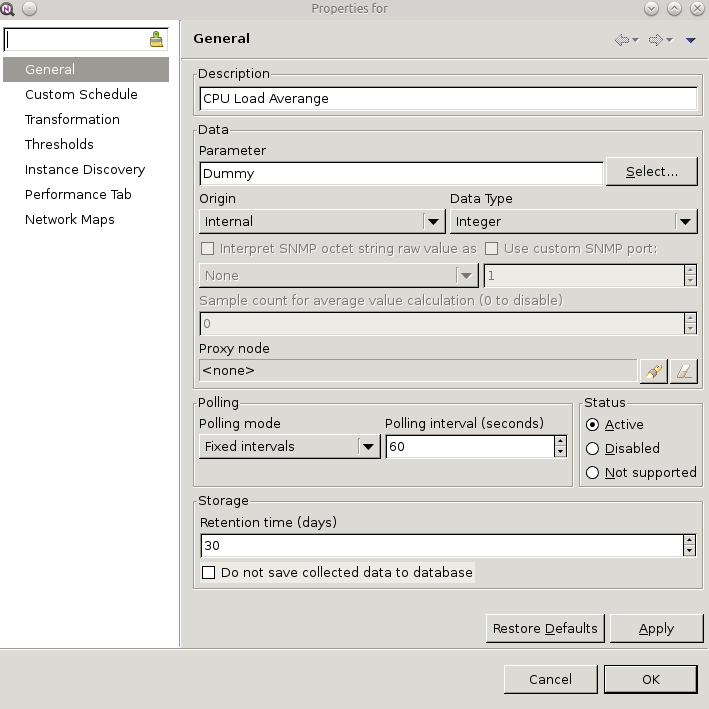
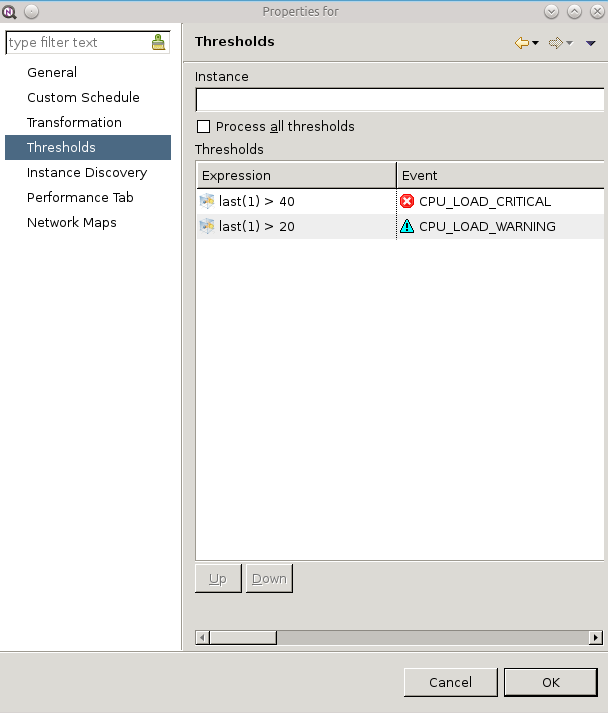
                First 5 screens.

                I try do it in order.


                Netxms1.png

                Netxms2.png

                Netxms3.png

                Netxms4.png

                Netxms5.png

                1 Reply Last reply
                0
                • G
                  G
                  Gray
                  wrote on last edited by
                  #8

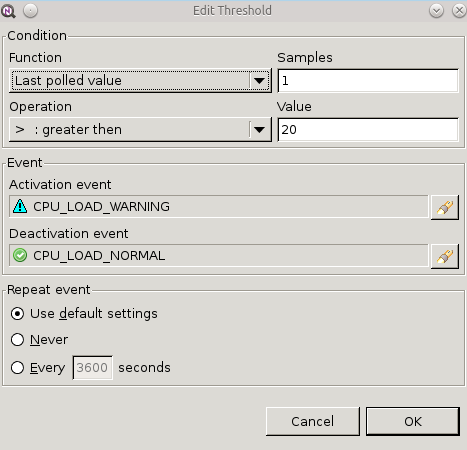
                  Part two.

                  I hope that helps.


                  Netxms6.png

                  Netxms7.png

                  Netxms8.png

                  Netxms9.png

                  1 Reply Last reply
                  0
                  • V
                    V
                    Victor Kirhenshtein
                    wrote on last edited by
                    #9

                    There are error in configuration, but it should not prevent alarm generation.

                    Can it be that you define threshold for DCI and only after define rule in event processing policy? In that case threshold violation event might be created before you define handling rule. You can check this by setting repeat interval in threshold - then it will repeat threshold violation event.

                    As for error I mention - you probably want to resolve existing alarm by "normal" event? If yes, then it will not work that way 🙂 Problem is with alarm keys - resolve find alarm to resolve by key, but you specify different key in resolve rule than in alarm creation rule. This could be reduced to two rules:

                    1. Generate alarm from events CPU_LOAD_WARNING or CPU_LOAD_CRITICAL, with severity "from event" and key "CPU_LOAD_%i_%5".

                    2. Resolve alarm from event CPU_LOAD_NORMAL by key "CPU_LOAD_%i_%3".

                    Notice difference in key - %5 vs %3 - for historical reasons DCI ID is parameter number 3 for threshold rearm events and number 5 for threshold violation event.

                    Best regards,
                    Victor

                    1 Reply Last reply
                    0
                    • G
                      G
                      Gray
                      wrote on last edited by
                      #10

                      Hi again.

                      I have mess in my configuration, can't be for 100?% sure in what order i create things.
                      I setup repeating in threshold and it works great.

                      I fix my configuration using your advice and it works!
                      Problem SOLVED.

                      Thx Victor!

                      1 Reply Last reply
                      0

                      Hello! It looks like you're interested in this conversation, but you don't have an account yet.

                      Getting fed up of having to scroll through the same posts each visit? When you register for an account, you'll always come back to exactly where you were before, and choose to be notified of new replies (either via email, or push notification). You'll also be able to save bookmarks and upvote posts to show your appreciation to other community members.

                      With your input, this post could be even better 💗

                      Register Login
                      Reply
                      • Reply as topic
                      Log in to reply
                      • Oldest to Newest
                      • Newest to Oldest
                      • Most Votes


                      • Login

                      • Don't have an account? Register

                      • Login or register to search.
                      Powered by NodeBB Contributors
                      • First post
                        Last post
                      0
                      • Categories
                      • Recent
                      • Tags
                      • Popular
                      • Users
                      • Groups