
LDAP Sync: Syncing only Group
-
Hello,
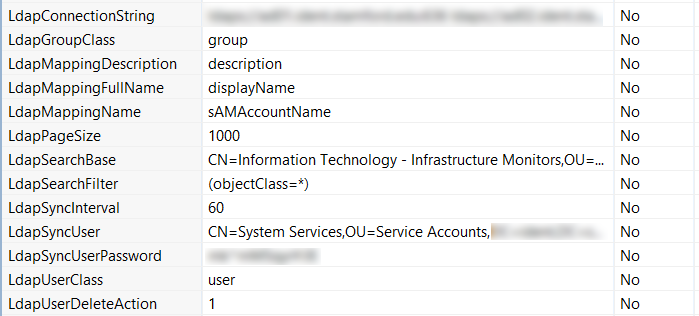
I've setup LDAP sync and it looks like NetXMS is able to connect and fetch data. While it seems to be able to read both group and it's members, it's creating only the group in NetXMS. Here's an excerpt from the debug log:[12-Jun-2015 15:14:05.178] [DEBUG] LDAPConnection::initLDAP(): Connecting to LDAP server [12-Jun-2015 15:14:05.354] [DEBUG] LDAPConnection::fillLists(): Found entry count: 1 [12-Jun-2015 15:14:05.354] [DEBUG] LDAPConnection::fillLists(): Found dn: CN=Information Technology - Infrastructure Monitors,OU=Information Technology,OU=Staff,OU=xxx1,DC=mycompany [12-Jun-2015 15:14:05.354] [DEBUG] LDAPConnection::fillLists(): member: CN=a1,OU=Information Technology,OU=Staff,OU=xxx1,DC=mycompany [12-Jun-2015 15:14:05.354] [DEBUG] LDAPConnection::fillLists(): member: CN=a2,OU=Information Technology,OU=Staff,DC=mycompany [12-Jun-2015 15:14:05.354] [DEBUG] LDAPConnection::fillLists(): member: CN=a3,OU=Information Technology,OU=Staff,OU=xxx1,DC=mycompany [12-Jun-2015 15:14:05.354] [DEBUG] LDAPConnection::fillLists(): member: CN=a4,OU=Information Technology,OU=Staff,OU=xxx2,DC=mycompany [12-Jun-2015 15:14:05.354] [DEBUG] LDAPConnection::fillLists(): Group added: dn: CN=Information Technology - Infrastructure Monitors,OU=Information Technology,OU=Staff,OU=xxx1,DC=mycompany [12-Jun-2015 15:14:05.354] [DEBUG] LDAPConnection::closeLDAPConnection(): Disconnect form LDAP server [12-Jun-2015 15:14:05.355] [DEBUG] SyncGroupMembers(): Sync for group: CN=Information Technology - Infrastructure Monitors,OU=Information Technology,OU=Staff,OU=xxx1,DC=mycompany [12-Jun-2015 15:14:05.355] [DEBUG] UpdateLDAPGroup(): Group added: dn: CN=Information Technology - Infrastructure Monitors,OU=Information Technology,OU=Staff,OU=xxx1,DC=mycompanyMy LDAP settings are attached in a screenshot here.
Any idea where I'm going wrong?
-
Hi,
problem is that you set search base to group object itself, so NetXMS reads only that group object (you can see hint on this in line "Found entry count: 1" - it means that only one matching object was found). You have to set search base to OU=Information Technology,OU=Staff,OU=xxx1,DC=mycompany. If you want to import only users that are member of that group, you should control it with LDAP search filter.
Best regards,
Victor -
Thank you very much Victor. I was able to follow your example and pointing the search base to the OU did the trick. However, I'm running into another issue now. Here's how my org is structured:
Org
|
|- Location A (OU)
|        |__ Staff
|                  |__ IT
|                  |__ Dept. A
|                  |__ Dept. B
|
|- Location B (OU)
|        |__ Staff
|                  |__ IT
|                  |__ Dept. A
|                  |__ Dept. B
As you can see - our OU structure is mirrored across multiple locations. Right now, my LdapSearchFilter for NetXMS points to the IT OU < Staff < Location A. I want it to be able to pull data from IT OU under Location B as well. How do I achieve that?
Thank you,
Sourjya -
Hi,
the you have to set search base to the top of the tree, and filter out non-IT users in LDAP search filter. Filter to include only users from IT OUs could look like following (not tested):
(ou:dn:=Information Technology)I took the OU name from log posted earlier: "CN=a1,OU=Information Technology,OU=Staff,OU=xxx1,DC=mycompany".
Here is more information on such filtering: http://help.globalscape.com/help/eft6/Advanced_LDAP_Filtering.htm.
Best regards,
Victor
Hello! It looks like you're interested in this conversation, but you don't have an account yet.
Getting fed up of having to scroll through the same posts each visit? When you register for an account, you'll always come back to exactly where you were before, and choose to be notified of new replies (either via email, or push notification). You'll also be able to save bookmarks and upvote posts to show your appreciation to other community members.
With your input, this post could be even better 💗
Register Login