Skip to content
  • Categories
  • Recent
  • Tags
  • Popular
  • Users
  • Groups
Skins
  • Light
  • Brite
  • Cerulean
  • Cosmo
  • Flatly
  • Journal
  • Litera
  • Lumen
  • Lux
  • Materia
  • Minty
  • Morph
  • Pulse
  • Sandstone
  • Simplex
  • Sketchy
  • Spacelab
  • United
  • Yeti
  • Zephyr
  • Dark
  • Cyborg
  • Darkly
  • Quartz
  • Slate
  • Solar
  • Superhero
  • Vapor

  • Default (Flatly)
  • No Skin
Collapse
Brand Logo

NetXMS Forum

  1. Home
  2. Support
  3. Best Practice to analyse event "SYS_THREAD_HANG"?

Best Practice to analyse event "SYS_THREAD_HANG"?

Scheduled Pinned Locked Moved Support
17 Posts 5 Posters 119.9k Views
  • Oldest to Newest
  • Newest to Oldest
  • Most Votes
Reply
  • Reply as topic
Log in to reply
This topic has been deleted. Only users with topic management privileges can see it.
  • U
    U
    Andreas@rc
    wrote on last edited by
    #4

    Hi,

    I'm facing the same problem. NetXMS started with this recently. Sometimes the server seems able to recover, but still ... this is not good.

    I'm running version 1.2.17 on a Windows 2008R2 64-bit, with a MSSQL DB on a different server.

    netxmsd: sh que
    Condition poller                 : 0
    Configuration poller             : 0
    Topology poller                  : 0
    Data collector                   : 0
    Database writer                  : 0
    Database writer (IData)          : 0
    Database writer (raw DCI values) : 0
    Event processor                  : 0
    Network discovery poller         : 0
    Node poller                      : 0
    Routing table poller             : 0
    Status poller                    : 0
    Syslog processing                : 0
    Syslog writer                    : 0
    

    What's the recommended debug level to help to resolve this issue?
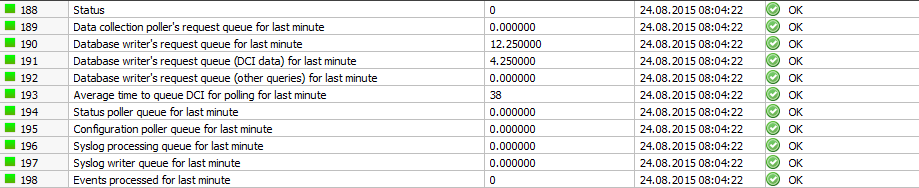

    NetXMS_Server.PNG

    NetXMS_Event.PNG

    1 Reply Last reply
    0
    • T
      T
      tomaskir
      wrote on last edited by
      #5

      1.2.17 has a few bugs that can cause this.

      I really recommend you try 2.0-RC1, it has a lot of fixes and optimizations that will probably fix this for you.

      1 Reply Last reply
      0
      • Dani@M3TU
        Dani@M3TU
        Dani@M3T
        wrote on last edited by
        #6

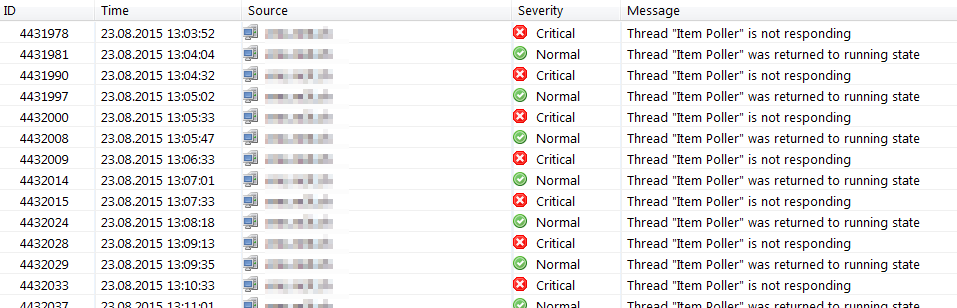
        We see this problem also again, here on V2.0-RC1 on Linux x64.


        eventlog.png

        1 Reply Last reply
        0
        • U
          U
          Andreas@rc
          wrote on last edited by
          #7

          As a workaround, i increased the polling interval (from 60->120 sec) for most of the DCIs.

          No thread hang so far, but still a bit early to celebrate.

          Size of my setup:

          Total number of objects:     17788
          Number of monitored nodes:   401
          Number of collectable DCIs:  2959
          
          1 Reply Last reply
          0
          • U
            U
            Andreas@rc
            wrote on last edited by
            #8

            @user55116 said in Best Practice to analyse event "SYS_THREAD_HANG"?:

            As a workaround, i increased the polling interval (from 60->120 sec) for most of the DCIs.

            No thread hang so far, but still a bit early to celebrate.

            Size of my setup:

            Total number of objects:     17788
            Number of monitored nodes:   401
            Number of collectable DCIs:  2959
            

            Well, the error occurs every week now, not whenever the server feels like it, only I partially success. I can now schedule a restart to prevent this from happening, but I would still prefer a proper solution.

            1 Reply Last reply
            0
            • Dani@M3TU
              Dani@M3TU
              Dani@M3T
              wrote on last edited by
              #9

              We also have no solution yet.

              1 Reply Last reply
              0
              • V
                V
                Victor Kirhenshtein
                wrote on last edited by
                #10

                Hi,

                when you encounter hang next time, could you please capture process state using following instruction?

                1. Check netxmsd PID
                2. Run

                gdb netxmsd

                (use full path if necessary). It will show (gdb) prompt.

                1. Within gdb run

                attach <netxmsd_pid>

                it should show (gdb) prompt again.

                4.  Run

                thread apply all bt

                and send me the output (could be quite long, so make sure you have adequate buffer length in terminal).

                1. Run

                detach

                to detach from netxmsd and let it run.

                Best regards,
                Victor

                1 Reply Last reply
                0
                • Dani@M3TU
                  Dani@M3TU
                  Dani@M3T
                  wrote on last edited by
                  #11

                  Hi Victor

                  Here the output.

                  thanks
                  Dani


                  putty.log

                  1 Reply Last reply
                  0
                  • V
                    V
                    Victor Kirhenshtein
                    wrote on last edited by
                    #12

                    Hi,

                    from the trace I see that server is blocked on reading one of Service.Check(...) parameters (and I see there are lot of them) which probably takes some time to complete. As DCI is locked when it is being polled, when item poller thread attempts to access this DCI it locks, and so watchdog warning is triggered.
                    Actually new feature called "agent side DCI cache" introduced in 2.0-RC1 can help - you can turn on agent cache for those DCIs (or all DCIs). This will switch then from polling mode to push mode, thus eliminating long locks on server side.

                    Best regards,
                    Victor

                    1 Reply Last reply
                    0
                    • Dani@M3TU
                      Dani@M3TU
                      Dani@M3T
                      wrote on last edited by
                      #13

                      Hi Victor

                      Thanks you for your analyse.
                      I changed all 'Service-Check'-DCIs to Agent Cache Mode = ON (are all DCIs with Soucre-node = NetXMS server). Seems to be the solution (ok a little bit early for all-clear)!

                      Is this feature fully implemented now in V2.0-RC1?
                      Is there also a disadvantage of Cache-mode=on or is it ok to change all agent-DCIs to cache-mode=on?
                      What are the possible values for server configuration variable "DefaultAgentCacheMode"? I couldn't found it in the Wiki.
                      Is there a short documentation of the agent-cache-mode feature?

                      thanks
                      Dani

                      1 Reply Last reply
                      0
                      • Dani@M3TU
                        Dani@M3TU
                        Dani@M3T
                        wrote on last edited by
                        #14

                        Is there a documentation of the cache feature?
                        There are 3 level for this feature:

                        1. server default setting 'DefaultAgentCacheMode' (which number is which setting?)
                        2. settings on the agent (on, off, default, is default the setting from the server settings?
                        3. settings on the individual DCI (on, off, default)

                        Are there limitations with V2.0-RC2?

                        thanks
                        Dani

                        1 Reply Last reply
                        0
                        • V
                          V
                          Victor Kirhenshtein
                          wrote on last edited by
                          #15

                          Hi,

                          it should be fully functional in 2.0-RC2. We will update documentation soon. In short:

                          1. DefaultAgentCacheMode can be either 1 (on) or 2 (off);
                          2. agent level "default" means using DefaultAgentCacheMode settings;
                          3. DCI level "default" means using agent level settings.

                          Best regards,
                          Victor

                          1 Reply Last reply
                          0
                          • B
                            B
                            Borgso
                            wrote on last edited by
                            #16

                            Sorry for necroing this topic, we have the same issue and just upgraded to 2.0.3 we are now able to use this AgentCache function.

                            On Source node, there is a script polling custom Services for values.
                            Without agent cache this would give 1 poll each second, with cache on it polls much more within one second.
                            But it does not save any data to DCI history, do "Origin" need to be "Push" and not "NetXMS agent" when AgentCache function is On?

                            Is this function the reason of SQLite requirment on agent and are there any agent side configuration needed (ie db location)?

                            1 Reply Last reply
                            0
                            • V
                              V
                              Victor Kirhenshtein
                              wrote on last edited by
                              #17

                              No, origin need to be "NetXMS agent". Yes, this is the main reason why agent needs SQLite. Usually no additional configuration required, agent will create local database in reasonable location ($install_prefix/var/lib/netxms if built from sources, /var/lib/netxms if installed from deb package).
                              There is a bug in 2.0.3 (fixed in 2.0.4) that cached mode actually works only for servers listed as MasterServers in agent configuration.

                              Best regards,
                              Victor

                              1 Reply Last reply
                              0

                              Hello! It looks like you're interested in this conversation, but you don't have an account yet.

                              Getting fed up of having to scroll through the same posts each visit? When you register for an account, you'll always come back to exactly where you were before, and choose to be notified of new replies (either via email, or push notification). You'll also be able to save bookmarks and upvote posts to show your appreciation to other community members.

                              With your input, this post could be even better 💗

                              Register Login
                              Reply
                              • Reply as topic
                              Log in to reply
                              • Oldest to Newest
                              • Newest to Oldest
                              • Most Votes


                              • Login

                              • Don't have an account? Register

                              • Login or register to search.
                              Powered by NodeBB Contributors
                              • First post
                                Last post
                              0
                              • Categories
                              • Recent
                              • Tags
                              • Popular
                              • Users
                              • Groups