
Questions about event log and netxagentd.log
-
Hi all,
2 short questions:
Is it somehow possible to leave events longer in the database than the retention time is configured at the DCI? I don't want to set the retention time too high, because of growing of the database. But if only the events would be saved, the growing should not be that high.
Is it possible to take a quick look at the netxagentd.log file within the NetXMS Management Console? Similar to the "Edit agent's configuration file" function. I have some nodes with the "Communication session broken: A request to send or receive data..." warning. To isolate the reason for this warning I want to take a quick look on which nodes this is happening (without mapping drives or logging on via mstsc).
I haven't found these functions, but I use NetXMS not for such a long time, so maybe there are some options.
As always any help/ideas are welcome

Bye
Heimo -
-
Event log ("event_log" table) have it's own retention time and it's completely independent from DCI history.
Retention time is controlled by server parameter "EventLogRetentionTime". Default value is 90 days. -
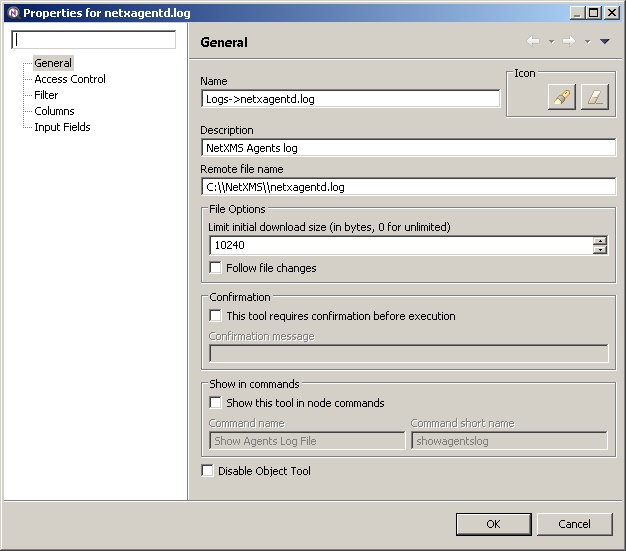
Two options: create object tool with type "Download" pointing to server's log (enabled "follow changed", if desired), or enabled filemgr subagent on the agent and use file manager functionality for that.
http://netxms.readthedocs.org/projects/admin/en/latest/object-management.html#download-file
http://netxms.readthedocs.org/projects/admin/en/latest/remote-file-management.html -
-
Hi Alex,
Thanks for the quick response.
Question 1: Perfect, I set the retention time of some DCIs also to 90 therefore I though there is a connection
Question 2: I tried it with the file download function, but for any reason the download doesn't stop resp. I get no file. In the right bottom corner, I see a progress bar with additional text "Download file from agent", but nothing happens (also if I cancel the operation).
Bye
Heimo
-
Hi all,
I'm still fighting with the object tools type download. After setting the debug level on the NetXMS server to 9 I see an "Error 400: Unknown command" in the netxmsd.log.
At the moment I don't know what could be wrong. I also tried to search here in the Forum but haven't found anything which helps me in my situation.

Is there anyone out there using this function?
Bye
Heimo -
Check that you have filemgr.nsm subagnet enabled and configured.
http://netxms.readthedocs.org/projects/admin/en/latest/remote-file-management.html#remote-file-management -
Hi Alex,
Sorry I misunderstood your post, thought I only need the filemgr for the second option (file manager functionality).
However, after some "Error 403: Access denied" messages its working now. The error message directed me to all the access rights stuff, but in the end it was the missing
[filemgr]
RootFolder = C:\in the agent config file which seems to give the "Error 403...".
Thank you very much Alex!

Bye
Heimo
Hello! It looks like you're interested in this conversation, but you don't have an account yet.
Getting fed up of having to scroll through the same posts each visit? When you register for an account, you'll always come back to exactly where you were before, and choose to be notified of new replies (either via email, or push notification). You'll also be able to save bookmarks and upvote posts to show your appreciation to other community members.
With your input, this post could be even better 💗
Register Login