Skip to content
  • Categories
  • Recent
  • Tags
  • Popular
  • Users
  • Groups
Skins
  • Light
  • Brite
  • Cerulean
  • Cosmo
  • Flatly
  • Journal
  • Litera
  • Lumen
  • Lux
  • Materia
  • Minty
  • Morph
  • Pulse
  • Sandstone
  • Simplex
  • Sketchy
  • Spacelab
  • United
  • Yeti
  • Zephyr
  • Dark
  • Cyborg
  • Darkly
  • Quartz
  • Slate
  • Solar
  • Superhero
  • Vapor

  • Default (Flatly)
  • No Skin
Collapse
Brand Logo

NetXMS Forum

  1. Home
  2. Support
  3. Upload file no longer working (v2.0.2)

Upload file no longer working (v2.0.2)

Scheduled Pinned Locked Moved Support
8 Posts 2 Posters 80.6k Views
  • Oldest to Newest
  • Newest to Oldest
  • Most Votes
Reply
  • Reply as topic
Log in to reply
This topic has been deleted. Only users with topic management privileges can see it.
  • B
    B
    bdefloo
    wrote on last edited by
    #1

    Hi,

    Since upgrading to v2.0.2 the "upload file" tool in the console no longer seems to work. (server, console and node all running on Windows Server 2008 R2)

    The upload file dialog opens when clicking "upload file" in the context menu of a node with the agent installed, and we can select a file from the list of files available on the server, but nothing happens when we click OK. The dialog simply remains open.
    I tried this on nodes with various agent versions (2.0.2, 1.2.13)

    We're uploading the files manually as workaround for now.

    Kind regards,
    Bastiaan Defloo

    1 Reply Last reply
    0
    • Z
      Z
      Tatjana Dubrovica
      wrote on last edited by
      #2

      Which exactly upload does not work: local file to server, from server to agent or local file to agent?
      What type of console do you use: web or desktop?

      1 Reply Last reply
      0
      • B
        B
        bdefloo
        wrote on last edited by
        #3

        Hi,

        We're trying to upload a file from the server to the agent, using the desktop console.

        1 Reply Last reply
        0
        • Z
          Z
          Tatjana Dubrovica
          wrote on last edited by
          #4

          It was not possible for me to reproduce. Maybe you can provide more information about input information. Screenshot or description of each field(filename, destinations, on hold flag and schedule fields).

          1 Reply Last reply
          0
          • B
            B
            bdefloo
            wrote on last edited by
            #5

            Hi,

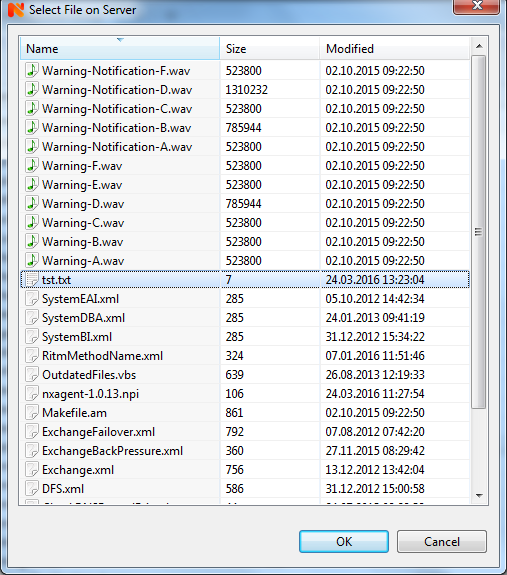
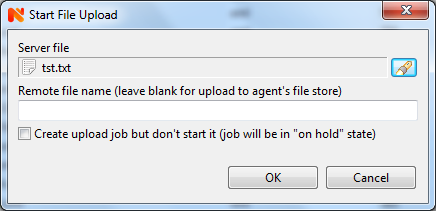
            As a test, I've uploaded a test file to the server using the console, and attempted to upload it from the server to a node.
            Clicking OK in the window shown in "start upload.png" does nothing, the window remains open.

            I've also tried setting the debug level to 9 on the server, but I don't find anything in the resulting log about a file upload.
            I wonder if there is some way we can determine if it's a bug in the console? (eg command not being sent to server)

            (There's also a small bug in the Server File Manager, if you freshly upload a file it always shows the File Size as 0)

            Kind regards,
            Bastiaan Defloo
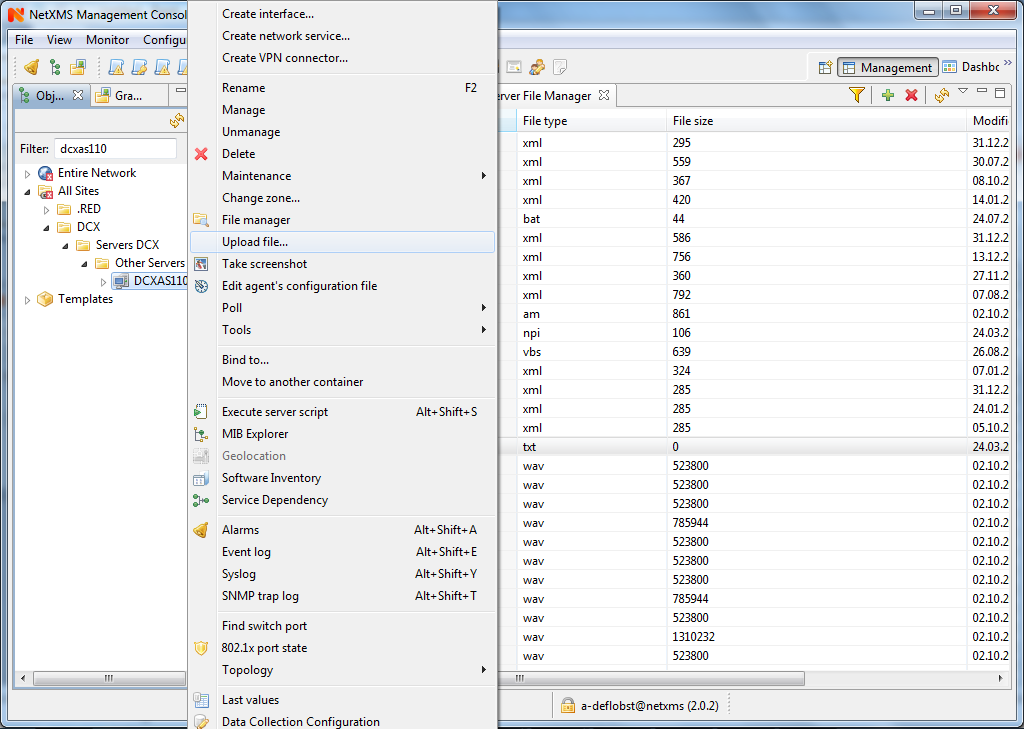

            menu.png

            select file.png

            start upload.png

            1 Reply Last reply
            0
            • Z
              Z
              Tatjana Dubrovica
              wrote on last edited by
              #6

              Are you sure you are using 2.0.2 console? File upload dialog have changed starting from 2.0-RC2 version. In 2.0.2 console it should look like in attachment. Please verify you server and console versions.

              Try to reinstall console
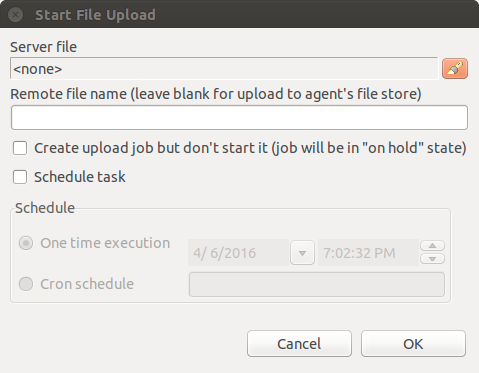

              upload_file_dialog_v2.0.2.png

              1 Reply Last reply
              0
              • B
                B
                bdefloo
                wrote on last edited by
                #7

                Hi,

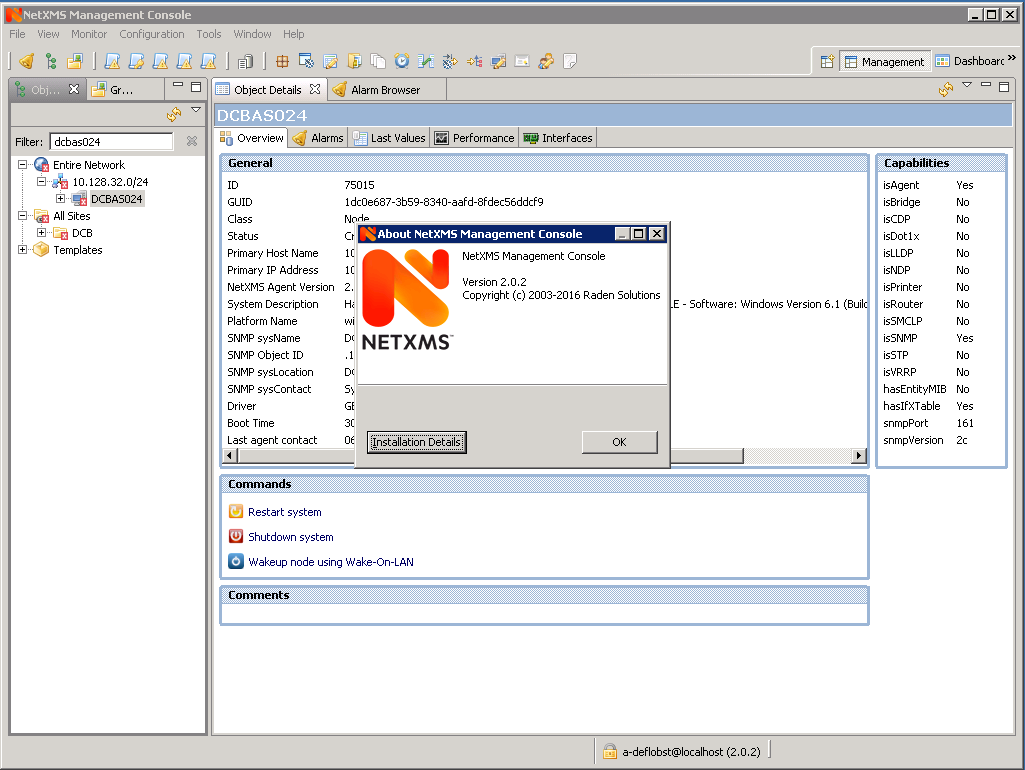
                Yes, we upgraded both the server and console to v2.0.2, from v1.2.16. See attached screenshot from the console that was installed by the server installer on the same machine, we have the same issue and file upload dialog there as well.

                Maybe it's a problem in the console package for Windows?
                I've uploaded the output from the "installation details" button as well, maybe you can find something in the version numbers of the org.netxms.ui.* plugins.

                Thanks for the help!


                version.png

                installation details.txt

                1 Reply Last reply
                0
                • B
                  B
                  bdefloo
                  wrote on last edited by
                  #8

                  Hi,

                  Is there any news on this? Has anyone else been able to check this in the Windows console?

                  We have the same upload dialog and problem when installing the 2.0.3 console from scratch.

                  Thanks!

                  Kind regards,
                  Bastiaan Defloo

                  1 Reply Last reply
                  0

                  Hello! It looks like you're interested in this conversation, but you don't have an account yet.

                  Getting fed up of having to scroll through the same posts each visit? When you register for an account, you'll always come back to exactly where you were before, and choose to be notified of new replies (either via email, or push notification). You'll also be able to save bookmarks and upvote posts to show your appreciation to other community members.

                  With your input, this post could be even better 💗

                  Register Login
                  Reply
                  • Reply as topic
                  Log in to reply
                  • Oldest to Newest
                  • Newest to Oldest
                  • Most Votes


                  • Login

                  • Don't have an account? Register

                  • Login or register to search.
                  Powered by NodeBB Contributors
                  • First post
                    Last post
                  0
                  • Categories
                  • Recent
                  • Tags
                  • Popular
                  • Users
                  • Groups