Skip to content
  • Categories
  • Recent
  • Tags
  • Popular
  • Users
  • Groups
Skins
  • Light
  • Brite
  • Cerulean
  • Cosmo
  • Flatly
  • Journal
  • Litera
  • Lumen
  • Lux
  • Materia
  • Minty
  • Morph
  • Pulse
  • Sandstone
  • Simplex
  • Sketchy
  • Spacelab
  • United
  • Yeti
  • Zephyr
  • Dark
  • Cyborg
  • Darkly
  • Quartz
  • Slate
  • Solar
  • Superhero
  • Vapor

  • Default (Flatly)
  • No Skin
Collapse
Brand Logo

NetXMS Forum

  1. Home
  2. Support
  3. MIB Browser problem

MIB Browser problem

Scheduled Pinned Locked Moved Support
7 Posts 3 Posters 48.1k Views
  • Oldest to Newest
  • Newest to Oldest
  • Most Votes
Reply
  • Reply as topic
Log in to reply
This topic has been deleted. Only users with topic management privileges can see it.
  • J
    J
    jonasc
    wrote on last edited by
    #1

    Hi!

    I'm fairly new to netxms so I might miss something very obvious here.

    I have compiled mibs through nxmibc on the Windows machine that we have netxms installed on.
    Compilation went fine.

    With the management console I selected [MIB Browser], for the device I want to work with, but I can't see the named OIDs that I expect.
    If I do an SNMP walk the the OIDs are sure found by the MIB browser but only the numbers.
    The browser tree is not poplulated with the new information from the compiled MIBs.

    I have hit the refresh button several times, restarted console, run the import twice etc but I'm out of ideas now.

    What am I missing?
    Thanks in advance

    1 Reply Last reply
    0
    • J
      J
      jonasc
      wrote on last edited by
      #2

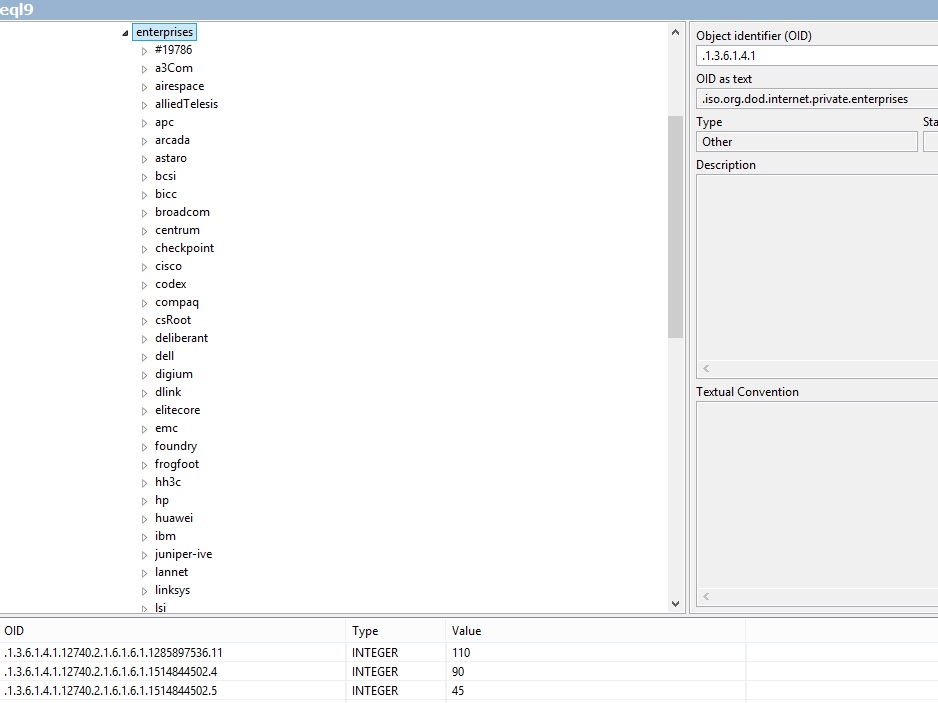
      Please see attached screenshot.
      OID .1.3.6.1.4.1 is defined (ofcourse)
      .12740.x.x.x.x is found through snmp walk but not defined in the navigation tree as you can see.

      I sense I'm missing something obvious but I don't know what...


      mib_netxms.jpg

      1 Reply Last reply
      0
      • V
        V
        Victor Kirhenshtein
        wrote on last edited by
        #3

        Hi,

        did you put compiled MIB file into correct location? Also, console synchronize MIB file only on startup, so you need to re-login after updating it.

        Best regards,
        Victor

        1 Reply Last reply
        0
        • J
          J
          jonasc
          wrote on last edited by
          #4

          I compiled it into c:\netxms\mibs\netxms.mib
          It popped up there after the comilation was made.

          And yes, I have re-logged in.

          How do I know where the console client looks for the MIB?
          Is the path above default?

          1 Reply Last reply
          0
          • V
            V
            Victor Kirhenshtein
            wrote on last edited by
            #5

            It should be C:\NetXMS\var\netxms.mib

            Best regards,
            Victor

            1 Reply Last reply
            0
            • J
              J
              jonasc
              wrote on last edited by
              #6

              Hi!
              First I omitted -o on the compiler, thinking that it defaulted to the right place.
              That was my first mistake. I redirected to c:\netxms\var\netxms.mib so that part was ok after that.

              Still it didn't work so I found out that the MIB-files-chain was broken from Equallogic.
              I did some troubleshooting among all references in every file and found the problem.

              So, the problem was twofolded...
              Thanks for your quick response and getting me on track.

              1 Reply Last reply
              0
              • R
                R
                rainerh
                wrote on last edited by
                #7

                Hello,
                I have the same Problem.
                I want to see the OID as text and not as number.
                What have you done?
                Thank you

                1 Reply Last reply
                0

                Hello! It looks like you're interested in this conversation, but you don't have an account yet.

                Getting fed up of having to scroll through the same posts each visit? When you register for an account, you'll always come back to exactly where you were before, and choose to be notified of new replies (either via email, or push notification). You'll also be able to save bookmarks and upvote posts to show your appreciation to other community members.

                With your input, this post could be even better 💗

                Register Login
                Reply
                • Reply as topic
                Log in to reply
                • Oldest to Newest
                • Newest to Oldest
                • Most Votes


                • Login

                • Don't have an account? Register

                • Login or register to search.
                Powered by NodeBB Contributors
                • First post
                  Last post
                0
                • Categories
                • Recent
                • Tags
                • Popular
                • Users
                • Groups