Skip to content
  • Categories
  • Recent
  • Tags
  • Popular
  • Users
  • Groups
Skins
  • Light
  • Brite
  • Cerulean
  • Cosmo
  • Flatly
  • Journal
  • Litera
  • Lumen
  • Lux
  • Materia
  • Minty
  • Morph
  • Pulse
  • Sandstone
  • Simplex
  • Sketchy
  • Spacelab
  • United
  • Yeti
  • Zephyr
  • Dark
  • Cyborg
  • Darkly
  • Quartz
  • Slate
  • Solar
  • Superhero
  • Vapor

  • Default (Flatly)
  • No Skin
Collapse
Brand Logo

NetXMS Forum

  1. Home
  2. Support
  3. Installing Linux agent on Redhat

Installing Linux agent on Redhat

Scheduled Pinned Locked Moved Support
7 Posts 2 Posters 31.1k Views
  • Oldest to Newest
  • Newest to Oldest
  • Most Votes
Reply
  • Reply as topic
Log in to reply
This topic has been deleted. Only users with topic management privileges can see it.
  • L
    L
    Lotfi
    wrote on last edited by
    #1

    Hello,
    I have a test environment with couple of Windows vms monitored by NetXMS, and i wanted to add a new VM with RedHat OS to be monitored. I downloaded the almost of the agents available on the Download Webpage, but when i try to install it, it asks for ./Configure file following the NetXMS manual labeled : Agent Installation Guide:Installing NetXMS Agent on UNIX

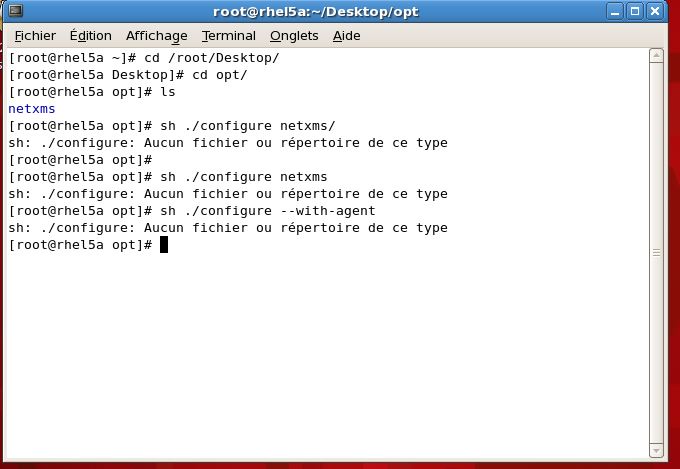
    When i try to run : ./configure netxms , i get an error saying sh: ./configure no such file or directory, the screenshot is attached.

    I have to say too, that it's a fresh OS install and nothing has been installed yet on the System which is a RedHat 5

    netxms-rhel5-install-agent.JPG

    1 Reply Last reply
    0
    • T
      T
      tomaskir
      wrote on last edited by
      #2

      You have to do ./configure inside the NetXMS directory.

      Just do "cd netxmsd" and then do configure.

      1 Reply Last reply
      0
      • L
        L
        Lotfi
        wrote on last edited by
        #3

        it gives the same error....


        netxms-rhel5-install-error.JPG

        1 Reply Last reply
        0
        • T
          T
          tomaskir
          wrote on last edited by
          #4

          This is because you downloaded the generic linux already pre-compiled package.
          In this case, you can just run it.

          "cd /opt/netxms/bin && chmod 0755 nxagentd && ./nxagentd"

          You need to download the source if you want to compile it.

          1 Reply Last reply
          0
          • L
            L
            Lotfi
            wrote on last edited by
            #5

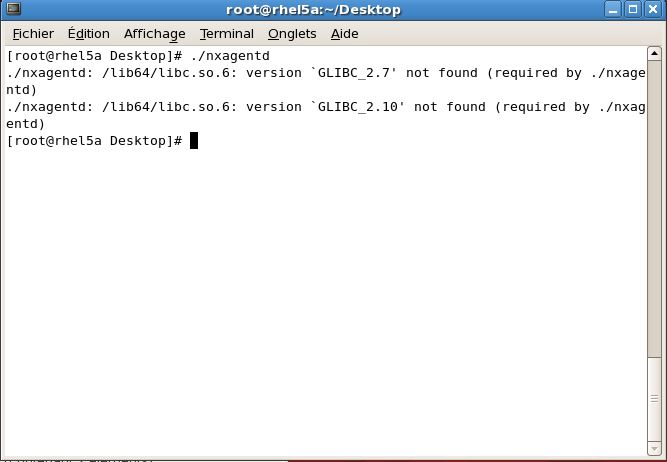
            You're right, i've downloaded both of them. And because i do not have big knowledge of Linux, i wanted to build it while i have the file needed. nxagentd on Desktop, in the screenshot.
            But when i try to run it, after CHMOD , it tells me that some libraries are missing, GLIBC_2.7, GLIBC_2.10 like in the screenshot attached
            Please, what do i have to make it?
            Thanks in advance

            netxms-rhel5-install-error_2.JPG

            1 Reply Last reply
            0
            • L
              L
              Lotfi
              wrote on last edited by
              #6

              Hello,

              I believe that i were using the wrong package.
              According to this document : http://netxms.readthedocs.io/projects/admin/en/latest/installation.html , the installation of the agent had to be done with the same package used for setting up a NetXMS server on Linux machine, so i downloaded that package : netxms-2.0.3.tar.gz and here, i do find ./configure file, but when i execute it, it gives me an error that might be related to the system libraries. I used Yum to install development tools and it works now,
              Just one question please, when i try to start the agent, i read in the log file :
              Unable to bind socket : Address already in use
              What is this error about??

              1 Reply Last reply
              0
              • L
                L
                Lotfi
                wrote on last edited by
                #7

                I just had to stop the firewall service,

                Problem resolved!! thanks 🙂

                1 Reply Last reply
                0

                Hello! It looks like you're interested in this conversation, but you don't have an account yet.

                Getting fed up of having to scroll through the same posts each visit? When you register for an account, you'll always come back to exactly where you were before, and choose to be notified of new replies (either via email, or push notification). You'll also be able to save bookmarks and upvote posts to show your appreciation to other community members.

                With your input, this post could be even better 💗

                Register Login
                Reply
                • Reply as topic
                Log in to reply
                • Oldest to Newest
                • Newest to Oldest
                • Most Votes


                • Login

                • Don't have an account? Register

                • Login or register to search.
                Powered by NodeBB Contributors
                • First post
                  Last post
                0
                • Categories
                • Recent
                • Tags
                • Popular
                • Users
                • Groups