
Reporting server
-
Hi,
still noone with a hint how to install Reports?
Tried all the different things from the WIKI and other sources, nothing works, not eaven the Icon in the Admin Interface will Show up......... I´m on 2.0.4. Please help us, bacause I think a lot of People have this Problem!!!!Regards
hary -
- Download https://www.netxms.org/download/reporting/netxms-reporting-server-2.0.4.zip
- Unpack to any desired location (I'll use /opt/nxreporting)
- Create folder for configuration: mkdir /opt/nxreporting.
- Create configuration file /opt/nxreporting/conf/nxreporting.xml:
<config>
  <workspace>/opt/nxreporting/workspace</workspace>
    <netxmsdConfig>/etc/netxmsd.conf</netxmsdConfig>
    <smtp>
        <server>127.0.0.1</server>
        <from>[email protected]</from>
    </smtp>
    <netxms>
        <server>127.0.0.1</server>
        <login>admin</login>
        <password>netxms</password>
    </netxms>
</config>
Section "<netxms>" required only if you have java-based reports, not sql-based.
- (optional) Create logger configuration /opt/nxreporting/conf/logback.xml:
<?xml version="1.0" encoding="UTF-8"?>
<configuration>
  <appender name="FILE" class="ch.qos.logback.core.rolling.RollingFileAppender">
    <file>/opt/nxreporting/log/nxreporting</file>

    <rollingPolicy class="ch.qos.logback.core.rolling.FixedWindowRollingPolicy">
      <fileNamePattern>/opt/nxreporting/log/nxreporting.%i.gz</fileNamePattern>
      <minIndex>1</minIndex>
      <maxIndex>5</maxIndex>
    </rollingPolicy>

    <triggeringPolicy class="ch.qos.logback.core.rolling.SizeBasedTriggeringPolicy">
      <maxFileSize>16MB</maxFileSize>
    </triggeringPolicy>
    <encoder>
      <pattern>%d %5p | %t | %-55logger{55} | %m %n</pattern>
    </encoder>
  </appender>

    <appender name="CONSOLE" class="ch.qos.logback.core.ConsoleAppender">
        <encoder>
            <pattern>%d %5p | %t | %-55logger{55} | %m %n</pattern>
        </encoder>
    </appender>

    <logger name="com.radensolutions" level="debug" />
    <logger name="com.radensolutions.reporting.infrastructure.impl.TcpConnector" level="error" />

    <root level="DEBUG">
        <appender-ref ref="CONSOLE"/>
        <!--<appender-ref ref="FILE"/>-->
    </root>
</configuration>
More info: http://logback.qos.ch/manual/configuration.html
- Create folder for workspace and copy some definitions:
mkdir -p /opt/nxreporting/workspace/definitions
cp ldz-alarm-resolution-time-1.0.0.jar /opt/nxreporting/workspace/definitions/7) Enable reporting server connector, set EnableReportingServer to 1 (either in GUI - server configuration, or using command line: "nxdbmgr set EnableReportingServer 1"), then restart netxmsd.
 Create additional tables by executing both scripts from https://git.netxms.org/public/netxms.git/tree/refs/heads/develop:/src/java/nxreporting/sql
9) Start reporting server: cd /opt/nxreporting/ && java -jar nxreporting-2.0.4.jarIn under 10 seconds, netxmsd should connect to reporting server and list of available reports will be visible in "Reporting" perspective.
Final layout of the file system:
/opt/nxreporting/conf/logback.xml
/opt/nxreporting/conf/nxreporting.xml
/opt/nxreporting/lib/*.jar
/opt/nxreporting/reporting-server-2.0.4.jar
/opt/nxreporting/workspace/definitions/ldz-alarm-resolution-time-1.0.0.jar -
Hi!
Thanks for youre help!!!!
Seems to work much better now!
Where can I get "ldz-alarm-resolution-time-1.0.0.jar" ist not in the lib..... ?
Reporting ist still not visible in NETXMS (not in Objects, only in "Window/Open Perpective", but empty, think because of no reportdefinition??), is there a Manual for creating reports?
Do we Need Jasper Report Library?
Can we autostart reporting Server?
One more Question: can I format Floating Point values to, lets say, 2 Digits after the comma? Like 12,34 and not 12,3456789Regards
Hary -
Sample report (+ source project for Jasper Studio) attached to this message.
To build resulting jar file you need Java and Apache Maven: "mvn package" will produce resulting jar in target/
-
HI!!!!!!
Thanks, this was it!!! Now I can Play arround and try to create own reports. But, for the Moment, I do not get any results, Jasper Problem? I see that reporting Server ist running and trying to create the Report. Finde this Errors
"com.mysql.jdbc.exceptions.jdbc4.MySQLSyntaxErrorException: Table 'netxms_db.hibernate_sequence' doesn't exist",
"at com.mysql.jdbc.SQLError.createSQLException(SQLError.java:980) ~[mysql-connector-java-5.1.36.jar:5.1.36]"Alos get this Error when try to compile the added sample:
Caused by: org.sonatype.aether.transfer.ArtifactNotFoundException: Could not find artifact com.radensolutions:nxreporting:jar:2.0-SNAPSHOT
at org.sonatype.aether.impl.internal.DefaultArtifactResolver.resolve(DefaultArtifactResolver.java:528) -
I'm trying to setup reporting server but not successful. From the log file, I'm getting org.apache.commons.configuration Count not locate file /etc/netxmsd.conf at null:
I've followed above procedure but cannot run reporting server.
OS: Windows Server 2008 R2 SP1
SQL: SQL Server 2008 R2Please help!!!
Thanks.
-
-
hi alex,
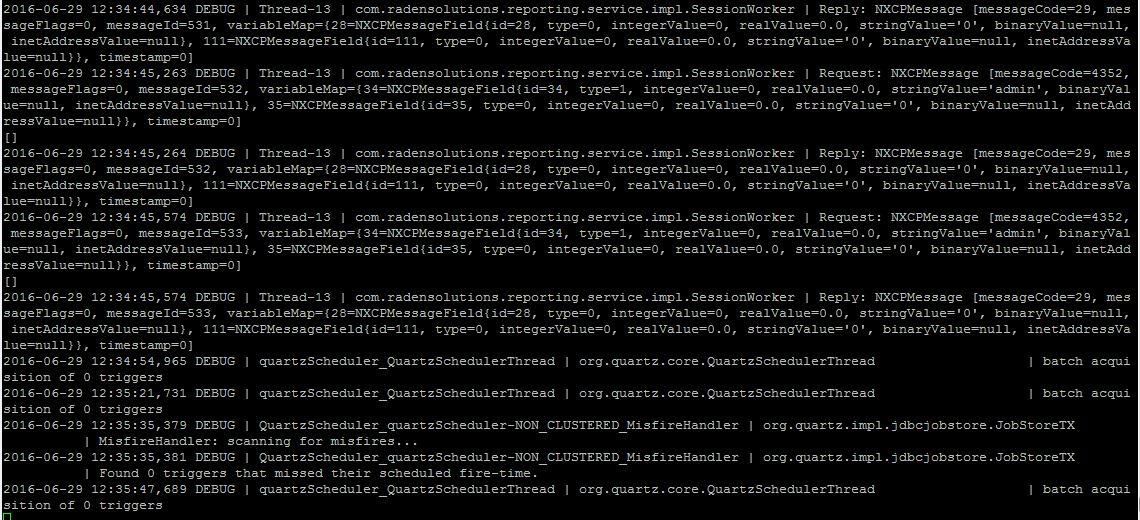
i have following your instruction, after me running command "cd /opt/nxreporting/ && java -jar nxreporting-2.0.2.jar"
just running detail about what i was did before and haven't finished just looping like on my image. i check on console report perspective not show anything. fyi me use reporting server version 2.0.2. have I missed something configures like you did?
here i'm attach the capture screen.thanks.
-
hi alex,
I have tried to do "mvn package of file given ldz-alarm-resolution-time-1.0.0-src.7z" When I try to do so I got error and tried
"mvn package of "Data collection configuration" given in sample_reports.tar.gz. on "https://www.netxms.org/forum/installation/install-report-server/"
it's same too, i got error.[INFO] Scanning for projects...
[INFO]
[INFO] ------------------------------------------------------------------------
[INFO] Building LDz - Alarm Resolution Time 1.0.0
[INFO] ------------------------------------------------------------------------
[WARNING] The POM for com.radensolutions:nxreporting:jar:2.0-SNAPSHOT is missing, no dependency information available
[INFO] ------------------------------------------------------------------------
[INFO] BUILD FAILURE
[INFO] ------------------------------------------------------------------------
[INFO] Total time: 0.723 s
[INFO] Finished at: 2016-07-01T13:33:15+07:00
[INFO] Final Memory: 5M/30M
[INFO] ------------------------------------------------------------------------
[ERROR] Failed to execute goal on project ldz-alarm-resolution-time: Could not resolve dependencies for project org.netxms.report:ldz-alarm-resolution-time:jar:1.0.0: Could not find artifact com.radensolutions:nxreporting:jar:2.0-SNAPSHOT -> [Help 1]
[ERROR]
[ERROR] To see the full stack trace of the errors, re-run Maven with the -e switch.
[ERROR] Re-run Maven using the -X switch to enable full debug logging.
[ERROR]
[ERROR] For more information about the errors and possible solutions, please read the following articles:
[ERROR] [Help 1] http://cwiki.apache.org/confluence/display/MAVEN/DependencyResolutionException[INFO] Scanning for projects...
[INFO]
[INFO] ------------------------------------------------------------------------
[INFO] Building Data Collection Report 1.0.0
[INFO] ------------------------------------------------------------------------
[WARNING] The POM for com.radensolutions:nxreporting:jar:2.0-SNAPSHOT is missing, no dependency information available
[INFO] ------------------------------------------------------------------------
[INFO] BUILD FAILURE
[INFO] ------------------------------------------------------------------------
[INFO] Total time: 0.470 s
[INFO] Finished at: 2015-09-11T09:05:20+05:30
[INFO] Final Memory: 5M/15M
[INFO] ------------------------------------------------------------------------
[ERROR] Failed to execute goal on project dci: Could not resolve dependencies for project org.netxms.report:dci:jar:1.0.0: Could not find artifact com.radensolutions:nxreporting:jar:2.0-SNAPSHOT -> [Help 1]
[ERROR]
[ERROR] To see the full stack trace of the errors, re-run Maven with the -e switch.
[ERROR] Re-run Maven using the -X switch to enable full debug logging.
[ERROR]
[ERROR] For more information about the errors and possible solutions, please read the following articles:
[ERROR] [Help 1] http://cwiki.apache.org/confluence/display/MAVEN/DependencyResolutionExceptionis dependency is not valid?
thanks
-
Hello! It looks like you're interested in this conversation, but you don't have an account yet.
Getting fed up of having to scroll through the same posts each visit? When you register for an account, you'll always come back to exactly where you were before, and choose to be notified of new replies (either via email, or push notification). You'll also be able to save bookmarks and upvote posts to show your appreciation to other community members.
With your input, this post could be even better 💗
Register Login