
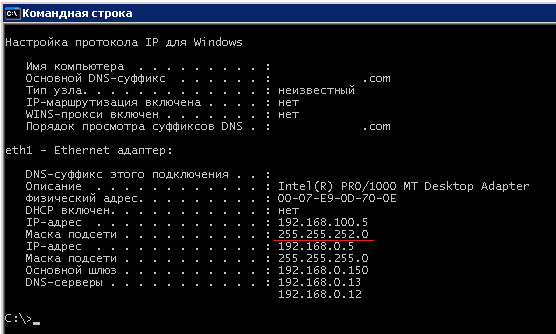
Invalid network mask
-
-
Hi,
server considers that first device found in certain subnet to be configured correctly (because usually it's a router). Sometimes it may encounter incorrectly configured device first. You can check all devices within subnet manually using "Interrfaces" tab, or you can create NXSL script that will walk nodes within subnet and report those with /8 mask on interface.
Best regards,
Victor -
-
Hi,
seems that agent read network mask incorrectly. I'll check it.
Best regards,
Victor -
Can you please provide:
- output of nxget command line tool, getting interface list. Example: /opt/netxms/bin/nxget -l 192.168.100.5 Net.InterfaceList
- Agent version
- OS version(where the agent is installed)
Thank you
-
@zev said in Invalid network mask:
Can you please provide:
- output of nxget command line tool, getting interface list. Example: /opt/netxms/bin/nxget -l 192.168.100.5 Net.InterfaceList
- Agent version
- OS version(where the agent is installed)
Thank you
196612 192.168.0.5/24 6(1500) 0007E90D700E eth1 196612 192.168.100.5/24 6(1500) 0007E90D700E eth1 1 127.0.0.1/32 24(1520) 000000000000 MS TCP Loopback interface- v 2.0.5
- Windows Server 2003 5.2.3790 SP2 32-bit
-
Hi,
I probably found a bug. Please try this agent version: https://cloud.netxms.org/index.php/s/JOmIn3OAWql7oBT.
Best regards,
Victor -

Hello! It looks like you're interested in this conversation, but you don't have an account yet.
Getting fed up of having to scroll through the same posts each visit? When you register for an account, you'll always come back to exactly where you were before, and choose to be notified of new replies (either via email, or push notification). You'll also be able to save bookmarks and upvote posts to show your appreciation to other community members.
With your input, this post could be even better 💗
Register Login