
DCI over SSH
-
Group,
I'm trying to get NetXMS to get DCI values over SSH. Server is on 2.1-M1. I am able to get NetXMS Agent SSH.Command(*) to work, but I can not for the life of me figure out how to get the Server itself to SSH into another node.
What goes in the parameter? I've tried command , "command" , Ssh.command(IP,"username","password","command") , etc. Nothing seems to work. It works fine if I have an agent on the node, but I can't install an agent on the switch, or AP.
I do have the username/password filled out on the node's SSH information in properties.
As soon as I switch the DCI over to SSH, the node never gets any SSH attempts of any form.
Thanks!
Knight. -
maybe check this thread it may have your answer
https://www.netxms.org/forum/general-support/dci-checks-over-ssh/
-
knight,
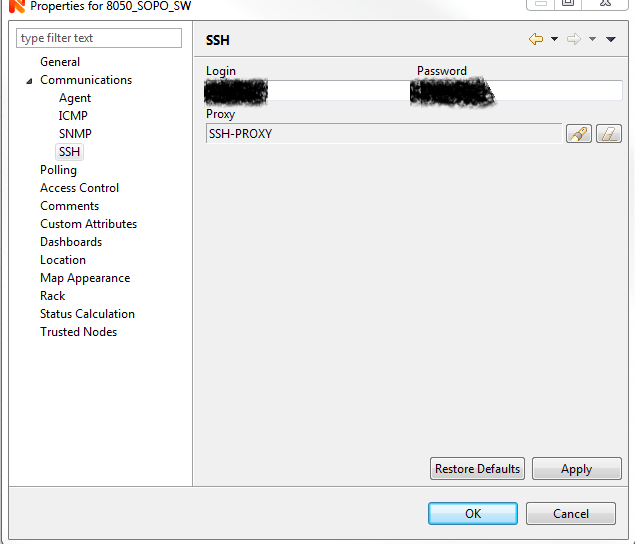
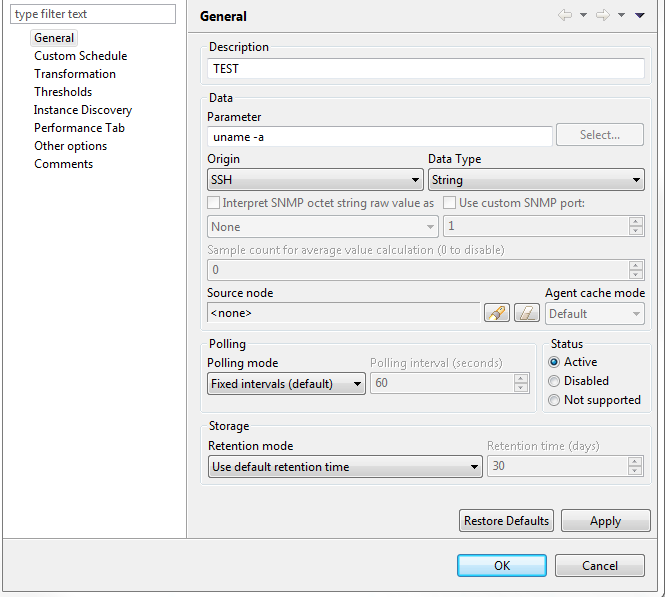
I was able to get it working by compiling the 2.1-M2 and enabling Subagent = ssh.nsm and in the ssh settings add the credentials of the switch as well as the select the agent acting as a proxy. In the parameters all i did was specify the command I wanted to run on remote switch. See the attachments I used a different machine to act as the proxy but I do think you can do all this from the server if you enable the agent locally and choose the local agent as the proxy. One thing I did notice is that if the response is multi line you wont get the full response .. Im hoping the dev's can chime in and maybe provide some insight ...The custom commands on this switch a returned in json format so i only get beck the first line.

-
gmonk63,
Thank you! Knowing what you are supposed to put in, eliminated enough variables that I figured it out.
It appears that you have to go through a proxy, and that proxy can't be the NetXMS server itself's agent.
Not really sure why the NetXMS server can't be a proxy, but for whatever reason, it won't.
Knight.
-

Hello! It looks like you're interested in this conversation, but you don't have an account yet.
Getting fed up of having to scroll through the same posts each visit? When you register for an account, you'll always come back to exactly where you were before, and choose to be notified of new replies (either via email, or push notification). You'll also be able to save bookmarks and upvote posts to show your appreciation to other community members.
With your input, this post could be even better 💗
Register Login