Skip to content
  • Categories
  • Recent
  • Tags
  • Popular
  • Users
  • Groups
Skins
  • Light
  • Brite
  • Cerulean
  • Cosmo
  • Flatly
  • Journal
  • Litera
  • Lumen
  • Lux
  • Materia
  • Minty
  • Morph
  • Pulse
  • Sandstone
  • Simplex
  • Sketchy
  • Spacelab
  • United
  • Yeti
  • Zephyr
  • Dark
  • Cyborg
  • Darkly
  • Quartz
  • Slate
  • Solar
  • Superhero
  • Vapor

  • Default (Flatly)
  • No Skin
Collapse
Brand Logo

NetXMS Forum

  1. Home
  2. Support
  3. Agent Screenshot

Agent Screenshot

Scheduled Pinned Locked Moved Support
14 Posts 7 Posters 633.6k Views
  • Oldest to Newest
  • Newest to Oldest
  • Most Votes
Reply
  • Reply as topic
Log in to reply
This topic has been deleted. Only users with topic management privileges can see it.
  • I
    I
    iGodunoff
    wrote on last edited by
    #4

    Unfortunately it doesn't work at all because nxsagent requires nxzlib.dll which isn't installed into NetXMS\bin directory. It seems that the nxagent installer program has an error. It should copy nxzlib.dll into NetXMS\bin (at least when I check mark "Install session agent") but it doesn't. As a result I see the error message every time I log in to my Windows system. The session agent doesn't start of course, and I can't get a screenshot.

    Of course, I can copy nxzlib.dll into NetXMS\bin manually but where can get it?

    1 Reply Last reply
    0
    • I
      I
      iGodunoff
      wrote on last edited by
      #5

      And one more important addition. Session agents running on Windows XP Pro machines produce very poor quality screenshots (fully transparent backgrounds, unreadable text etc.). Agents running on XP Home machines can't produce screenshots at all (although session agents are starting and running with no errors). At present time I didn't test 'get screenshot' function on many different Windows versions and editions yet, but it seems that in modern OSes (eg. Win8/8.1) all work fine.

      1 Reply Last reply
      0
      • V
        V
        Victor Kirhenshtein
        wrote on last edited by
        #6

        Hi!

        Both problems (missing nxzlib and screenshot quality) already fixed in upcoming release.

        Best regards,
        Victor

        1 Reply Last reply
        0
        • I
          I
          iGodunoff
          wrote on last edited by
          #7

          OK, thank you very much!

          1 Reply Last reply
          0
          • J
            J
            jhonnyvey
            wrote on last edited by
            #8

            When i try to get screenshot i got this error:

            "Cannot take screenshot: Operation cannot be completed due to agent error"

            Agent working perfect in host.
            Is this feature working?

            Tks

            1 Reply Last reply
            0
            • T
              T
              tomaskir
              wrote on last edited by
              #9

              If the session agent is running, the feature should work (does for me on Windows).

              1 Reply Last reply
              0
              • J
                J
                jhonnyvey
                wrote on last edited by
                #10

                Hi,

                I'm trying to capture the screen of windows server.
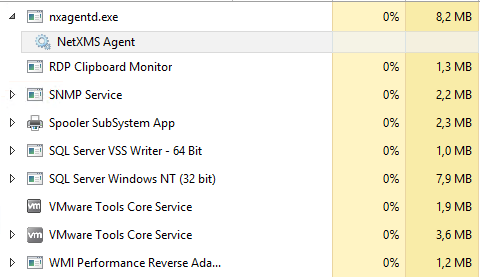
                In attchament follows the screenshot of the services that are running.
                Need i turn on any other service to work?


                services.png

                1 Reply Last reply
                0
                • V
                  V
                  Victor Kirhenshtein
                  wrote on last edited by
                  #11

                  Hi,

                  you need session agent (nxsagent.exe) to run in user sessions.

                  Best regards,
                  Victor

                  1 Reply Last reply
                  0
                  • J
                    J
                    jhonnyvey
                    wrote on last edited by
                    #12

                    Hi,

                    I already try it
                    Running with -H or without i see the message " Connected to master agent" then messages " Receive message CMD_KEEPALIVE"
                    But when try to got screent shot receive message: Cannot take screenshot: Operation cannot be completed due to agent error"

                    Running agent on Windows 2012 R2 Server x64

                    Tks!


                    services.png

                    1 Reply Last reply
                    0
                    • C
                      C
                      CostinB
                      wrote on last edited by
                      #13

                      Hello,

                      I just wanted to state that i have the same issue as lindeamon, but looking thru the logs i see the actual "take Screenshot" feature defaults to take a snapshot of the console session (for servers that allow multiple users to be logged on).

                      If you login to the console session the screenshot option works as expected, but by default on servers you do not connect to the console session, so that is why you get the error.

                      This is what i see in the logs when i push the "take screenshot"  [session:0] Take snapshot from session "Console"
                      And when i manually start the nxsagent i get :
                      Session agent connector 1: login as username@RDP-Tcp#22 [8]

                      Is there any way to take a screenshot of a different user, or other than the console session?

                      Thank you,
                      Costin

                      1 Reply Last reply
                      0
                      • V
                        V
                        Victor Kirhenshtein
                        wrote on last edited by
                        #14

                        Hi,

                        currently screenshots defaulted to console session. We will add session selector in one of next versions.

                        Best regards,
                        Victor
                        1 Reply Last reply
                        0

                        Hello! It looks like you're interested in this conversation, but you don't have an account yet.

                        Getting fed up of having to scroll through the same posts each visit? When you register for an account, you'll always come back to exactly where you were before, and choose to be notified of new replies (either via email, or push notification). You'll also be able to save bookmarks and upvote posts to show your appreciation to other community members.

                        With your input, this post could be even better 💗

                        Register Login
                        Reply
                        • Reply as topic
                        Log in to reply
                        • Oldest to Newest
                        • Newest to Oldest
                        • Most Votes


                        • Login

                        • Don't have an account? Register

                        • Login or register to search.
                        Powered by NodeBB Contributors
                        • First post
                          Last post
                        0
                        • Categories
                        • Recent
                        • Tags
                        • Popular
                        • Users
                        • Groups