
Customize which columns are displayed, order, and font size in Alarm Dashboard
-
We are trying to create a display wall for monitoring in our office. The purpose is to highlight the issues. If a user needs details, they can open up NetXMS on their own workstation. We find the Alarm Browser and Alarm dashboard contain more info than we would like. What we would like would to be able to limit which columns are displayed and make the fonts big enough to read across the room. For example, we would probably limit the display to Source, Message, Ack, and Modify Date. We would sort on Modify Date in reverse order.
If we also had the ability to display the modify date as elapsed time (ie 1 hour, 2 days, etc.) it would be very nice.
-
I've added this as feature request: https://www.radensolutions.com/chiliproject/issues/524
-
1] I too need this feature of displaying only selected columns in logs of Alarms and Events ...
ie. ONLY SELECTED COLUMNS and Filtering conditions (Condition and Ordering) in Alarm log and Event log should be customized and stored as prefilters and when executed, display those details only... (of course, this can be done by selecting the node and clicking Event log/ Alarm log for that node, but I would like to do it in Event log and Alarm log with prefilters listed in and executing those preset filters to list only few selected columns and filtered conditions and preset order like...)
[sample for Event logs:)
PresetName: Node1
Columns: ID, Time, Source, Severity, Message
Condition1: 'Source' IS Node1
Filter1: 'Time' reverse sortedID Time Source Severity Message
xxx dd:mm:yy hh:mm:ss Node1 Critical Node down
xxx dd:mm:yy hh:mm:ss Node1 Normal Node upPresetName: Rack1
Columns: ID, Time, Source, Event, Severity, Message
Condition1: 'Source' IS Node99 or 'Source' IS Server1 or 'Source' IS Server3
Condition2: 'Severity' IS Critical or 'Severity' IS Major
Filter1: 'Time' reverse sorted
Filter2: 'Severity' sortedID Time Source Severity Message
xxx dd:mm:yy hh:mm:ss Node99 Critical mmm
xxx dd:mm:yy hh:mm:ss Server3 Critical mmm
xxx dd:mm:yy hh:mm:ss Server3 Critical mmm
xxx dd:mm:yy hh:mm:ss Server1 Critical mmm
xxx dd:mm:yy hh:mm:ss Node99 Major mmm
xxx dd:mm:yy hh:mm:ss Node99 Critical mmm
xxx dd:mm:yy hh:mm:ss Server3 Major mmmHas it been done??? Or if available, how to do it ???
2] Is there anyway to get this report exported to Excel or PDF format file???
--------------------
rojaRAJU, O+
========== -
Hi,
- I don't think you can store preset filters, nor can you select to only show some columns.
- There is an "Export all to CSV" icon in the top right corner for logs (i.e. not in the Alarm Browser, but the Alarm Log).
The original post is from 2014 and the link Victor posted for the feature request no longer works, as the bugtracker system was switched in between.
However, I believe this is the new link for this request (i.e. it's still open): https://track.radensolutions.com/issue/NX-357
Note that the original request was about the Alarm Dashboard, not the Alarm or Event Logs.
There is another request for those two here: https://track.radensolutions.com/issue/NX-1052You may want to add a comment to the above with your suggestions and/or requirements.
Cheers
-
For anyone coming from another product with Alarm viewing capabilities that are selectable, this functionality is pretty important if not a show stopper.
for those that have not - you do not know what you are missing.
I currently have 4 Alarm viewers (including NetXMS).
Two have no customising - this includes NetXMS
One has basic column selection but no column ordering - frustrating.
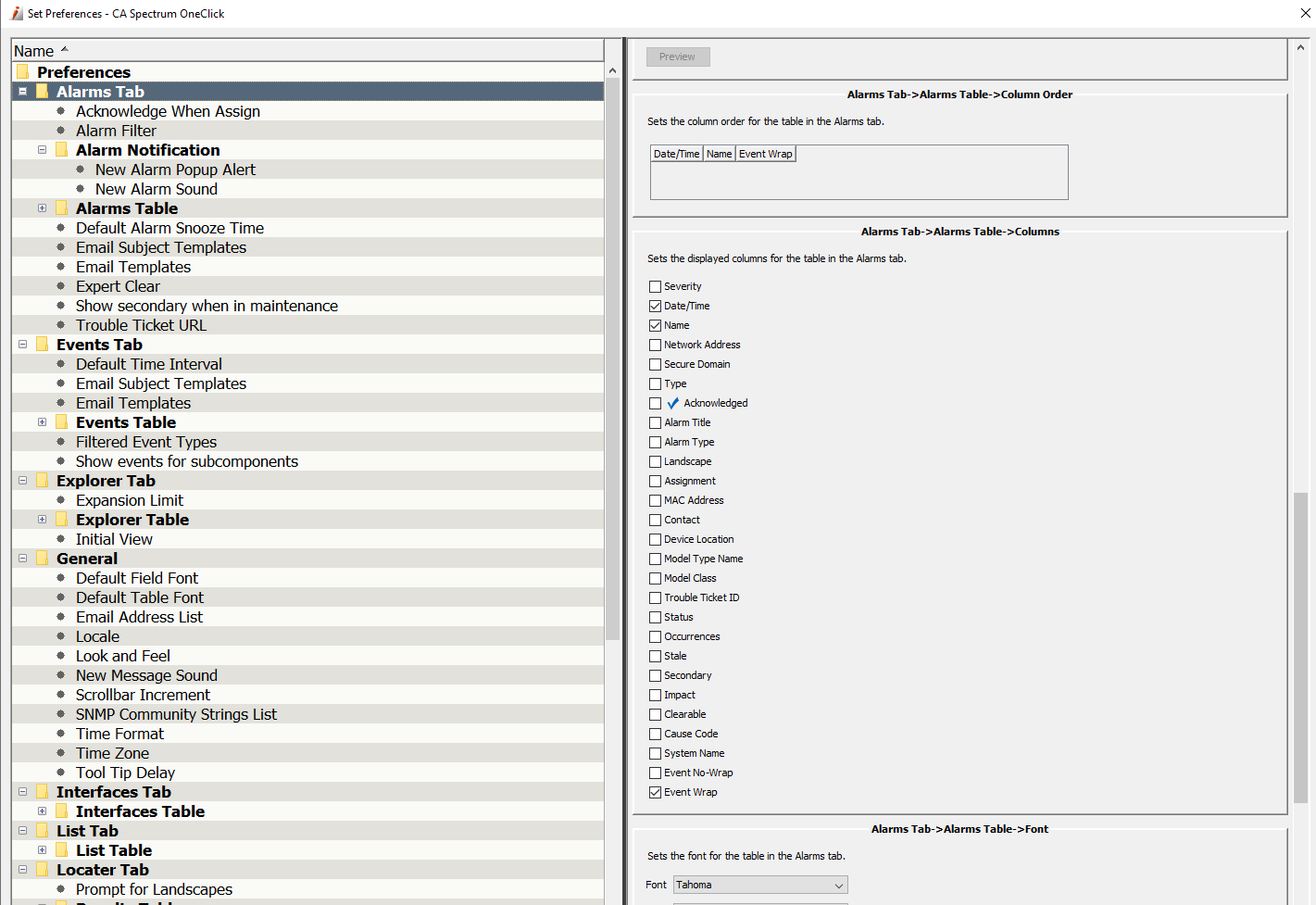
One has everything - absolutely everything. Column section, column ordering, preset filtering, severity filtering, separate settings for Alarms, Events, Explorer(Tree), Interfaces.
The preference setting screen is attached - see for yourself!!.So why go NetXMS if I have the above? - the other product's DCI equivalent monitoring is appalling and as I can display NETXMS alarms per container and filter in "Outstanding" - I have a minimum workable solution with NetXMS.
Hello! It looks like you're interested in this conversation, but you don't have an account yet.
Getting fed up of having to scroll through the same posts each visit? When you register for an account, you'll always come back to exactly where you were before, and choose to be notified of new replies (either via email, or push notification). You'll also be able to save bookmarks and upvote posts to show your appreciation to other community members.
With your input, this post could be even better 💗
Register Login