
Switch Interfaces showing up on multiple VLANS that they are not configured for
-
ok, here is what you asked for with the latest version 2.0.4
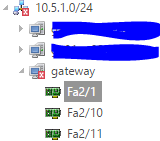
Here is the switch config for the first port.
interface FastEthernet2/1
switchport access vlan 2
speed 100
duplex full
spanning-tree portfast
!and vlan config
interface Vlan1
ip address 10.2.1.1 255.255.0.0
!
interface Vlan2
ip address 10.3.1.1 255.255.0.0
!
interface Vlan5
ip address 10.5.1.1 255.255.0.0
!This port should not show up in the graph below as it' has access only to vlan 2 and no voice vlan defined, nor is it a tagged port allowing all vlans.
-
I never did see a reply to this?
-
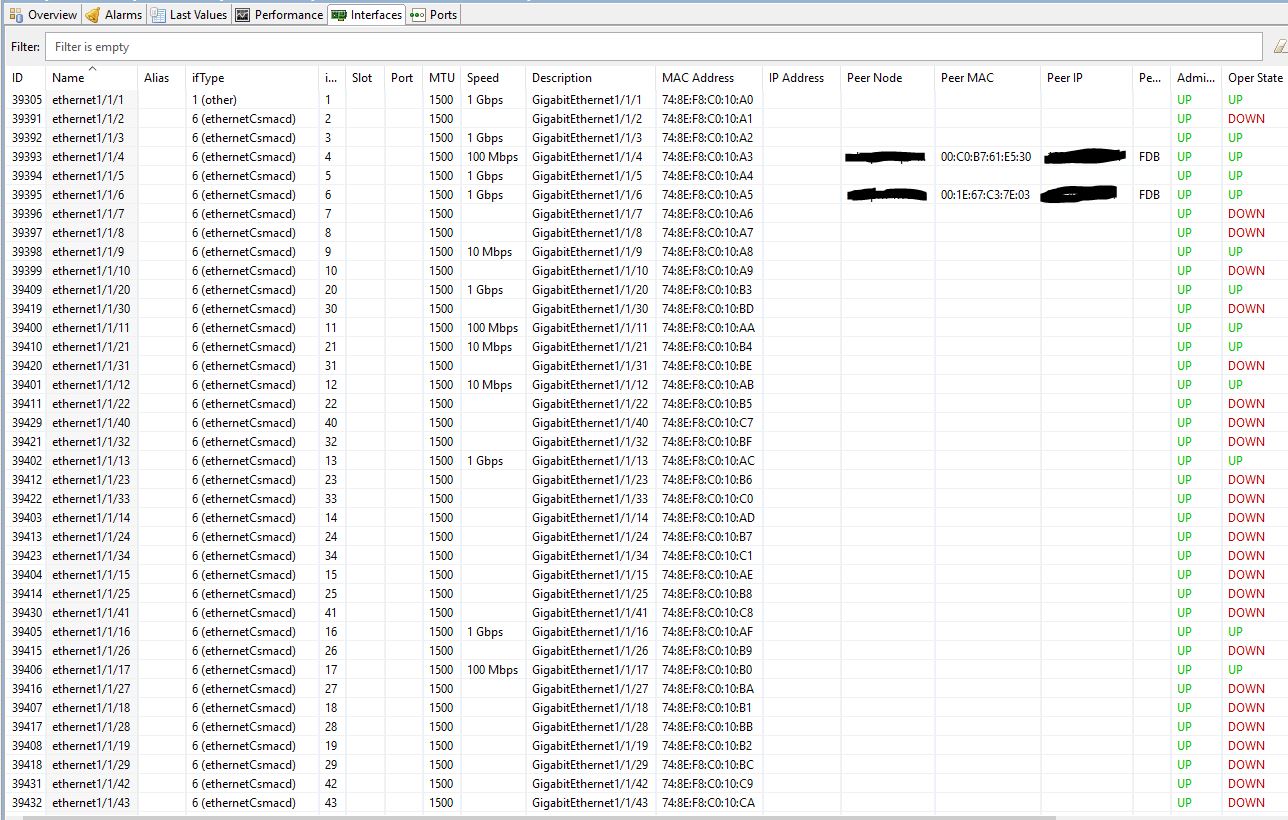
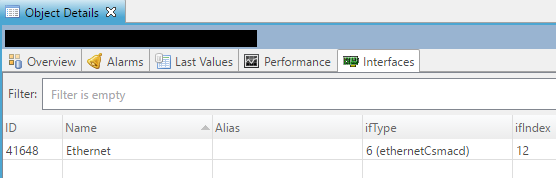
The screenshot Victor asked for was for the "Interfaces" tab underneath the Object details. Something like the one attached.
Just to confirm your question:
- your switch is in multiple VLANs and networks
- your switch shows under every one of those networks underneath "Entire Network"
- when you expand the switch under any of those networks, it shows all interfaces, every time
- You are expecting that the switch will only list the interfaces which are actually a part of those networks
I guess the answer is that NetXMS does not treat interfaces under Entire Network like that. It only confirms if the node itself is in the network.
When you expand the node, it will list all child objects, e.g. interfaces. There is no filtering applied.If the above is correct, I suggest submitting a feature request to filter interfaces listed on nodes under Entire Network to only show if the interfaces themselves are a part of the selected network.
Cheers,
Tursiops
-
@tursiops said in Switch Interfaces showing up on multiple VLANS that they are not configured for:
The screenshot Victor asked for was for the "Interfaces" tab underneath the Object details. Something like the one attached.
Just to confirm your question:
- your switch is in multiple VLANs and networks
- your switch shows under every one of those networks underneath "Entire Network"
- when you expand the switch under any of those networks, it shows all interfaces, every time
- You are expecting that the switch will only list the interfaces which are actually a part of those networks
I guess the answer is that NetXMS does not treat interfaces under Entire Network like that. It only confirms if the node itself is in the network.
When you expand the node, it will list all child objects, e.g. interfaces. There is no filtering applied.If the above is correct, I suggest submitting a feature request to filter interfaces listed on nodes under Entire Network to only show if the interfaces themselves are a part of the selected network.
Cheers,
TursiopsYep that is exactly it with some additions/changes. I have a router in which the WAN Interface is the first one, and it shows in the WAN Network, and the rest of the interfaces which are not in the WAN network. And the same for the LAN Network. Also this is a bug, it is mis-representing what is actually there. I will attach the other screenshot in a moment.
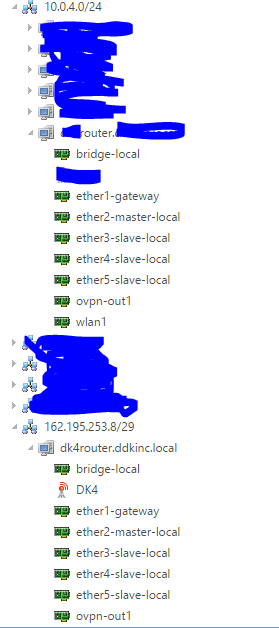
-
I could not get this via the web interface. I had to use the console, is there a way to get it via the web interface, if not, i will request it as a feature.
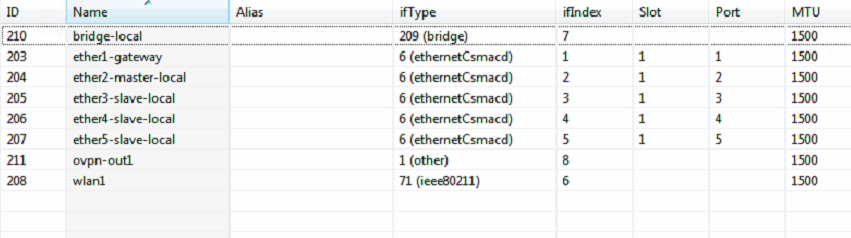
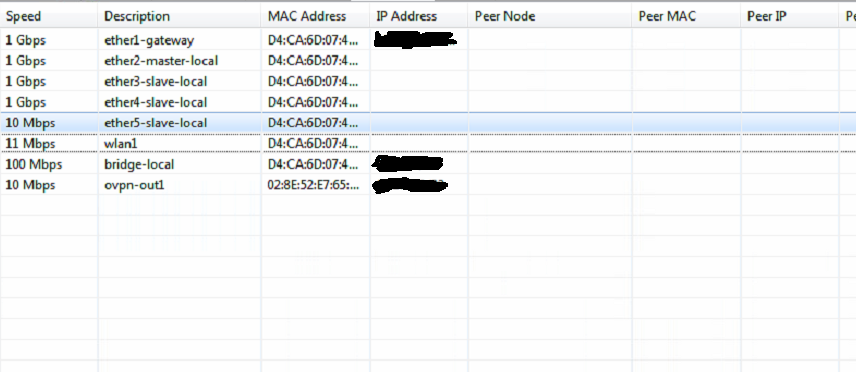
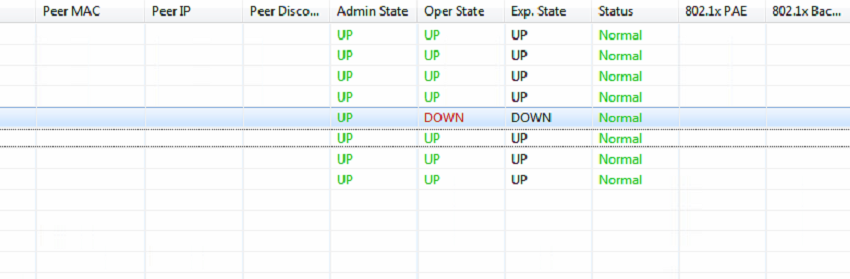
-
I suggest submitting the original issue in the Bug Tracker (https://www.radensolutions.com/chiliproject/projects/netxms).
Not being a developer, I didn't call it a bug as it looks to me like the functionality you are looking for was never implemented (i.e. it's not broken, it's missing).The "Interfaces" tab exists in the web interface on our installation (see attached screenshot; from a server with a single NIC) and can be reached in the same was as in the console. Not sure why it would not be visible in yours.
-
@tursiops said in Switch Interfaces showing up on multiple VLANS that they are not configured for:
I suggest submitting the original issue in the Bug Tracker (https://www.radensolutions.com/chiliproject/projects/netxms).
Not being a developer, I didn't call it a bug as it looks to me like the functionality you are looking for was never implemented (i.e. it's not broken, it's missing).The "Interfaces" tab exists in the web interface on our installation (see attached screenshot; from a server with a single NIC) and can be reached in the same was as in the console. Not sure why it would not be visible in yours.
I am wondering myself. I used the latest downloads from the downloads for 64 bit windows.
-
-
@starkiller said in Switch Interfaces showing up on multiple VLANS that they are not configured for:
Submitted
What good does it do to submit this?
It has not gotten any traction that I can see. -
Hi,
as I understood it is misconception, not a bug. When you walk object tree end expand object, you see ALL child objects. Interfaces are child objects of a node, so when you expand a node, you see all interfaces. It is irrelevant if you come to that node via subnet, or container, or template, etc. You always will see all objects below.
Best regards,
Victor -
@victor said in Switch Interfaces showing up on multiple VLANS that they are not configured for:
Hi,
as I understood it is misconception, not a bug. When you walk object tree end expand object, you see ALL child objects. Interfaces are child objects of a node, so when you expand a node, you see all interfaces. It is irrelevant if you come to that node via subnet, or container, or template, etc. You always will see all objects below.
Best regards,
VictorSo your saying that it is irrelevant that the interface is not configured to have access to that vlan.
expanding the tree via vlan will show the interface since it could be configured to see that vlan, even though its not currently configured for that vlan.
So instead of showing facts, netxms is showing facts and possibilities.
Is there anything in the docs that state that netxms will show the vlan the interface is configured for as well as possible vlans the interface could be configured for?
No other network monitoring system does this that I am aware of.
OpenNMS, PandoraFMS, Zabbix to name a few open source free ones do not do this and neither do ones like Solarwinds or PRTG.Victor this is very misleading as one expects a network monitoring system to show facts and not possibly configurations.
In any case I am just one user expressing and issue with the on part of the design of netxms which causes confusion compared to other NMS systems and hoping it would recognized as and issue and be fixed by the author.
-
@starkiller said in Switch Interfaces showing up on multiple VLANS that they are not configured for:
In any case I am just one user expressing and issue with the on part of the design of netxms which causes confusion compared to other NMS systems and hoping it would recognized as and issue and be fixed by the author.
I just read through this entire thread.
Actually, you are one user that is fighting the system, instead of trying to understand how it works.
NetXMS make NO assumption, it does NOT show what could be. It shows what is.
You seem to completely misunderstand the concept that one node is one object, and it's linked to (it's bound) to many places around the system.It's consistency.
The way you are proposing would be way too confusing to existing and new users.
One object, with the same Object ID would show different children (be that interfaces, or VPN connectors, or wireless interfaces, etc.) across different parts of the system.I REALLY suggest trying to see how the system works and why it works that way instead of arguing why the way that works for thousands of NetXMS users is wrong.
You make 0 attempts to ask questions, to see why the system behaves how it does, or to understand NetXMS philosophy.
So you will have to accept my post doing the same. -
@tomaskir said in Switch Interfaces showing up on multiple VLANS that they are not configured for:
I just read through this entire thread.
Actually, you are one user that is fighting the system, instead of trying to understand how it works.
Everyone sees it differently.
@tomaskir said in Switch Interfaces showing up on multiple VLANS that they are not configured for:
NetXMS make NO assumption, it does NOT show what could be. It shows what is.
You seem to completely misunderstand the concept that one node is one object, and it's linked to (it's bound) to many places around the system.It's consistency.
I can only restate what the screenshots and config snippet show which is that the screen shots show interfaces as a child of a vlan/subnet that those interfaces are not part of and do not pass traffic for. The 2 objects should not be associated together as they have no association which should warrant such a graphical representation.
@tomaskir said in Switch Interfaces showing up on multiple VLANS that they are not configured for:
The way you are proposing would be way too confusing to existing and new users.
One object, with the same Object ID would show different children (be that interfaces, or VPN connectors, or wireless interfaces, etc.) across different parts of the system.I REALLY suggest trying to see how the system works and why it works that way instead of arguing why the way that works for thousands of NetXMS users is wrong.
I would hope that showing what is there vs showing what isn't there as being there is not confusing for users.
-
Interfaces are NOT descendants of a subnet - they are descendants of a node. Node can be in multiple subnets.
Best regards,
Victor -
@victor said in Switch Interfaces showing up on multiple VLANS that they are not configured for:
Interfaces are NOT descendants of a subnet - they are descendants of a node. Node can be in multiple subnets.
Best regards,
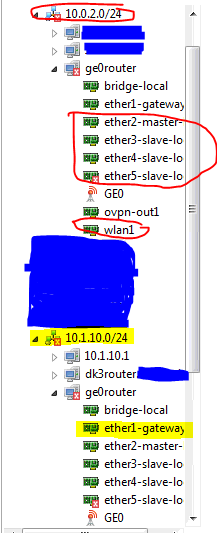
VictorI understand a node can be in multiple subnets. When you expand the subnet and it shows the interfaces of that node who are not configured for that subnet in that subnet is what I am referring to.
I have attached another screenshot. The Interfaces with the red circle around them are configured to be in the subnet with the red circle around them. The Interfaces with the Yellow Highlight are configured to be in the subnet with the yellow highlight.
The node is the ge0router, unless I am mistaken about what a node is.
I wanted to make it as clear as possible what I am describing.
Its a bug to me, but a work as designed to you Victor and a few others that use netxms.
I am fine with that as I am not using it in production because of this issue as I do not have time to explain why its visually misrepresented to those who have compared this to other systems out there. Thanks for taking the time to look at it Victor.
Hello! It looks like you're interested in this conversation, but you don't have an account yet.
Getting fed up of having to scroll through the same posts each visit? When you register for an account, you'll always come back to exactly where you were before, and choose to be notified of new replies (either via email, or push notification). You'll also be able to save bookmarks and upvote posts to show your appreciation to other community members.
With your input, this post could be even better 💗
Register Login