
Install report server
-
I am also working with Windows 2008 Server 64Bit with MySQL and don't get the reporting server operational. A quick guide for Windows environments including the following topics would be very appriciated:
* which software is needed (recommended) and where to install (for instance where to install nxreporting-2.0-M2.jar and included lib directory)
* which config file(s) need to be changed to get it operational
* a standard report for test purposes -
The lib an the jar file are seeming to be a module which is capable of being run by java.
That how far I got with the humble knowledge I have at the moment.
Starting the server with java -jar netxms-....jar seems to work.
The only problem is how to change configurations for example if you don't use postgresql and use mssql instead. -
Hello.
Reporting module is still sort of work-in-progress, it will be finalised and fully documented with the 2.0 release.
In a meantime, I'll write some notes here.
Part 1 – setup
-
Enable support in netxms core, then restart netxmsd:
nxdbmgr set EnableReportingServer 1 -
Unpack netxms-reporting-server-2.0-M2.zip into some folder, in this example - /opt/nxreporting
-
Create directory "conf"
-
Create logger configuration: conf/logback.xml (sample attached), detailed description here: http://logback.qos.ch/manual/configuration.html#syntax
-
Create configuration file for reporting server: conf/nxreporting.xml
<config>
  <workspace>/opt/nxreporting/workspace</workspace>
    <netxmsdConfig>/opt/netxms/etc/netxmsd.conf</netxmsdConfig>
    <datasources>
        <datasource>
            <id>secondary</id>
            <type>postgresql</type>
            <url>jdbc:postgresql://127.0.0.1/netxms</url>
            <username>netxms</username>
            <password>netxms</password>
        </datasource>
    </datasources>
    <smtp>
        <server>127.0.0.1</server>
        <from>[email protected]</from>
    </smtp>
    <netxms>
        <server>127.0.0.1</server>
        <login>admin</login>
        <password>netxms</password>
    </netxms>
</config>
In most cases (when reports are using only single datasource), setting "netxmsdConfig" is enough, database type and credentials will loaded automatically from netxmsd.conf.
"netxms" section of the config is required for reports, which load data not from SQL datasource, but using NetXMS API instead (connection is maintained by reporting server).-
Create workspace directory (as set by "workspace" parameter), it will contain both report definitions and intermediate report data (in "output" directory).
-
Put report definition jars into workspace/definitions/:
AirAlk:~() $ ls -al /opt/nxreporting/workspace/definitions/*.jar -rw-r--r-- 1 alk wheel 3729 Mar 11 15:31 /opt/nxreporting/workspace/definitions/alarm-history-1.0.0.jar -rw-r--r-- 1 alk wheel 5607 Mar 11 15:31 /opt/nxreporting/workspace/definitions/alarm-resolution-time-1.0.0.jar -rw-r--r-- 1 alk wheel 4570 Mar 11 15:31 /opt/nxreporting/workspace/definitions/alarm-resolution-time-statistics-by-users-1.0.0.jar -rw-r--r-- 1 alk wheel 4203 Mar 11 15:31 /opt/nxreporting/workspace/definitions/dci-1.0.0.jar -rw-r--r-- 1 alk wheel 9968 Mar 11 15:31 /opt/nxreporting/workspace/definitions/epp-1.0.0.jar …- Start reporting server:
cd /opt/nxreporting
java -jar nxreporting-2.0-M2.jar
When started with "-jar" option, java will automatically find configuration files in conf/ and all libraries in lib/. However, you can run it differently (and omit "cd /opt/nxreporting"):
java -cp /opt/nxreporting/lib/\*.jar:/opt/nxreporting/conf:/opt/nxreporting/nxreporting-2.0-M2.jar com.radensolutions.reporting.Launcheror, if you are running windows:
java -cp /opt/nxreporting/lib/\*.jar:/opt/nxreporting/conf:/opt/nxreporting/nxreporting-2.0-M2.jar com.radensolutions.reporting.LauncherResulting directory structure:
/opt/nxreporting:
total 5728
drwxr-xr-x   6 alk  wheel      204 Apr  7 20:31 .
drwxr-xr-x  14 alk  wheel      476 Apr  3 20:07 ..
drwxr-xr-x   4 alk  wheel      136 Apr  7 20:31 conf
drwxr-xr-x  79 alk  wheel     2686 Jan 23 10:29 lib
-rw-r--r--   1 alk  wheel  2929061 Jan 23 10:29 nxreporting-2.0-M2.jar
drwxr-xr-x   4 alk  wheel      136 Mar 11 15:06 workspace

/opt/nxreporting/conf:
total 16
drwxr-xr-x  4 alk  wheel   136 Apr  7 20:31 .
drwxr-xr-x  6 alk  wheel   204 Apr  7 20:31 ..
-rw-r--r--  1 alk  wheel  1367 Apr  7 20:21 logback.xml
-rw-r--r--  1 alk  wheel   764 Apr  7 13:21 nxreporting.xml

/opt/nxreporting/lib:
total 109528
…

/opt/nxreporting/workspace:
total 0
drwxr-xr-x   4 alk  wheel   136 Mar 11 15:06 .
drwxr-xr-x   6 alk  wheel   204 Apr  7 20:31 ..
drwxr-xr-x  32 alk  wheel  1088 Mar 11 15:43 definitions
drwxr-xr-x   8 alk  wheel   272 Mar 11 15:42 output

/opt/nxreporting/workspace/definitions:
total 248
drwxr-xr-x  32 alk  wheel  1088 Mar 11 15:43 .
drwxr-xr-x   4 alk  wheel   136 Mar 11 15:06 ..
-rw-r--r--   1 alk  wheel  3729 Mar 11 15:31 alarm-history-1.0.0.jar
-rw-r--r--   1 alk  wheel  5607 Mar 11 15:31 alarm-resolution-time-1.0.0.jar
-rw-r--r--   1 alk  wheel  4570 Mar 11 15:31 alarm-resolution-time-statistics-by-users-1.0.0.jar
…

/opt/nxreporting/workspace/output:
total 0
drwxr-xr-x   8 alk  wheel  272 Mar 11 15:42 .
drwxr-xr-x   4 alk  wheel  136 Mar 11 15:06 ..
drwxr-xr-x   4 alk  wheel  136 Mar 11 15:44 01827cdb-cb23-4b06-b607-fd02c4279add
drwxr-xr-x   4 alk  wheel  136 Mar  7 22:04 52ce4398-a131-4a79-887e-672cc73d5d34
drwxr-xr-x   3 alk  wheel  102 Mar 11 15:44 8a7c025c-84c8-4914-b2bf-3b4cde27a224
…
You can download complete sample setup here (including two reports): https://www.dropbox.com/s/pcqtfqhnwnrseb9/nxreporting.tar.bz2?dl=0
-
-
Part 2 – report definitions.
On startup, reporting server scan workspace/definitions directory for *.jar files.
Each file is unpacked into it's own folder based on jar name (e.g. "report1.jar" will be unpacked into "report1").
Each archive should contain at least one file – "main.jrxml", which is main report definition.
It can also contain subreports, images – or anything else, supported by Jasper Reports. Any additional resources should be referenced using paths relative to root folder of unpacked report, which is set as addtional paramter "SUBREPORT_DIR" (e.g. "$P{SUBREPORT_DIR}/logo.png").Archive can also contain java code, which will be used as data provider (instead of querying SQL database).
Reporting server will try to load class "report.DataSource", which should implement interface "com.radensolutions.reporting.custom.NXCLDataSource" (attached sample: Event Processing Policy). Query string language in jrxml should be set to "nxcl" (default - SQL).Simplest way to create jar files are using Maven, empty project is provided in samples archive. Running "mvn package" will produce complete jar file in "target" directory.
Sample reports (attached):
"Data Collection Configuration" – list of data collection items configured on node(s), pure SQL.
"Event Processing Policy" – EPP in printable format, data is loaded using Java API directly from NetXMS. Please note that netxms user (as it was configured in "<netxms>" section) should have permissions for reading EPP.
"empty" – just a stub for your own reports: change name in "pom.xml", copy jrxml into src/main/resources, run "mvn package" – and you'll get jar file which can be deployed into workspace/definitions/.
-
Hi,
Could anyone upload nxreporting.tar.bz2 again please?
Many Thanks

-
-
hy guys,
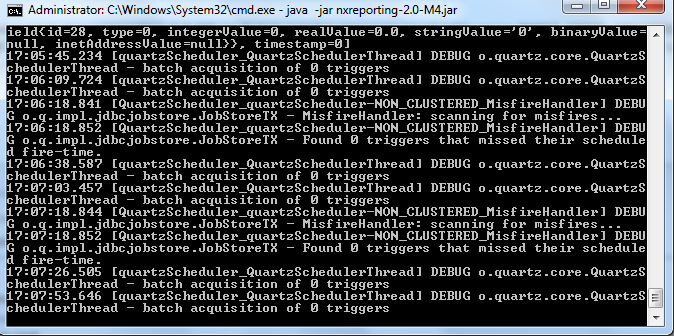
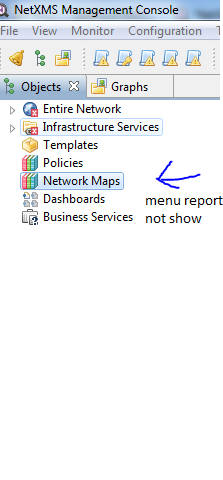
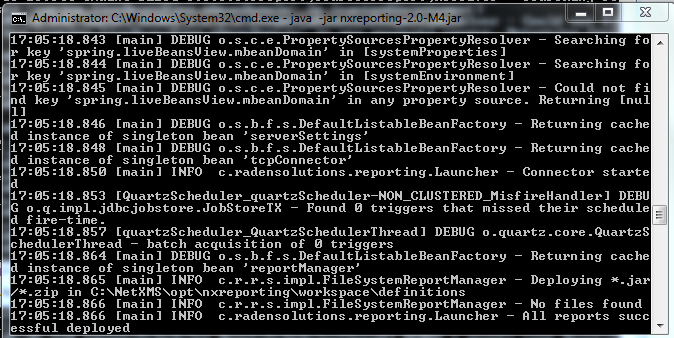
i have done running java -jar nxreporting-2.0-M4.jar but in running proccess need table name "QRTZ_FIRED_TRIGGERS" and "QRTZ_TRIGGERS" but in database is nothing. i assume create it n then is successed. can i know original table need cause i'm create manually. and then after succes running that report haven't running too. can somebody help me???
thanks.
-
Hello Alex,
can you upload the examples once again?
The projekt files in sample_reports.tar.gz do not work. Thank you.Kind regards,
Dennis@alk said in Install report server:
Hello.
Reporting module is still sort of work-in-progress, it will be finalised and fully documented with the 2.0 release.
In a meantime, I'll write some notes here.
Part 1 – setup
-
Enable support in netxms core, then restart netxmsd:
nxdbmgr set EnableReportingServer 1 -
Unpack netxms-reporting-server-2.0-M2.zip into some folder, in this example - /opt/nxreporting
-
Create directory "conf"
-
Create logger configuration: conf/logback.xml (sample attached), detailed description here: http://logback.qos.ch/manual/configuration.html#syntax
-
Create configuration file for reporting server: conf/nxreporting.xml
<config>
  <workspace>/opt/nxreporting/workspace</workspace>
    <netxmsdConfig>/opt/netxms/etc/netxmsd.conf</netxmsdConfig>
    <datasources>
        <datasource>
            <id>secondary</id>
            <type>postgresql</type>
            <url>jdbc:postgresql://127.0.0.1/netxms</url>
            <username>netxms</username>
            <password>netxms</password>
        </datasource>
    </datasources>
    <smtp>
        <server>127.0.0.1</server>
        <from>[email protected]</from>
    </smtp>
    <netxms>
        <server>127.0.0.1</server>
        <login>admin</login>
        <password>netxms</password>
    </netxms>
</config>
In most cases (when reports are using only single datasource), setting "netxmsdConfig" is enough, database type and credentials will loaded automatically from netxmsd.conf.
"netxms" section of the config is required for reports, which load data not from SQL datasource, but using NetXMS API instead (connection is maintained by reporting server).-
Create workspace directory (as set by "workspace" parameter), it will contain both report definitions and intermediate report data (in "output" directory).
-
Put report definition jars into workspace/definitions/:
AirAlk:~() $ ls -al /opt/nxreporting/workspace/definitions/*.jar -rw-r--r-- 1 alk wheel 3729 Mar 11 15:31 /opt/nxreporting/workspace/definitions/alarm-history-1.0.0.jar -rw-r--r-- 1 alk wheel 5607 Mar 11 15:31 /opt/nxreporting/workspace/definitions/alarm-resolution-time-1.0.0.jar -rw-r--r-- 1 alk wheel 4570 Mar 11 15:31 /opt/nxreporting/workspace/definitions/alarm-resolution-time-statistics-by-users-1.0.0.jar -rw-r--r-- 1 alk wheel 4203 Mar 11 15:31 /opt/nxreporting/workspace/definitions/dci-1.0.0.jar -rw-r--r-- 1 alk wheel 9968 Mar 11 15:31 /opt/nxreporting/workspace/definitions/epp-1.0.0.jar …- Start reporting server:
cd /opt/nxreporting
java -jar nxreporting-2.0-M2.jar
When started with "-jar" option, java will automatically find configuration files in conf/ and all libraries in lib/. However, you can run it differently (and omit "cd /opt/nxreporting"):
java -cp /opt/nxreporting/lib/\*.jar:/opt/nxreporting/conf:/opt/nxreporting/nxreporting-2.0-M2.jar com.radensolutions.reporting.Launcheror, if you are running windows:
java -cp /opt/nxreporting/lib/\*.jar:/opt/nxreporting/conf:/opt/nxreporting/nxreporting-2.0-M2.jar com.radensolutions.reporting.LauncherResulting directory structure:
/opt/nxreporting:
total 5728
drwxr-xr-x   6 alk  wheel      204 Apr  7 20:31 .
drwxr-xr-x  14 alk  wheel      476 Apr  3 20:07 ..
drwxr-xr-x   4 alk  wheel      136 Apr  7 20:31 conf
drwxr-xr-x  79 alk  wheel     2686 Jan 23 10:29 lib
-rw-r--r--   1 alk  wheel  2929061 Jan 23 10:29 nxreporting-2.0-M2.jar
drwxr-xr-x   4 alk  wheel      136 Mar 11 15:06 workspace

/opt/nxreporting/conf:
total 16
drwxr-xr-x  4 alk  wheel   136 Apr  7 20:31 .
drwxr-xr-x  6 alk  wheel   204 Apr  7 20:31 ..
-rw-r--r--  1 alk  wheel  1367 Apr  7 20:21 logback.xml
-rw-r--r--  1 alk  wheel   764 Apr  7 13:21 nxreporting.xml

/opt/nxreporting/lib:
total 109528
…

/opt/nxreporting/workspace:
total 0
drwxr-xr-x   4 alk  wheel   136 Mar 11 15:06 .
drwxr-xr-x   6 alk  wheel   204 Apr  7 20:31 ..
drwxr-xr-x  32 alk  wheel  1088 Mar 11 15:43 definitions
drwxr-xr-x   8 alk  wheel   272 Mar 11 15:42 output

/opt/nxreporting/workspace/definitions:
total 248
drwxr-xr-x  32 alk  wheel  1088 Mar 11 15:43 .
drwxr-xr-x   4 alk  wheel   136 Mar 11 15:06 ..
-rw-r--r--   1 alk  wheel  3729 Mar 11 15:31 alarm-history-1.0.0.jar
-rw-r--r--   1 alk  wheel  5607 Mar 11 15:31 alarm-resolution-time-1.0.0.jar
-rw-r--r--   1 alk  wheel  4570 Mar 11 15:31 alarm-resolution-time-statistics-by-users-1.0.0.jar
…

/opt/nxreporting/workspace/output:
total 0
drwxr-xr-x   8 alk  wheel  272 Mar 11 15:42 .
drwxr-xr-x   4 alk  wheel  136 Mar 11 15:06 ..
drwxr-xr-x   4 alk  wheel  136 Mar 11 15:44 01827cdb-cb23-4b06-b607-fd02c4279add
drwxr-xr-x   4 alk  wheel  136 Mar  7 22:04 52ce4398-a131-4a79-887e-672cc73d5d34
drwxr-xr-x   3 alk  wheel  102 Mar 11 15:44 8a7c025c-84c8-4914-b2bf-3b4cde27a224
…
You can download complete sample setup here (including two reports): https://www.dropbox.com/s/pcqtfqhnwnrseb9/nxreporting.tar.bz2?dl=0
-
-
I'm trying to install reporting server on Windows following the instructions in the admin guide:
https://www.netxms.org/documentation/adminguide/reporting.html#installation-manual
Step 8 refers to a link that no longer exists:
8. Create additional tables by executing both scripts from https://git.netxms.org/public/netxms.git/tree/refs/heads/develop:/src/java/nxreporting/sqlI've extracted the files but my definitions folder is empty, I don't know where to get those files. The zip file on the download page only contains a lib folder and a main .jar file.
https://www.netxms.org/download/releases/2.2/2.2.2/netxms-reporting-server-2.2.2.zip
When I run the following command:
java -cp /opt/nxreporting/lib/\*.jar:/opt/nxreporting/conf:/opt/nxreporting/reporting-server-2.2.2.jar com.radensolutions.reporting.LauncherOR
java -cp C:\NetXMS\opt\nxreporting\lib\*.jar C:\NetXMS\opt\nxreporting\reporting-server-2.2.2.jar com.radensolutions.reporting.LauncherI get this error:
Error: Could not find or load main class com.radensolutions.reporting.Launcher
Below is the entire directory structure.
I'm sure I'm missing something or doing something wrong, please let me know what to do.
Thanks!
Volume in drive C has no label. Volume Serial Number is CAB5-6A94 Directory of C:\NetXMS\opt 02/01/2018 06:54 PM <DIR> . 02/01/2018 06:54 PM <DIR> .. 02/01/2018 06:54 PM 0 dir.txt 02/01/2018 06:53 PM <DIR> nxreporting 1 File(s) 0 bytes Directory of C:\NetXMS\opt\nxreporting 02/01/2018 06:53 PM <DIR> . 02/01/2018 06:53 PM <DIR> .. 02/01/2018 06:08 PM <DIR> conf 02/01/2018 06:45 PM <DIR> lib 01/08/2018 02:11 PM 668,742 reporting-server-2.2.2.jar 02/01/2018 06:12 PM <DIR> workspace 1 File(s) 668,742 bytes Directory of C:\NetXMS\opt\nxreporting\conf 02/01/2018 06:08 PM <DIR> . 02/01/2018 06:08 PM <DIR> .. 02/01/2018 06:08 PM 663 nxreporting.xml 1 File(s) 663 bytes Directory of C:\NetXMS\opt\nxreporting\lib 02/01/2018 06:45 PM <DIR> . 02/01/2018 06:45 PM <DIR> .. 01/08/2018 02:11 PM 62,983 activation-1.1.jar 01/08/2018 02:11 PM 445,288 antlr-2.7.7.jar 01/08/2018 02:11 PM 4,467 aopalliance-1.0.jar 01/08/2018 02:11 PM 192,035 bcmail-jdk14-1.38.jar 01/08/2018 02:11 PM 192,035 bcmail-jdk14-138.jar 01/08/2018 02:11 PM 1,551,468 bcprov-jdk14-1.38.jar 01/08/2018 02:11 PM 1,551,468 bcprov-jdk14-138.jar 01/08/2018 02:11 PM 22,994 bctsp-jdk14-1.38.jar 01/08/2018 02:11 PM 608,376 c3p0-0.9.1.1.jar 01/08/2018 02:11 PM 49,513 castor-core-1.3.3.jar 01/08/2018 02:11 PM 872,827 castor-xml-1.3.3.jar 01/08/2018 02:11 PM 230,951 commons-beanutils-1.9.0.jar 01/08/2018 02:11 PM 263,965 commons-codec-1.9.jar 01/08/2018 02:11 PM 575,389 commons-collections-3.2.1.jar 01/08/2018 02:11 PM 362,679 commons-configuration-1.10.jar 01/08/2018 02:11 PM 24,283 commons-daemon-1.0.15.jar 01/08/2018 02:11 PM 160,519 commons-dbcp-1.4.jar 01/08/2018 02:11 PM 196,768 commons-digester-2.1.jar 01/08/2018 02:11 PM 284,220 commons-lang-2.6.jar 01/08/2018 02:11 PM 60,686 commons-logging-1.1.1.jar 01/08/2018 02:11 PM 96,221 commons-pool-1.5.4.jar 01/08/2018 02:11 PM 544,403 core-3.2.1.jar 01/08/2018 02:11 PM 313,898 dom4j-1.6.1.jar 01/08/2018 02:11 PM 1,830,791 ecj-4.3.1.jar 01/08/2018 02:11 PM 16,030 geronimo-jta_1.1_spec-1.1.1.jar 01/08/2018 02:11 PM 6,998,724 groovy-all-2.4.4.jar 01/08/2018 02:11 PM 45,024 hamcrest-core-1.3.jar 01/08/2018 02:11 PM 75,288 hibernate-commons-annotations-5.0.1.Final.jar 01/08/2018 02:11 PM 5,583,264 hibernate-core-5.0.7.Final.jar 01/08/2018 02:11 PM 598,084 hibernate-entitymanager-5.0.7.Final.jar 01/08/2018 02:11 PM 113,371 hibernate-jpa-2.1-api-1.0.0.Final.jar 01/08/2018 02:11 PM 11,289,823 icu4j-57.1.jar 01/08/2018 02:11 PM 1,132,307 itext-2.1.7.js5.jar 01/08/2018 02:11 PM 34,476 jackson-annotations-2.1.4.jar 01/08/2018 02:11 PM 206,866 jackson-core-2.1.4.jar 01/08/2018 02:11 PM 926,562 jackson-databind-2.1.4.jar 01/08/2018 02:11 PM 28,576 jakarta-regexp-1.4.jar 01/08/2018 02:11 PM 187,752 jandex-2.0.0.Final.jar 01/08/2018 02:11 PM 5,531,229 jasperreports-6.3.1.jar 01/08/2018 02:11 PM 32,118 jasperreports-functions-6.3.1.jar 01/08/2018 02:11 PM 714,194 javassist-3.18.1-GA.jar 01/08/2018 02:11 PM 2,497 javax.inject-1.jar 01/08/2018 02:11 PM 66,802 jboss-logging-3.3.0.Final.jar 01/08/2018 02:11 PM 16,618 jcl-over-slf4j-1.7.12.jar 01/08/2018 02:11 PM 330,246 jcommon-1.0.23.jar 01/08/2018 02:11 PM 1,565,065 jfreechart-1.0.19.jar 01/08/2018 02:11 PM 573,912 joda-time-2.2.jar 01/08/2018 02:11 PM 1,394,512 jpathwatch-0.95.jar 01/08/2018 02:11 PM 314,932 junit-4.12.jar 01/08/2018 02:11 PM 280,928 logback-classic-1.1.3.jar 01/08/2018 02:11 PM 455,041 logback-core-1.1.3.jar 01/08/2018 02:11 PM 1,586,103 lucene-analyzers-common-4.5.1.jar 01/08/2018 02:11 PM 2,297,477 lucene-core-4.5.1.jar 01/08/2018 02:11 PM 205,195 lucene-queries-4.5.1.jar 01/08/2018 02:11 PM 384,884 lucene-queryparser-4.5.1.jar 01/08/2018 02:11 PM 45,578 lucene-sandbox-4.5.1.jar 01/08/2018 02:11 PM 521,157 mail-1.4.7.jar 01/08/2018 02:11 PM 972,007 mysql-connector-java-5.1.36.jar 01/08/2018 02:11 PM 149,288 netxms-base-2.2.2.jar 01/08/2018 02:11 PM 432,518 netxms-client-2.2.2.jar 01/08/2018 02:11 PM 3,698,857 ojdbc6-12.1.0.2.jar 01/08/2018 02:11 PM 445,343 olap4j-0.9.7.309-JS-3.jar 01/08/2018 02:11 PM 2,136,557 poi-3.12.jar 01/08/2018 02:11 PM 654,490 postgresql-9.4-1202-jdbc4.jar 01/08/2018 02:11 PM 660,316 quartz-2.2.1.jar 01/08/2018 02:11 PM 386,724 simple-xml-2.6.4.jar 01/08/2018 02:11 PM 32,127 slf4j-api-1.7.12.jar 01/08/2018 02:11 PM 370,051 spring-aop-4.2.4.RELEASE.jar 01/08/2018 02:11 PM 731,512 spring-beans-4.2.4.RELEASE.jar 01/08/2018 02:11 PM 1,097,552 spring-context-4.2.4.RELEASE.jar 01/08/2018 02:11 PM 176,775 spring-context-support-4.2.4.RELEASE.jar 01/08/2018 02:11 PM 1,078,737 spring-core-4.2.4.RELEASE.jar 01/08/2018 02:11 PM 262,990 spring-expression-4.2.4.RELEASE.jar 01/08/2018 02:11 PM 423,369 spring-jdbc-4.2.4.RELEASE.jar 01/08/2018 02:11 PM 466,177 spring-orm-4.2.4.RELEASE.jar 01/08/2018 02:11 PM 562,475 spring-test-4.2.4.RELEASE.jar 01/08/2018 02:11 PM 265,523 spring-tx-4.2.4.RELEASE.jar 01/08/2018 02:11 PM 584,207 sqljdbc4-4.0.jar 01/08/2018 02:11 PM 179,346 stax-1.2.0.jar 01/08/2018 02:11 PM 23,346 stax-api-1.0-2.jar 01/08/2018 02:11 PM 26,514 stax-api-1.0.1.jar 01/08/2018 02:11 PM 109,318 xml-apis-1.0.b2.jar 01/08/2018 02:11 PM 93,395 xpp3-1.1.3.3.jar 83 File(s) 70,072,376 bytes Directory of C:\NetXMS\opt\nxreporting\workspace 02/01/2018 06:12 PM <DIR> . 02/01/2018 06:12 PM <DIR> .. 02/01/2018 06:45 PM <DIR> definitions 02/01/2018 06:12 PM <DIR> output 0 File(s) 0 bytes Directory of C:\NetXMS\opt\nxreporting\workspace\definitions 02/01/2018 06:45 PM <DIR> . 02/01/2018 06:45 PM <DIR> .. 0 File(s) 0 bytes Directory of C:\NetXMS\opt\nxreporting\workspace\output 02/01/2018 06:12 PM <DIR> . 02/01/2018 06:12 PM <DIR> .. 0 File(s) 0 bytes Total Files Listed: 86 File(s) 70,741,781 bytes 20 Dir(s) 379,893,391,360 bytes free -
All libraries are in manifest, so you can just run "cd java -jar reporting-server-2.2.2.jar" (working directory should be C:\NetXMS\opt\nxreporting)
-
Got a little further, thanks!
What else am I missing?
I get this when running
java -jar reporting-server-2.2.2.jar09:53:33.507 [main] DEBUG c.r.reporting.dao.DaoContextConfig - DaoContextConfig initialized. 09:53:33.507 [main] DEBUG o.s.b.f.s.DefaultListableBeanFactory - Returning cached instance of singleton bean 'org.springframework.transaction.config.internalTransactionAdvisor' 09:53:33.507 [main] DEBUG o.s.b.f.s.DefaultListableBeanFactory - Finished creating instance of bean 'daoContextConfig' 09:53:33.507 [main] DEBUG o.s.b.f.s.DefaultListableBeanFactory - Creating shared instance of singleton bean 'dataSource' 09:53:33.507 [main] DEBUG o.s.b.f.s.DefaultListableBeanFactory - Creating instance of bean 'dataSource' 09:53:33.507 [main] DEBUG o.s.b.f.s.DefaultListableBeanFactory - Returning cached instance of singleton bean 'daoContextConfig' 09:53:33.898 [main] WARN o.s.c.a.AnnotationConfigApplicationContext - Exception encountered during context initialization - cancelling refresh attempt: org.springframework.beans.factory.BeanCreationException: Error creating bean with name 'reportManager': Injection of autowired dependencies failed; nested exception is org.springframework.beans.factory.BeanCreationException: Could not autowire field: private com.radensolutions.reporting.service.Session com.radensolutions.reporting.service.impl.FileSystemReportManager.session; nested exception is org.springframework.beans.factory.BeanCreationException: Error creating bean with name 'sessionImpl': Injection of autowired dependencies failed; nested exception is org.springframework.beans.factory.BeanCreationException: Could not autowire field: private com.radensolutions.reporting.service.ReportScheduler com.radensolutions.reporting.service.impl.SessionImpl.scheduler; nested exception is org.springframework.beans.factory.BeanCreationException: Error creating bean with name 'reportScheduler': Injection of autowired dependencies failed; nested exception is org.springframework.beans.factory.BeanCreationException: Could not autowire field: private com.radensolutions.reporting.service.NotificationService com.radensolutions.reporting.service.impl.QuartzReportScheduler.notificationService; nested exception is org.springframework.beans.factory.BeanCreationException: Error creating bean with name 'notificationServiceImpl': Injection of autowired dependencies failed; nested exception is org.springframework.beans.factory.BeanCreationException: Could not autowire field: private org.hibernate.SessionFactory com.radensolutions.reporting.service.impl.NotificationServiceImpl.session; nested exception is org.springframework.beans.factory.UnsatisfiedDependencyException: Error creating bean with name 'sessionFactory' defined in class path resource [com/radensolutions/reporting/dao/DaoContextConfig.class]: Unsatisfied dependency expressed through constructor argument with index 0 of type [javax.sql.DataSource]: : Error creating bean with name 'dataSource' defined in class path resource [com/radensolutions/reporting/dao/DaoContextConfig.class]: Bean instantiation via factory method failed; nested exception is org.springframework.beans.BeanInstantiationException: Failed to instantiate [javax.sql.DataSource]: Factory method 'dataSource' threw exception; nested exception is java.lang.NullPointerException; nested exception is org.springframework.beans.factory.BeanCreationException: Error creating bean with name 'dataSource' defined in class path resource [com/radensolutions/reporting/dao/DaoContextConfig.class]: Bean instantiation via factory method failed; nested exception is org.springframework.beans.BeanInstantiationException: Failed to instantiate [javax.sql.DataSource]: Factory method 'dataSource' threw exception; nested exception is java.lang.NullPointerException 09:53:33.898 [main] DEBUG o.s.b.f.s.DefaultListableBeanFactory - Destroying singletons in org.springframework.beans.factory.support.DefaultListableBeanFactory@742aa2: defining beans [org.springframework.context.annotation.internalConfigurationAnnotationProcessor,org.springframework.context.annotation.internalAutowiredAnnotationProcessor,org.springframework.context.annotation.internalRequiredAnnotationProcessor,org.springframework.context.annotation.internalCommonAnnotationProcessor,org.springframework.context.annotation.internalPersistenceAnnotationProcessor,org.springframework.context.event.internalEventListenerProcessor,org.springframework.context.event.internalEventListenerFactory,appContextConfig,org.springframework.context.annotation.ConfigurationClassPostProcessor.importAwareProcessor,org.springframework.context.annotation.ConfigurationClassPostProcessor.enhancedConfigurationProcessor,NXCLQueryExecutorFactory,serverSettings,tcpConnector,reportManager,reportResultServiceImpl,sessionImpl,reportScheduler,smtpSenderImpl,notificationServiceImpl,sessionWorker,generatorJob,daoContextConfig,reportResultDAOImpl,org.springframework.transaction.annotation.ProxyTransactionManagementConfiguration,org.springframework.transaction.config.internalTransactionAdvisor,transactionAttributeSource,transactionInterceptor,org.springframework.transaction.config.internalTransactionalEventListenerFactory,dataSource,sessionFactory,transactionManager,org.springframework.aop.config.internalAutoProxyCreator,javaMailSender,quartzScheduler]; root of factory hierarchy -
-
-
-
If it's the SQL script you're looking for in Git, see post #2:
-
Thanks for the info.
However, I think we're all looking for a good step by step guide to setting up reporting on NetXMS on a Windows server.
@troffasky said in Install report server:
If it's the SQL script you're looking for in Git, see post #2:
-
-
You have to write the reports yourself. There are some sample reports on this thread:
https://www.netxms.org/forum/installation/reporting-server-4315/
Hello! It looks like you're interested in this conversation, but you don't have an account yet.
Getting fed up of having to scroll through the same posts each visit? When you register for an account, you'll always come back to exactly where you were before, and choose to be notified of new replies (either via email, or push notification). You'll also be able to save bookmarks and upvote posts to show your appreciation to other community members.
With your input, this post could be even better 💗
Register Login