Skip to content
  • Categories
  • Recent
  • Tags
  • Popular
  • Users
  • Groups
Skins
  • Light
  • Brite
  • Cerulean
  • Cosmo
  • Flatly
  • Journal
  • Litera
  • Lumen
  • Lux
  • Materia
  • Minty
  • Morph
  • Pulse
  • Sandstone
  • Simplex
  • Sketchy
  • Spacelab
  • United
  • Yeti
  • Zephyr
  • Dark
  • Cyborg
  • Darkly
  • Quartz
  • Slate
  • Solar
  • Superhero
  • Vapor

  • Default (Flatly)
  • No Skin
Collapse
Brand Logo

NetXMS Forum

  1. Home
  2. Support
  3. Agent Tunnel Port Configuration

Agent Tunnel Port Configuration

Scheduled Pinned Locked Moved Support
5 Posts 2 Posters 39.8k Views
  • Oldest to Newest
  • Newest to Oldest
  • Most Votes
Reply
  • Reply as topic
Log in to reply
This topic has been deleted. Only users with topic management privileges can see it.
  • G
    G
    gdodd
    wrote on last edited by
    #1

    Is there a way to change the Agent Tunnel Port from 4703 to port 80 or 443 for example? If not, I'd like to make a feature request to allow this. Use case, some of my clients have strict firewall rules and do not allow traffic out except on specific ports, with typical web ports (80/443) being allowed.

    Thank you,
    Gary

    1 Reply Last reply
    0
    • V
      V
      Victor Kirhenshtein
      wrote on last edited by
      #2

      Hi,

      it is supposed to be. You can set listening port on server by changing parameter AgentTunnelListenPort, and on agent side you can specify port after : in ServerConnection parameter. However, due to a bug, agent will always connect to port 4703. It is fixed in current development branch and fix will be included into next release.

      Best regards,
      Victor

      1 Reply Last reply
      0
      • G
        G
        gdodd
        wrote on last edited by
        #3

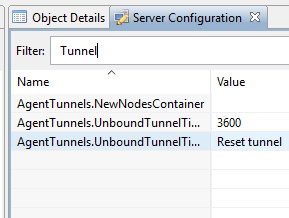
        Maybe this is part of the bug. I am on version 2.2.3 and do not have the AgentTunnelListenPort parameter in my server configuration (or I am looking in the wrong place).

        Looking forward to the next release as I am eager to get the rest of my clients on NetXMS.


        tunnel_params.PNG

        1 Reply Last reply
        0
        • G
          G
          gdodd
          wrote on last edited by
          #4

          I have tested this with agent 2.2.4 and was able to use ServerConnection = <server_ip>:<port> in the agent config.

          Server side I needed to add the parameter (see below) to the config table using my database manager

          AgentTunnelListenPort	443	1	1	I	N	Port server listens on for Agent Tunnels	NULL	4703
          
          1 Reply Last reply
          0
          • V
            V
            Victor Kirhenshtein
            wrote on last edited by
            #5

            Hi,

            you can also add any missing configuration parameter directly from UI (there is option "add parameter" in server configuration view) or using nxdbmgr:

            nxdbmgr set AgentTunnelListenPort 443

            Best regards,
            Victor
            1 Reply Last reply
            0

            Hello! It looks like you're interested in this conversation, but you don't have an account yet.

            Getting fed up of having to scroll through the same posts each visit? When you register for an account, you'll always come back to exactly where you were before, and choose to be notified of new replies (either via email, or push notification). You'll also be able to save bookmarks and upvote posts to show your appreciation to other community members.

            With your input, this post could be even better 💗

            Register Login
            Reply
            • Reply as topic
            Log in to reply
            • Oldest to Newest
            • Newest to Oldest
            • Most Votes


            • Login

            • Don't have an account? Register

            • Login or register to search.
            Powered by NodeBB Contributors
            • First post
              Last post
            0
            • Categories
            • Recent
            • Tags
            • Popular
            • Users
            • Groups