Skip to content
  • Categories
  • Recent
  • Tags
  • Popular
  • Users
  • Groups
Skins
  • Light
  • Brite
  • Cerulean
  • Cosmo
  • Flatly
  • Journal
  • Litera
  • Lumen
  • Lux
  • Materia
  • Minty
  • Morph
  • Pulse
  • Sandstone
  • Simplex
  • Sketchy
  • Spacelab
  • United
  • Yeti
  • Zephyr
  • Dark
  • Cyborg
  • Darkly
  • Quartz
  • Slate
  • Solar
  • Superhero
  • Vapor

  • Default (Flatly)
  • No Skin
Collapse
Brand Logo

NetXMS Forum

  1. Home
  2. Support
  3. How to access delay timer key in NXSL?

How to access delay timer key in NXSL?

Scheduled Pinned Locked Moved Support
5 Posts 3 Posters 73.0k Views
  • Oldest to Newest
  • Newest to Oldest
  • Most Votes
Reply
  • Reply as topic
Log in to reply
This topic has been deleted. Only users with topic management privileges can see it.
  • P
    P
    pedrong
    wrote on last edited by
    #1

    Hi All, I am trying to create a filtering script to check if a delay timer key has expired or not.  Is there any NXSL Class serves such purpose?

    Here is what I am trying to achieve :-

    1. Delay the email alert by 180 seconds if any node/interface is down [Done]
    2. When the node/interface is up and the delay timer is still within 180 seconds, no email alert. Otherwise, an email alert on the node/interface is UP.

    Any help is greatly appreciated!

    Pedro

    1 Reply Last reply
    0
    • T
      T
      token
      wrote on last edited by
      #2

      You can configure Processing Policy like in attached image.

      Note a difference between variables %i and %I. They are points to a same data - object ID but %i represent it in hex value and %I represent in decimal value. Used in script $node->id returns value in decimal, so the timer key must be generated with decimal value too.
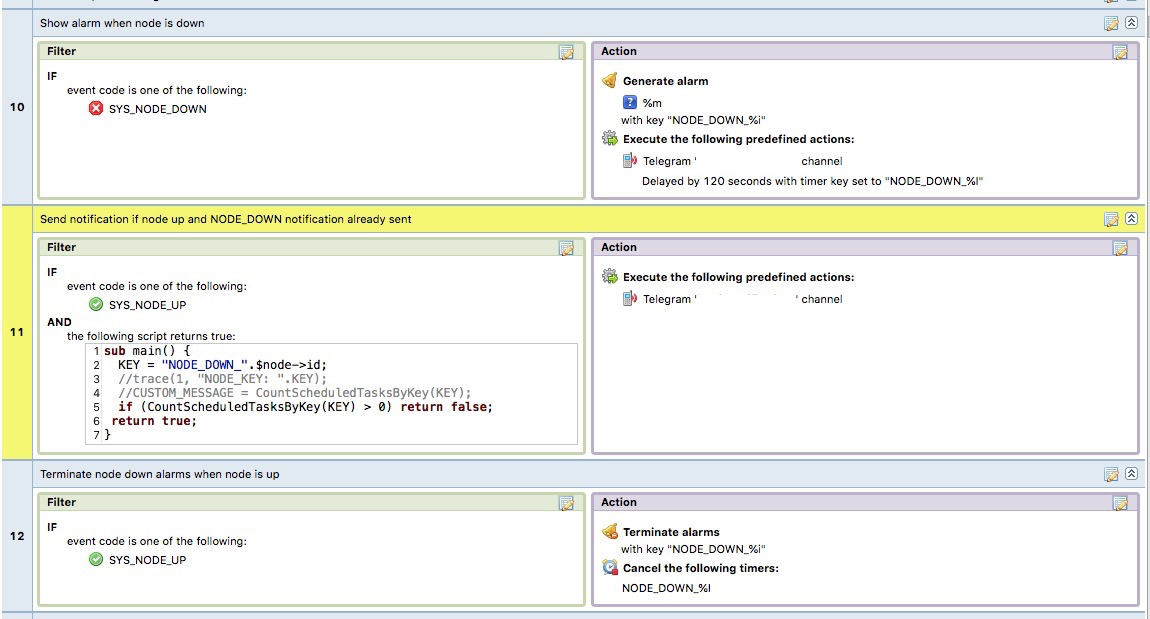

      IMAGE 2020-06-02 18:03:59.png

      1 Reply Last reply
      0
      • P
        P
        pedrong
        wrote on last edited by
        #3

        hi Token, thank you so much for your reply! The trick is very useful!

        1 Reply Last reply
        0
        • F
          F
          Filipp Sudanov
          wrote on last edited by
          #4

          In addition - a good practice is to use expandString function, e.g.

          key = $event->expandString("TIMER_DC_THRESHOLD_%I_%<dciId>");
          

          in this case you just use the same string with macros as when specifying timer key, so there's no need to compose the key manually.

          1 Reply Last reply
          0
          • F
            F
            Filipp Sudanov
            wrote on last edited by
            #5

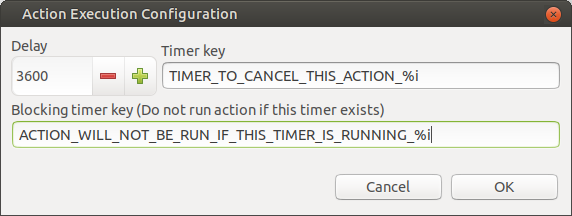
            Also, in 3.5 there's now an ability to skip action, if a particular timer is running. So your condition should now fit into 2 EPP rules.

            Screenshot at 2020-09-25 13-07-15.png

            1 Reply Last reply
            0

            Hello! It looks like you're interested in this conversation, but you don't have an account yet.

            Getting fed up of having to scroll through the same posts each visit? When you register for an account, you'll always come back to exactly where you were before, and choose to be notified of new replies (either via email, or push notification). You'll also be able to save bookmarks and upvote posts to show your appreciation to other community members.

            With your input, this post could be even better 💗

            Register Login
            Reply
            • Reply as topic
            Log in to reply
            • Oldest to Newest
            • Newest to Oldest
            • Most Votes


            • Login

            • Don't have an account? Register

            • Login or register to search.
            Powered by NodeBB Contributors
            • First post
              Last post
            0
            • Categories
            • Recent
            • Tags
            • Popular
            • Users
            • Groups