Skip to content
  • Categories
  • Recent
  • Tags
  • Popular
  • Users
  • Groups
Skins
  • Light
  • Brite
  • Cerulean
  • Cosmo
  • Flatly
  • Journal
  • Litera
  • Lumen
  • Lux
  • Materia
  • Minty
  • Morph
  • Pulse
  • Sandstone
  • Simplex
  • Sketchy
  • Spacelab
  • United
  • Yeti
  • Zephyr
  • Dark
  • Cyborg
  • Darkly
  • Quartz
  • Slate
  • Solar
  • Superhero
  • Vapor

  • Default (Flatly)
  • No Skin
Collapse
Brand Logo

NetXMS Forum

  1. Home
  2. Support
  3. Dumb question of the day - Windows CPU load via SNMP *** solved ***

Dumb question of the day - Windows CPU load via SNMP *** solved ***

Scheduled Pinned Locked Moved Support
9 Posts 2 Posters 115.5k Views
  • Oldest to Newest
  • Newest to Oldest
  • Most Votes
Reply
  • Reply as topic
Log in to reply
This topic has been deleted. Only users with topic management privileges can see it.
  • P
    P
    paul
    wrote on last edited by
    #1

    Persistence does not overcome ignorance  😢 😢 - four hours later I accept defeat.

    OK - so I walk .1.3.6.1.2.1.25.3.3.1.2 and I get two OID's for my two processors. .3 and .4

    I can add each OID as a parameter individually and they return the CPU load for each one.
    I can add a table and point it at .1.3.6.1.2.1.25.3.3.1.2 and it loads the CPU load for each CPU into the table.

    The above - although working - is completely useless to me 😞 - it just proves that close is not close enough 😞

    If I try and add .1.3.6.1.2.1.25.3.3.1.2.{instance}  then I get unsupported error. This is so it can be used on a template and be number of CPU's independent.

    Though I would be happy with the outcome from the table if it gave me the AVG of the table - that gives me the device average CPU load -  I cannot seem to work out how to do that.

    Why do I persist??

    Once I have this working - I will have my first cut of an implementable default Windows template built as I have Memory and Drives already working. It is just this - soooo frustrating 😞

    https://wiki.netxms.org/wiki/Creating_SNMP_table_DCI did not help enough. It got me to columns but other than having the values in the columns - I could not give them the ID's of the CPU's.

    My preference would be to have the CPU's listed using instance type of DCI - and to have a summary transformation somehow.

    1 Reply Last reply
    0
    • V
      V
      Victor Kirhenshtein
      wrote on last edited by
      #2

      Hi,

      as you are not interested in each individual CPU usage you don't actually need instance discovery. Instead, you could use script DCI that will walk all CPU load OIDs and calculate average. This script should work:

      snmp = CreateSNMPTransport($node);
      if (snmp == null)
      	return null;
      
      varbinds = SNMPWalk(snmp, ".1.3.6.1.2.1.25.3.3.1.2");
      if (varbinds == null)
      	return null;
      
      count = 0;
      total = 0;
      for(v : varbinds)
      {
      	count++;
      	total += v->value;
      }
      
      return total / count;
      

      It returns null to indicate data collection error if SNMP walk fails.

      Best regards,
      Victor

      1 Reply Last reply
      0
      • P
        P
        paul
        wrote on last edited by
        #3

        Thanks Victor.

        Apart from being a legend for having such a fantastic product - your 17 lines of code has - again - made my day!!.

        I have it implemented in two versions - one as a script and one as a SNMP monitor against .1.3.6.1.2.1.25.3.3.1.2.3 and simply using that code in the transform to provide the answer.

        My Windows SNMP template now has the following: (see picture as well)

        File system by instance - Total / used /  % used
        Physical and Virtual memory (via file system instance DCI )
        sysuptime in days - string and floating point.
        CPU % Busy as a script and as SNMP DCI via transform.


        Current Windows SNMP Template progress - after 7 days with NetXMS.png

        1 Reply Last reply
        0
        • P
          P
          paul
          wrote on last edited by
          #4

          OK - one more silly question - but that's it (for today)

          How would I collect and show each individual CPU load and show it? 

          I don't need it for the overview page but it would be handy as there are times when a process goes 100% CPU on a processor - but overall, being under 50%, will not trigger my combined 70% busy exception.

          1 Reply Last reply
          0
          • V
            V
            Victor Kirhenshtein
            wrote on last edited by
            #5

            Then you need instance discovery DCI that will create separate DCI for each processor instance. You can set DCI parameter name to .1.3.6.1.2.1.25.3.3.1.2.{instance} and in instance discovery method select SNMP Walk - OIDs and use .1.3.6.1.2.1.25.3.3.1.2 as a base.

            Best regards,
            Victor

            1 Reply Last reply
            0
            • P
              P
              paul
              wrote on last edited by
              #6

              Victor,

              Again what can I say - your assistance is immensely appreciated.

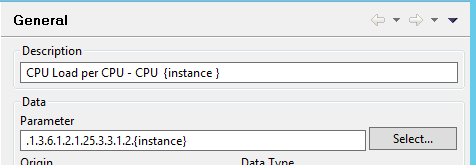
              It is in and live already - but - it did not enumerate the instance name in the title like it does for my file system equivalent DCI.

              Did I miss something?


              it works - except for the title.png

              title.png

              1 Reply Last reply
              0
              • P
                P
                paul
                wrote on last edited by
                #7

                hmmm instance-name perhaps - let me see.....

                Nope - which makes sense.

                The instance name of each CPU is the OID of that CPU - which means I need to insert that last octet of the OID into the Description field. $1 does not work - shows as $1 and instance-name returns 0.

                Stumped again 😞


                not instance-name.png

                1 Reply Last reply
                0
                • P
                  P
                  paul
                  wrote on last edited by
                  #8

                  OK - Rule 1 of every thing I do - WAIT 5  minutes!!.

                  1 Reply Last reply
                  0
                  • P
                    P
                    paul
                    wrote on last edited by
                    #9

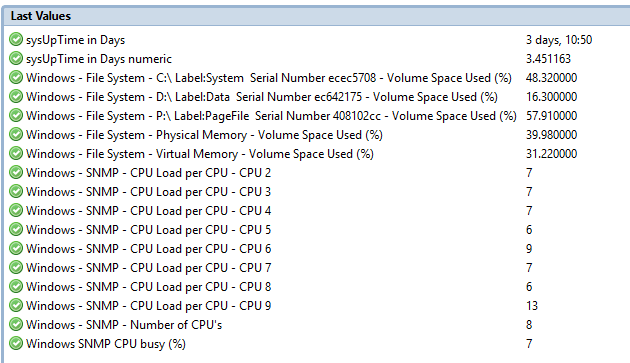
                    Done - all working!!

                    Overkill to have this on the Overview page - but doing so just to demonstrate it working on an 8 CPU server.

                    Victor and Tursiops - thank you both - a fantastic outcome 🙂


                    windows - snmp - all working.png

                    1 Reply Last reply
                    0

                    Hello! It looks like you're interested in this conversation, but you don't have an account yet.

                    Getting fed up of having to scroll through the same posts each visit? When you register for an account, you'll always come back to exactly where you were before, and choose to be notified of new replies (either via email, or push notification). You'll also be able to save bookmarks and upvote posts to show your appreciation to other community members.

                    With your input, this post could be even better 💗

                    Register Login
                    Reply
                    • Reply as topic
                    Log in to reply
                    • Oldest to Newest
                    • Newest to Oldest
                    • Most Votes


                    • Login

                    • Don't have an account? Register

                    • Login or register to search.
                    Powered by NodeBB Contributors
                    • First post
                      Last post
                    0
                    • Categories
                    • Recent
                    • Tags
                    • Popular
                    • Users
                    • Groups