
Setting up traps from CISCO UCS - fun and games
-
Well - I bit the bullet and set up the main two traps I need. The fun and games are as follows:
- Selecting the trap did not automatically import the OID's. Had to manually enter them.
- When selecting by OID - make sure you get your order right. The move up / Move down does not work. I got the first one wrong - and therefore the following 12 as well. No way to fix.
- If you know the order the OIDS will come in - much quicker just to select position and do them in order.
- As the OID text is not carried across - don't waste your time entering it.
- When formatting the Alarm in Event Processing Policy - watch out for 256 char limit. UCS traps, when including /n for new line, exceed 256 chars.
- Copy and paste within Event Processing Policy when you have used all 256 chars gives an error. Copy and paste from Notepad ++ instead.
- Alarm log shows Event before Message however Alarm Browser does not - makes for a very busy and messy screen.
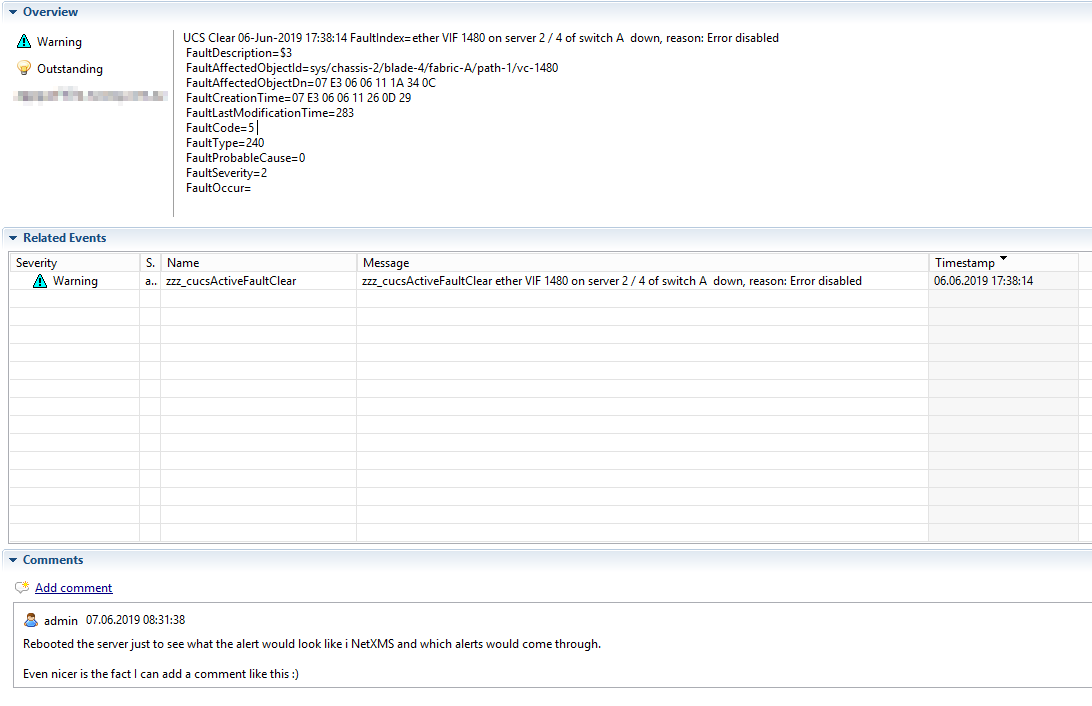
- Alarm Detail is weird - it allows me to show my shortened version of Message in Related Events (without the event title) - in Overview - gives me the whole message only.
- When hovering over the alarm in Alarm Browser - I get the line by line message - but again, I do not get the Event Message or the Event.
- Nearly forgot - Creation Time and Modification time are Octet Strings - no way to have NetXMS interpret them - come through as rubbish chars.
So there it is - I managed to get two traps in - with significant effort. Hopefully some of these will be improved.
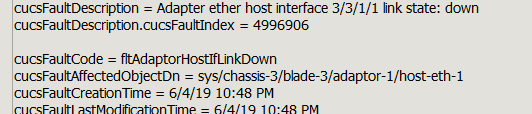
Here is example of correctly formatted trap with times in corrected format.
-
Hello! It looks like you're interested in this conversation, but you don't have an account yet.
Getting fed up of having to scroll through the same posts each visit? When you register for an account, you'll always come back to exactly where you were before, and choose to be notified of new replies (either via email, or push notification). You'll also be able to save bookmarks and upvote posts to show your appreciation to other community members.
With your input, this post could be even better 💗
Register Login