Skip to content
  • Categories
  • Recent
  • Tags
  • Popular
  • Users
  • Groups
Skins
  • Light
  • Brite
  • Cerulean
  • Cosmo
  • Flatly
  • Journal
  • Litera
  • Lumen
  • Lux
  • Materia
  • Minty
  • Morph
  • Pulse
  • Sandstone
  • Simplex
  • Sketchy
  • Spacelab
  • United
  • Yeti
  • Zephyr
  • Dark
  • Cyborg
  • Darkly
  • Quartz
  • Slate
  • Solar
  • Superhero
  • Vapor

  • Default (Flatly)
  • No Skin
Collapse
Brand Logo

NetXMS Forum

  1. Home
  2. Support
  3. Sharing Standard Templates for NetXMS

Sharing Standard Templates for NetXMS

Scheduled Pinned Locked Moved Support
75 Posts 26 Posters 2.3m Views
  • Oldest to Newest
  • Newest to Oldest
  • Most Votes
Reply
  • Reply as topic
Log in to reply
This topic has been deleted. Only users with topic management privileges can see it.
  • L
    L
    lindeamon
    wrote on last edited by
    #34

    thank you hanfelt, will use them.
    hope everyone will do the same...

    1 Reply Last reply
    0
    • H
      H
      Hanfelt
      wrote on last edited by
      #35

      Next template is for synology nases out there  😄

      TODO: Find a way to show disk usage on ex. Volume 1
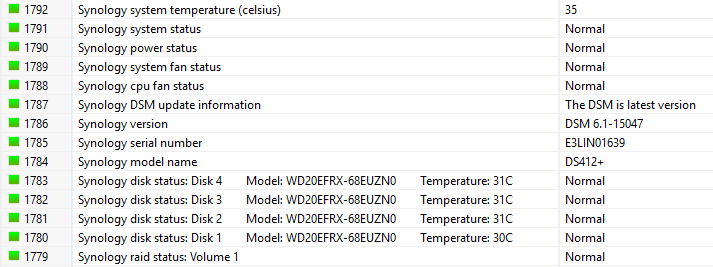

      SYNOLOGY.xml

      1.PNG

      1 Reply Last reply
      0
      • R
        R
        rainerh
        wrote on last edited by
        #36

        Hello,

        I tried to use HP.xml for Import from Hanfelt (Post April 06, 2017).
        * HP.xml (78.52 kB - downloaded 23 times.)

        The Import ends with error:

        Cannot import configuration: Configuration cannot be imported because of validation errors

        How can I import the XML-File?

        I use version 2.1-RC1

        Thank you
         🙂

        1 Reply Last reply
        0
        • U
          U
          umit
          wrote on last edited by
          #37

          How can I import these template in Windows NetXMS ?

          1 Reply Last reply
          0
          • V
            V
            Victor Kirhenshtein
            wrote on last edited by
            #38

            Hi,

            download XML file to your workstation and choose Tools -> Import configuration from main menu, then choose XML file to import.

            Best regards,
            Victor

            1 Reply Last reply
            0
            • T
              T
              Tursiops
              wrote on last edited by
              #39

              Going through our SNMP based templates right now and will be posting a few over the next few days (once I clean them up a bit by removing our custom events, thresholds and stuff).

              APC, CyberPower & Eaton UPS

              Starting with APC, CyberPower and Eaton XUPS.
              Especially APC has probably been done to death, so I'm throwing in our Object Tool for APC UPS which allows triggering a Self-Test or Runtime Calibration directly from within NetXMS (SNMP Write access to UPS is required).
              For the Eaton template, we only have a single IBM XUPS (which uses Eaton), so the auto-bind script is extremely limited as I have no other examples. If anyone has more of those devices it might be an idea to update the template accordingly.
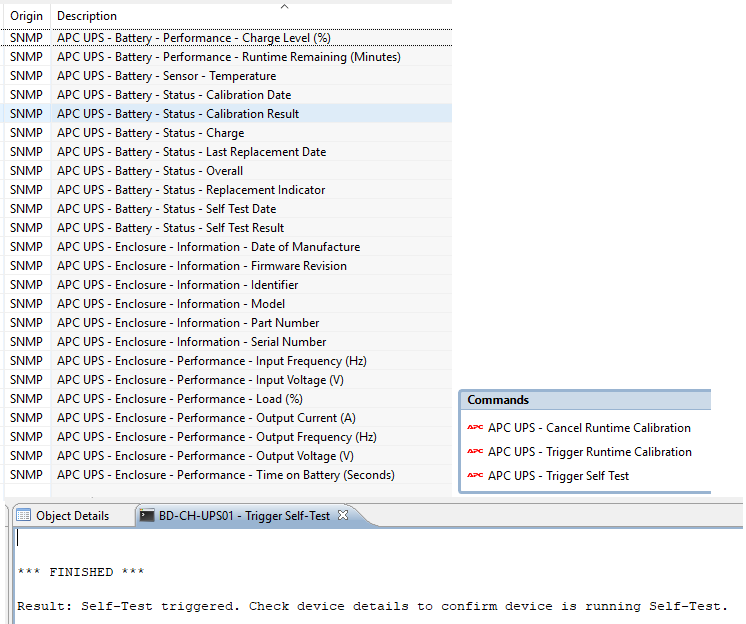
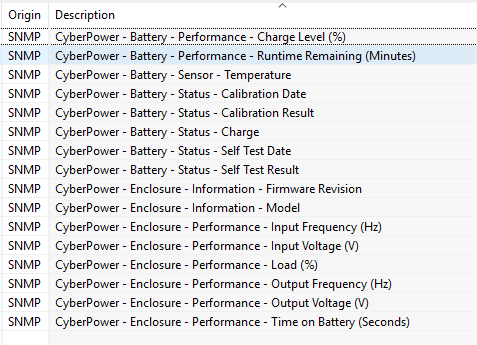
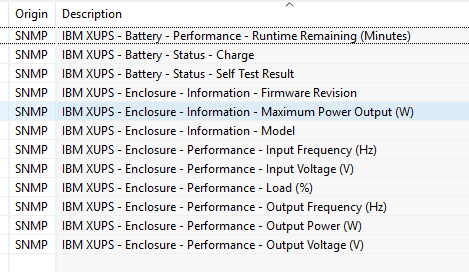
              UPS Templates and Tools.xml

              UPS - APC UPS.png

              UPS - Cyberpower.png

              UPS - Eaton XUPS.png

              1 Reply Last reply
              0
              • T
                T
                Tursiops
                wrote on last edited by
                #40

                DELL OpenManage SNMP template

                Applies to:

                • Systems with Object ID .1.3.6.1.4.1.8072.3.2.10 (i.e. reporting as "Linux") and a valid entry for .1.3.6.1.4.1.674.10892.1.300.80.1.2.1.1 (DELL -> BaseBoard -> Chassis -> BaseBoard Index)
                • Windows systems with "Dell OpenManage Systems Management" or "Dell EMC OpenManage Systems Management" software installed

                Requirements for Windows:

                • Windows SNMP service needs to be installed before DELL OpenManage. Otherwise you'll be missing the SNMP agents.

                We don't have a lot of DELL systems and none with Linux, so can't comment on the requirements here.
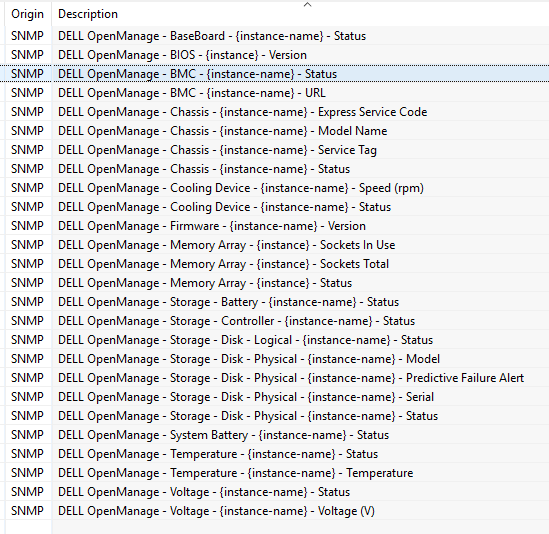

                DELL OpenManage.png

                DELL OpenManage.xml

                1 Reply Last reply
                0
                • T
                  T
                  Tursiops
                  wrote on last edited by
                  #41

                  DELL iDRAC SNMP template

                  Applies to:

                  • Systems with Object ID .1.3.6.1.4.1.674.10892.5

                  There is obviously quite an overlap with the OpenManage template, but the OIDs are in different parts of the tree. One is for the agents that are installed on a system, the other for the out of band management card.
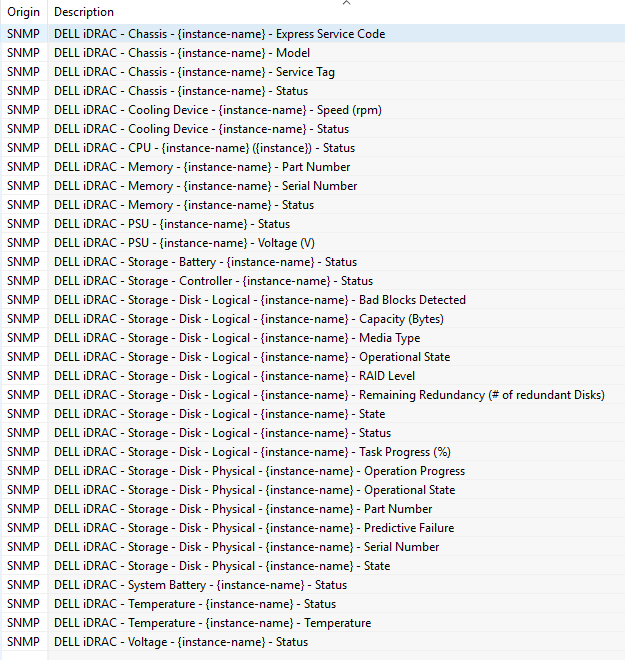

                  DELL iDRAC.xml

                  DELL iDRAC.png

                  1 Reply Last reply
                  0
                  • P
                    P
                    paul
                    wrote on last edited by
                    #42

                    Great work Tursiops - fantastic contributions!!

                    DRAC is on my list as we have a couple of hundred of them scattered around. As many have links about as fast as a tin can and some string, we were judicious in what we monitored. Funny thing - again - we pick things not included normally such as LCD status - our global OK / NOTOK item.

                    Will also end up with a Xen and Centos applicable template once I get around to the Dells.
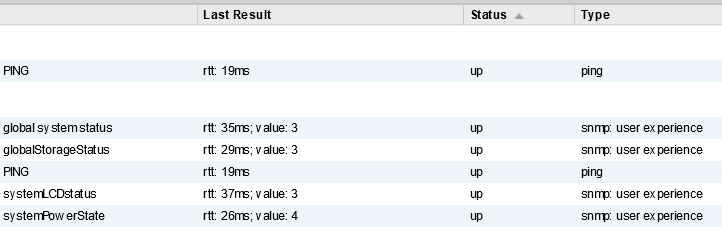

                    drac monitoring.png

                    1 Reply Last reply
                    0
                    • P
                      P
                      paul
                      wrote on last edited by
                      #43

                      Well - here is the first cut of my Windows generic template. it includes the events that are triggered.

                      For explanation of the thresholds that apply in this template, they are implemented as per here:
                      https://www.netxms.org/forum/general-support/simple-question-cdm-monitoring-using-snmp-anybody-doing-this/msg25843/#msg25843


                      Windows NetXMS template including events.xml

                      1 Reply Last reply
                      0
                      • T
                        T
                        Tursiops
                        wrote on last edited by
                        #44

                        HP iLO SNMP Template

                        Applies to:

                        • Systems with Object ID .1.3.6.1.4.1.232.9.4.10
                        • Windows Systems with "HP Insight Management Agents" or "HPE Insight Management Agents" installed.

                        Requirements for Windows:

                        • Windows SNMP service needs to be installed before the Insight Management Agents. Otherwise you'll be missing the SNMP agents.
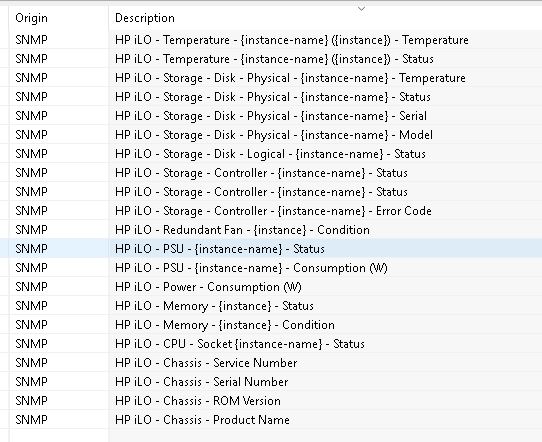
                        HP ILO.xml

                        HP ILO.png

                        1 Reply Last reply
                        0
                        • T
                          T
                          Tursiops
                          wrote on last edited by
                          #45

                          Intel SNMP Sub-Agent for Intel Server Boards

                          Applies to:

                          • Windows Systems with "Intel(R) Server Management SNMP Subagent" installed.

                          Requirements for Windows:

                          • Windows SNMP service needs to be installed before the Intel SNMP Subagent.
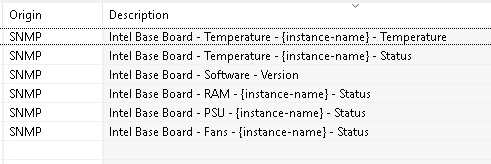
                          Intel Base Board.xml

                          Intel Base Board.png

                          1 Reply Last reply
                          0
                          • T
                            T
                            Tursiops
                            wrote on last edited by
                            #46

                            LSI MegaRAID SNMP Template (and rebranded versions of it)

                            Applies to:

                            • Windows Systems with a variation of "RAID Web Console" or "MegaRAID StorageManager" installed.

                            Requirements for Windows:

                            • Windows SNMP service needs to be installed prior to installing the Console.
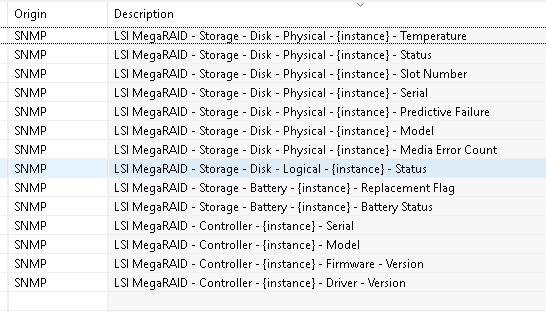
                            LSI MegaRAID.xml

                            LSI MegaRAID.png

                            1 Reply Last reply
                            0
                            • T
                              T
                              Tursiops
                              wrote on last edited by
                              #47

                              Lenovo XClarity SNMP Template

                              Applies to:

                              • Systems with SNMP Object ID of .1.3.6.1.4.1.19046.11.1
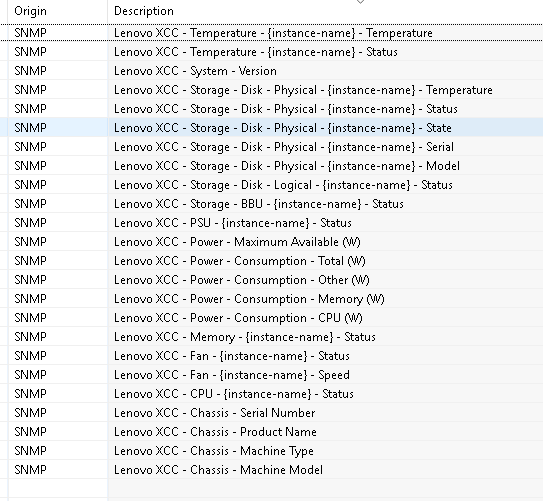
                              LenovoXCC.xml

                              LenovoXCC.png

                              1 Reply Last reply
                              0
                              • T
                                T
                                Tursiops
                                wrote on last edited by
                                #48

                                Sophos Email Appliance SNMP Template

                                Applies to:

                                • Systems with SNMP Object ID of .1.3.6.1.4.1.2604 and an existing SNMP OID of .1.3.6.1.4.1.2604.2.1.1.2 which is not null.

                                Potential Issue:
                                On the system we monitor, the In-/Outbound Message counters seem to reset once a day, always at the same time, leading to nonsense values. A transform script was added to ignore such values. Depending on your email load, this may need to be adjusted (or a different solution found).
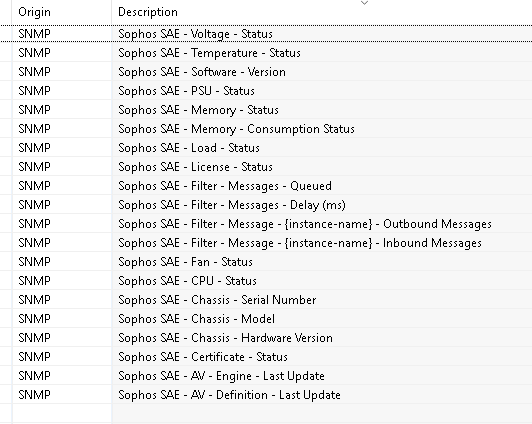

                                Sophos Email Appliance.xml

                                Sophos Email Appliance.png

                                1 Reply Last reply
                                0
                                • T
                                  T
                                  Tursiops
                                  wrote on last edited by
                                  #49

                                  WD MyCloud SNMP Template

                                  Applies to:

                                  • Systems with SNMP Object ID of .1.3.6.1.4.1.5127.1.1.1.2

                                  Note:

                                  • The Capacity Used % is a scripted DCI, the device itself does not provide a direct % for alerting. The DCI does not rely on the Total and Free DCIs, but collects both values independently via SNMP. If you have a range of these devices, it's probably worth changing the script.
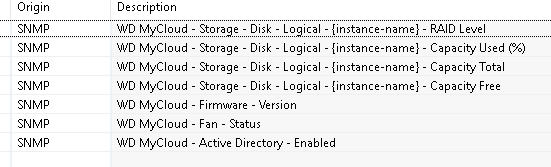
                                  WD MyCloud.xml

                                  WD MyCloud.png

                                  1 Reply Last reply
                                  0
                                  • T
                                    T
                                    Tursiops
                                    wrote on last edited by
                                    #50

                                    Synology NAS SNMP Template

                                    Applies to:

                                    • Systems with SNMP Object ID matching .1.3.6.1.4.1.8072.* and a valid response for SNMP OID .1.3.6.1.4.1.6574.1.5.1.0.
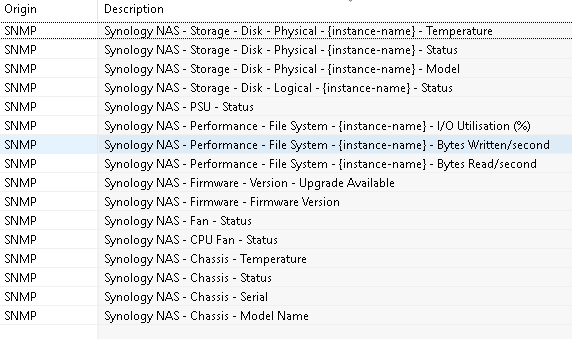
                                    Synology NAS.xml

                                    Synology NAS.png

                                    1 Reply Last reply
                                    0
                                    • T
                                      T
                                      Tursiops
                                      wrote on last edited by
                                      #51

                                      Netgear ReadyNAS SNMP Template

                                      Applies to:

                                      • Systems with SNMP Object ID matching  .1.3.6.1.4.1.4526.100.16.* or System Description matching "ReadyDATA OS".
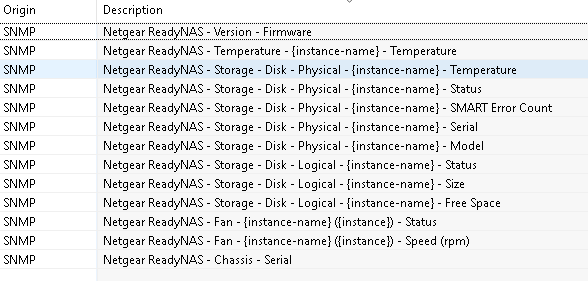
                                      Netgear ReadyNAS.xml

                                      Netgear ReadyNAS.png

                                      1 Reply Last reply
                                      0
                                      • T
                                        T
                                        Tursiops
                                        wrote on last edited by
                                        #52

                                        QNAP NAS SNMP Template

                                        Applies to:

                                        • Systems with SNMP Object ID matching .1.3.6.1.4.1.24681.* and a valid response for SNMP OID .1.3.6.1.4.1.24681.1.4.1.1.1.1.4.2.0. (QNAP NAS Template)
                                        • Systems with SNMP Object ID matching .1.3.6.1.4.1.24681.* and no valid response for SNMP OID .1.3.6.1.4.1.24681.1.4.1.1.1.1.4.2.0. (QNAP NAS (old) Template)

                                        Notes:
                                        I am unsure at which firmware version the new MIB kicked in. It also appears some older models even with the latest firmware are still using the old MIB. The extra check for the OID above seems to work well for identification though.

                                        Also attached a separate template with three QNAP SNMP Traps (QNAP appears to simply send Inform/Warning/Error traps with different messages) and matching events.
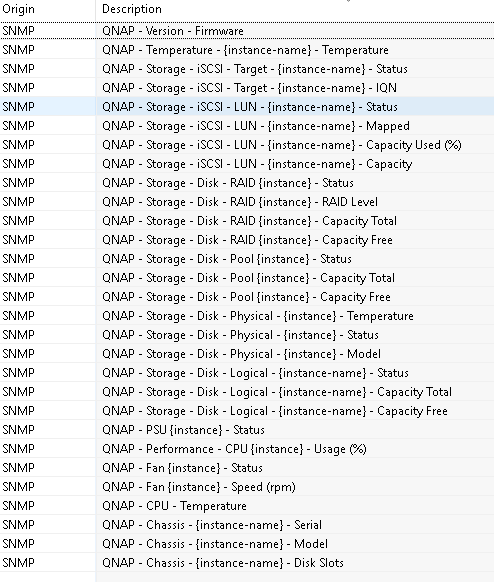
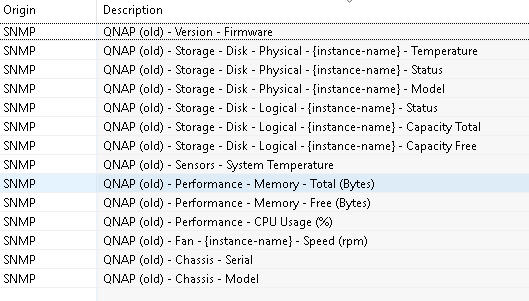

                                        QNAP NAS.xml

                                        QNAP NAS.png

                                        QNAP NAS (old).png

                                        QNAP SNMP Traps.xml

                                        QNAP Traps.png

                                        1 Reply Last reply
                                        0
                                        • T
                                          T
                                          Tursiops
                                          wrote on last edited by
                                          #53

                                          WatchGuard Firewall SNMP Template

                                          Applies to:

                                          • Systems with SNMP Object ID matching .1.3.6.1.4.1.3097.* (WatchGuard Template)
                                          • Systems with SNMP Object ID matching .1.3.6.1.4.1.3097.* and a valid response for SNMP OID .1.3.6.1.4.1.3097.6.6.1.0 (WatchGuard FireCluster Template)

                                          Note:

                                          • The Used RAM % is a scripted DCI, the device itself does not provide a direct % for alerting. The DCI does not rely on the Installed/Free RAM DCIs, but collects both values independently via SNMP. If you have a range of these devices, it's probably worth changing the script.

                                          Also attached a separate template with a simple SNMP Trap for Alerts triggered by WatchGuards. Every alert triggers the same trap.
                                          Configuring alerts via SNMP Traps is a bit of a pain in Watchguards, as you need to enable SNMP, configure the destination and enable alerts in every little service/proxy/whatever you might want to get alerts for..
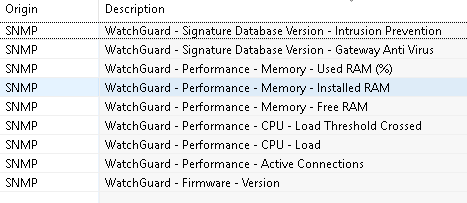
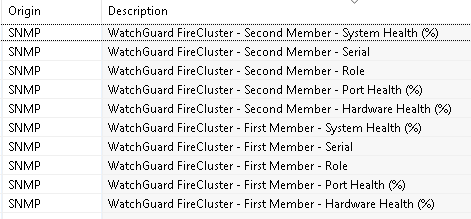
                                          WatchGuard.xml

                                          WatchGuard.png

                                          WatchGuard FireCluster.png

                                          WatchGuard SNMP Trap.xml

                                          1 Reply Last reply
                                          0

                                          Hello! It looks like you're interested in this conversation, but you don't have an account yet.

                                          Getting fed up of having to scroll through the same posts each visit? When you register for an account, you'll always come back to exactly where you were before, and choose to be notified of new replies (either via email, or push notification). You'll also be able to save bookmarks and upvote posts to show your appreciation to other community members.

                                          With your input, this post could be even better 💗

                                          Register Login
                                          Reply
                                          • Reply as topic
                                          Log in to reply
                                          • Oldest to Newest
                                          • Newest to Oldest
                                          • Most Votes


                                          • Login

                                          • Don't have an account? Register

                                          • Login or register to search.
                                          Powered by NodeBB Contributors
                                          • First post
                                            Last post
                                          0
                                          • Categories
                                          • Recent
                                          • Tags
                                          • Popular
                                          • Users
                                          • Groups