Skip to content
  • Categories
  • Recent
  • Tags
  • Popular
  • Users
  • Groups
Skins
  • Light
  • Brite
  • Cerulean
  • Cosmo
  • Flatly
  • Journal
  • Litera
  • Lumen
  • Lux
  • Materia
  • Minty
  • Morph
  • Pulse
  • Sandstone
  • Simplex
  • Sketchy
  • Spacelab
  • United
  • Yeti
  • Zephyr
  • Dark
  • Cyborg
  • Darkly
  • Quartz
  • Slate
  • Solar
  • Superhero
  • Vapor

  • Default (Flatly)
  • No Skin
Collapse
Brand Logo

NetXMS Forum

  1. Home
  2. Support
  3. Sharing Standard Templates for NetXMS

Sharing Standard Templates for NetXMS

Scheduled Pinned Locked Moved Support
75 Posts 26 Posters 2.3m Views
  • Oldest to Newest
  • Newest to Oldest
  • Most Votes
Reply
  • Reply as topic
Log in to reply
This topic has been deleted. Only users with topic management privileges can see it.
  • T
    T
    Tursiops
    wrote on last edited by
    #46

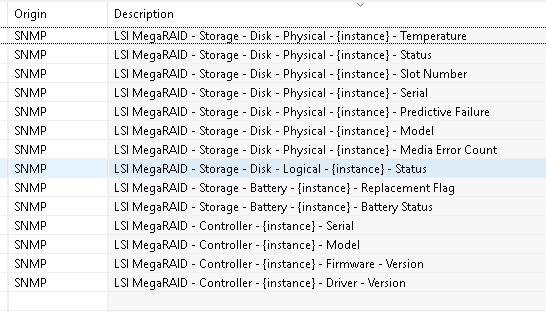
    LSI MegaRAID SNMP Template (and rebranded versions of it)

    Applies to:

    • Windows Systems with a variation of "RAID Web Console" or "MegaRAID StorageManager" installed.

    Requirements for Windows:

    • Windows SNMP service needs to be installed prior to installing the Console.
    LSI MegaRAID.xml

    LSI MegaRAID.png

    1 Reply Last reply
    0
    • T
      T
      Tursiops
      wrote on last edited by
      #47

      Lenovo XClarity SNMP Template

      Applies to:

      • Systems with SNMP Object ID of .1.3.6.1.4.1.19046.11.1
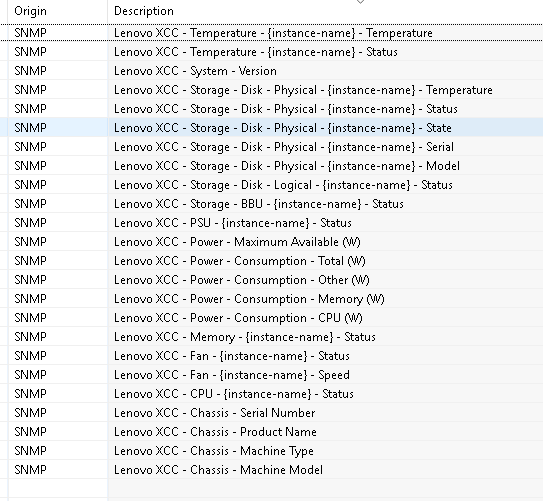
      LenovoXCC.xml

      LenovoXCC.png

      1 Reply Last reply
      0
      • T
        T
        Tursiops
        wrote on last edited by
        #48

        Sophos Email Appliance SNMP Template

        Applies to:

        • Systems with SNMP Object ID of .1.3.6.1.4.1.2604 and an existing SNMP OID of .1.3.6.1.4.1.2604.2.1.1.2 which is not null.

        Potential Issue:
        On the system we monitor, the In-/Outbound Message counters seem to reset once a day, always at the same time, leading to nonsense values. A transform script was added to ignore such values. Depending on your email load, this may need to be adjusted (or a different solution found).
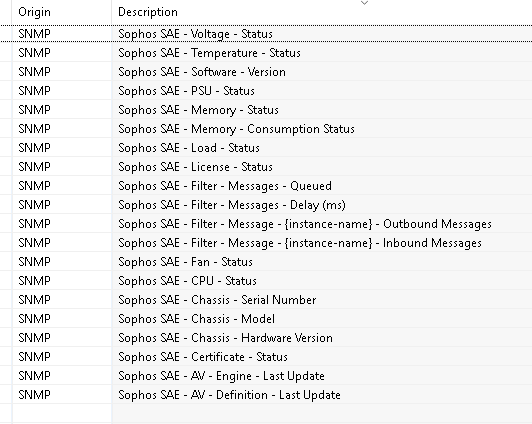

        Sophos Email Appliance.xml

        Sophos Email Appliance.png

        1 Reply Last reply
        0
        • T
          T
          Tursiops
          wrote on last edited by
          #49

          WD MyCloud SNMP Template

          Applies to:

          • Systems with SNMP Object ID of .1.3.6.1.4.1.5127.1.1.1.2

          Note:

          • The Capacity Used % is a scripted DCI, the device itself does not provide a direct % for alerting. The DCI does not rely on the Total and Free DCIs, but collects both values independently via SNMP. If you have a range of these devices, it's probably worth changing the script.
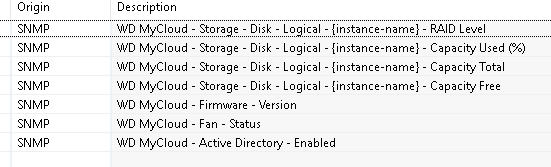
          WD MyCloud.xml

          WD MyCloud.png

          1 Reply Last reply
          0
          • T
            T
            Tursiops
            wrote on last edited by
            #50

            Synology NAS SNMP Template

            Applies to:

            • Systems with SNMP Object ID matching .1.3.6.1.4.1.8072.* and a valid response for SNMP OID .1.3.6.1.4.1.6574.1.5.1.0.
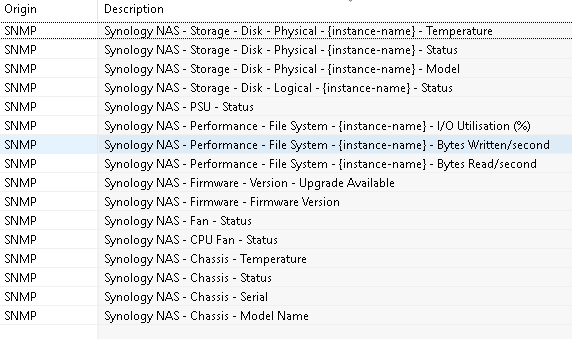
            Synology NAS.xml

            Synology NAS.png

            1 Reply Last reply
            0
            • T
              T
              Tursiops
              wrote on last edited by
              #51

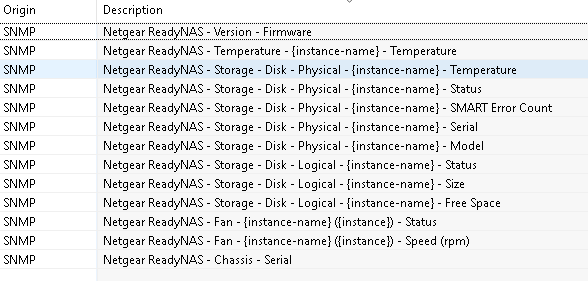
              Netgear ReadyNAS SNMP Template

              Applies to:

              • Systems with SNMP Object ID matching  .1.3.6.1.4.1.4526.100.16.* or System Description matching "ReadyDATA OS".
              Netgear ReadyNAS.xml

              Netgear ReadyNAS.png

              1 Reply Last reply
              0
              • T
                T
                Tursiops
                wrote on last edited by
                #52

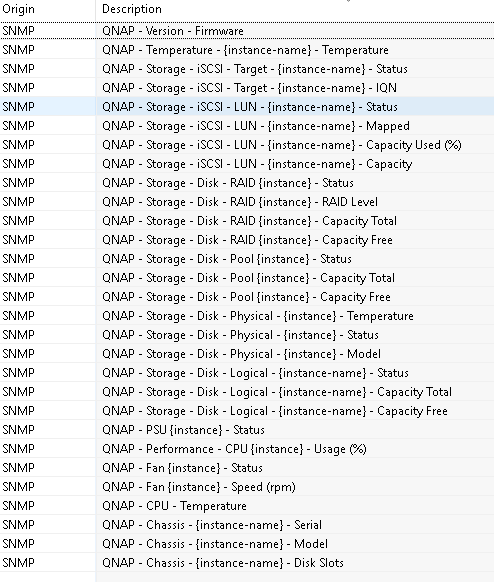
                QNAP NAS SNMP Template

                Applies to:

                • Systems with SNMP Object ID matching .1.3.6.1.4.1.24681.* and a valid response for SNMP OID .1.3.6.1.4.1.24681.1.4.1.1.1.1.4.2.0. (QNAP NAS Template)
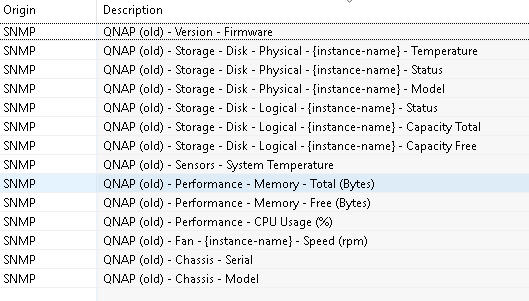
                • Systems with SNMP Object ID matching .1.3.6.1.4.1.24681.* and no valid response for SNMP OID .1.3.6.1.4.1.24681.1.4.1.1.1.1.4.2.0. (QNAP NAS (old) Template)

                Notes:
                I am unsure at which firmware version the new MIB kicked in. It also appears some older models even with the latest firmware are still using the old MIB. The extra check for the OID above seems to work well for identification though.

                Also attached a separate template with three QNAP SNMP Traps (QNAP appears to simply send Inform/Warning/Error traps with different messages) and matching events.

                QNAP NAS.xml

                QNAP NAS.png

                QNAP NAS (old).png

                QNAP SNMP Traps.xml

                QNAP Traps.png

                1 Reply Last reply
                0
                • T
                  T
                  Tursiops
                  wrote on last edited by
                  #53

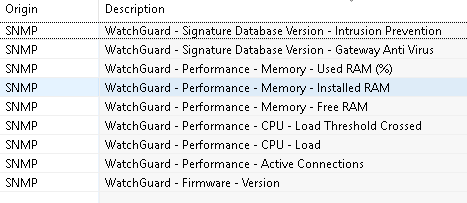
                  WatchGuard Firewall SNMP Template

                  Applies to:

                  • Systems with SNMP Object ID matching .1.3.6.1.4.1.3097.* (WatchGuard Template)
                  • Systems with SNMP Object ID matching .1.3.6.1.4.1.3097.* and a valid response for SNMP OID .1.3.6.1.4.1.3097.6.6.1.0 (WatchGuard FireCluster Template)

                  Note:

                  • The Used RAM % is a scripted DCI, the device itself does not provide a direct % for alerting. The DCI does not rely on the Installed/Free RAM DCIs, but collects both values independently via SNMP. If you have a range of these devices, it's probably worth changing the script.

                  Also attached a separate template with a simple SNMP Trap for Alerts triggered by WatchGuards. Every alert triggers the same trap.
                  Configuring alerts via SNMP Traps is a bit of a pain in Watchguards, as you need to enable SNMP, configure the destination and enable alerts in every little service/proxy/whatever you might want to get alerts for..
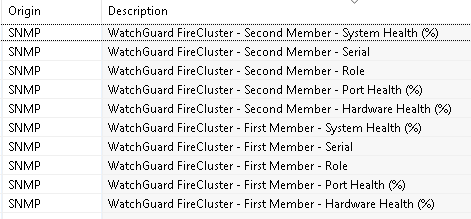
                  WatchGuard.xml

                  WatchGuard.png

                  WatchGuard FireCluster.png

                  WatchGuard SNMP Trap.xml

                  1 Reply Last reply
                  0
                  • T
                    T
                    Tursiops
                    wrote on last edited by
                    #54

                    SonicWALL SNMP Template

                    Applies to:

                    • Systems with SNMP Object ID .1.3.6.1.4.1.8741.1

                    Note:

                    • The Concurrent Connections % is a scripted DCI, the device itself does not provide a direct % for alerting. The DCI does not rely on the Maximum and Current DCIs, but collects both values independently via SNMP. If you have a range of these devices, it's probably worth changing the script.
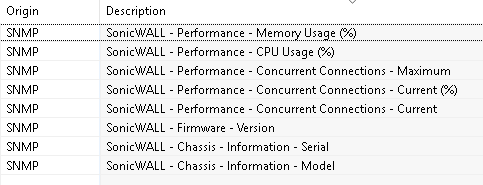
                    SonicWALL.xml

                    SonicWALL.png

                    1 Reply Last reply
                    0
                    • T
                      T
                      Tursiops
                      wrote on last edited by
                      #55

                      Ruckus Brocade ICX SNMP Template

                      Applies to:

                      • Systems with SNMP Object ID matching .1.3.6.1.4.1.1991.*, but not .1.3.6.1.4.1.1991.1.3.52.2.4.1.1.
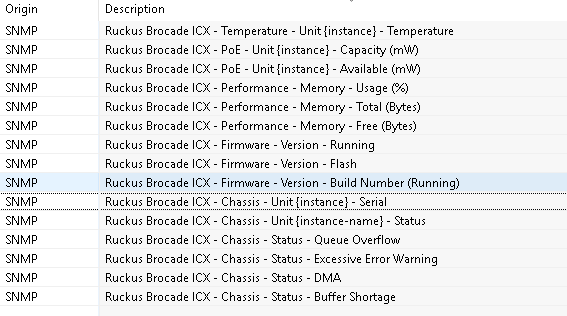
                      Ruckus Brocade ICX.png

                      Ruckus Brocade ICX.xml

                      1 Reply Last reply
                      0
                      • T
                        T
                        Tursiops
                        wrote on last edited by
                        #56

                        TP Link Switch SNMP Template

                        Applies to:

                        • Systems with SNMP Object ID matching .1.3.6.1.4.1.11863.5.*

                        Note:

                        • We only monitor one of these and it's not returning a lot of data (that we found useful from a monitoring perspective), so the template is fairly simple.
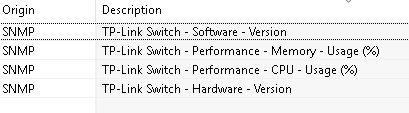
                        TP Link.png

                        TP Link.xml

                        1 Reply Last reply
                        0
                        • T
                          T
                          Tursiops
                          wrote on last edited by
                          #57

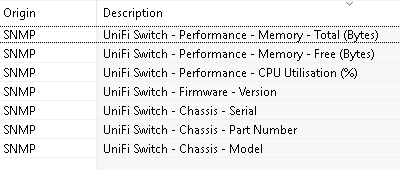
                          UniFi Switch SNMP Template

                          Applies to:

                          • Systems with SNMP Object ID .1.3.6.1.4.1.4413 and system description starting with "USW-".

                          Notes:

                          • We are monitoring only one of these and the above looks like it should work for other UniFi switches if this one device is anything to go by. Problem with .1.3.6.1.4.1.4413 is that it is the Broadcom Enterprise, so could potentially be matching a lot of other devices if it wasn't for the additional system description restriction. As all data for the UniFi switch is also located in the Broadcom Enterprise, this could maybe be turned into a more generic Broadcom template (someone with matching devices would be able to confirm this).
                          UniFi Switch.xml

                          UniFi Switch.png

                          1 Reply Last reply
                          0
                          • T
                            T
                            Tursiops
                            wrote on last edited by
                            #58

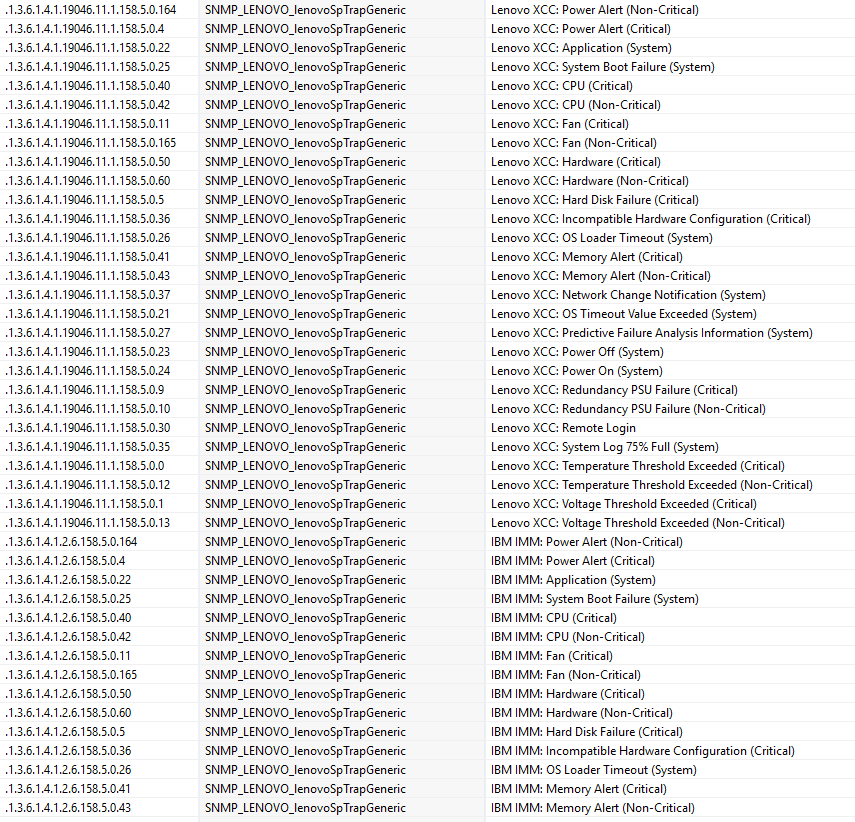
                            Lenovo XClarity / IBM Integrated Management Console SNMP Traps Template

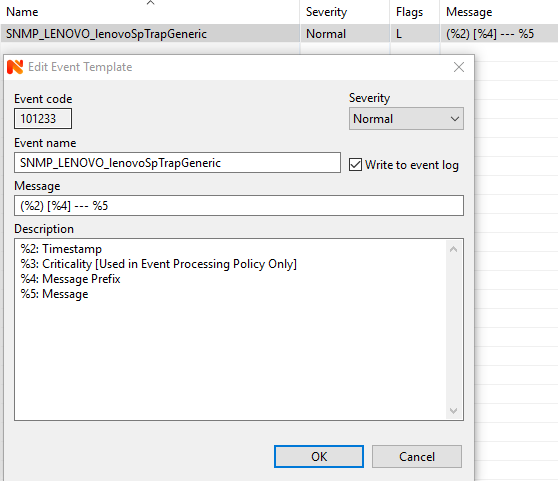
                            The traps all contain the same varbinds. The trap configuration in this template pick out the following:

                            • Datetime
                            • Priority
                            • Message Text
                            • Message ID Prefix

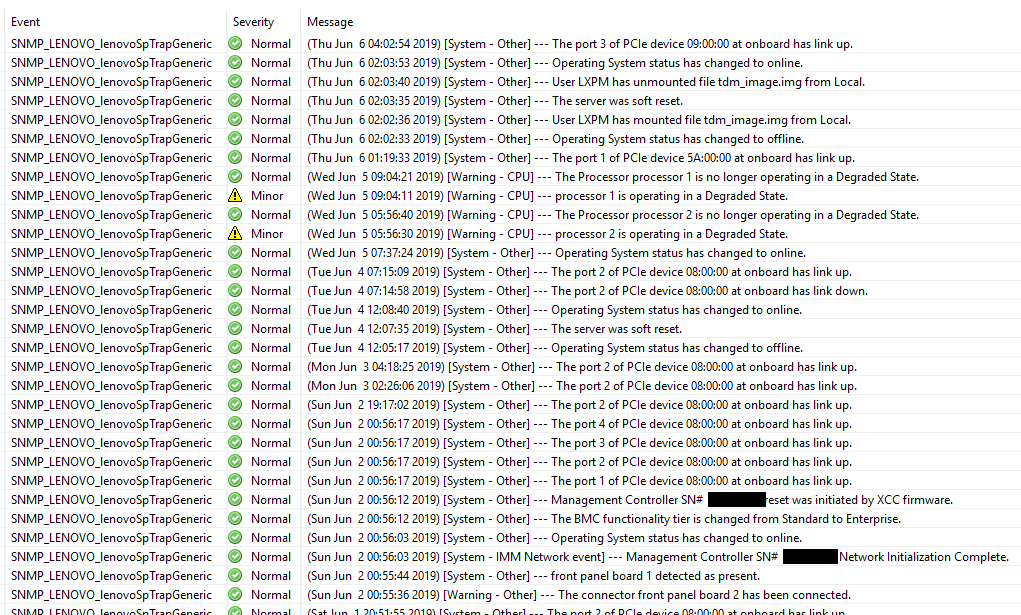
                            The Event includes the Datetime, Prefix and Message Text.
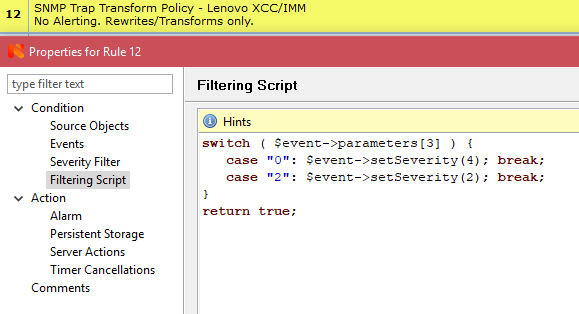
                            Priority is read inside the Event Processing policy, which changes the Events severity as needed. The policy is effectively used as "SNMP Trap Transform Script".

                            No policy for alerting is included, but that could be done inside the included policy or by adding another one below it (processing does not stop at the transform policy).


                            SNMP Traps - Lenovo XCC, IBM IMM.xml
                            SNMP Traps - Lenovo XCC - SNMP Trap Configuration Sample.png

                            SNMP Traps - Lenovo XCC - Event configuration.png

                            SNMP Traps - Lenovo XCC - Event Processing Policy.png

                            SNMP Traps - Lenovo XCC - Sample Event Logs.png

                            1 Reply Last reply
                            0
                            • T
                              T
                              Tursiops
                              wrote on last edited by
                              #59

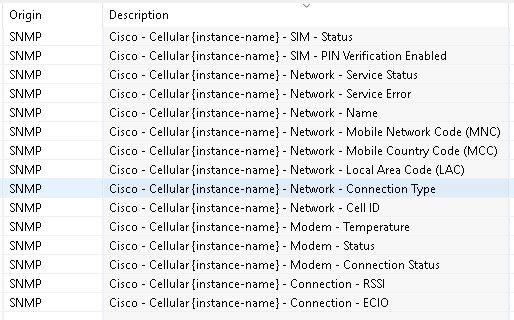
                              Cisco 3/4G SNMP Template

                              Applies to:

                              • Systems with SNMP Object ID .1.3.6.1.4.1.9.1.* and a valid entry in the .1.3.6.1.4.1.9.9.661.1.1.1.1 table.
                              Cisco Cellular.xml

                              Cisco Celluar.png

                              1 Reply Last reply
                              0
                              • T
                                T
                                Tursiops
                                wrote on last edited by
                                #60

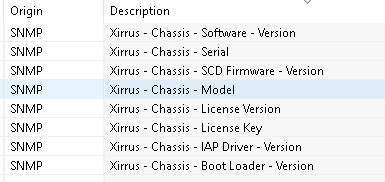
                                Xirrus Access Point SNMP Template

                                Applies to:

                                • Systems with SNMP Object ID .1.3.6.1.4.1.21013.1.*

                                Notes:

                                • Default SNMP Community for Xirrus access points is xirrus.
                                Xirrus.xml

                                Xirrus.png

                                1 Reply Last reply
                                0
                                • T
                                  T
                                  Tursiops
                                  wrote on last edited by
                                  #61

                                  Ruckus ZoneDirector SNMP Template

                                  Applies to:

                                  • Systems with SNMP Object ID .1.3.6.1.4.1.25053.3.1.5.*

                                  Note:

                                  • Unnamed WAPs in ZoneDirector will show up with the same instance name, making it difficult to tell them apart. It is recommended to ensure they all have proper names.
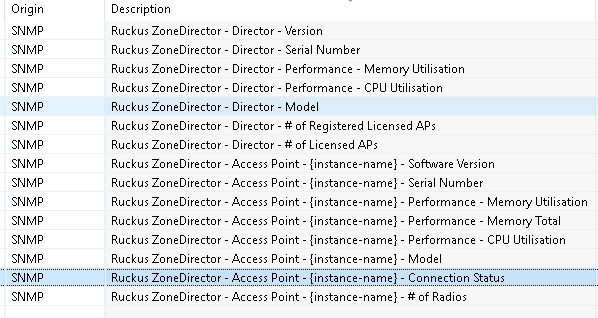
                                  Ruckus ZoneDirector.xml

                                  Ruckus ZoneDirector.png

                                  1 Reply Last reply
                                  0
                                  • T
                                    T
                                    Tursiops
                                    wrote on last edited by
                                    #62

                                    Ubiquiti AirMAX SNMP Template

                                    Applies to:

                                    • Devices with SNMP Object ID .1.3.6.1.4.1.10002.1 (Frogfoot MIB, which Ubiquiti at some point decided to use before they got their own Enterprise OID) or SNMP Object ID like .1.3.6.1.4.1.41112.* (Ubiquiti's own OID). Devices must also have a valid entry for OID .1.3.6.1.4.1.41112.1.4.1.1.9.1 (i.e. must have an antenna registered)

                                    Notes:

                                    • Just to avoid potential disappointment: This is not a template for Unifi Access Points. It is for AirMAX wireless bridges.
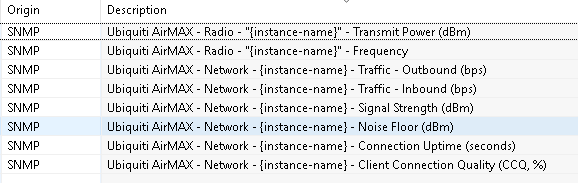
                                    Ubiquiti AirMAX.xml

                                    Ubiquiti AirMAX.png

                                    1 Reply Last reply
                                    0
                                    • T
                                      T
                                      Tursiops
                                      wrote on last edited by
                                      #63

                                      Ubiquiti UniFi SNMP Template

                                      Applies to:

                                      • A range of devices with Ubiquiti-style messy OIDs depending on firmware versions (things changed with firmware version 3.9.19):
                                          - Devices with SNMP Object ID .1.3.6.1.4.1.10002.1 or SNMP Object ID like .1.3.6.1.4.1.41112.* if a valid result is returned for OID .1.3.6.1.4.1.41112.1.6.3.1.
                                          - Devices with SNMP Object ID .1.3.6.1.4.1.8072.3.2.10 if a valid result is return for OI .1.3.6.1.4.1.41112.1.6.3.1.0.
                                          - The Ubiquiti template applies to anything with either 10002 or 41112 match as well as 8072. In case of the latter, the system description also needs to start with UAP.

                                      Notes:

                                      • The pre/post 3.9.19 UniFi templates included in the XML both collect the exact same data. They only cater for the fact that Ubiquiti decided to change the OIDs used.
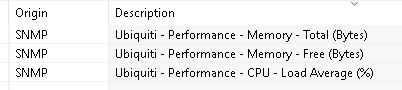

                                      Ubiquiti.xml

                                      Ubiquiti.png

                                      Unifi.png

                                      1 Reply Last reply
                                      0
                                      • P
                                        P
                                        paul
                                        wrote on last edited by
                                        #64

                                        Once we get to the improved trap processing in V3 later this year as indicated by Victor, I will do the AVAYA / Dell / Dell IDRAC / CISCO / APC ixcs traps that have numerous oids that are the same per trap but need to be entered over and over.

                                        1 Reply Last reply
                                        0
                                        • P
                                          P
                                          pedro6161
                                          wrote on last edited by
                                          #65

                                          Anyone have template for palo alto firewall ?

                                          please advice

                                          1 Reply Last reply
                                          0

                                          Hello! It looks like you're interested in this conversation, but you don't have an account yet.

                                          Getting fed up of having to scroll through the same posts each visit? When you register for an account, you'll always come back to exactly where you were before, and choose to be notified of new replies (either via email, or push notification). You'll also be able to save bookmarks and upvote posts to show your appreciation to other community members.

                                          With your input, this post could be even better 💗

                                          Register Login
                                          Reply
                                          • Reply as topic
                                          Log in to reply
                                          • Oldest to Newest
                                          • Newest to Oldest
                                          • Most Votes


                                          • Login

                                          • Don't have an account? Register

                                          • Login or register to search.
                                          Powered by NodeBB Contributors
                                          • First post
                                            Last post
                                          0
                                          • Categories
                                          • Recent
                                          • Tags
                                          • Popular
                                          • Users
                                          • Groups