Skip to content
  • Categories
  • Recent
  • Tags
  • Popular
  • Users
  • Groups
Skins
  • Light
  • Brite
  • Cerulean
  • Cosmo
  • Flatly
  • Journal
  • Litera
  • Lumen
  • Lux
  • Materia
  • Minty
  • Morph
  • Pulse
  • Sandstone
  • Simplex
  • Sketchy
  • Spacelab
  • United
  • Yeti
  • Zephyr
  • Dark
  • Cyborg
  • Darkly
  • Quartz
  • Slate
  • Solar
  • Superhero
  • Vapor

  • Default (Flatly)
  • No Skin
Collapse
Brand Logo

NetXMS Forum

  1. Home
  2. Support
  3. Total disk space in use of all servers

Total disk space in use of all servers

Scheduled Pinned Locked Moved Support
13 Posts 3 Posters 60.7k Views
  • Oldest to Newest
  • Newest to Oldest
  • Most Votes
Reply
  • Reply as topic
Log in to reply
This topic has been deleted. Only users with topic management privileges can see it.
  • V
    V
    Victor Kirhenshtein
    wrote on last edited by
    #2

    Hi!

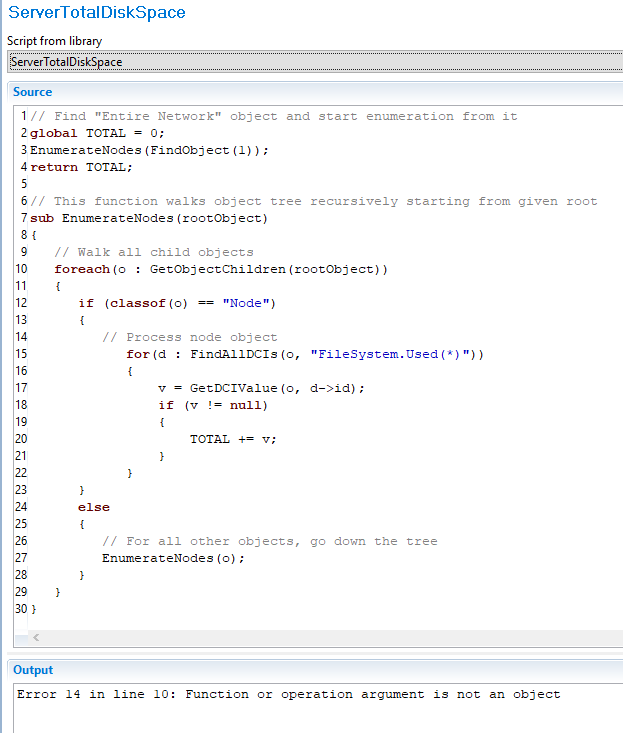
    If you need just one number for total disk space then best approach would be script DCI that will enumerate all servers and add up used disk space. Possible script implementation is following:

    // Find "Entire Network" object and start enumeration from it
    global TOTAL = 0;
    EnumerateNodes(FindObject(1));
    return TOTAL;
    
    // This function walks object tree recursively starting from given root
    sub EnumerateNodes(rootObject)
    {
    	// Walk all child objects
    	foreach(o : GetObjectChildren(rootObject))
    	{
    		if (classof(o) == "Node")
    		{
    			// Process node object
                for(d : FindAllDCIs(o, "FileSystem.Used(*)"))
                {
                    v = GetDCIValue(o, d->id);
                    if (v != null)
                    {
                        TOTAL += v;
                    }
                }
    		}
    		else
    		{
    			// For all other objects, go down the tree
    			EnumerateNodes(o);
    		}
    	}
    }
    

    You should select right top level object for enumeration. Also this script does not check if same node encountered multiple times - so you either have to pass such rot object under which each node bound exactly once, ar add additional check to avoid duplicates.

    Best regards,
    Victor

    1 Reply Last reply
    0
    • B
      B
      blairmc96
      wrote on last edited by
      #3

      Thanks Victor!

      Where would I put this?  Does this go in the script library?

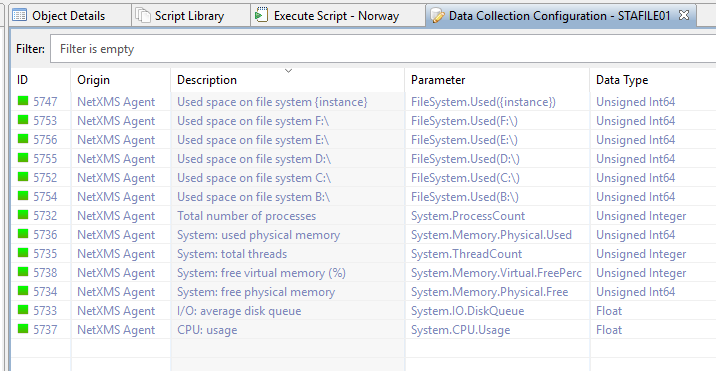
      Also, every time I use FileSystem.Used(*) it never works to enumerate all the instances.  I thought it had to be FileSystem.Used({instance})?

      1 Reply Last reply
      0
      • V
        V
        Victor Kirhenshtein
        wrote on last edited by
        #4

        Yes, you create script in library and then create script DCI specifying this script as parameter name. For testing you can select any container, right click and select "execute server script". You can also add print or trace calls to provide diagnostic. You have to use * as wildcard in FindAllDCIs call.

        Best regards,
        Victor

        1 Reply Last reply
        0
        • B
          B
          blairmc96
          wrote on last edited by
          #5

          Thanks Victor.

          When I try to run it against a node, I get this:

          Error 14 in line 10: Function or operation argument is not an object

          The server in question has the DCI FileSystem.Used on it and shows all the drives.

          Also, how do I create a script DCI?  Where do I create that?

          Thanks

          1 Reply Last reply
          0
          • T
            T
            Tursiops
            wrote on last edited by
            #6

            Script works fine on my system. Did you copy&paste or type it?
            The reason the script uses FileSystem.Used(*) is because the * in the script is a wildcard, so it catches all such DCIs. It is not the same as an actual DCI on a node.

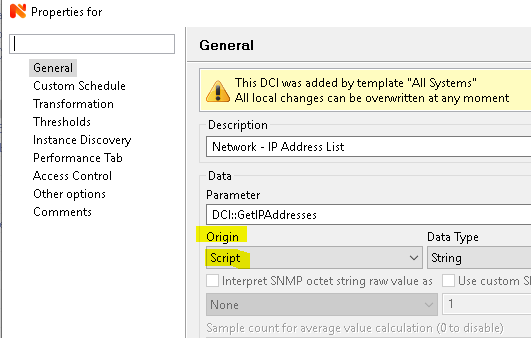
            To create a script DCI, create a new DCI and select Script under Origin. As Parameter you use the name of the script in your Script Library (see attached example for a script called "DCI::GetIPAddresses", obviously yours will be called something else).

            ScriptDCI.png

            1 Reply Last reply
            0
            • B
              B
              blairmc96
              wrote on last edited by
              #7

              Thanks!

              What node do I create the DCI on?  Am I just missing something?

              I did just copy & paste it into a new script.

              1 Reply Last reply
              0
              • T
                T
                Tursiops
                wrote on last edited by
                #8

                As you are using a script DCI that goes through every single node in your installation, you can put that DCI on any node, really.
                You could create a dummy node, e.g. "AWS" and create the DCI on there.

                Based on your error, it doesn't like something (the rootObject?) in line

                foreach(o : GetObjectChildren(rootObject))
                

                As per the script, initially that'd get the object children of object 1 (which is "Entire Network") and then move down the tree.
                I wouldn't think this could break unless there is a typo in the script (direct copy&paste without a single change worked without any issues for me on two different installs) or some kind of database corruption. But Victor might have an idea.

                1 Reply Last reply
                0
                • B
                  B
                  blairmc96
                  wrote on last edited by
                  #9

                  Thanks, I just tried copying & pasting again but got the same error, see attached.  One of the machines I'm testing on has the FileSystem.Used({instance}) enumerated on it just fine and last values reports the data correctly.

                  I'm not sure what I'm doing wrong.


                  error.png

                  error1.png

                  1 Reply Last reply
                  0
                  • T
                    T
                    Tursiops
                    wrote on last edited by
                    #10

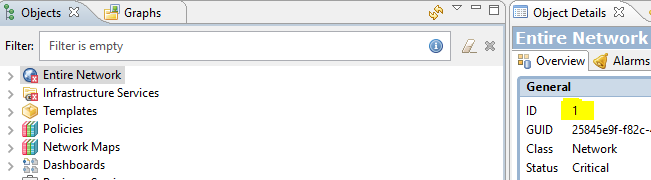
                    When you click on "Entire Network", what's the ID of the Object?
                    It should (and the script expects it to) be "1" but if for some odd reason it isn't, that'd be a problem.


                    Entire Network.png

                    1 Reply Last reply
                    0
                    • B
                      B
                      blairmc96
                      wrote on last edited by
                      #11

                      I can confirm it is indeed 1.

                      1 Reply Last reply
                      0
                      • V
                        V
                        Victor Kirhenshtein
                        wrote on last edited by
                        #12

                        Check server configuration variable CheckTrustedNodes - it should be set to 0 (false).

                        Best regards,
                        Victor

                        1 Reply Last reply
                        0
                        • B
                          B
                          blairmc96
                          wrote on last edited by
                          #13

                          It was set to 1.  I have no idea how it got set that way.

                          I set it to 0 and restarted, and it produced results!

                          Is there somewhere in the documentation about scripting that I missed?

                          Thank you for your help!

                          *** FINISHED ***

                          Result: 27706007919104

                          1 Reply Last reply
                          0

                          Hello! It looks like you're interested in this conversation, but you don't have an account yet.

                          Getting fed up of having to scroll through the same posts each visit? When you register for an account, you'll always come back to exactly where you were before, and choose to be notified of new replies (either via email, or push notification). You'll also be able to save bookmarks and upvote posts to show your appreciation to other community members.

                          With your input, this post could be even better 💗

                          Register Login
                          Reply
                          • Reply as topic
                          Log in to reply
                          • Oldest to Newest
                          • Newest to Oldest
                          • Most Votes


                          • Login

                          • Don't have an account? Register

                          • Login or register to search.
                          Powered by NodeBB Contributors
                          • First post
                            Last post
                          0
                          • Categories
                          • Recent
                          • Tags
                          • Popular
                          • Users
                          • Groups