
Search option within filtering takes minutes to populate
-
When using the filtering option in alarm log (right click on node does not have this option - it has alarms which is already available in Object Details), it starts to search from the first character typed.
Unfortunately for me, with 3500 nodes, this then hangs my NetXMS console till it can populate the list based on that first character - a pointless exercise considering the time it wastes.
Of all the things I like and dislike - this is the one thing that all users get really annoyed about and they vent at me to which there is nothing I can do.
Either let me entered the source node freehand completely, or let me enter it partially and then invoke search. Using the last search is great when adding traps and events, but for source, when there are over 3000 entries in the tree to traverse and then for me to select from - when that is not near enough anyway, is a nightmare.Is there a setting somewhere where I can turn off "search once first letter is typed" or can I set numberofcharstypedtobeginsearch to 3 instead of 1?
-
There are server-side settings which get pushed to clients as defaults and you can override them on the client itself as well.
See screenshots.For Client Configuration, go to File -> Preferences -> Object Browser. Even with different server side settings configured, I'm pretty sure it'll show filter delay as 300 (ms) and filter minimal length as 1 which are client defaults (but don't apply if you have "use server settings for object filter" checked).

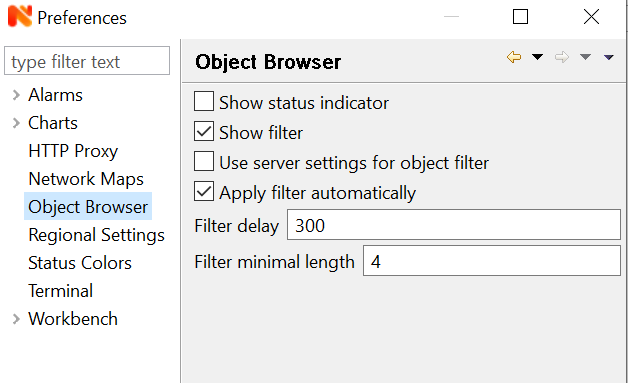
-
Don't you just hate it when the answer is right in front of you!!
Thanks for pointing this out - working much, much better now.
I have included my original settings so everyone knows what NOT to use

*** I worked out where my bad settings came from - they are the default when you untick use server settings ***

Hello! It looks like you're interested in this conversation, but you don't have an account yet.
Getting fed up of having to scroll through the same posts each visit? When you register for an account, you'll always come back to exactly where you were before, and choose to be notified of new replies (either via email, or push notification). You'll also be able to save bookmarks and upvote posts to show your appreciation to other community members.
With your input, this post could be even better 💗
Register Login