
Notification channel driver for Microsoft Teams
-
-
Hi,
I have updated documentation: https://www.netxms.org/documentation/adminguide/event-processing.html#drivers
-
-
It should be in 3.1, but we recently found that it is missing for Windows build. New patch release for Windows build will be on Monday.
-
I have followed the instructions here: https://www.netxms.org/documentation/adminguide/event-processing.html#drivers and set up a webhook in Teams, but I've just noticed the it saying "Driver Error", which isn't very helpful. How can I troubleshoot this?
So far I have not received any mesages into Teams.
I've searched for "teams" in /var/log/netxmsd, but only found the following:2021.09.21 10:20:35.175 *I* [ncd.msteams ] Microsoft Teams driver instantiatedI have the following in my Driver Configuration:
ThemeColor=FF6A00
UseMessageCards = false

[Channels]
Channel=https://xxxx.webhook.office.com/webhookb2/xxxxx
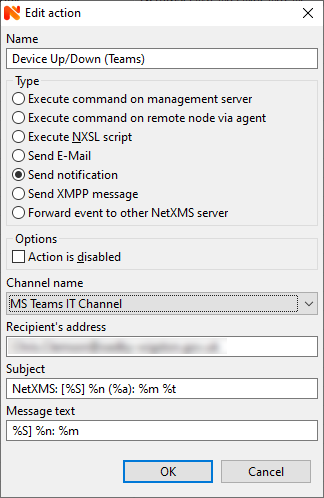
Attached is a picture of the error and of my notification action

-
Try to set debug level to 7 for tag ncd.msteams - you should see more detailed diagnostic in the log then.
Best regards,
Victor -
2021.09.28 14:56:12.854 *D* [ncd.msteams        ] Prepared request: { "text":"NetXMS: [Normal] xxxxxx: Node up 28.Sep.2021 14:56:12\n\nNormal] xxxxxx: Node up" }
2021.09.28 14:56:13.099 *D* [ncd.msteams        ] Got 162 bytes
2021.09.28 14:56:13.099 *D* [ncd.msteams        ] Error response from webhook: <html>^M
<head><title>301 Moved Permanently</title></head>^M
<body>^M
<center><h1>301 Moved Permanently</h1></center>^M
<hr><center>nginx</center>^M
</body>^M
</html>^M
Anyone know what that means? That normally means a redirect will happen. Is this normal behaviour?
Sorry, I've not used webhooks before.... -
Hi!
can you show output of
curl -v https://xxxx.webhook.office.com/webhookb2/xxxxxMay be you will need to post the actual request prepared by netxms, in this case
curl -v -X POST https://xxxx.webhook.office.com/webhookb2/xxxxx
-H "Content-Type: application/json"
-d "{ "text":"NetXMS: [Normal] xxxxxx: Node up 28.Sep.2021 14:56:12\n\nNormal] xxxxxx: Node up" }" -
Hi Filipp,
Thanks for the reply.
Yes, the first command didn't work as it says "GET not supported".
The second command worked, although you need to enclose the "-d" option with single quotes instead of double as double quotes are used in the data.
It looked like it worked:Node up 28.Sep.2021 14:56:12\n\nNormal] xxxxxx: Node up" }' * Trying 52.97.146.162:443... * TCP_NODELAY set * Connected to xxxxxxxx.webhook.office.com (52.97.146.162) port 443 (#0) * ALPN, offering h2 * ALPN, offering http/1.1 * successfully set certificate verify locations: * CAfile: /etc/ssl/certs/ca-certificates.crt CApath: /etc/ssl/certs * TLSv1.3 (OUT), TLS handshake, Client hello (1): * TLSv1.3 (IN), TLS handshake, Server hello (2): * TLSv1.2 (IN), TLS handshake, Certificate (11): * TLSv1.2 (IN), TLS handshake, Server key exchange (12): * TLSv1.2 (IN), TLS handshake, Server finished (14): * TLSv1.2 (OUT), TLS handshake, Client key exchange (16): * TLSv1.2 (OUT), TLS change cipher, Change cipher spec (1): * TLSv1.2 (OUT), TLS handshake, Finished (20): * TLSv1.2 (IN), TLS handshake, Finished (20): * SSL connection using TLSv1.2 / ECDHE-RSA-AES256-GCM-SHA384 * ALPN, server accepted to use h2 * Server certificate: * subject: C=US; ST=Washington; L=Redmond; O=Microsoft Corporation; CN=*.webhook.office.com * start date: May 12 00:00:00 2020 GMT * expire date: May 12 12:00:00 2022 GMT * subjectAltName: host "xxxxxx.webhook.office.com" matched cert's "*.webhook.office.com" * issuer: C=US; O=DigiCert Inc; CN=DigiCert Cloud Services CA-1 * SSL certificate verify ok. * Using HTTP2, server supports multi-use * Connection state changed (HTTP/2 confirmed) * Copying HTTP/2 data in stream buffer to connection buffer after upgrade: len=0 * Using Stream ID: 1 (easy handle 0x56077e955e10) > POST /webhookb2/xxxxxxx HTTP/2 > Host: xxxxx.webhook.office.com > user-agent: curl/7.68.0 > accept: */* > content-type: application/json > content-length: 93 > * We are completely uploaded and fine * Connection state changed (MAX_CONCURRENT_STREAMS == 100)! < HTTP/2 200 < cache-control: no-cache < pragma: no-cache < content-length: 1 < content-type: text/plain; charset=utf-8 < expires: -1 < server: Microsoft-IIS/10.0 < request-id: e043cd8f-7a80-4713-4620-fe2db9000165 < strict-transport-security: max-age=31536000; includeSubDomains; preload < x-calculatedfetarget: CWLP265CU017.internal.outlook.com < x-backendhttpstatus: 200 < x-feproxyinfo: CWLP265CA0401.GBRP265.PROD.OUTLOOK.COM < x-calculatedbetarget: CWXP265MB1910.GBRP265.PROD.OUTLOOK.COM < x-backendhttpstatus: 200 < x-aspnet-version: 4.0.30319 < x-cafeserver: CWLP265CA0401.GBRP265.PROD.OUTLOOK.COM < x-beserver: CWXP265MB1910 < x-rum-validated: 1 < x-proxy-routingcorrectness: 1 < x-proxy-backendserverstatus: 200 < ms-cv: j81D4IB6E0dGIP4tuQABZQ.1.1 < x-feserver: CWLP265CA0401 < x-powered-by: ASP.NET < x-feserver: LO2P265CA0472 < date: Sat, 16 Oct 2021 13:18:24 GMT < * Connection #0 to host xxxxx.webhook.office.com left intactwhich I guess looks good. If I change the GUID-type part of the URL it fails, so the URL is correct. I can't check if anything arrived in the Teams channel until I go back to the office on Monday
Hello! It looks like you're interested in this conversation, but you don't have an account yet.
Getting fed up of having to scroll through the same posts each visit? When you register for an account, you'll always come back to exactly where you were before, and choose to be notified of new replies (either via email, or push notification). You'll also be able to save bookmarks and upvote posts to show your appreciation to other community members.
With your input, this post could be even better 💗
Register Login