
Netxms tomcat .war deploy
-
-
-
Sometimes it helps to undeploy application, stop Tomcat, clean Tomcat's working directory, and deploy application again.
Best regards,
Victor -
That is strange,
i using tomcat8 on debian 10, so i stop it, delete working dir /var/lib/tomcat8/webapps
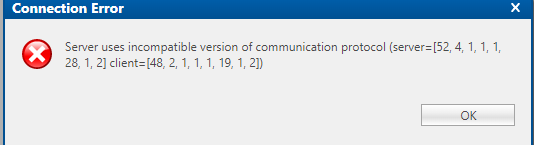
start it for test, so no web working, i copy downloaded .war from web into webapps folder, it been automaticaly deployed i see v3 libs in plugins directory, but web told me same is i posted before.
:-
i do upgrade of previous versions using this method and was ok.#!/bin/bash wget -O ROOT.war https://www.netxms.org/download/releases/3.4/nxmc-3.4.284.war chown tomcat8:tomcat8 ROOT.war service tomcat8 stop cp -f ROOT.war /var/lib/tomcat8/webapps service tomcat8 start -
/var/lib/tomcat8/webapps is where application is deployed. But working directories for applications are in /var/lib/tomcat9/work/Catalina/localhost - try to delete them.
Best regards,
Victor -
@victor said in Netxms tomcat .war deploy:
/var/lib/tomcat8/webapps is where application is deployed. But working directories for applications are in /var/lib/tomcat8/work/Catalina/localhost - try to delete them.
Best regards,
VictorThank You Victor, exactly like you write, after delete catalina work dir and start tomcat again new UI is up and running.
Problem solved.
Hello! It looks like you're interested in this conversation, but you don't have an account yet.
Getting fed up of having to scroll through the same posts each visit? When you register for an account, you'll always come back to exactly where you were before, and choose to be notified of new replies (either via email, or push notification). You'll also be able to save bookmarks and upvote posts to show your appreciation to other community members.
With your input, this post could be even better 💗
Register Login