Skip to content
  • Categories
  • Recent
  • Tags
  • Popular
  • Users
  • Groups
Skins
  • Light
  • Brite
  • Cerulean
  • Cosmo
  • Flatly
  • Journal
  • Litera
  • Lumen
  • Lux
  • Materia
  • Minty
  • Morph
  • Pulse
  • Sandstone
  • Simplex
  • Sketchy
  • Spacelab
  • United
  • Yeti
  • Zephyr
  • Dark
  • Cyborg
  • Darkly
  • Quartz
  • Slate
  • Solar
  • Superhero
  • Vapor

  • Default (Flatly)
  • No Skin
Collapse
Brand Logo

NetXMS Forum

  1. Home
  2. Support
  3. Huawei Router Configuration Polls Fails

Huawei Router Configuration Polls Fails

Scheduled Pinned Locked Moved Support
13 Posts 3 Posters 34.7k Views
  • Oldest to Newest
  • Newest to Oldest
  • Most Votes
Reply
  • Reply as topic
Log in to reply
This topic has been deleted. Only users with topic management privileges can see it.
  • F
    F
    Filipp Sudanov
    wrote on last edited by
    #4

    Note these lines in configuration poll:

    [15.01.2021 12:10:10]    Checking SNMP...
    [15.01.2021 12:10:24]    No response from SNMP agent
    

    For some reasons netxms is not able to receive response from that router. There are two options:

    • problems with network/firewall/etc so that packets are not getting to where they should
    • this router does not understand the way how netxms created SNMP request and does not reply.

    I would suggest capturing communication between netxms and this router using tcpdump or Wireshark. If you need help in doing that, please inform, if your netxms is running on linux or windows.

    1 Reply Last reply
    0
    • M
      M
      Mazhar Bokhari
      wrote on last edited by
      #5

      Thanks, Yes I need your help in capturing communication between NetXMS and the router.
      I am using a Windows machine for NetXMS.

      1 Reply Last reply
      0
      • M
        M
        Mazhar Bokhari
        wrote on last edited by
        #6

        Hi Filipp,

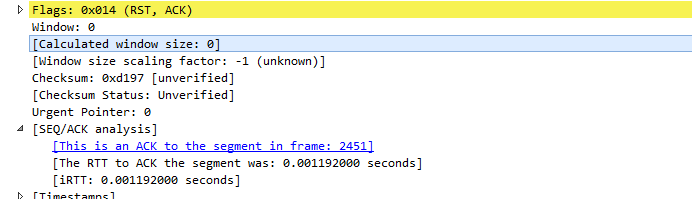
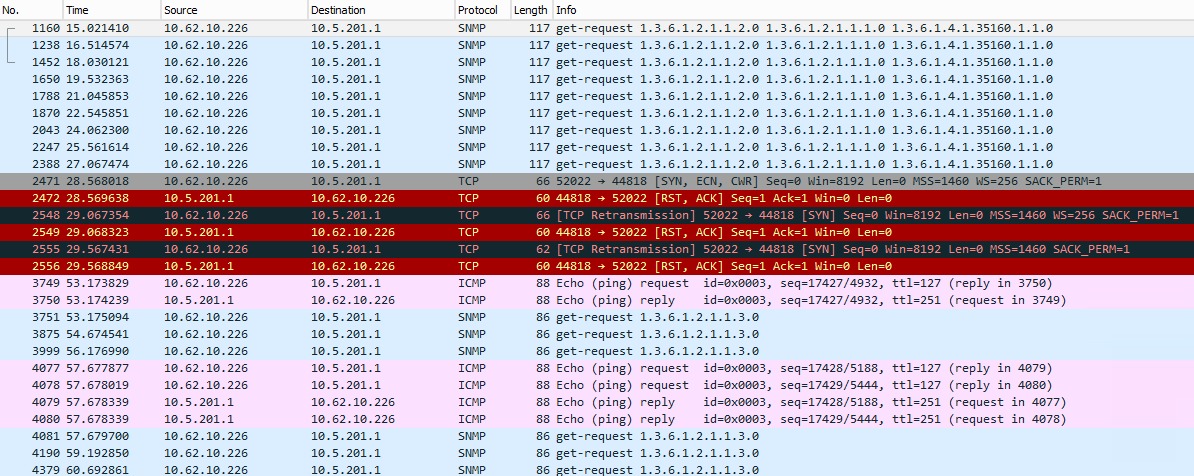
        Please find the attached communication snap between the router and the NetXMS server.

        Thanks,
        Mazhar

        NetXMS.png

        1 Reply Last reply
        0
        • M
          M
          Mazhar Bokhari
          wrote on last edited by
          #7

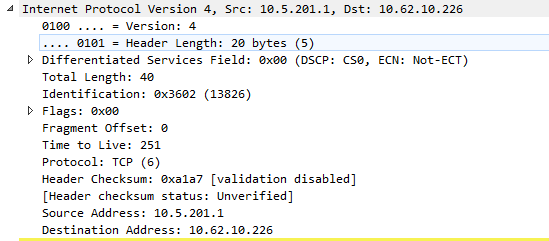
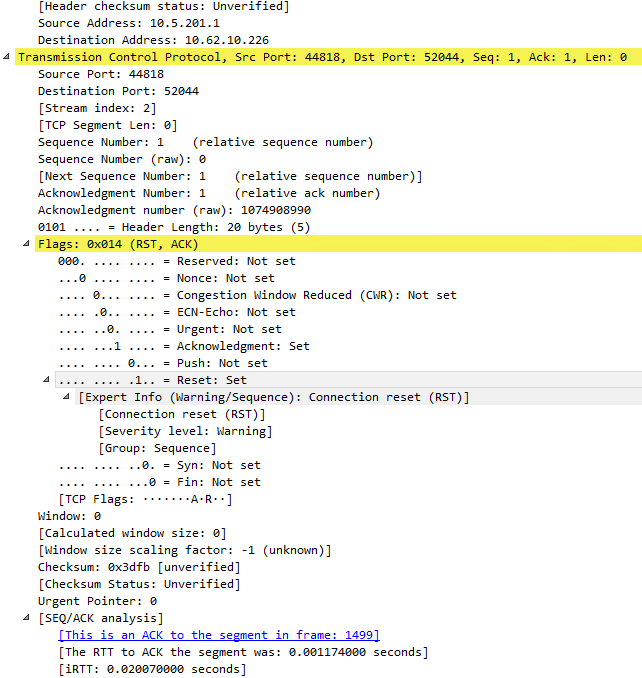
          More Snaps for better understanding.


          NetXMS1.PNG

          NetXMS2.PNG

          1 Reply Last reply
          0
          • M
            M
            Mazhar Bokhari
            wrote on last edited by
            #8

            One more 🙂


            NetXMS3.PNG

            1 Reply Last reply
            0
            • F
              F
              Filipp Sudanov
              wrote on last edited by
              #9

              TCP connection to port 44818 happens on the next step of configuration poll - that's an attempt to connect via Ethernet/IP protocol. It's a protocol used in industrial devices. Your router is answering with RST - it says that this port is closed. This is normal.
              The part related to SNMP is above. You can see that NetXMS is sending SNMP request that have three OIDs in it - 1.3.6.1.2.1.1.2.0 and so on. The is no reply, so the request is being repeated multiple time.

              It could be that the router does not like that three OIDs are requested simultaneously. You can try turning on server configuration parameter SNMP.Discovery.SeparateProbeRequests, then only one OID will be requested at a time.

              1 Reply Last reply
              0
              • M
                M
                Mazhar Bokhari
                wrote on last edited by
                #10

                I have enabled SNMP.Discovery.SeparateProbeRequests parameter and restarted the server service but no luck.

                 😢 😢 😢

                1 Reply Last reply
                0
                • G
                  G
                  gokiwi
                  wrote on last edited by
                  #11

                  Would you not have to add the non standard snmp ports to the snmp configuration under Network Credentials ?

                  1 Reply Last reply
                  0
                  • F
                    F
                    Filipp Sudanov
                    wrote on last edited by
                    #12

                    Are you sure that the other monitoring software is using exactly SNMP, not some proprietary protocol? Does it use standard SNMP port?
                    You can try capturing communication of that software to the router with Wireshark and compare what network packets it's actually sending.

                    also you can try getting some data via SNMP using snmpget package from netsnmp software https://sourceforge.net/projects/net-snmp/files/net-snmp binaries/5.5-binaries/net-snmp-5.5.0-2.x64.exe/download

                    1 Reply Last reply
                    0
                    • M
                      M
                      Mazhar Bokhari
                      wrote on last edited by
                      #13

                      The problem is fixed now by permitting server IP in ACL on the router for accepting the SNMP queries.

                      Thank You Filipp.

                      1 Reply Last reply
                      0

                      Hello! It looks like you're interested in this conversation, but you don't have an account yet.

                      Getting fed up of having to scroll through the same posts each visit? When you register for an account, you'll always come back to exactly where you were before, and choose to be notified of new replies (either via email, or push notification). You'll also be able to save bookmarks and upvote posts to show your appreciation to other community members.

                      With your input, this post could be even better 💗

                      Register Login
                      Reply
                      • Reply as topic
                      Log in to reply
                      • Oldest to Newest
                      • Newest to Oldest
                      • Most Votes


                      • Login

                      • Don't have an account? Register

                      • Login or register to search.
                      Powered by NodeBB Contributors
                      • First post
                        Last post
                      0
                      • Categories
                      • Recent
                      • Tags
                      • Popular
                      • Users
                      • Groups