
Summary table with interface names & speed
-
Dear community
I'm trying to create a summary table that includes interface name and speed for a specific type of equipment
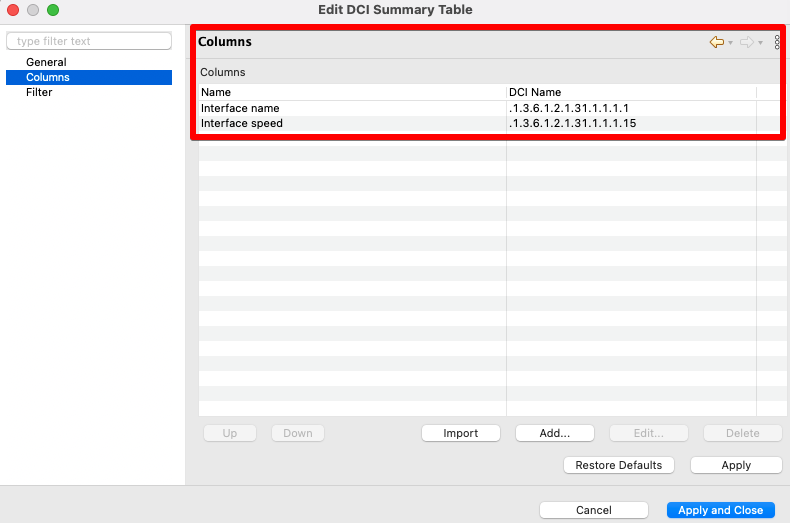
I'm using the following DCIs as columns in the summary table
.1.3.6.1.2.1.31.1.1.1.1. (Interface Name)
.1.3.6.1.2.1.31.1.1.1.15 (Speed)However if I run the summary table it does not return any records.
Is it possible to create these type of summary tables based on node interfaces instead of DCIs?
I would appreciate your input
Thanks
-
Summary table does not perform any requests to collect data on it's own. It just find DCIs present on nodes by matching DCI's parameter and showing these.
So it means that your nodes need to have DCIs with corresponding parameters, e.g. .1.3.6.1.2.1.31.1.1.1.15.1
Does all your equipment has only one network interface? Are OIDs same for all nodes? Or there could be several interfaces on a node? Which should be in the summary table then?
-
Hi,
you can create script DCI that will collect all necessary information into table. For example, create script in script library:
table = new Table();
table->addColumn("Node", DCI::STRING, "Node", true);
table->addColumn("Interface", DCI::STRING, "Interface", true);
table->addColumn("Speed", DCI::INT32, "Speed");

for(n : GetAllNodes())
{
   if (!n->isSNMP)
      continue;
   for(i : n->interfaces)
   {
   	row = table->addRow();
   	table->set(row, 0, n->name);
   	table->set(row, 1, i->name);
   	table->set(row, 2, i->speed);
   }
}

return table;
Then create table DCI on any node (I usually use node representing NetXMS server itself) with origin "Script". and set script name as parameter name. Value of this table DCI will contain list of all interfaces on all SNMP capable nodes with their speeds. By changing script you can add more columns and change conditions for inclusion as needed.
Best regards,
Victor -
Hello! It looks like you're interested in this conversation, but you don't have an account yet.
Getting fed up of having to scroll through the same posts each visit? When you register for an account, you'll always come back to exactly where you were before, and choose to be notified of new replies (either via email, or push notification). You'll also be able to save bookmarks and upvote posts to show your appreciation to other community members.
With your input, this post could be even better 💗
Register Login